An AI coding project failure rarely looks like a single catastrophic mistake. It looks like four months of steady, confident work that produces nothing shippable. One developer spent over 400 hours building with AI tools before realizing the project had become an elaborate exercise in running in place. This is the post-mortem of that spiral.
The Project That Started as a Weekend Build
The idea was simple enough. A dashboard tool for a small SaaS product, something the developer estimated would take a weekend with AI assistance. The first few hours were euphoric. Cursor generated components, wired up API routes, and scaffolded pages faster than the developer had ever worked before. By Sunday night, a working prototype sat on localhost.
That prototype became the problem. It worked just well enough to suggest that the finished product was close. So the developer kept going. Monday became Tuesday. The weekend project became a week-long sprint. The week became a month.
Each day followed the same rhythm. The AI would generate a solution. The solution would introduce a subtle problem. The developer would ask the AI to fix the problem. The fix would create two new edge cases. The developer would ask the AI to handle the edge cases. And the codebase would grow.
By week six, the repository had over 40,000 lines of code for what was supposed to be a simple dashboard. The developer had accepted thousands of AI suggestions without fully reviewing them. The architecture had no coherent structure because it had been built reactively, one fix layered on top of another, guided by whatever the AI suggested next.
What Dark Flow Looks Like from the Inside
There is a term gaining traction in AI productivity discussions called "dark flow" or "junk flow." It describes a state where AI-assisted coding feels intensely productive but produces little actual value. The developer is busy. The code is being written. Features appear to be taking shape. But the underlying project is not moving toward completion.
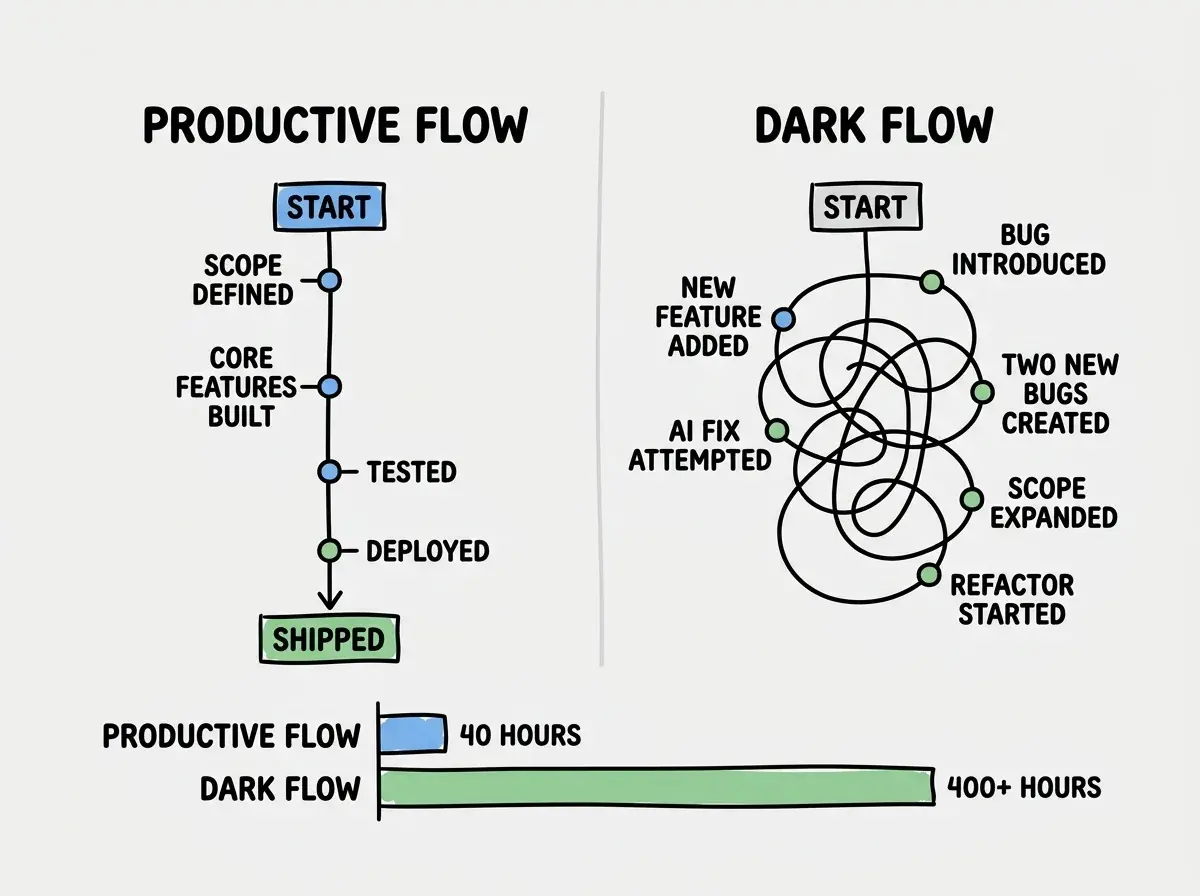
Dark flow is deceptive because all the surface indicators of progress are present. Code is being committed. The developer is engaged. Problems are being solved. But the problems being solved are problems created by previous solutions, not problems that move the product forward.
The 400-hour developer described it this way: "Every single day I felt like I was one good session away from finishing. That feeling never went away, even after three months."
Dark flow is the most dangerous state in AI-assisted development. You feel productive. Your commit history looks productive. But you are solving problems that the AI itself created, not problems that move your product toward launch. The clearest signal is when you cannot answer the question "what did I ship this week?" with something a user would notice.
The METR Study and the Perception Gap
This experience is not an isolated anecdote. In 2025, the METR research group conducted a randomized controlled trial with experienced open-source developers. The results were striking. Developers using AI coding tools were 19% slower on real-world tasks than developers working without them. But here is the part that matters most for understanding dark flow: those same developers believed they were 20% faster.
That is a 40-point perception gap. Developers thought they were saving a fifth of their time while actually losing a fifth. The gap explains why the 400-hour developer kept going. Every session felt fast. Every AI-generated solution appeared to work. The subjective experience of using the tools was one of speed and capability, even as the objective reality was one of accumulating complexity and slowing progress.
The METR study did not conclude that AI tools are useless. It concluded that the tasks where AI helps and the tasks where AI hurts are not always obvious, and that developers are remarkably poor at telling the difference in real time.
The Compulsive Accept Trap in Action
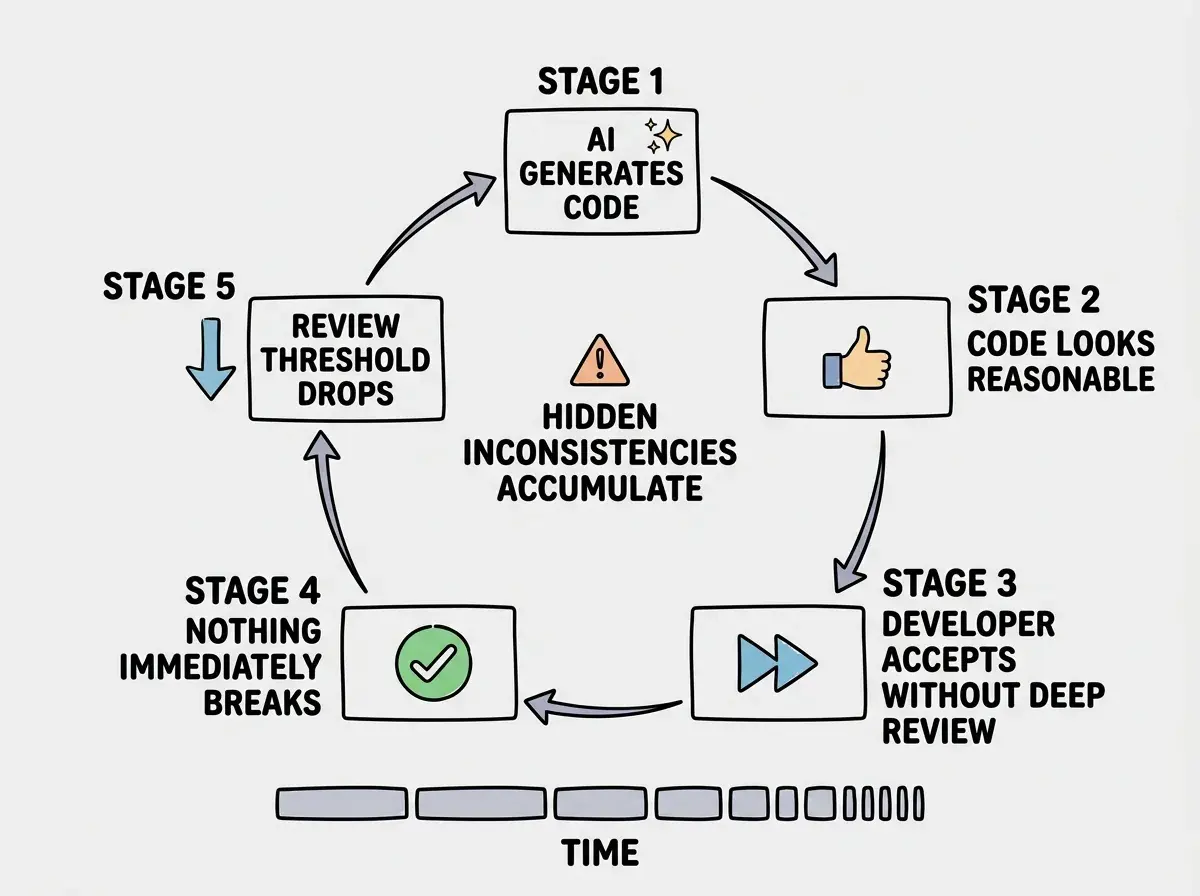
Around week three, the developer stopped reviewing AI-generated code in detail. This is the compulsive accept trap, a pattern where the high volume and apparent quality of AI suggestions gradually erodes the habit of careful review.
The trap works through a simple feedback loop. The AI generates code. The code looks reasonable. You accept it. Nothing immediately breaks. So next time, you review a little less carefully. Then a little less. Eventually, you are rubber-stamping everything the AI produces.
In the 400-hour project, the compulsive accept trap had a specific consequence. The AI had been generating inconsistent data models across different parts of the application. Some components expected user data in one format. Others expected a different format. The developer did not catch the inconsistency because each individual suggestion looked correct in isolation. The conflict only became visible when the application was tested end-to-end, by which point dozens of components needed to be rewritten.
Treating AI-generated code like trusted library code. Libraries are tested by thousands of users across thousands of projects. AI suggestions are generated fresh each time with no testing, no review, and no guarantee of consistency with code generated five minutes earlier. Every acceptance is a decision that deserves conscious attention.
The Scope Creep Spiral
AI tools have a unique relationship with scope creep. Traditional scope creep happens because stakeholders request new features. AI-assisted scope creep happens because the tool makes new features feel free.
When the AI can scaffold a new feature in minutes, saying "no" to additional scope feels irrational. Why not add user preferences? The AI can build that in twenty minutes. Why not add an export feature? That is maybe thirty minutes of work. Why not add role-based permissions? The AI generated the boilerplate in one prompt.
Each of these additions was individually reasonable. Collectively, they transformed a simple dashboard into an enterprise application that a solo developer had no capacity to maintain, test, or ship.
The 400-hour developer's feature list grew from 5 items to 47 over the course of the project. Not because anyone asked for 42 additional features, but because the AI made each one feel trivially easy to add.
The Burnout Endpoint
At month four, the developer stopped working on the project entirely. Not because of a decision to stop, but because the motivation was gone. The pattern of spending hours each day feeling productive while making no real progress had drained something fundamental.
Burnout from dark flow is particularly cruel because the developer cannot even point to external factors. There was no unreasonable boss, no impossible deadline, no toxic team dynamic. The developer did this to themselves, or at least that is how it felt. The shame of spending 400 hours on something that never shipped compounded the exhaustion.
The project was eventually abandoned. Some of the code was salvageable for a much smaller rebuild that took two weeks.
Five Signals You Are In Dark Flow
Recognizing dark flow while it is happening requires watching for specific patterns rather than trusting your subjective sense of progress.
You cannot demo anything new this week. If you have been coding all week and cannot show a single new capability to someone who does not look at code, you are likely in dark flow.
Your bug fixes create new bugs. When solving one problem reliably introduces another, the codebase has accumulated more complexity than you (or the AI) can manage coherently.
The scope keeps growing but the launch date keeps moving. If new features are being added faster than existing features are being finished, the project is expanding rather than converging.
You have stopped reviewing AI suggestions carefully. If you notice yourself accepting code without reading it, you have entered the compulsive accept trap and the quality of your codebase is degrading silently.
The project "feels close" for more than two weeks. Genuinely close projects ship. If the finish line keeps receding, your estimate of remaining work is wrong.
Dark flow is just one of several patterns that derail AI-assisted projects. Understanding the full landscape of AI coding traps helps you build faster without burning out.
Explore MoreHow to Recover (or Prevent This Entirely)
The two-week rule is the simplest intervention. If you cannot ship a meaningful increment within two weeks, stop and reassess whether the current approach is converging toward something shippable.
Time-box every AI session. Set a timer for 90 minutes. When it goes off, review what you actually accomplished versus what you planned. If the gap is large, the AI is generating churn rather than progress.
Scope-lock your features before you start building. Write down exactly what version 1 includes. When the AI makes it easy to add something not on the list, add it to a "version 2" document instead. The features are not gone. They are just not blocking your launch.
And review every AI suggestion as if a junior developer wrote it. In terms of consistency, context awareness, and architectural judgment, that is approximately what you are getting.
The difference between shipping and spiraling is not the tool you use. It is the habits you build around it. Start with the fundamentals.
Start HereWhat This Means For You
The 400-hour project is not an edge case. It is a pattern that plays out at smaller scales every day, in weekend projects that stretch to months, in prototypes that never become products, in developers who feel busy but cannot explain what they shipped.
AI coding tools are genuinely powerful. They can compress weeks of work into days when used with discipline. But that same power, without guardrails, creates a new category of failure that did not exist before. Projects do not fail because the code does not work. They fail because the code never stops being written.
If you are deep into a project right now and something in this post-mortem felt familiar, take that seriously. Set a two-week deadline. Define what "done" means. And if the AI's suggestions are creating more problems than they solve, turn it off for a day and see how much clarity returns when you are the one making every decision.