Here is a stat that should make you uncomfortable: 92% of developers now use AI daily, and AI-generated code ships 1.7 times more major security issues than human-written code. You are almost certainly shipping AI-generated code. And it is almost certainly more vulnerable than you think.
Penetration testing your AI app is like hiring a locksmith to test your locks. You pay someone to try every door, jiggle every window, and pick every lock before a real burglar shows up. The difference is that you are the locksmith, and the building is the web application you just shipped with Cursor, Copilot, or Claude. You are going to systematically try to break into your own app so nobody else gets to do it first.
This guide walks you through a complete DIY penetration test using free tools. You should be comfortable reading HTTP requests and working with a terminal. Everything here is about testing your own application ethically, on infrastructure you own and control.
Setting Up Your Testing Environment
Before you start trying to break things, you need the right tools. The good news is that the best pen testing tools for web applications are free.
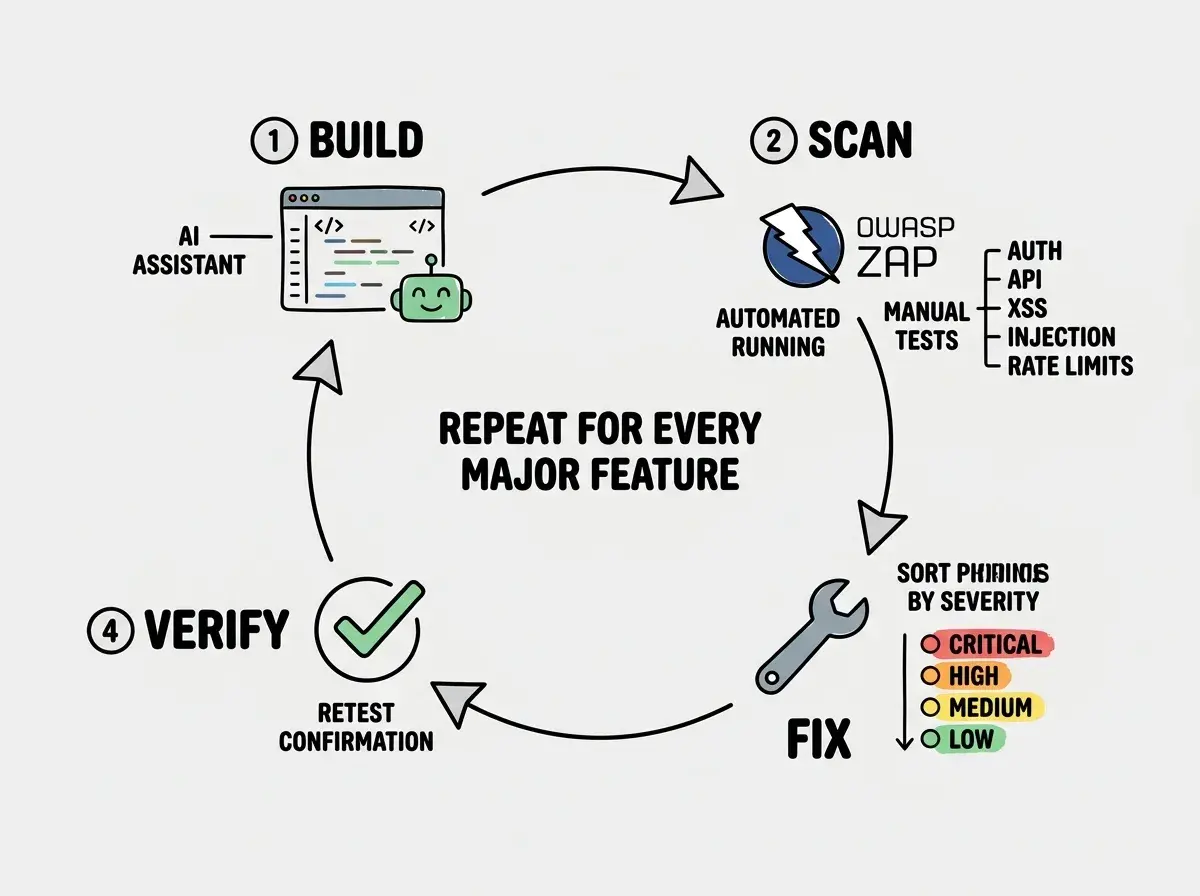
OWASP ZAP (Zed Attack Proxy) is your primary weapon. It is an open-source security scanner maintained by the OWASP Foundation. Download it from zaproxy.org and launch it. ZAP works as a proxy between your browser and your application, intercepting and analyzing every request.
Burp Suite Community Edition is the other major option with a polished interface, but the free version limits scanning speed. For a DIY pen test, ZAP is plenty.
You also want curl or httpie for manual API testing, your browser's developer tools, and a notepad for recording findings. The locksmith does not just try locks randomly. They document every weakness, every unlocked door, every window that does not latch properly.
Set up ZAP by configuring your browser to use it as a proxy (typically localhost:8080). Then browse your application normally. ZAP will passively catalog every endpoint, parameter, and cookie it observes. This passive scan alone often reveals surprising things about your app's attack surface.
Testing Authentication and Session Management
Authentication is where AI-generated code fails most consistently. AI tools build login flows that look correct but miss critical security details. The front door might have a deadbolt, but is it actually engaged?
Start by testing these specific scenarios:
Brute force protection. Try logging in with wrong credentials 50 times in rapid succession using curl. Does your app lock the account? Does it introduce progressive delays? Does it show a CAPTCHA? If the answer to all three is "no," an attacker can run a password-guessing script against your login endpoint indefinitely.
Session handling. Log in, copy your session token from the browser's cookies, then log out. Paste that token back into a new request. If the session still works after logout, your app is not invalidating sessions properly. A stolen session token remains valid even after the user thinks they have logged out.
Password reset flows. Request a password reset, then check whether the reset token in the URL is a predictable pattern (sequential numbers, timestamps, short tokens). Check whether the token expires and whether you can reuse it. AI tools frequently generate reset flows with tokens that never expire or use Math.random() instead of cryptographically secure randomness.
JWT handling. If your app uses JSON Web Tokens, check whether the signature is actually verified. A surprising number of AI-generated JWT implementations accept tokens with the algorithm set to "none," meaning no signature at all. Try modifying the payload of your JWT and sending it to see if the server accepts it.
Penetration testing your AI app is not about being a security expert. It is about being systematic. The locksmith does not need to know how to build a lock. They need to know the ten most common ways locks fail and test each one methodically. AI-generated code fails in predictable patterns, which means a structured checklist catches most vulnerabilities.
Probing Your API Endpoints
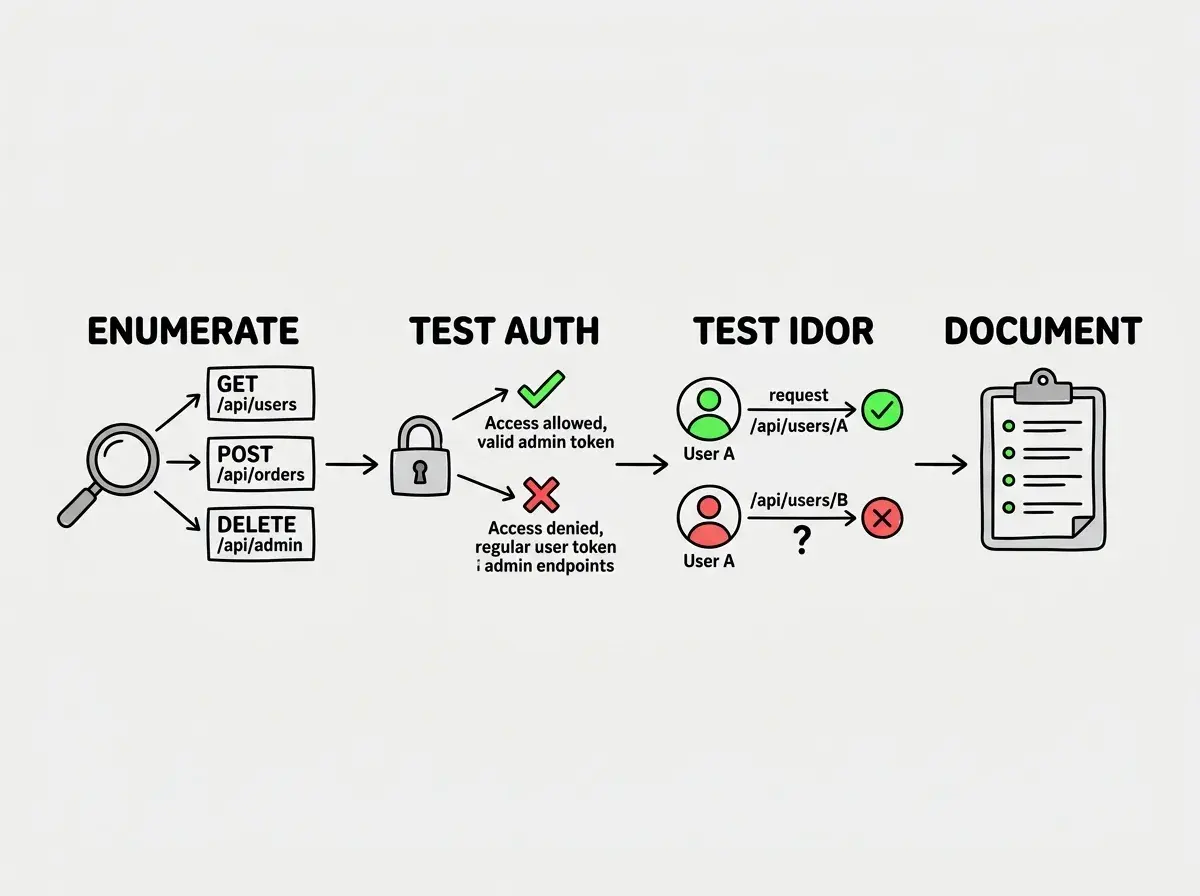
Your API is the back door to your application, and AI tools are notorious for leaving it wide open. The locksmith checks every entrance, not just the front door. Fire up ZAP's active scanner against your API, but also run these manual tests:
Authorization bypass. Log in as a regular user, then try accessing admin-only endpoints by changing the URL. If your app has endpoints like /api/admin/users, try hitting them with a non-admin token. AI-generated code often implements frontend route guards without corresponding backend checks.
IDOR (Insecure Direct Object References). If your app has URLs like /api/users/123/profile, change that 123 to 124. Can you see another user's profile? Try this with every endpoint that takes an ID parameter. AI tools build CRUD endpoints that return whatever ID you ask for, regardless of whether you should have access.
HTTP method tampering. If an endpoint only supports GET, try sending a POST, PUT, or DELETE. Some frameworks and AI-generated route handlers respond to methods they should not. A read-only endpoint that also accepts DELETE is a serious vulnerability.
Mass assignment. Send extra fields in your API requests. If your user update endpoint expects { name: "test" }, try sending { name: "test", role: "admin", isVerified: true }. AI-generated code frequently passes request bodies directly to database update functions without filtering allowed fields.
Hunting for XSS and Injection Vulnerabilities
Cross-site scripting and injection attacks are the bread and butter of web security testing, and AI-generated code is especially prone to both. Think of these as checking whether the locks can be bypassed entirely by going through the wall.
Reflected XSS. Find every place your application displays user input: search bars, URL parameters, form fields, error messages. Enter <script>alert('xss')</script> and see if an alert box appears. If it does, your application is rendering user input as HTML without sanitization. Try <img src=x onerror=alert(1)> for cases where script tags are filtered but other HTML is not.
Stored XSS. Submit the same test payloads through forms that save data (profile names, comments, descriptions). Then visit the page where that data is displayed. If the script executes when another user views the page, you have stored XSS, which is significantly more dangerous than reflected XSS because it affects every visitor.
SQL injection. For every form field and URL parameter, try entering ' OR '1'='1 and '; DROP TABLE users; --. If the application returns different results, throws a database error, or behaves unexpectedly, the input is being passed directly into a SQL query. Even if you use an ORM, check for any raw query methods in your codebase.
Command injection. If your application processes filenames, URLs, or any input that might touch system commands, try payloads like ; ls -la or | cat /etc/passwd. AI tools sometimes use exec() or child_process for operations that should use safer alternatives.
ZAP's active scanner tests many of these automatically, but manual testing catches context-specific vulnerabilities that automated scanners miss. Run both.
Testing Rate Limiting and Abuse Prevention
Rate limiting is the lock on the gate, preventing someone from trying thousands of keys per second. AI tools almost never implement it because rate limiting is not part of the "make the feature work" mindset that AI code generation optimizes for.
Test rate limiting on your login endpoint, registration endpoint, password reset endpoint, any endpoint that sends emails or SMS, and any public API endpoint.
The test is simple: write a loop that hits the endpoint 100 times in 10 seconds. If all 100 requests succeed, you have no rate limiting. The fix is usually straightforward with middleware like express-rate-limit or your hosting platform's built-in rate limiting (Cloudflare, Vercel, and Netlify all offer this).
Many developers add rate limiting to the login endpoint but forget every other sensitive endpoint. An attacker who cannot brute-force your login can still abuse an unprotected password reset endpoint to send thousands of emails from your domain, destroying your sending reputation. Rate limiting needs to cover every endpoint with abuse potential, not just the most obvious one.
Documenting and Prioritizing Your Findings
The locksmith does not just try every lock and walk away. They hand you a report detailing which locks are broken, which are weak, and which need replacing first. Your pen test findings need the same treatment.
For every vulnerability you discover, document four things: the vulnerability (with the specific endpoint affected), reproduction steps (so you can verify the fix later), severity (critical, high, medium, low), and a recommended fix.
Prioritize ruthlessly. Critical findings are anything that exposes user data, allows unauthorized access, or enables account takeover. Fix these first. High findings could be chained with other issues to cause serious damage. Medium and low findings are things like missing security headers or verbose error messages.
A realistic prioritization for most AI-built apps: fix authentication and authorization issues first, then injection and XSS vulnerabilities, then add rate limiting, then address everything else.
Building Pen Testing into Your Workflow
A single pen test is valuable. Regular pen testing is transformational. Every time you add a significant feature (especially one generated by AI), run through at least the authentication and API endpoint tests again. The locksmith who only checks the locks once is not much help when you install a new door.
Set up ZAP to run automated scans in your CI/CD pipeline. ZAP has a Docker image and CLI designed for this. Even a basic automated scan on every deployment catches regressions where a previously fixed vulnerability gets reintroduced by AI-generated code.
Keep a living document of your findings. Track what you found, when you fixed it, and when you retested. This becomes invaluable when you hire a professional pen tester, which you should once your app handles real user data at scale.
Penetration testing your AI app is not optional anymore. The question is not whether your app has vulnerabilities. It is whether you find them before someone else does. Be your own locksmith. Test every lock. Document every weakness. Fix what matters most first. Then do it again.