Adding payment integration to your app is the moment it stops being a side project and starts being a business. With 92% of developers now using AI tools daily, you can build a product in a weekend, but getting paid for it requires choosing the right payment provider and wiring it up correctly. This guide walks you through Stripe, Lemon Squeezy, and Paddle so you can pick the right fit and start collecting revenue.
Think of adding payments like hiring someone to run the cash register at your store. Stripe is like hiring your own cashier and setting up the register yourself. You get complete control over every detail, from the receipt layout to the tip jar placement, but you are responsible for tax compliance, fraud prevention, and making sure the drawer balances at the end of the night. Lemon Squeezy and Paddle are like hiring a full checkout service that shows up with their own register, handles sales tax in every jurisdiction, and manages refunds on your behalf. You give up some control, but you gain simplicity. That analogy will guide every decision in this tutorial.
Why Payment Provider Choice Matters
The payment provider you pick affects more than just how money hits your bank account. It determines your tax obligations, your checkout experience, your subscription management workflow, and how much code you need to write and maintain.
Stripe gives you the most flexibility. You can build custom checkout flows, handle complex pricing models, and integrate with virtually any platform. But that flexibility comes with responsibility. You are the merchant of record, which means you handle sales tax collection and remittance in every jurisdiction where you have customers. For a solo founder selling globally, that is a real burden.
Lemon Squeezy and Paddle act as your merchant of record. They collect and remit sales tax (including EU VAT) on your behalf. Your checkout service handles the tax paperwork while you focus on building product. The tradeoff is higher fees and less control over the checkout experience.
If you are selling to consumers globally and do not want to deal with sales tax compliance, choose Lemon Squeezy or Paddle. They act as your merchant of record and handle tax in every jurisdiction. If you need maximum control over pricing, checkout flows, and already have a tax solution (or sell B2B where tax is simpler), Stripe is the better choice. Your cashier setup should match the complexity you are willing to manage.
Here is a quick comparison of what each provider handles for you versus what you handle yourself.
Stripe charges 2.9% + $0.30 per transaction. You handle tax, refund logistics, and fraud rules. You get full API access, custom checkout UI, and support for nearly every payment method globally.
Lemon Squeezy charges 5% + $0.50 per transaction. Your checkout service handles tax, fraud, and chargebacks. You get a hosted checkout, affiliate management, and license key generation built in.
Paddle charges 5% + $0.50 per transaction. Similar to Lemon Squeezy, your checkout service handles tax and compliance. Paddle is particularly strong for SaaS subscriptions and has robust dunning (failed payment recovery) built in.
Setting Up Stripe Checkout
Stripe requires the most setup, but it also gives you the most control. Here is how to wire up a basic checkout flow in a Next.js app.
First, install the Stripe SDK and create a checkout session on your server. The checkout session defines what the customer is buying, the price, and where to redirect them after payment. Tell your AI coding tool something like this.
"Create an API route at /api/checkout that accepts a priceId in the request body, creates a Stripe checkout session with that price, and redirects the customer to the Stripe-hosted checkout page. Include success and cancel URLs that point back to the app."
The checkout session approach is the recommended path for most apps. Stripe hosts the payment form, handles PCI compliance, and sends the customer back to your success page. You never touch credit card numbers directly, which keeps your cashier setup clean and secure.
After the customer pays, Stripe sends a webhook to your server confirming the payment. This is where the real integration work happens.
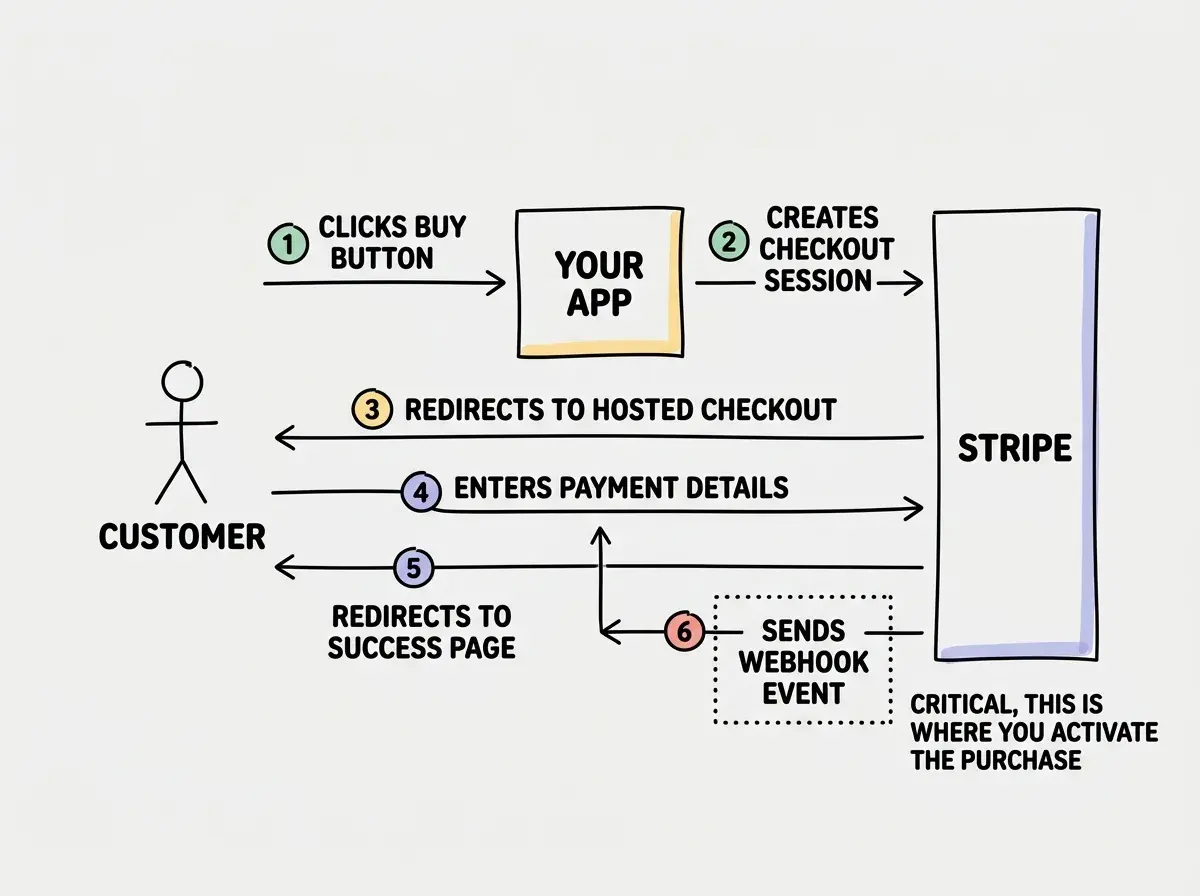
Never trust the success page redirect to confirm a purchase. Customers can close their browser or lose internet. Your cashier needs to verify the sale independently, which is exactly what the webhook does.
Handling Webhooks Correctly
Webhooks are the backbone of any payment integration. Every provider sends them, and getting webhook handling wrong is the most common source of payment bugs.
A webhook is an HTTP POST request that the payment provider sends to your server when something happens: a payment succeeds, a subscription renews, a refund is issued. Your job is to receive that request, verify it is authentic, and update your database accordingly.
"Create a webhook endpoint at /api/webhooks/stripe that verifies the Stripe signature, then handles these events: checkout.session.completed (activate the user's purchase), customer.subscription.updated (sync subscription status), and customer.subscription.deleted (revoke access). Store the subscription status in your database."
For Lemon Squeezy and Paddle, the webhook flow is similar but simpler. Since your checkout service handles more of the complexity, you typically only need to listen for a few events: order completed, subscription activated, subscription cancelled, and subscription payment failed.
Processing webhooks without idempotency protection. Payment providers will retry webhooks if your server does not respond with a 200 status code, which means the same event can arrive multiple times. If your webhook handler grants access or sends a confirmation email without checking whether it already processed that event, customers will get duplicate emails and your database will have duplicate records. Always store the event ID and skip processing if you have seen it before. Your cashier should never ring up the same sale twice.
Three rules for reliable webhook handling. First, always verify the signature before processing. Second, respond with a 200 status immediately, then process the event asynchronously if the logic is complex. Third, make your handler idempotent so duplicate deliveries do not cause problems.
Subscription Patterns That Work
Most AI-built apps use subscription pricing, and each provider handles subscriptions differently.
With Stripe, you create Products and Prices in the Stripe Dashboard, then reference those price IDs in your checkout sessions. Stripe handles billing cycles, proration when customers upgrade or downgrade, and payment retries when cards fail. But you are responsible for checking subscription status in your app and gating features accordingly.
With Lemon Squeezy and Paddle, subscriptions work through their hosted checkout. Your checkout service creates the subscription, manages billing, handles upgrades and downgrades, and even provides a customer portal where users can update their payment method or cancel. You receive webhook events when the subscription status changes and update your database.
The pattern that works for all three providers looks like this. Store the subscription status and current plan in your users table. When a webhook arrives indicating a status change, update that field. When a user accesses a paid feature, check their subscription status. Simple, reliable, and provider-agnostic.
"Add a subscription_status field (active, past_due, cancelled, none) and a plan field (free, pro, enterprise) to the users table. Create a middleware or utility function that checks these fields before allowing access to paid features. Update these fields only through webhook events, never through client-side code."
This approach keeps your billing logic clean regardless of which provider you choose. If you ever switch from Stripe to Paddle (or vice versa), the only code that changes is the webhook handler. The rest of your app checks the same database fields.
Learn how to go from idea to launched app with AI coding tools.
Start buildingWhen to Use Each Provider
Choosing between these three is less about which is "best" and more about which matches your situation right now.
Choose Stripe if you are building a B2B SaaS where customers expect invoices and custom billing terms, you need complex pricing (usage-based, tiered, per-seat), or you already have a tax compliance solution like Stripe Tax or a third-party service. Your cashier setup requires more work upfront, but the flexibility pays off as your billing needs grow.
Choose Lemon Squeezy if you are an indie hacker selling digital products, courses, or a simple SaaS to consumers. The built-in tax compliance, affiliate program, and license key generation save you weeks of development. The checkout service handles the complexity so you can focus on product.
Choose Paddle if you are building a SaaS with subscriptions as the core business model. Paddle's dunning management (recovering failed payments) is excellent, their analytics are built for subscription metrics, and the merchant of record model means you do not worry about tax compliance as you scale internationally.
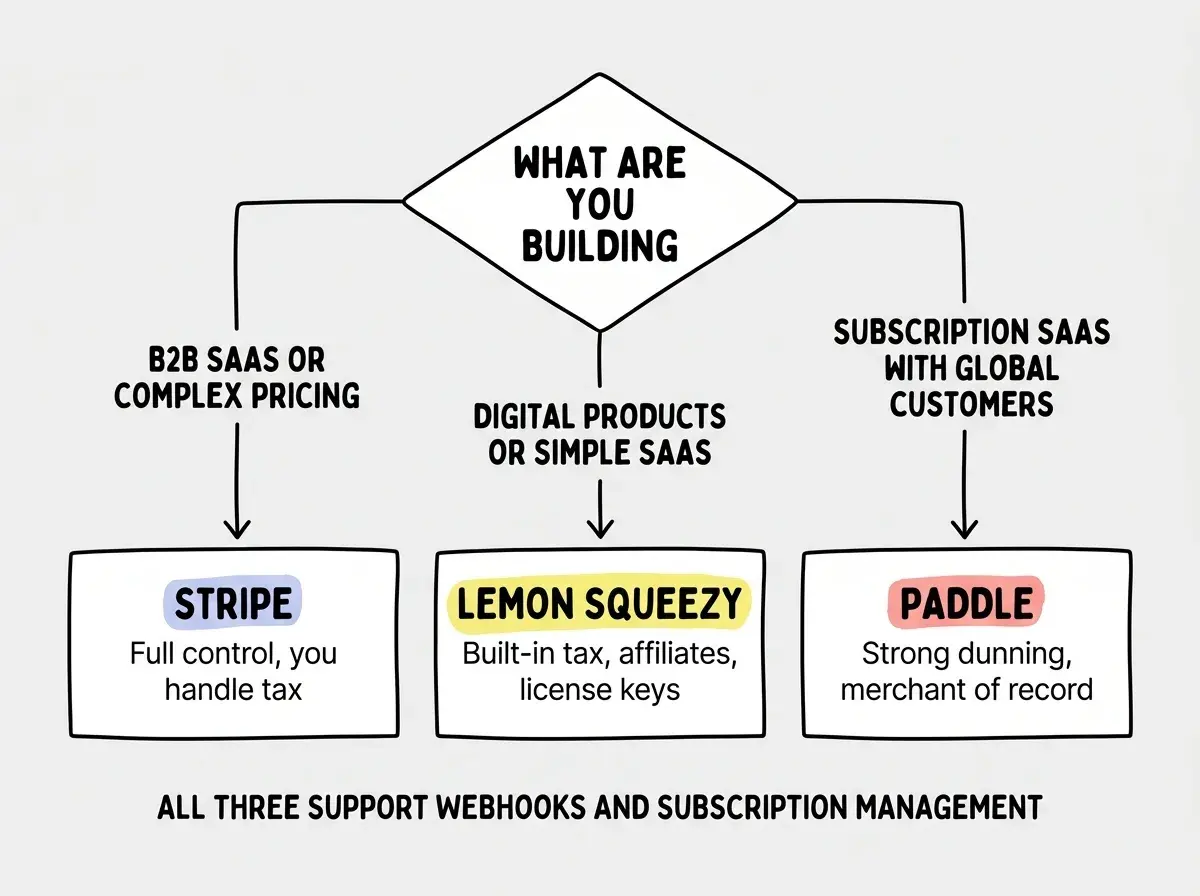
Many founders start with Lemon Squeezy or Paddle to validate their product and migrate to Stripe later when they need more control. The subscription pattern described above makes this migration straightforward because your app logic is decoupled from the provider.
Dig deeper
A few hand-picked sources if you want to go further.
What This Means For You
You now have a practical framework for adding payment integration to your app. The provider you choose depends on your business model, your willingness to handle tax compliance, and how much control you need over the checkout experience.
- If you are a founder validating an idea: Start with Lemon Squeezy or Paddle. Let the checkout service handle tax and compliance while you focus on finding product-market fit. You can migrate later if you need more control. Getting revenue flowing matters more than picking the perfect provider.
- If you are an indie hacker selling digital products: Lemon Squeezy is built for you. License keys, affiliate programs, and a hosted checkout mean you can go from zero to accepting payments in an afternoon. Pair it with the webhook pattern above and your app will reliably grant access to every paying customer.
- If you are building a SaaS for the long term: Start with Stripe or Paddle depending on your tax situation. Invest the time to set up proper webhook handling and idempotent event processing from day one. Payment bugs compound over time. Get the foundation right and your cashier will run smoothly as you scale.
Pick a payment provider and ship your first paid feature this weekend.
Start building today