Traditional pair programming has two roles: the driver who types and the navigator who thinks ahead. One person holds the keyboard while the other watches the road. AI pair programming works the same way, except your partner has read every Stack Overflow answer ever written, never needs a coffee break, and has absolutely no idea what your product is supposed to do. That last part is the whole challenge.
Working with an AI coding partner is like co-driving a rally car with someone who has memorized every road in the world but has never seen your specific course. They can tell you the optimal way to take any corner. But they do not know that the bridge at kilometer 12 washed out last week, or that your co-driver carved a shortcut through the field at kilometer 8. You bring the local knowledge. They bring the encyclopedic skill. The magic happens when you figure out who should be talking at any given moment.
The Two Modes of AI Pair Programming
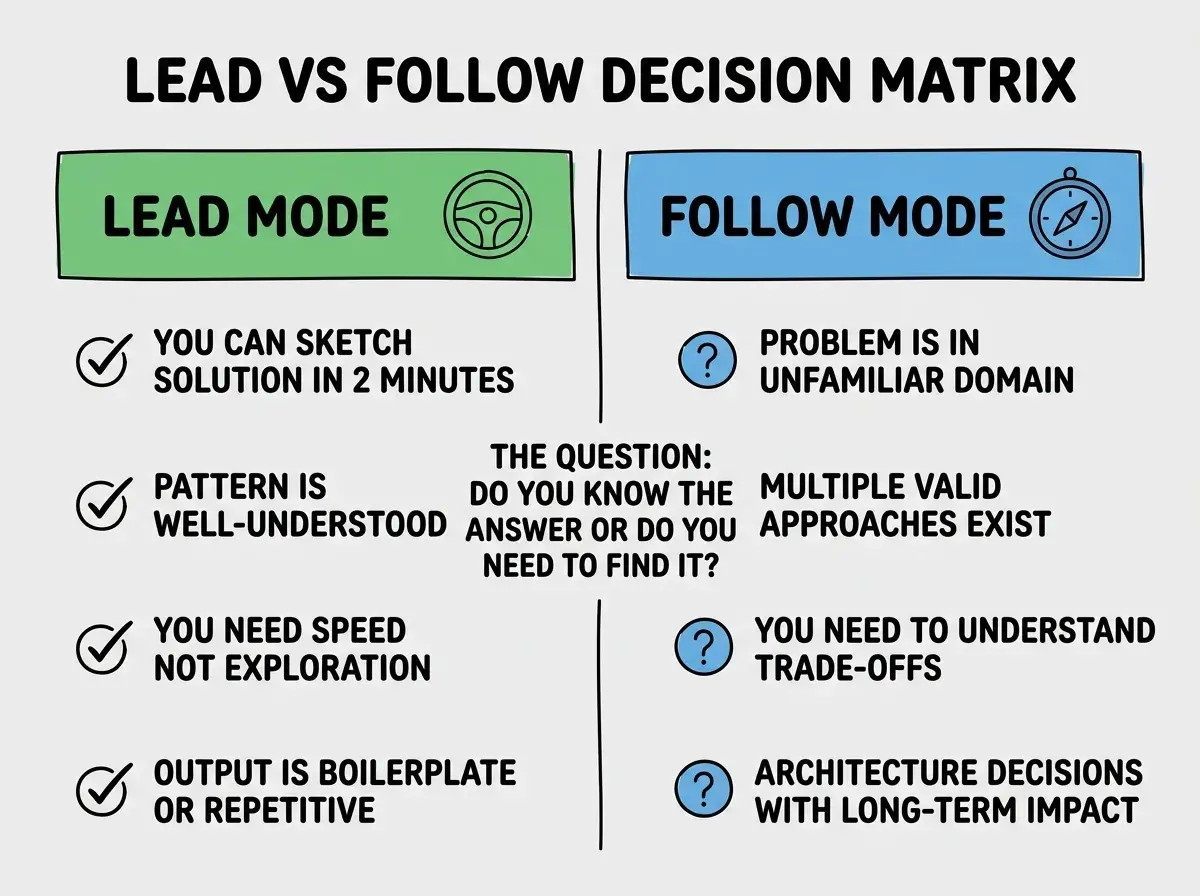
Every productive AI pair programming session operates in one of two modes. You are either leading or following. The moment you stop being deliberate about which mode you are in, the session drifts into what I call "prompt ping-pong," where you and the AI take turns generating code that neither of you fully understands.
Leading mode means you know what you want and you are using the AI to execute faster than you could type. You have the architecture in your head. You know the function signatures, the data flow, the edge cases. You describe each piece and the AI generates it. You review, adjust, and move to the next piece. This is the mode for building features you have built before, implementing well-understood patterns, and writing boilerplate.
Following mode means you have a problem and you are not sure about the best approach. You describe the problem and let the AI propose solutions. You ask it to explain trade-offs. You explore different approaches together. This is the mode for unfamiliar domains, complex algorithms, and architectural decisions where you need a thinking partner.
The single biggest factor in productive AI pair programming is consciously choosing whether you are leading or following before you start typing. Leading mode is for speed. Following mode is for exploration. Mixing them unconsciously produces code that is fast to write and slow to understand.
Most developers default to leading mode because it feels productive. You are generating code. Lines are appearing. The file is growing. But the sessions where I have learned the most and produced the best code were following sessions, where I described a problem and let the AI walk me through approaches I had not considered.
When to Lead
Lead when you have clarity. If you can sketch the solution on a whiteboard in under two minutes, you should be leading. The AI is your fast typist, not your architect.
Here are the situations where leading mode produces the best results.
CRUD operations and boilerplate. You know the database schema. You know the API shape. Tell the AI exactly what to generate: "Create a REST endpoint for updating user profiles. Accept name, email, and avatar URL. Validate that email is unique. Return the updated user." The more specific your instruction, the less time you spend fixing the output.
Refactoring existing code. You understand the current code and you know what it should become. "Refactor this component to extract the form validation into a custom hook. Keep the same behavior. The hook should return the validation errors and a validate function." Leading mode refactoring is surgical. You know exactly where to cut.
Test writing. You know the function, the expected inputs, and the expected outputs. "Write tests for the calculateShipping function. Test free shipping over $50, flat rate under $50, international addresses with a 2x multiplier, and invalid address objects." Leading mode testing is mechanical, and that is the point. Let the AI handle the mechanics while you define the scenarios.
When to Follow
Follow when you have questions. If you find yourself thinking "I wonder what the best way to..." you should be following. Let the AI propose, and then interrogate its proposals.
Unfamiliar libraries and frameworks. "I need to implement real-time notifications in a Next.js app. What are my options and what are the trade-offs between them?" Let the AI lay out Server-Sent Events vs WebSockets vs polling. Ask follow-up questions. Push back on assumptions.
Performance optimization. "This database query takes 3 seconds with 100,000 rows. Here is the query and the schema. What are my options for making it faster?" The AI will propose indexing strategies, query restructuring, and caching approaches. Your job is to evaluate which option fits your constraints.
Debugging complex issues. "The app crashes after exactly 47 minutes of inactivity. Here are the logs. What could cause this pattern?" Following mode debugging leverages the AI's pattern-matching across millions of similar issues.
The key behavior in following mode is asking "why" after every suggestion. The explanation either confirms the suggestion or reveals assumptions that do not apply.
Effective Prompting Mid-Session
The hardest part of AI pair programming is not the first prompt. It is the prompts in the middle of a session, when you have context built up and you need to steer without losing it.
Here are the three mid-session prompting patterns that work consistently.
The anchor prompt. When the AI starts drifting from your intent, restate the goal before giving the next instruction. "Remember, we are building a payment flow for a subscription product. The user should never see a raw Stripe error. With that context, refactor the error handling in the checkout function." The anchor pulls the AI back to your intent without starting over.
The scope limiter. When the AI tries to do too much, constrain it explicitly. "Only modify the handleSubmit function. Do not touch the form validation, the API call, or the error display. I just need you to add loading state management to handleSubmit." Without scope limits, AI assistants will "helpfully" refactor adjacent code that was working fine.
The checkpoint prompt. Every 15 to 20 minutes, pause and ask the AI to summarize what you have built so far. "List the functions we have created, what each one does, and any known issues we have not addressed yet." This serves two purposes: it verifies the AI's understanding matches yours, and it creates a reference point you can return to if a later change breaks something.
Letting the AI accumulate context without checkpoints. After 30 minutes of back-and-forth, the AI is working with a long conversation history where early instructions may conflict with later ones. If you notice the AI starting to contradict its earlier suggestions or generating code that does not match the patterns you established, it is time for a checkpoint prompt or a fresh session with a clear summary of where you are.
The Handoff Moments
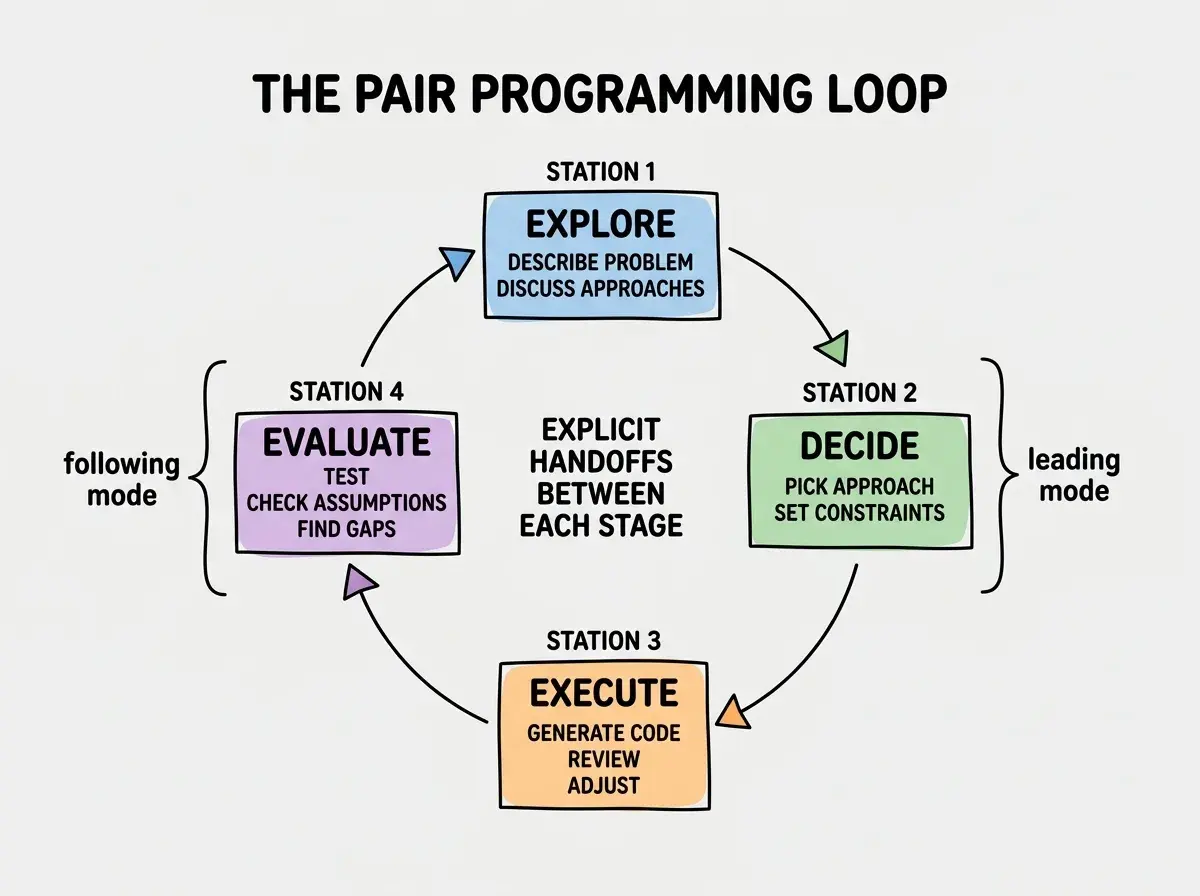
In rally driving, the most dangerous moments are the transitions. When you shift from a straight road to a tight corner, both driver and co-driver need to be perfectly synchronized. AI pair programming has the same critical transitions, and mishandling them is where most sessions go wrong.
Handoff from following to leading. You have explored options and picked an approach. Now switch cleanly: "We are going with approach 2, the Redis-backed session store. From here, I will describe each piece and you generate the implementation. Start with the session middleware." This explicit handoff prevents the AI from continuing to discuss alternatives when you need it generating code.
Handoff from leading to following. You have been generating code smoothly, and then you hit something unexpected. "The tests are passing but the integration test fails with a timeout. I am not sure why. Here is the test output. Let us debug this together." This explicit handoff prevents you from guessing at solutions when you should be letting the AI analyze the problem.
Handoff between sessions. When you close your IDE and come back tomorrow, the AI has no memory of yesterday's session. Start every new session with a 3-sentence summary: what you built, where you stopped, and what needs to happen next. "Yesterday we built the payment flow through checkout. The webhook handler is incomplete. Today we need to finish webhook handling and add receipt email sending." Three sentences, and the AI is back up to speed.
Pair programming is just one pattern. Learn the full spectrum of human-AI collaboration techniques.
Explore More GuidesCommon Anti-Patterns to Avoid
After hundreds of hours of AI pair programming, I have seen the same mistakes over and over, including in my own sessions.
The rubber stamp. Accepting generated code without reading it because the AI "probably got it right." Read every line. The AI generates code that looks correct. Looking correct and being correct are different things.
The infinite loop. Asking the AI to fix its own bug, then fix the fix, then fix the fix's fix. If the second attempt fails, start a fresh conversation with a clearer problem description.
The context dump. Pasting your entire codebase into the chat and saying "help me add feature X." Give the AI the specific files it needs and point it to the exact location where the change should happen.
The solo driver. Using the AI only for code completion and never entering following mode. The AI's ability to reason about problems and explain trade-offs is worth more than its ability to type fast.
Learn the workflows and habits that turn AI tools from novelty into genuine productivity gains.
See All AI Workflow Guides