Most developers using AI coding tools are winging it. They open Cursor, type a prompt, get some code, paste it in, fix the errors, and repeat until something works. It is like cooking without a recipe. Sometimes you get a decent meal. Often you get a mess. And you can never reliably reproduce the good results because you do not know which steps mattered.
A real workflow is a recipe. It tells you what to do at each stage, what the AI is good at during that stage, and where human judgment is irreplaceable. I have been refining this workflow over hundreds of features, and the pattern is consistent enough to share. Think of it as an assembly line for software, where each station has specific tools and specific quality checks before the piece moves to the next station.
The Assembly Line
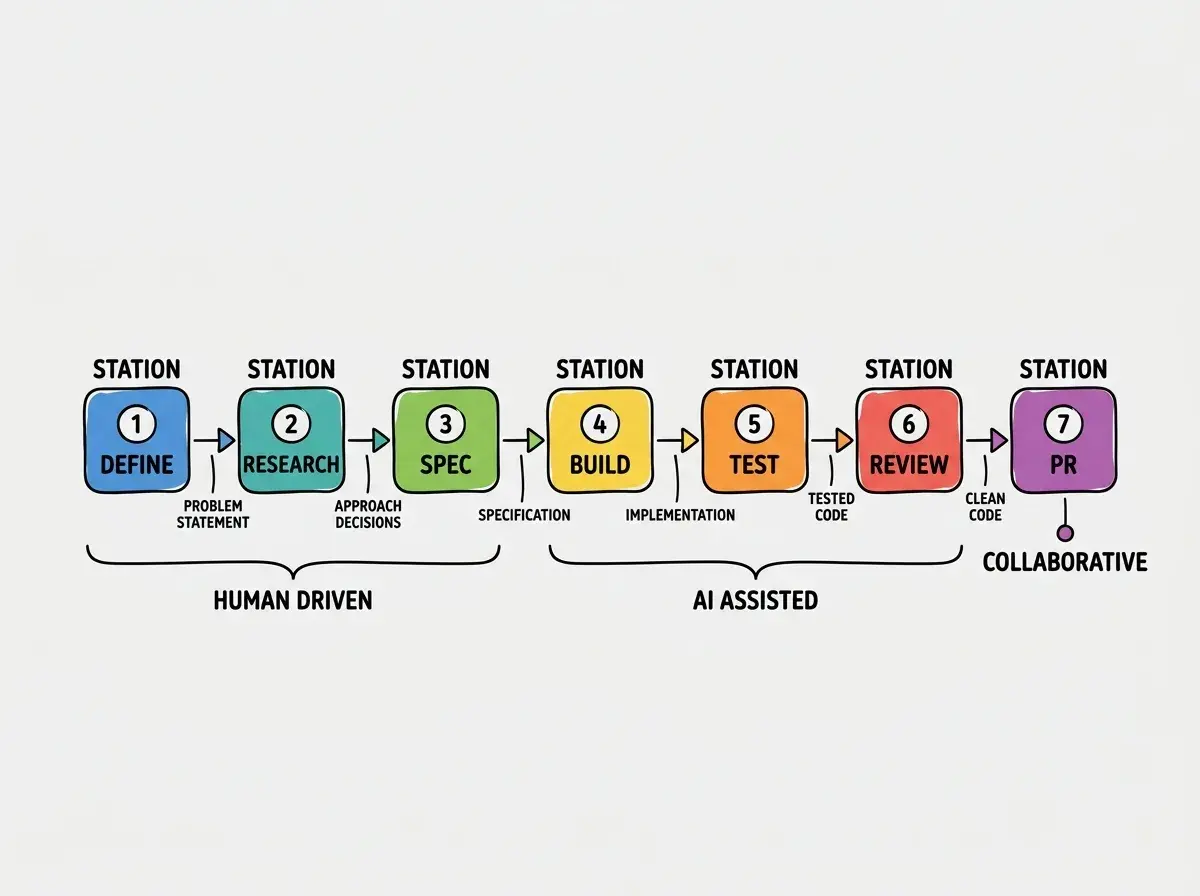
The workflow has seven stations. Each one has a clear input, a clear output, and a clear handoff to the next. Skipping stations is how you end up with code that works in development and breaks in production.
The developers who get the most from AI tools are not better at prompting. They are better at structuring their work into clear stages where AI excels at some and humans excel at others. The workflow itself is the multiplier, not the AI model. A mediocre model with a great workflow beats a great model with no workflow every time.
Here are the seven stations, in order. Each one has a clear input and a clear handoff to the next.
Write a one-paragraph description of what you are building and why. Not how. Not the technical approach. Just the problem and the user outcome. This paragraph becomes the context for every AI interaction in the next six steps. Without it, your prompts lack direction and your AI generates plausible-looking code that solves the wrong problem.
Ask your AI chat tool to outline approaches, tradeoffs, and relevant libraries. Do not generate implementation code yet. Instead, generate knowledge. Ask for the three most common ways to solve this problem. Ask what can go wrong with each approach. Ask about edge cases. Spend 15 minutes learning before you spend two hours coding. This is where you pick your ingredients before you start cooking.
Turn your research into a short specification. List the inputs, outputs, constraints, and acceptance criteria. What does "done" look like? What does "broken" look like? AI tools are excellent at generating specs from rough notes. Give it your problem paragraph and research notes, and ask it to produce a spec you can review. Review it carefully. The spec is your recipe. Errors here compound into every line of code downstream.
Now you write code. Use your AI coding tool (Cursor, Copilot, Claude Code) with the spec as context. Generate in small, testable chunks. One component at a time. One function at a time. One route at a time. After each generation, read the code. Does it match the spec? Does it handle the edge cases you identified? If not, fix it now. Do not stack generated code on top of unverified generated code.
Write tests for the code you just generated. AI tools are surprisingly good at generating test cases when you give them the implementation and the spec. Ask for unit tests, edge case tests, and integration tests. Run them. Fix failures. This is where most developers skip ahead and pay for it later. Untested AI-generated code is a bet that the model understood your requirements perfectly. It did not.
Read through the complete implementation as if someone else wrote it. Because, in a meaningful sense, someone else did. Look for unnecessary complexity, duplicated logic, missing error handling, and naming that does not match your codebase conventions. Ask your AI tool to review its own code against the spec. It will often catch issues it introduced. Clean up before you commit, not after.
Write a clear PR description that summarizes what changed, why it changed, and how to test it. AI tools can draft PR descriptions from your diff, but always edit them. A good PR description helps your reviewer (human or AI) understand the intent, not just the code. Link to the spec. Include screenshots if there are visual changes. This is the final quality gate before your code reaches the main branch.
Why This Order Matters
The assembly line is sequential for a reason. Each station produces an artifact that the next station needs.
Problem definition feeds research. Without knowing what you are solving, you research aimlessly. AI tools generate better research when you give them a focused question, not a vague topic.
Research feeds the spec. Your specification reflects informed decisions, not guesses. You chose approach A over approach B because your research surfaced tradeoffs that matter for your specific context.
The spec feeds implementation. This is where the workflow pays for itself. A clear spec makes AI code generation dramatically better. Instead of "build a user settings page," you prompt with "build a user settings page with three tabs (Profile, Notifications, Billing), where Profile includes name, email, and avatar upload to Supabase Storage, Notifications includes toggles for email and push with immediate save on toggle, and Billing shows the current plan with a link to the Stripe customer portal." The second prompt generates code you can actually ship.
Where AI Helps Most (And Where It Hurts)
Not every station on the assembly line benefits equally from AI tools. Understanding this prevents you from over-relying on AI where it is weakest.
Stations 2 and 4 are where AI shines brightest. Research (exploring approaches, finding libraries, understanding tradeoffs) and implementation (writing code from a clear spec) are where AI tools save the most time. These are knowledge retrieval and pattern application tasks, exactly what language models are trained for.
Stations 1 and 3 are where humans are irreplaceable. Defining the problem requires understanding your users, your business, and your constraints. Writing the spec requires judgment about what matters and what does not. AI can help draft these artifacts, but a human must own them. Delegating problem definition to an AI tool is like asking a sous chef to decide what restaurant to open. They can execute, but the vision has to be yours.
Station 5 is a force multiplier. AI-generated tests catch bugs that AI-generated code introduced. This sounds circular, but it works because test generation and code generation exercise different parts of the model's training. A model might generate code that mishandles null inputs but also generate a test that checks for null inputs. The cross-check is valuable.
Station 6 is where you catch AI hallucinations. The review step exists specifically because AI tools generate plausible-looking code that is subtly wrong. An API call with the wrong HTTP method. A database query that works but is missing an index hint. A component that renders correctly but leaks memory through an uncleared interval. You catch these in review, not in production.
Jumping straight to Station 4 (implementation) without doing Stations 1-3. This is the most common workflow failure with AI tools. You open Cursor, write a prompt, generate code, and iterate until it works. But "works" and "correct" are different things. Code that works in your dev environment with test data may break with real users, real edge cases, and real scale. The spec is what tells you whether the code is correct, not just functional. Without it, you have no way to evaluate the output.
Practical Prompting at Each Station
The same AI tool needs different instructions at different stages. Research prompts are exploratory: "What are the three most common approaches to real-time notifications in a Next.js app? For each, explain tradeoffs in complexity, cost, and reliability." Implementation prompts are directive: "Implement a NotificationBell component using SWR that polls /api/notifications every 30 seconds, shows an unread count badge, and marks notifications as read on click." Testing prompts are adversarial: "Write tests for NotificationBell covering empty state, unread count accuracy, error handling for API 500s, and cleanup when the component unmounts."
The shift from exploratory to directive to adversarial maps to the assembly line stages. Research explores. Implementation executes. Testing attacks.
Practical guides for shipping real projects with AI tools.
Read moreTime Budget Per Station
Not every station takes equal time. Here is a realistic breakdown for a medium-sized feature (a new page with API integration and database changes).
Station 1 (Define): 10-15 minutes. Station 2 (Research): 15-30 minutes. Station 3 (Spec): 20-30 minutes. Station 4 (Build): 1-2 hours. Station 5 (Test): 30-60 minutes. Station 6 (Review): 20-30 minutes. Station 7 (PR): 10-15 minutes.
Total: roughly 3-5 hours for a feature that would take 6-10 hours without AI tools and without a structured workflow. The time savings come from two places. AI accelerates stations 4 and 5 by 50-70%. The workflow prevents the rework loops that eat time when you skip planning.
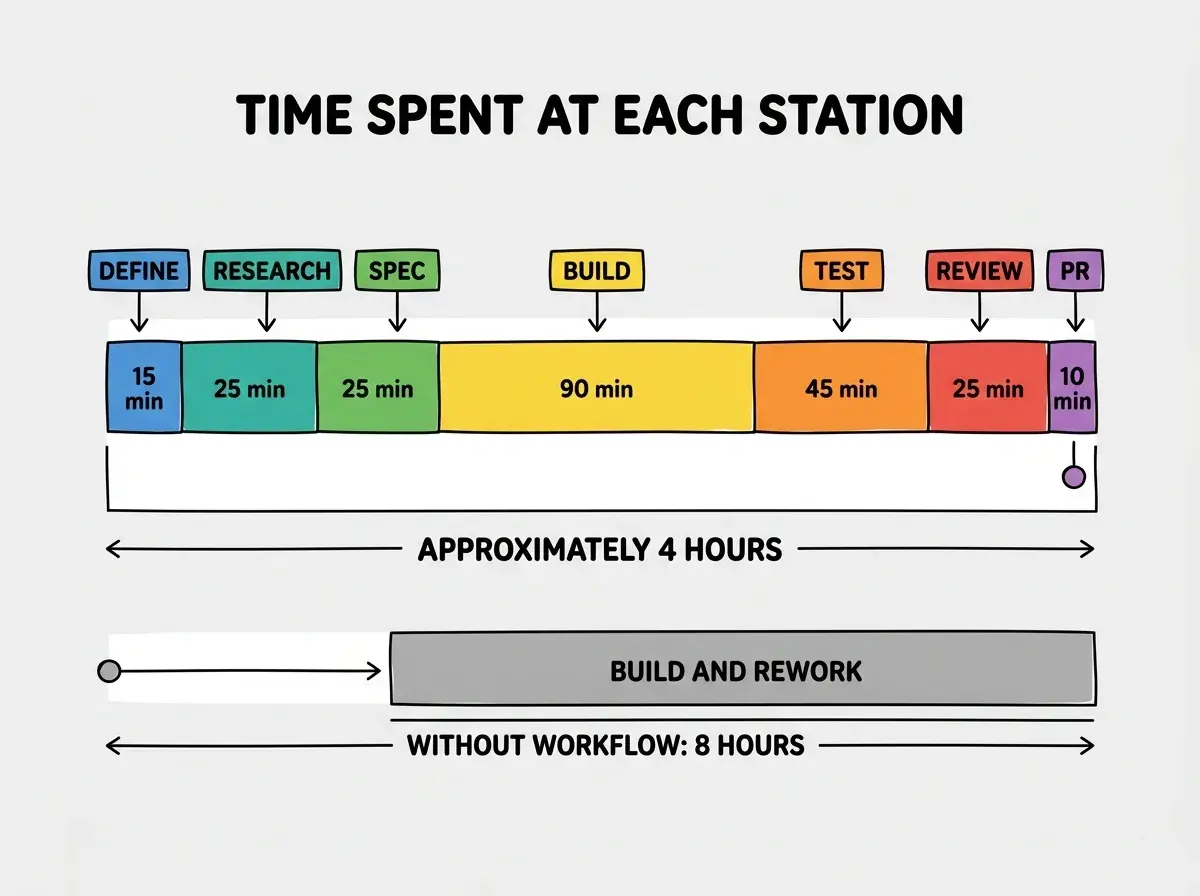
The numbers speak for themselves. Structure your work before you start it, and the work goes faster.
Start with the fundamentals before diving into advanced workflows.
Start hereFAQ
What This Means For You
The workflow is the recipe. AI tools are the kitchen equipment. A great kitchen does not make you a great cook, but a great recipe makes the kitchen dramatically more useful.
Start using this workflow on your next feature. It will feel slow for the first one or two features because you are not used to writing specs and doing research before coding. By the third feature, you will notice that your implementation sessions are shorter, your code reviews have fewer comments, and your pull requests get merged faster. The upfront investment in thinking pays dividends in reduced rework. Every time.