Think of the OpenAI Codex agent as a research assistant you send to the library. You hand over a task, they disappear into the stacks, do the reading, take notes, write a draft, and come back with something ready for your review. You never had to sit in the library yourself. That is the core premise behind OpenAI's autonomous coding agent.
With 92% of developers now using AI tools daily, the question is no longer whether to use AI for coding. It is which flavor of AI assistance fits the way you actually work. Codex makes a specific bet: that many coding tasks do not need you watching in real time. Let the agent work independently, then review the output like you would a pull request from a junior developer.
What the OpenAI Codex Agent Actually Is
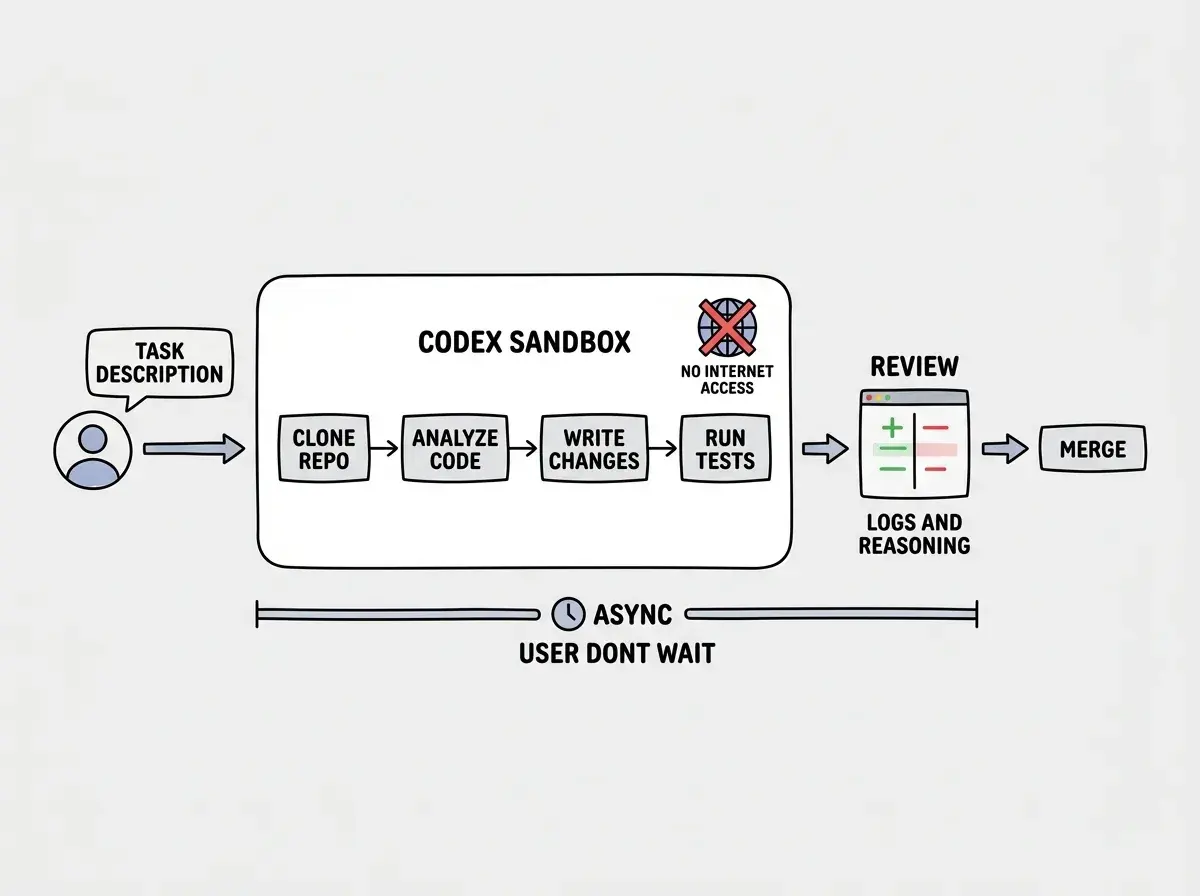
OpenAI Codex is a cloud-based autonomous coding agent integrated directly into ChatGPT. You open ChatGPT, describe a task, and Codex spins up a sandboxed cloud environment to execute it. The agent clones your repository, reads the codebase, writes code, runs tests, and produces changes you can review and merge.
Unlike Copilot (which suggests completions as you type) or Cursor (which edits files with you watching), Codex takes a task description and runs with it. You fire off the request and go do something else. When it finishes, you get a diff, logs of what it tried, and a summary of its reasoning.
This is the research assistant heading into the library. You gave them the topic. They figure out which books to pull, which chapters matter, and how to synthesize the information. Your job starts when they return with the draft.
Codex is not a smarter autocomplete. It is a fully autonomous agent that clones your repo, works in an isolated sandbox, and delivers completed changes for review. The shift from "AI helps while you code" to "AI codes while you do other things" is the fundamental difference between Codex and inline assistants like Copilot or Cursor.
The Sandboxed Environment
Every Codex task runs inside its own isolated cloud sandbox. The sandbox is a full Linux environment with your repository cloned into it. Codex can install dependencies, run build commands, execute test suites, and interact with the filesystem. But it cannot reach the internet. It cannot call external APIs, download packages from npm at runtime, or phone home to third-party services. The environment is pre-configured with your project's dependencies before execution begins.
Why does this matter? First, safety. An autonomous agent with internet access and write permissions to your repo is a security nightmare. The sandbox ensures that even if Codex hallucinates a command, the blast radius is contained. Second, reproducibility. Because the environment is hermetically sealed, the same task run twice should produce the same results. No flaky network calls, no version drift from package registries, no surprises.
For senior developers, this should feel familiar. It is conceptually similar to running CI/CD pipelines in isolated containers.
Parallel Task Execution
Imagine sending five research assistants to the library simultaneously, each working on a different question. That is what Codex enables with parallel task execution.
You can submit multiple tasks at once, and each one spins up its own independent sandbox. One might refactor a module, another writes tests for an API endpoint, and a third fixes a bug in the authentication flow. They all run concurrently, each in isolation, each producing its own set of changes for your review.
This is genuinely useful for senior developers managing larger codebases. Instead of sequentially tackling a backlog of tasks, you batch them. The cognitive load shifts from "doing the work" to "reviewing the work." You spend your morning triaging tasks and writing clear descriptions, then spend the afternoon reviewing diffs.
The practical ceiling is that tasks need to be independent. If task B depends on the output of task A, you cannot run them in parallel. Codex does not share state between sandboxes. Each one starts fresh from your repository's current state.
ChatGPT Integration and the UX Model
Codex lives inside ChatGPT, which means the interface is conversational. You describe what you want in natural language, optionally point to specific files or functions, and hit send. No special syntax, no configuration file, no CLI flags.
You can discuss the approach before kicking off the task. "I need to refactor this service to use dependency injection. Here are the three files. Here is what the tests should look like afterward." Codex takes that conversation context as the brief for its autonomous work.
After the task completes, results appear in the same chat thread. You see proposed changes as diffs, the reasoning behind each change, and logs from any commands the agent ran. If something is off, you provide feedback in the same conversation and ask Codex to try again. Instead of getting a code snippet you copy-paste, you get a complete set of changes applied to your actual repository.
How Codex Compares to Other Autonomous Agents
The autonomous coding agent space has gotten crowded. Devin, Jules, and Claude Code all occupy adjacent territory, but with meaningfully different approaches.
Devin (by Cognition) runs in a full virtual environment with a browser, terminal, and code editor. It can browse the web, read documentation, and interact with external services. The tradeoff is speed and cost. Think of Devin as a research assistant who not only goes to the library but also visits other offices and does field research. More capable in theory, slower in practice.
Jules (by Google) focuses on GitHub integration. You assign Jules to a GitHub issue, and it creates a pull request with the proposed fix. The workflow is tightly coupled to the GitHub ecosystem, making it frictionless for teams already using Issues for task management. Jules is the research assistant who only works from your filing cabinet.
Claude Code (by Anthropic) is a terminal-based agent that runs locally on your machine, reading and writing files directly in your project. No cloud sandbox. It sees your actual filesystem and runs your actual dev server. The advantage is deep context and zero latency. The tradeoff is that it works in your terminal session and benefits from more active guidance. Claude Code is like having the research assistant sitting next to you at your desk, working on your computer.
Codex splits the difference. More autonomous than Claude Code (you do not need to babysit it) but more constrained than Devin (no internet, sandboxed environment). For many senior developers, this is the right tradeoff. Independence without unpredictability.
Treating autonomous agents as interchangeable. Codex, Devin, Jules, and Claude Code optimize for different workflows. Codex excels at parallelizable, well-defined tasks you can describe upfront. Claude Code excels at exploratory work where you need to iterate quickly with full local context. Choosing the wrong agent for the wrong task type leads to frustration regardless of how capable the underlying model is.
Practical Use Cases Where Codex Shines
Not every coding task benefits from an autonomous agent. Codex is strongest in specific scenarios.
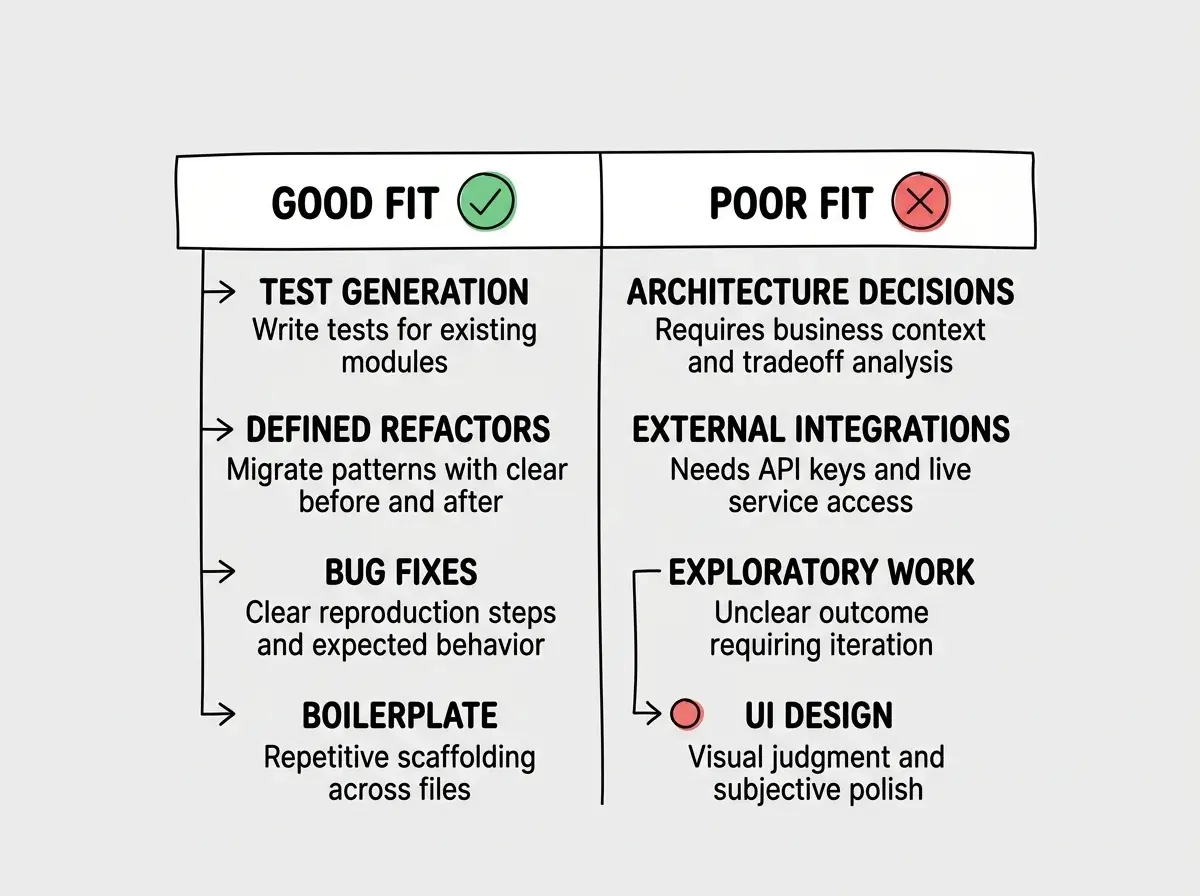
Test generation is the clearest win. You describe which modules need tests and what edge cases to cover. Codex reads the source code, writes the tests, and runs them to verify they pass. This is tedious work that senior developers routinely defer, and it maps perfectly to the "send it to the library" model.
Refactoring with clear specifications works well too. Migrating from callbacks to async/await, converting class components to functional components, or restructuring a directory layout are tasks where the desired outcome is well-defined. Codex executes these mechanically and thoroughly.
Bug fixes with reproduction steps fit the model when you can describe the bug clearly. "This endpoint returns a 500 when the profile has no avatar URL. Null reference in the serializer. Fix it and add a test." That specificity gives Codex enough to work with.
Where Codex struggles. Open-ended design work, architectural decisions requiring business context, and tasks needing access to external services are poor fits. If you cannot describe the desired output clearly enough for a pull request review, it is probably not a good Codex task.
Current Limitations
Codex is impressive but far from a replacement for a developer. The no-internet constraint means it cannot install new dependencies or consult updated documentation during execution. If your task requires a new library, you need to add it to the project first.
The async model also means longer feedback loops. With an inline assistant, you see results instantly and course-correct in real time. With Codex, you wait for the task to complete, review the output, and then either accept or start a new iteration. For tasks requiring multiple rounds of refinement, this can be slower than pair-programming with Claude Code or Cursor.
Context limitations still apply. While Codex can read your entire repository, its understanding of implicit conventions and architectural patterns that live in people's heads is limited. The research assistant can read every book in the library, but they might miss the unwritten institutional knowledge that long-time team members carry.
Stay current on the latest developments in autonomous agents and AI-assisted development.
Browse more reviewsWhere This Is Going
Autonomous coding agents will handle an increasing share of well-defined implementation work, and developers will shift toward specification, review, and architecture. Codex is OpenAI's bet on that future, and the sandboxed, parallel, async model is a thoughtful one.
For senior developers, the honest assessment: Codex will not replace your judgment, your architectural instincts, or your ability to navigate ambiguity. But it can meaningfully reduce time spent on implementation tasks that are important but not intellectually demanding. Write the brief, send the research assistant to the library, and spend your time on the problems that actually require your expertise.
The developers who benefit most will be those who get exceptionally good at writing clear task descriptions, reviewing diffs critically, and knowing which tasks belong in the sandbox versus which ones need a human at the keyboard.
Get practical guidance on integrating AI tools into your development workflow.
Start learning