Every AI coding tool in 2026 promises to write code for you. Cursor and Claude Code act like power steering, helping you drive faster while you stay behind the wheel. Devin, Cognition's autonomous AI developer, promises something fundamentally different. It wants to be the self-driving car. You tell it where to go, and it handles the entire journey on its own. With 92% of developers now using AI tools daily and 25% of Y Combinator's W25 batch shipping startups with 95%+ AI-generated codebases, understanding what autonomous coding actually delivers matters more than following the hype cycle.
This review is based on real usage, public benchmarks, and community reports. Not the launch demo. Not the Twitter hype.
What Devin Actually Does
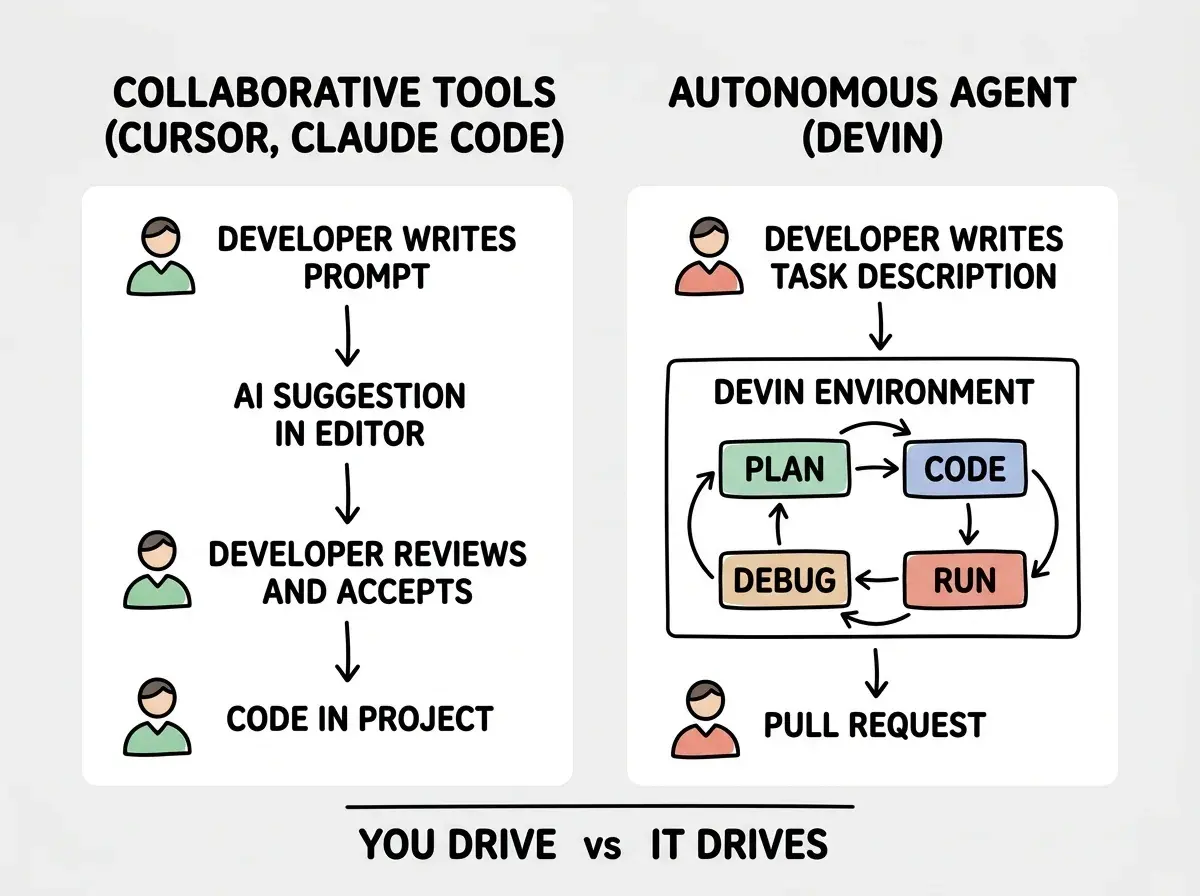
Devin is not another autocomplete layer sitting inside your editor. It is a full autonomous agent with its own development environment, including a code editor, terminal, and web browser. You describe a task in natural language, and Devin plans the work, writes the code, runs it, debugs errors, searches documentation, and iterates until the task is done. You can watch the entire process in real time through a Slack-like interface, or walk away and check back later.
The environment is the key differentiator. When you ask Devin to integrate a third-party API, it can read the API docs in its browser, write the integration code in its editor, run tests in its terminal, and fix failures without any human intervention. Collaborative tools like Cursor give you suggestions inside your IDE. Devin gives you a full development loop running independently.
Think of it this way. Cursor and Claude Code are power steering. They make your hands on the wheel more effective. Devin is the autonomous vehicle. It takes the destination and attempts the whole route. The question is whether the roads it travels are well-mapped enough for that to work.
Devin's value proposition is not writing better code than Cursor or Claude Code. It is writing code without you being present. The quality of the output matters, but the real differentiator is the workflow shift from collaborative coding to delegated coding. If you are evaluating Devin, evaluate it on whether full autonomy actually fits your development process, not on whether the code itself is marginally better or worse.
How It Performs in Practice
Cognition's SWE-bench results positioned Devin as a breakthrough, and the numbers were impressive for early 2024. But real-world performance tells a more nuanced story. Devin performs well on tasks with clear boundaries and well-documented patterns. It struggles when the problem space is ambiguous.
Where Devin handles things well. Boilerplate generation, dependency upgrades, test scaffolding, API integrations with good documentation, codebase-wide refactoring with clear patterns, and bug fixes where the error message points directly to the problem. These tasks follow predictable paths. Devin can plan them, execute them, and self-correct when something breaks along the way.
Where Devin struggles. Novel architecture decisions, nuanced UX implementation, performance optimization that requires understanding user behavior, and anything that needs context beyond the codebase itself. If you ask Devin to "make the onboarding flow feel less overwhelming," it does not have the product intuition to know what that means. It can restructure components, but it cannot make judgment calls about what belongs on screen and what does not.
The debugging loop is both a strength and a limitation. Devin's ability to run code, see errors, and iterate is genuinely useful. But when it hits a problem it cannot solve through iteration, it can spin for a long time. Community reports consistently mention tasks where Devin spent 30-45 minutes retrying variations of the same broken approach before needing human intervention. The self-driving car analogy holds here too. When the road is clear, it drives smoothly. When conditions get unusual, it can circle the same block repeatedly.
Cognition's Pricing and Plans
Devin's pricing has evolved since launch, but the current structure targets teams rather than individual developers. The base plan runs $500/month per seat, which includes a set number of compute hours for Devin's autonomous environment. Additional compute is billed on usage. There is no meaningful free tier for production use.
This pricing tells you exactly who Cognition is building for. At $500/month, Devin needs to save roughly 10-15 hours of senior developer time monthly to break even. For a startup with three engineers drowning in migration work, dependency updates, and test coverage, the math can work. For a solo indie hacker who enjoys the coding process, it is an expensive assistant for tasks you could handle yourself.
Compare that to Cursor Pro at $20/month or Claude Code at usage-based pricing that typically runs $50-150/month for active developers. Collaborative tools cost a fraction of Devin and cover the tasks most developers actually need help with. Devin's premium only makes sense when the autonomous workflow saves more time than the collaborative one, and that depends entirely on what kind of work fills your backlog.
When Autonomous Coding Makes Sense
The self-driving car does not make sense for every trip. A quick drive to the grocery store (fixing a typo, adding a field to a form) does not need autonomy. You are faster doing it yourself with power steering. The autonomous vehicle earns its keep on the long highway stretches where the route is predictable and you would rather use the travel time for something else.
Devin makes sense when you have a backlog of well-defined, medium-complexity tasks. Migration scripts, test suites for existing code, integrations with well-documented APIs, codebase-wide lint fixes, and dependency upgrades with clear migration guides. These are the highway miles. The task is clear, the path is documented, and having a human present adds oversight cost without proportional value.
Devin does not make sense for your core product work. The features that differentiate your app, the UX decisions that define your brand, the architecture choices that determine your scaling story. These need human judgment at every step. Delegating them to an autonomous agent is like putting a self-driving car on an unmarked dirt road. It might arrive somewhere, but probably not where you intended.
Treating Devin as a replacement for a junior developer instead of a tool for specific task categories. Teams that assign Devin the same mixed bag of work they would give a new hire consistently report disappointment. Devin excels at clearly scoped, well-documented tasks. It does not learn your team's conventions, ask clarifying questions proactively, or develop product intuition over time. Use it like a specialized machine, not a general-purpose teammate.
How It Compares to Collaborative Tools
The real competition is not Devin versus no AI. It is Devin versus the collaborative tools most developers already use. And the comparison is not straightforward because they solve different problems.
Cursor and Claude Code keep you in flow state. You think, they suggest, you accept or modify, and you move forward. The feedback loop is measured in seconds. You retain full context about what the code does and why. The downside is that you are present for every line, which means your time is the bottleneck.
Devin removes you from the loop entirely for specific tasks. The feedback loop is measured in minutes or hours. You lose direct context about implementation decisions (though you can review the session replay). The upside is that your time is freed for other work while Devin executes.
For most senior developers, the collaborative model wins for daily coding work. You are faster with power steering than waiting for the autonomous car to complete its route, park, and send you a notification. But for backlog work that does not require your direct input? Devin's model starts to make real sense.
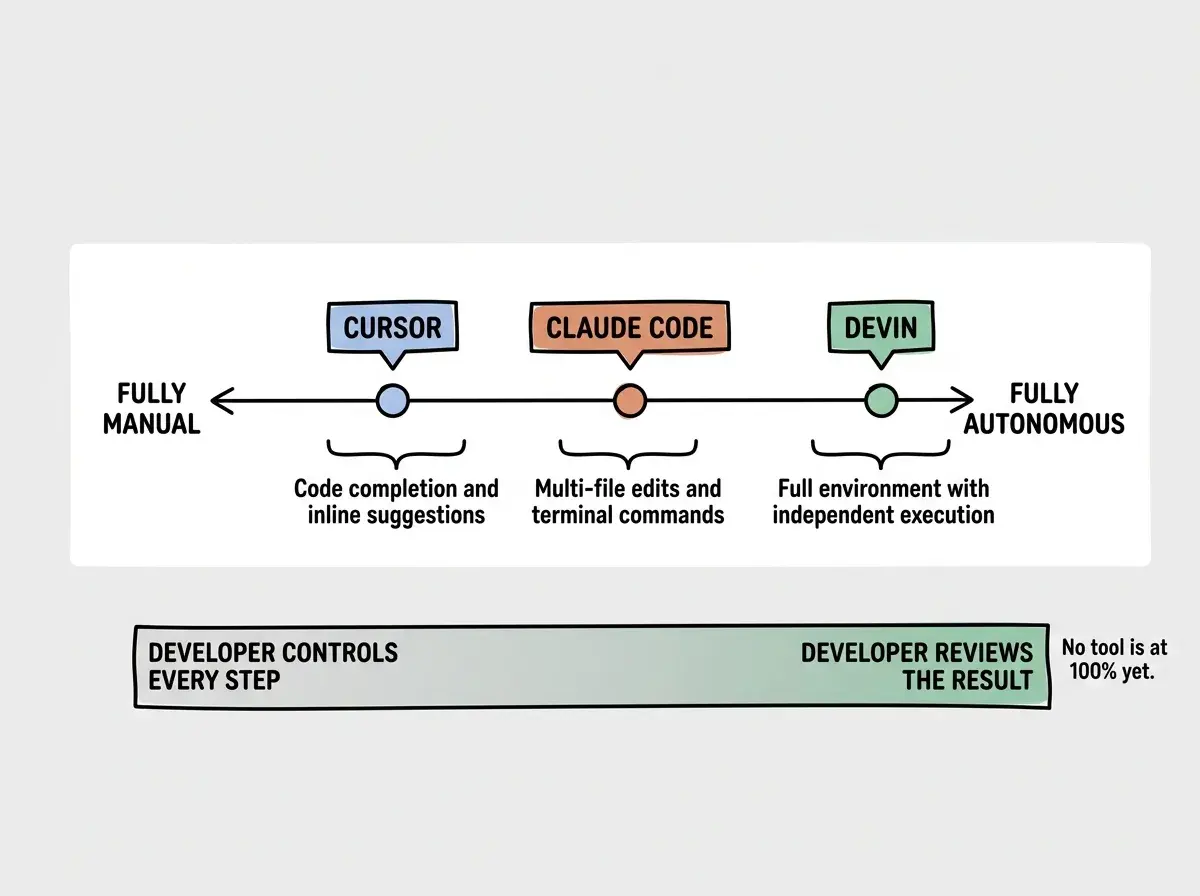
Understand how different AI development tools compare across the full spectrum.
Explore AI toolsThe Bigger Picture
Devin represents an important experiment in where AI-assisted development is heading. The question is not whether autonomous coding agents will improve. They will. The question is whether full autonomy is the right paradigm for software development, or whether the collaborative model will keep evolving to capture most of the same value.
The car analogy is useful one last time here. Self-driving technology has improved dramatically, but most of us still drive our own cars with better and better assistance features. The power steering got electronic. The car got lane keeping and adaptive cruise control. Full self-driving exists, but it is not the default mode for most drivers in most situations.
Devin might follow the same trajectory. The autonomous capability is real and improving. But for most development work, collaborative tools that make you faster while keeping you in control might remain the more practical choice. The sweet spot is probably using both. Collaborative tools for your core product work, and autonomous agents for the well-defined tasks that do not need your creative input.
If you are considering Devin, start with a narrow experiment. Pick a specific category of tasks from your backlog, ones that are well-documented, clearly scoped, and not on your critical path. Run those through Devin for a month and measure the actual time saved against the $500 price tag. That will tell you more than any review, including this one.
Get practical guidance on choosing and combining AI development tools for your workflow.
See the full toolkit