Google Jules AI is the coding assistant that works while you are not watching. Think of it as a night shift developer. You assign a task before you log off, and when you come back, there is a pull request waiting for review. That is the core pitch, and it is a genuinely different approach from the AI coding tools most developers are used to.
With 92% of developers now using AI tools daily, the market is crowded. Copilot autocompletes your lines. Claude Code runs commands in your terminal. Cursor rewrites your files in real time. But Jules does something none of them prioritize. It takes a task, disappears into a sandboxed environment, and works on it asynchronously. No babysitting required.
This review breaks down how Jules actually works, where it fits in the current landscape, and whether the night shift model delivers on its promise.
How the Async Workflow Actually Functions
Jules operates on a fundamentally different loop than most AI coding tools. Instead of sitting inside your editor waiting for prompts, it runs as a standalone agent that you hand tasks to through a web interface or the Gemini app.
The workflow looks like this. You describe a task in natural language. Something like "refactor the authentication middleware to use JWT validation instead of session cookies" or "fix the failing test suite in the payments module." Jules reads your repository, creates a plan, and starts executing. It works inside a secure cloud VM with its own development environment, running code, testing changes, and iterating on errors without your involvement.
When Jules finishes, it delivers a pull request to your GitHub repository. The PR includes the code changes, a description of what was done, and the reasoning behind key decisions. You review it like any other PR from a human teammate. Approve, request changes, or close it.
The night shift analogy holds up well here. You do not stand over a night shift worker's shoulder. You leave instructions, they execute, and you review the output in the morning. Jules follows the same pattern. Assign the task, go focus on something else (or sleep), and come back to a finished PR.
Jules is not a real-time coding assistant. It is an async task runner that produces pull requests. If you need instant autocomplete or interactive pair programming, Jules is the wrong tool. If you need to offload well-defined tasks and review results later, it is built specifically for that workflow.
What Powers Jules Under the Hood
Jules runs on Google's Gemini 2.5 Pro model, which gives it strong reasoning capabilities for code understanding and generation. The model handles context windows large enough to read through substantial codebases before making changes.
The execution environment matters just as much as the model. Jules spins up a sandboxed VM for each task. Inside that VM, it clones your repo, installs dependencies, runs your test suite, and verifies that changes actually work before submitting a PR. This is not generating code in a vacuum. It is running the code, catching errors, and fixing them in a loop.
GitHub integration is the primary delivery mechanism. Jules connects directly to your repositories and operates through the standard Git workflow. It creates branches, commits changes, and opens PRs. For teams already built around GitHub-centric code review, Jules slots in without requiring any new processes.
Google has positioned Jules inside the broader Gemini ecosystem. You can access it through the Gemini app, and it ties into Google's existing infrastructure for authentication and billing. For organizations already invested in Google Cloud, the integration story is smoother than adopting an independent platform.
Where Jules Differs From Devin and Claude Code
The autonomous coding agent space has three distinct approaches right now, and understanding the differences saves you from picking the wrong tool.
Devin was the first widely publicized autonomous coding agent. It also works asynchronously and delivers code, but it positions itself as a full "AI software engineer" with a broader scope. Devin includes a browser, a terminal, and a code editor in its cloud environment. It can research documentation, navigate web interfaces, and handle multi-step workflows that go beyond pure coding. The tradeoff is cost and complexity. Devin's pricing starts higher, and its broader capabilities mean more surface area for things to go wrong.
Claude Code takes the opposite approach. It runs locally in your terminal, executes commands on your machine, and works interactively. You watch it work, approve or reject actions, and steer it in real time. It is more like an extremely capable pair programmer sitting next to you than a night shift worker. The strength is precision and control. The limitation is that it requires your attention.
Jules sits between these two. It is asynchronous like Devin but more focused in scope. It handles coding tasks and delivers PRs, without trying to be a general-purpose software engineer that browses the web and manages deployments. Compared to Claude Code, Jules trades real-time control for the ability to work independently.
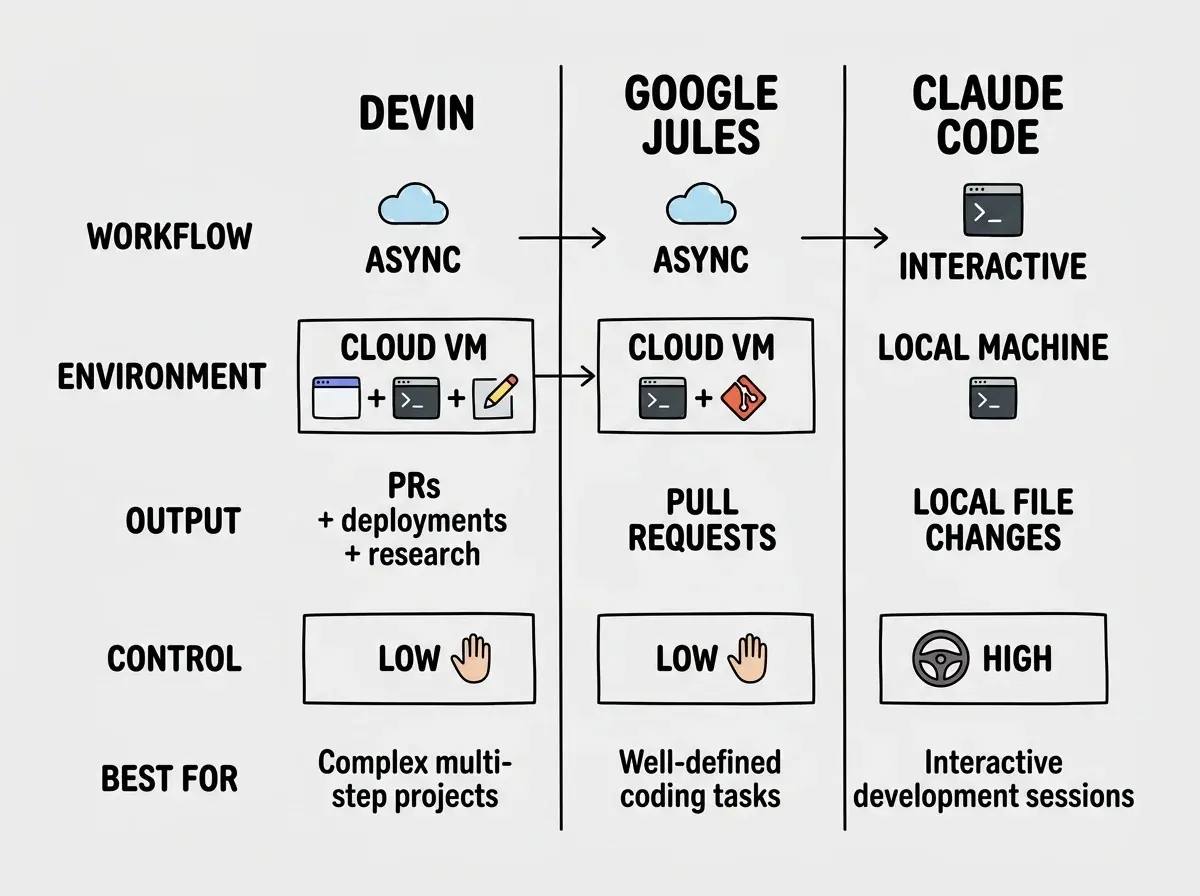
The practical difference comes down to your workflow. If you have a backlog of well-scoped tickets and want them worked on in parallel while you focus on architecture or product decisions, Jules fits naturally. If you need an AI that helps you think through problems in real time, Claude Code is the better choice. If you want an AI that can handle entire project workflows end-to-end, Devin aims for that space.
GitHub Integration and Team Workflows
Jules is built around GitHub as its primary collaboration surface. This is a deliberate design choice that makes adoption easier for teams already running standard PR-based workflows.
When Jules submits a pull request, it goes through your existing review process. CI pipelines run. Linters check the code. Team members review and comment. Nothing about your team's workflow needs to change to accommodate Jules. It is just another contributor opening PRs.
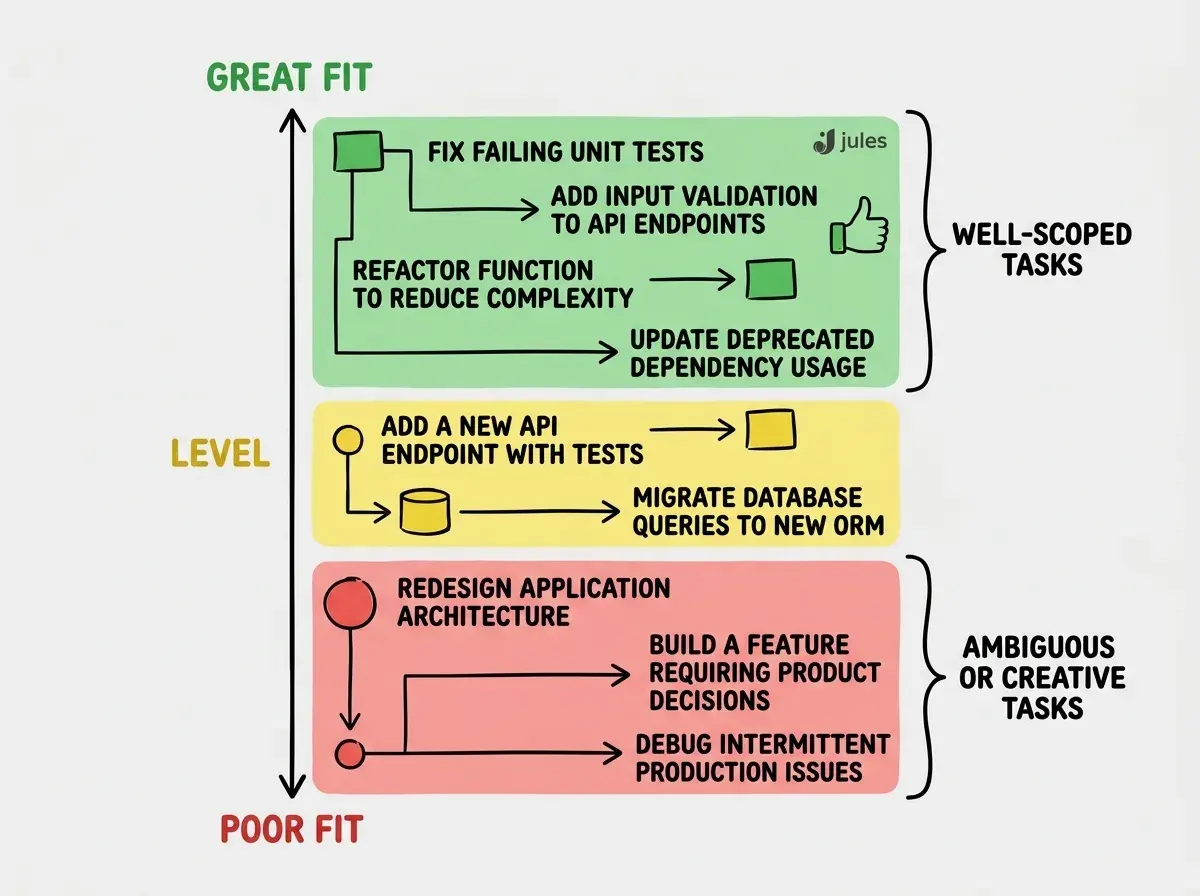
For team leads and senior developers, this creates an interesting dynamic. You can use Jules to handle the tasks that are important but not complex enough to justify a senior engineer's focused time. Bug fixes, test coverage improvements, straightforward refactors, and dependency updates are all strong candidates. The night shift worker takes care of the maintenance while the day shift focuses on the features that require human judgment and creativity.
Jules also supports iterative feedback. If a PR needs changes, you can comment on it and Jules will update the branch. This back-and-forth mirrors how you would work with a junior developer. Review, provide feedback, get a revised version.
Assigning Jules tasks that are too vague or too ambitious. "Improve the codebase" will produce mediocre results. "Refactor the user service to separate database queries from business logic" gives Jules enough structure to deliver something useful. Like any night shift worker, clear instructions produce better outcomes than open-ended mandates.
Current Limitations Worth Knowing
Jules is still maturing, and being honest about its current limitations matters more than hype.
Context boundaries. While Gemini 2.5 Pro handles large context windows, extremely large monorepos can still challenge Jules. It works best with repositories where the relevant code is reasonably scoped rather than spread across hundreds of interconnected files.
No real-time collaboration. You cannot watch Jules work and course-correct mid-task. If Jules misunderstands the task, you find out when the PR arrives. The feedback loop is longer by design.
Language and framework coverage. Jules handles mainstream languages well, with particular strength in Python, JavaScript, TypeScript, and Java. Niche languages or custom toolchains may produce less reliable results.
Task scoping matters enormously. Jules performs best on tasks a competent developer could complete in a few hours. Multi-day epics requiring architectural decisions or creative problem-solving are not what this tool is built for. Keep tasks focused and Jules delivers. Make them too broad and quality drops.
Pricing and Access
Google offers Jules with a free tier that includes limited tasks per day, making it accessible for individual developers to test the workflow. Paid plans through Gemini Advanced unlock higher task limits and priority execution.
Compared to Devin's pricing at $500/month, Jules is significantly more accessible. The free tier alone lets you evaluate whether async coding agents fit your workflow before committing budget.
Finding the right tool depends on how you actually work, not just feature lists.
Browse tool comparisonsHow to Get the Most Out of Jules
Write tasks like tickets for a junior developer. Include the goal, the relevant files, any constraints, and what "done" looks like. "Add rate limiting to the /api/users endpoint using a sliding window algorithm, 100 requests per minute per IP" is a task Jules can execute well.
Start with low-risk tasks. Test coverage improvements, small refactors, and dependency updates are perfect starting points. You learn how Jules interprets instructions before trusting it with anything customer-facing.
Review PRs carefully at first. Like onboarding any new team member, review Jules's early PRs more thoroughly until you develop confidence in its output for your specific codebase.
Use it for the backlog, not the roadmap. Jules excels at clearing the pile of "should do" tasks that never get prioritized. That is exactly the kind of work a good night shift handles.
The best results come from understanding each tool's strengths and using them accordingly.
Explore more reviewsWhat This Means For Your Workflow
Google Jules AI is not a replacement for interactive tools like Claude Code or Cursor. It is the night shift complement. Use your interactive tools for work that benefits from real-time thinking. Use Jules for the well-scoped tasks that just need to get done while you focus elsewhere.
The async model is still early, and Jules will improve at handling ambiguity and larger codebases. But even today, a night shift developer that works for free is a genuinely useful addition. The question is not whether Jules is perfect. It is whether it saves you time on the tasks you were not getting to anyway.