On-call practices for a solo builder are the design choices that determine whether running a production app is sustainable or burns you out within six months. The default for most builders is "I am always on call, every alert wakes me up, and I hope nothing breaks." That works for a few months, then quality of sleep degrades, response time degrades, and either the app or the founder collapses. The better path is a small set of explicit practices that limit when you respond, what you respond to, and how the response works.
This guide walks through the four pillars of solo on-call, alert hygiene, the runbook discipline, the support boundary, and the recovery rhythm.
Why Solo On-Call Is Different
The on-call literature was written for engineering teams of ten or more people, with rotations, escalations, and dedicated incident commanders. None of that applies to a solo operator. You are simultaneously the alert receiver, the investigator, the fixer, and the communicator, and you cannot rotate the role to anyone else.
The implication is that every aspect of on-call has to be designed around a single human's sustainable load. An alert that wakes a team member who can hand off in the morning is fine. An alert that wakes the only person who can fix it, with no morning relief, is corrosive. The first rule of solo on-call is to be ruthless about which alerts cross which thresholds.
A 2024 IndieHackers operational survey of 412 solo SaaS founders found that 68% reported "frequent or constant" stress from being on-call, and that 31% had abandoned a profitable project specifically because of on-call burden. The dropout rate was the second-leading cause of small SaaS shutdowns, behind only revenue decline.
The pattern to copy is a hospital's emergency triage. Not every patient who walks in gets immediate attention. The triage nurse classifies severity, and only the actually-emergency cases get pulled to the front of the line. Your alerts need the same triage, most issues are not actual emergencies and should not be treated like one.
Pillar 1, Alert Hygiene
The single biggest lever in solo on-call is what you actually get paged for. Most builders configure alerts that fire too readily, then learn to ignore them, which defeats the alerting system. The discipline is to have very few alerts that always matter, rather than many alerts that sometimes matter.
The right alert thresholds for a solo builder are conservative. Not "the response time crossed 1 second." Try "the response time has been over 3 seconds for 5 consecutive minutes." Not "an error happened." Try "the error rate is 5x baseline for 10 minutes." The goal is to fire only when something is actually wrong and human judgment is needed.
The classification I use, three tiers, page me immediately (downtime over 5 minutes, payments broken, data loss risk), notify me within an hour (degraded performance, intermittent errors, third-party outage), and notify me by end of week (capacity warnings, expiring certificates, slow trends). Match each tier to a different channel, SMS for tier 1, email for tier 2, weekly digest for tier 3.
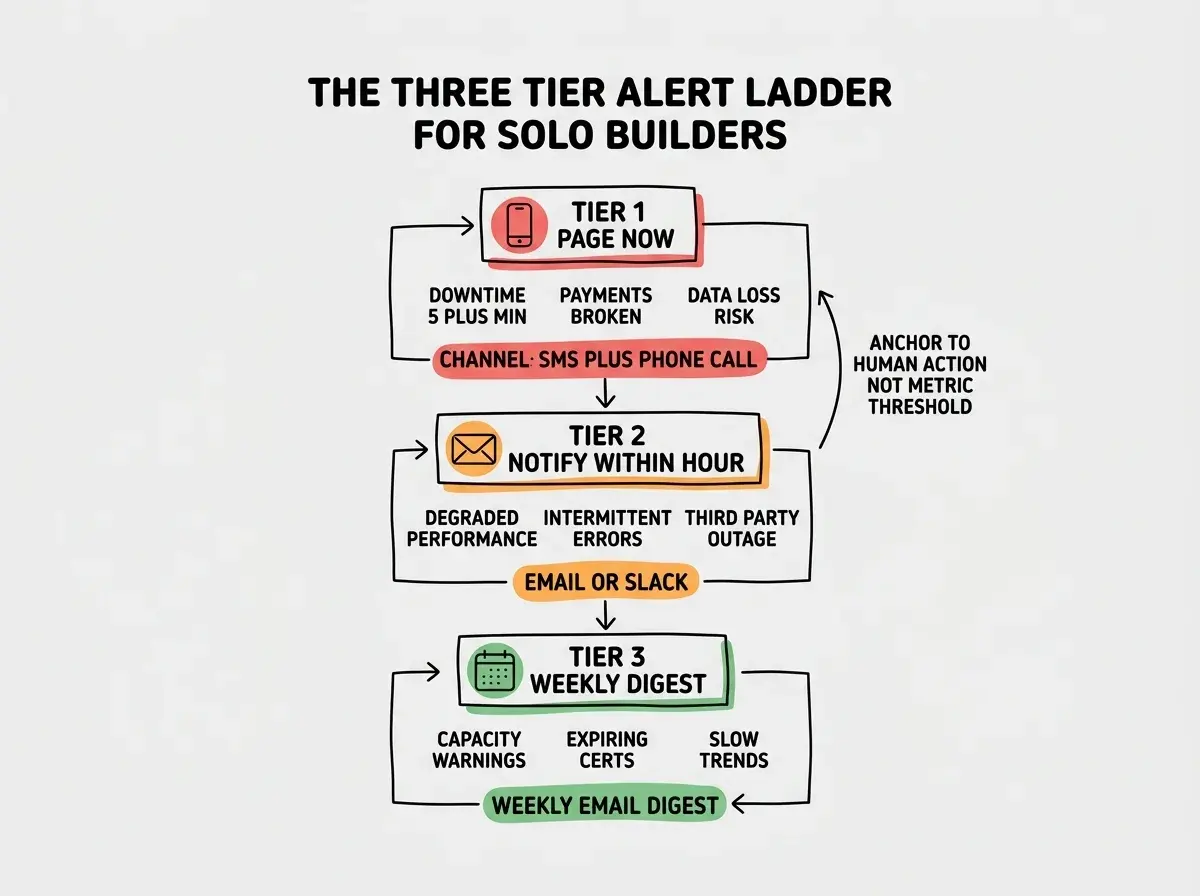
The exercise that shapes alerts well is, for every alert that fires, ask "did this need me to wake up." If the answer is no for two consecutive incidents, demote the alert to a lower tier. After a few weeks of pruning, the alerts that remain are ones that actually need human attention.
Pillar 2, Runbooks
A runbook is a written procedure for handling a specific incident type. For a solo builder, runbooks are what let your tired, half-awake self handle a 3am incident with minimal cognitive load. The discipline is to write the runbook before the incident, not during it.
The minimum viable runbook set covers the four most likely incident types. Database is down. Hosting platform is down. A third-party dependency (payments, email, auth) is down. The app is up but a critical feature is broken. Each runbook is a one-page markdown file with the same structure, what to check first, how to confirm the diagnosis, what to do, and what to communicate to users.
The runbooks live in a folder in your repo, ideally indexed by a top-level RUNBOOKS.md that links to each one. During an incident, you open the index, find the right runbook, and follow the steps. The cognitive load drops from "what do I do" to "step 3 of the runbook says check the database connection logs."
Read the rest of the operations series for solo builders
Browse the grow categoryThe runbook format I use is, header section with severity, services affected, and average resolution time, then a "diagnosis" section with the questions to answer, then a "remediation" section with the steps, then a "communication" section with the customer-facing message template. Each section is no more than a few lines.
Pillar 3, the Support Boundary
The hardest pillar for most solo builders is setting boundaries on when you respond. The default of "I am always available" feels like good customer service but is a trap, the more available you are, the more your customers expect immediate responses, the more your inbox controls your life.
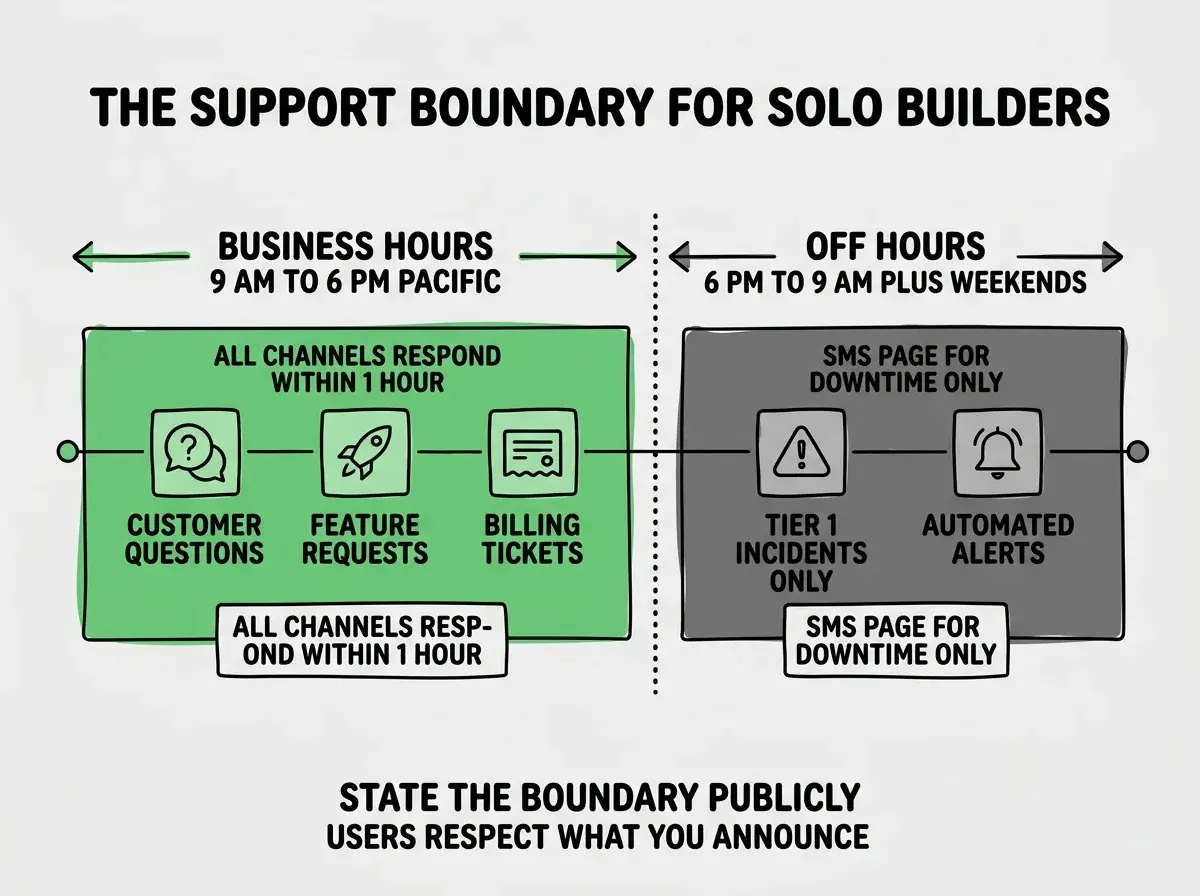
The pattern that works is explicit hours communicated up front. Your status page says "Support is available Monday through Friday, 9am to 6pm Pacific. Outside those hours, the on-call rotation handles tier 1 incidents only." Your auto-responder reinforces it. Your customers stop expecting 11pm replies because you have explicitly told them not to.
The exception is tier 1 incidents, the ones where customers cannot use the app at all. Those need response any time, because that is what users are paying for. But customer feature requests, billing questions, and minor bugs can wait until business hours, and your stated policy makes that wait normal instead of suspicious.
The other piece is canned responses. For every common question, build a saved reply. The reply takes ten seconds to send, the customer feels heard, and you do not type the same answer twice. Most help desk tools support this natively.
The most common solo on-call mistake is the silent boundary, where you stop responding outside business hours but never tell customers. They keep emailing, you keep ignoring, they get frustrated, churn climbs. State the boundary publicly. The act of stating it is what makes it sustainable.
The corollary is that boundaries with paying customers should be more generous than boundaries with free users. A paying customer might get same-business-day response while a free user gets 48 hours. This is fine, charge accordingly.
Pillar 4, Recovery Rhythm
The last pillar is the discipline of recovering from each incident, not just resolving it. Every incident takes something out of you, sleep, focus, energy. If you do not deliberately replenish, the cumulative debt becomes burnout.
The practice that works is, after every tier 1 incident, take a half day off the day after. Not optional, not "if I feel like it," scheduled. The half day is for sleep, exercise, or time away from the screen. The work that would have happened in those hours is real, but losing it is cheaper than losing the founder.
The other practice is the postmortem habit. Within 48 hours of every meaningful incident, write a postmortem (just for yourself, even if it never goes public). The format is, what happened, what we did, what we will do differently. The act of writing it converts the incident from anxiety to data, and the prevention items improve the next month's reliability.
What This Means For You
Solo on-call is sustainable with discipline and impossible without it. The four pillars above are not advanced operations theory, they are the basic hygiene that lets you run a production app without it eating your life.
- If you're a founder: The day you take on your first paid customer is the day to set up these practices. Adding them later, after habits and customer expectations are formed, is much harder.
- If you're changing careers: These same principles apply at larger companies, just with more people sharing the load. Practicing them solo first is excellent preparation for being the on-call lead later.
- If you're a student: Read public postmortems from major outages to internalize the runbook pattern. The good ones from Cloudflare, GitHub, and Vercel are short, technical, and instructive.
Browse more operations and reliability guides
Read more grow guides