Every builder needs a control tower. As your project grows from a weekend idea to something real, the chaos of scattered notes, forgotten tasks, and unclear priorities starts slowing you down. Project management tools for builders are the control tower that keeps your work visible and your momentum intact. But not every control tower looks the same. Some are flexible observation decks with panoramic views. Others are streamlined radar rooms with focused displays. And some are cockpits built right into the aircraft itself.
That is exactly what you get with Notion, Linear, and GitHub Projects. Three fundamentally different approaches to the same problem, each designed for a different kind of builder.
Quick Verdict
| Notion | Linear | GitHub Projects | |
|---|---|---|---|
| Best for | Flexible planning, docs + tasks together | Sprint-based development, fast teams | Code-integrated tracking, open source |
| Price | Free for solo, $10/mo per seat (Plus) | Free for teams up to 250 issues, $8/seat/mo | Free with GitHub repo |
| Strength | Does everything, infinitely customizable | Opinionated speed, keyboard-first UX | Lives where your code already lives |
| Weakness | Can become a mess without discipline | Rigid workflow, less useful for non-dev tasks | Limited features compared to dedicated tools |
With 92% of developers using AI tools daily in 2026, your building speed has never been faster. But faster building creates more loose threads, more half-finished features, and more decisions to track. The right project management tool catches those threads before they unravel.
You do not need project management when you are building alone for a weekend. You need it when you start losing track of what you decided yesterday, when features pile up faster than you can ship them, or when someone else joins the project. The trigger is not team size. It is complexity. If your brain can no longer hold the full picture, it is time for a control tower.
Notion as the Observation Deck
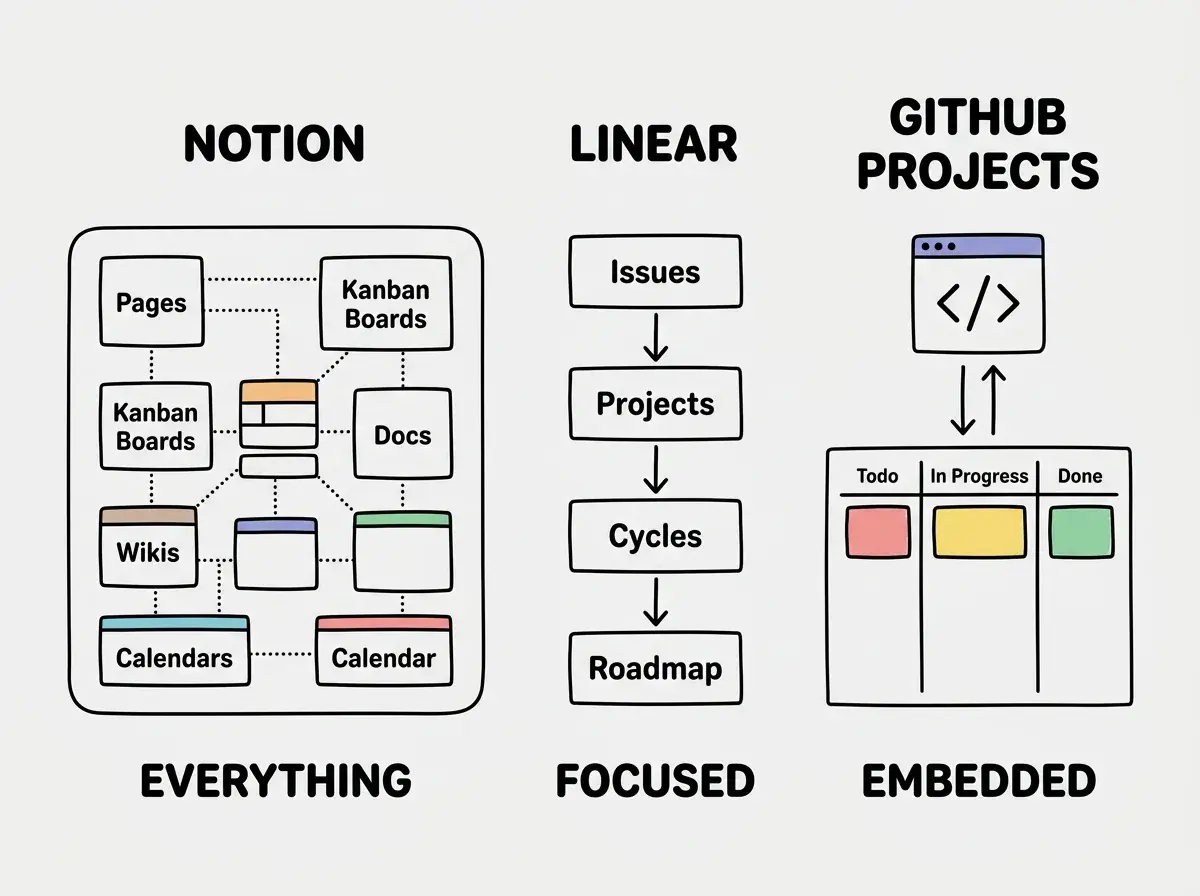
Think of Notion as a glass-walled observation deck at the top of your control tower. You can see everything, arrange everything, and build any view you want. The flexibility is the point.
Notion is a workspace that happens to do project management. You get databases, kanban boards, calendars, timelines, documents, and wikis all in one tool. A single Notion workspace can hold your product roadmap, meeting notes, design briefs, content calendar, and personal journal. Nothing else on this list comes close to that breadth.
For solo builders and indie hackers, Notion's free tier is generous. You get unlimited pages and blocks for personal use. The Plus plan at $10/mo per seat adds collaboration features, but most solo builders never need it. You can run an entire product operation from a free Notion account for months.
Where Notion shines for builders is the planning phase. Before you write a single line of code, Notion lets you think out loud. Create a product requirements doc, link it to a task board, tag items by priority, and switch between table view and kanban view depending on your mood. The observation deck lets you zoom out to the big picture or zoom in to a single task.
The danger is over-engineering your setup. Notion gives you so many options that builders frequently spend more time designing their workspace than actually building their product. You create a database for features, another for bugs, another for ideas, add twenty properties to each, build complex formulas to calculate priority scores, and suddenly your "lightweight" project management is a full-time job. The observation deck is only useful if you spend most of your time looking out the windows, not rearranging the furniture.
Notion's speed is its weakness. The app can feel sluggish, especially on larger workspaces. Switching between pages involves loading times that feel noticeable after using Linear. For rapid task management during a coding session, the latency adds friction.
Linear as the Radar Room
Linear is the streamlined radar room in your control tower. The screens show exactly what matters. The controls are minimal. Everything is optimized for speed and focus.
Linear is opinionated project management built specifically for software teams. It has issues, projects, cycles (sprints), and roadmaps. That is it. You will not find a wiki, a document editor, or a content calendar. Linear does one thing and does it exceptionally well.
The keyboard-first experience is what developers love. Press C to create an issue. Press I to open the inbox. Every action has a shortcut, and the interface responds instantly. After using Linear for a week, clicking through Notion menus feels painfully slow. The radar room does not waste your time with unnecessary animations or loading screens.
Cycles bring natural rhythm to solo work. Even if you are building alone, Linear's cycle feature (essentially week-long or two-week sprints) forces you to scope your work into manageable chunks. Instead of an endless backlog that grows faster than you can clear it, you pick a handful of issues for this cycle and focus. When the cycle ends, unfinished work rolls over automatically. This built-in structure prevents the "infinite todo list" problem that haunts Notion-based setups.
The limitation is scope. Linear is a software development tool. If you also need to plan marketing content, track customer conversations, manage a knowledge base, or organize research, you will need a second tool alongside Linear. The radar room shows your development work in high resolution, but it has blind spots for everything else.
Pricing favors small teams. Linear's free tier supports up to 250 active issues, which covers most solo projects. The Standard plan at $8/seat/mo unlocks unlimited issues and more advanced features. For a solo builder or a small team, the cost is modest.
GitHub Projects as the Cockpit
GitHub Projects is the cockpit built directly into your aircraft. You do not leave the plane to check your instruments. Everything is right there, integrated with the controls you are already using.
GitHub Projects turns your repository into a project management tool. Issues become tasks. Pull requests become progress updates. Labels become categories. Milestones become deadlines. If your code lives on GitHub, your project management can live there too, with zero context switching between tools.
The integration is genuinely useful. When you close a pull request, the linked issue moves to "Done" automatically. When you mention an issue in a commit message, it creates a traceable connection between the decision and the code change. For open-source projects where contributors need to find and claim work, GitHub Projects is the natural choice because everything lives in one place.
Custom fields and views have improved significantly. GitHub Projects now supports table views, board views, custom fields (text, number, date, single select, iteration), and basic filtering. It is no longer just a kanban board stapled to your repo. You can build lightweight roadmaps, track priority levels, and group work by milestone or sprint.
But "improved" does not mean "caught up." Compared to Notion's database power or Linear's polished interface, GitHub Projects still feels utilitarian. Reporting is minimal. There are no built-in cycle analytics, no burndown charts, and no inbox for triaging new work. The cockpit gives you the instruments you need to fly, but it will not generate a flight report for your stakeholders.
The price is unbeatable. GitHub Projects is free for public and private repositories. No per-seat charges, no feature gating, no usage limits. If you are already paying for GitHub, project management costs you nothing extra.
Using GitHub Projects as a standalone planning tool without connecting it to actual issues and pull requests. The entire value of GitHub Projects is the integration with your code workflow. If you are just creating cards on a board without linking them to issues, branches, and PRs, you have built a worse version of Trello. The cockpit only works when it is connected to the engine.
Solo Builder vs Team Considerations
The right tool shifts depending on how many people are involved.
Solo builders benefit most from the simplest tool that keeps them accountable. If your project has fewer than 20 active tasks at any time, a single Notion board or a GitHub Projects board is enough. Adding Linear for a solo weekend project is like installing an air traffic control system for a paper airplane. Overkill slows you down.
Solo builders with growing complexity start needing structure. When your project has multiple features in progress, a backlog of 50+ items, and you find yourself forgetting what you decided two days ago, Linear's cycles and focus-driven design help you stay on track. The radar room earns its place when there is enough signal to monitor.
Small teams (2-5 people) need shared visibility. This is where Notion's flexibility or Linear's structured approach both shine. The key requirement is that everyone can see what others are working on without asking. Notion works if the team includes non-developers (designers, marketers, content people). Linear works if the team is all developers.
Teams using GitHub heavily should start with GitHub Projects and only add another tool when they hit a wall. The zero-context-switch advantage is real. Every minute spent switching between your code editor, your terminal, and a separate project management app is a minute of friction that compounds across a team.
Pick the right tools before you start building.
Explore the toolkitA Lightweight Setup That Works
Here is a practical starting point for most solo builders and indie hackers, regardless of which tool you choose.
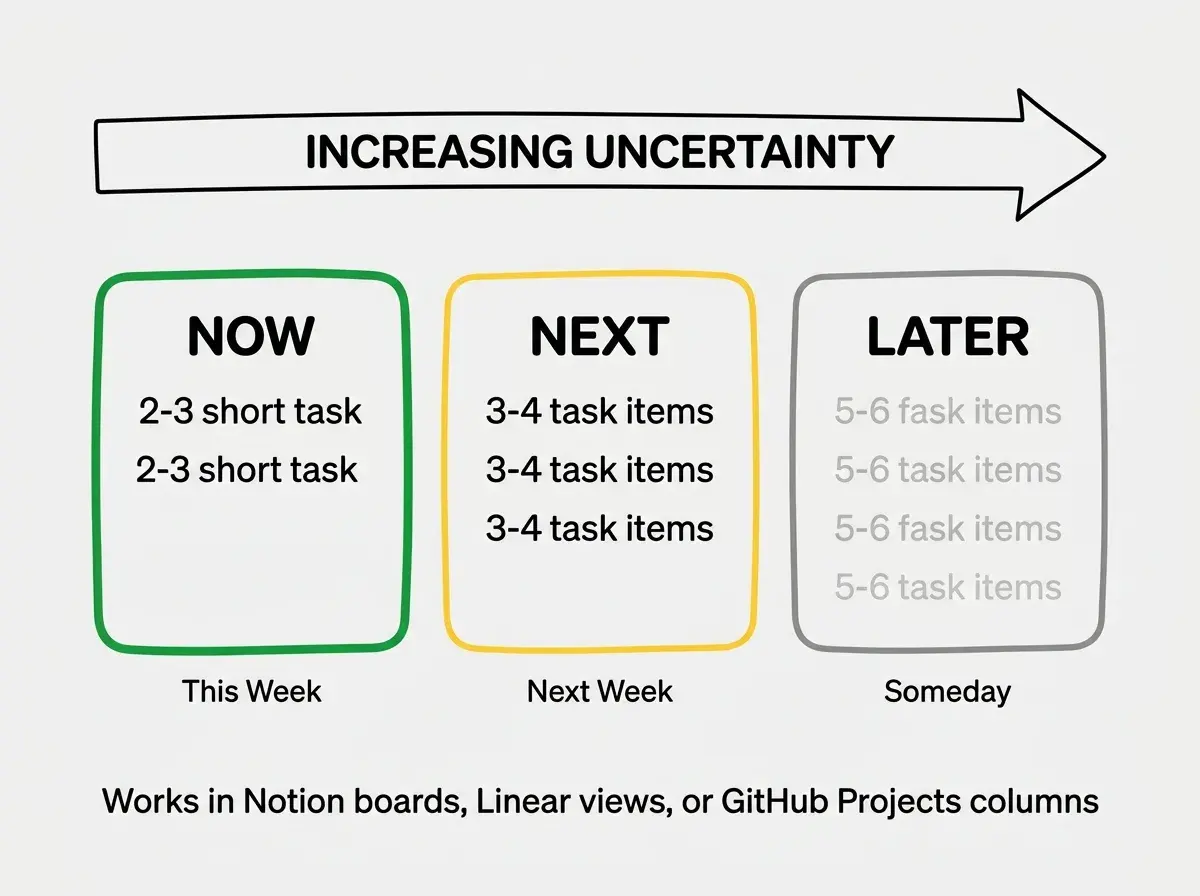
Keep your system to three lists. Now (what you are working on this week), Next (what comes after), and Later (everything else). This works in Notion as a board with three columns, in Linear as a filtered view by priority, or in GitHub Projects as a board with three status columns. Three lists prevent the infinite backlog problem while still capturing ideas for the future.
Spend less than five minutes a day on project management. If your system demands more than that, you have over-built it. The control tower exists to help you see clearly and act decisively. It should never become the thing that consumes your attention.
Revisit your choice every three months. Your needs at 0 users are different from your needs at 1,000 users, which are different from your needs with three teammates. The tool that was perfect when you started might be wrong six months later. Switching costs are low for all three options, so do not treat your first choice as permanent.
Project management tools are just one piece of your builder toolkit.
See the full stackWhat This Means For You
The control tower metaphor holds because project management tools should give you visibility without demanding your attention. Notion is the observation deck where you can see everything and customize every angle, perfect for builders who think broadly and plan flexibly. Linear is the radar room with focused instruments and zero distractions, built for developers who want structure without overhead. GitHub Projects is the cockpit embedded in your aircraft, ideal when your code and your plans should live in the same place.
For most solo builders starting out, the honest answer is that any of these three will work if you keep it simple. The tool matters far less than the habit of writing down what you are doing, what comes next, and what you decided to skip. Pick the one closest to where you already spend your time. If you live in GitHub, start there. If you love customizing your workspace, Notion will make you happy. If you want speed and structure without decisions, Linear will keep you moving.
The worst project management system is the one you build for a week and never open again. The best one is the one you actually use.