With 92% of developers using AI tools daily, the question has shifted from "should I use AI coding assistants" to "how many can I run at once?" Multi-agent AI coding is the practice of running multiple AI agents simultaneously on a single codebase, each handling a different task. It sounds chaotic. It can be. But with the right orchestration, it becomes the fastest way to ship production software.
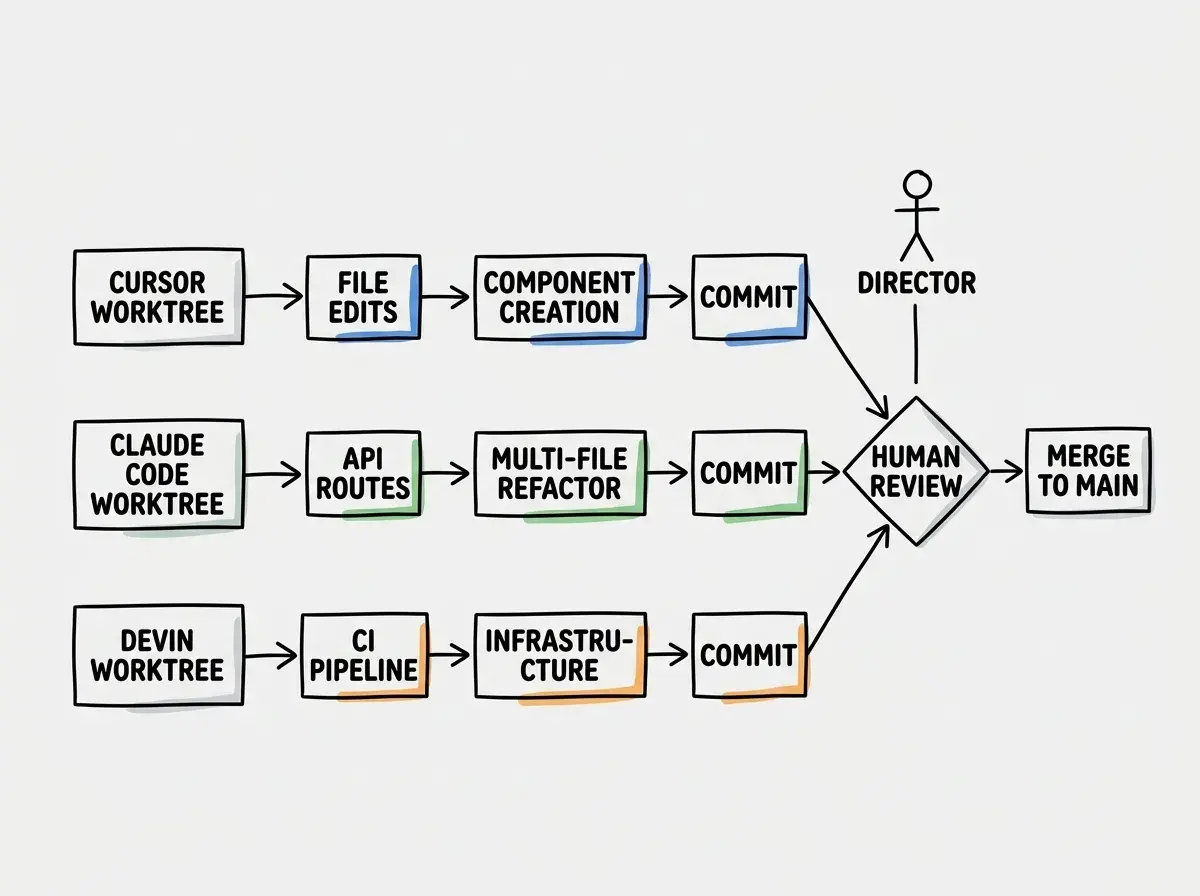
Think of it like running a film production crew. You are the director. Cursor is your camera operator, handling the shot-by-shot visual work inside a single file. Claude Code is your sound engineer, wiring up backend plumbing and running terminal commands across the full project. Devin is your set designer, spinning up entire environments and deploying infrastructure in its own sandbox. Each crew member has a specialty, and the film only works when they are coordinated rather than stepping on each other's takes.
Why Single-Agent Workflows Hit a Ceiling
A single AI agent is powerful. But every agent has constraints. Cursor excels at inline code editing and rapid iteration within a file, yet it struggles with large-scale refactors that span dozens of modules. Claude Code navigates entire repositories and executes multi-step terminal workflows, but it operates in a CLI without the visual feedback loop of an IDE. Devin works autonomously on isolated tasks in its own cloud environment, which makes it great for greenfield features but clumsy for surgical fixes in existing code.
The ceiling becomes obvious when your project reaches a certain complexity. You need a new API endpoint, a frontend component that consumes it, database migrations, and updated tests. A single agent handles these sequentially. Multiple agents handle them in parallel. The time savings are real, but only if the agents do not conflict.
The Film Crew Model for Multi-Agent Orchestration
The film production analogy holds up remarkably well when you examine actual orchestration patterns. On a real film set, the director does not grab the camera. The director coordinates, reviews takes, and decides when each department moves. Multi-agent AI coding works the same way.
The Camera Operator (Cursor/Windsurf) handles close-up work. File-level edits, component creation, inline refactoring, and visual iteration through the IDE. You point it at a specific scene and let it shoot.
The Sound Engineer (Claude Code/Aider) handles the technical wiring that connects everything. Terminal commands, multi-file refactors, dependency management, test execution, and architectural decisions that span the full codebase. This crew member works in the background while the camera operator shoots.
The Set Designer (Devin/Codegen) builds entire environments from scratch. New microservices, CI/CD pipelines, infrastructure-as-code, and exploratory prototypes. They work in their own studio (sandbox environment) and deliver finished sets for the main production to use.
The director's job, your job, is to assign the right task to the right crew member, review their output, and make sure nobody is building a medieval castle when the scene calls for a modern apartment.
Multi-agent AI coding is not about running more agents for speed. It is about matching each agent's strengths to the right type of task. Cursor for surgical edits, Claude Code for cross-cutting changes, Devin for isolated autonomous work. The director (you) is irreplaceable because only you hold the full creative vision of the project.
Git Worktrees for Agent Isolation
The single most important technical decision in multi-agent orchestration is how you isolate each agent's work. If two agents edit the same branch simultaneously, you get merge conflicts, overwritten changes, and chaos. Git worktrees solve this cleanly.
A git worktree lets you check out multiple branches of the same repository into separate directories, all sharing the same .git history. Each agent operates in its own worktree on its own branch. No conflicts until you are ready to merge.
# Create worktrees for each agent
git worktree add ../project-cursor feature/new-dashboard
git worktree add ../project-claude feature/api-refactor
git worktree add ../project-devin feature/ci-pipeline

# Each agent works in its own directory
# Cursor opens ../project-cursor
# Claude Code runs in ../project-claude
# Devin clones or connects to ../project-devin
This is like giving each crew member their own soundstage. The camera operator films in Studio A, the sound engineer mixes in Studio B, and the set designer builds in Studio C. They all contribute to the same film, but they never physically collide.
The merge step is where you, the director, review each agent's work and integrate it. Sometimes the takes combine seamlessly. Sometimes you need to reshoot a scene because two agents made incompatible assumptions about a shared interface. That review step is non-negotiable.
Shared Context Challenges
The hardest problem in multi-agent coding is not isolation. It is shared context. When the camera operator changes a component's props interface, the sound engineer working on the API that feeds that component does not automatically know. On a film set, the script supervisor tracks continuity. In multi-agent coding, you need an equivalent.
Approach 1: Shared specification files. Before agents start, write a brief spec that defines the interfaces between their tasks. If Agent A is building a dashboard component and Agent B is building the API endpoint, write a TypeScript interface file that both reference. This is like the shot list that every department reads before filming begins.
Approach 2: Sequential handoffs. Instead of full parallelism, run agents in a pipeline. Agent A builds the API and commits. Agent B pulls that commit and builds the frontend against the real types. This is slower but eliminates context drift entirely.
Approach 3: Context documents. Maintain a running document (markdown works fine) that summarizes what each agent has done and what interfaces exist. Update it after each agent completes a task. Every agent reads the document before starting its next task.
In practice, most teams use a combination. Shared specs for the critical interfaces, parallel execution for independent tasks, and sequential handoffs for tightly coupled work.
Running three agents in parallel on tightly coupled features without defining shared interfaces first. The agents each invent their own data shapes, and you spend more time reconciling their output than you saved by parallelizing. Always define the contract before the work begins, just like a film crew blocks out the scene before rolling cameras.
Practical Workflows That Actually Work
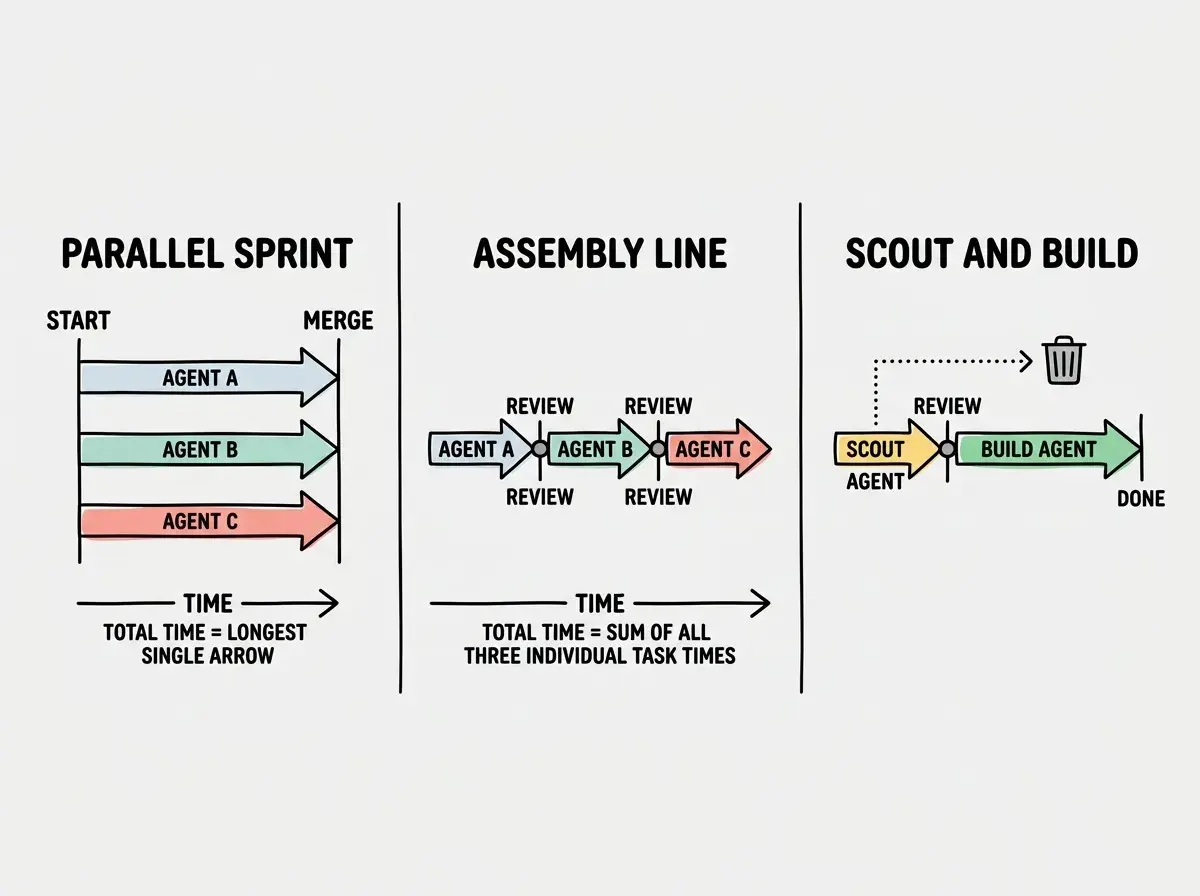
Here are three orchestration patterns that deliver consistent results in real projects.
Pattern 1: The Parallel Sprint. Best for features with clear boundaries. You create three worktrees, assign independent tasks (new page, new API route, new test suite), and let agents run simultaneously. Merge when all three finish. Total time is the duration of the slowest agent rather than the sum of all three.
Pattern 2: The Assembly Line. Best for features that build on each other. Agent A generates the database schema and migrations. You review and merge. Agent B builds the API layer against that schema. Review and merge. Agent C builds the UI against that API. Each stage has full context from the previous stage. Slower than full parallelism, but the output is more coherent.
Pattern 3: The Scout and Build. Best for uncertain requirements. Send Devin (or another autonomous agent) to prototype a solution in isolation. Review the prototype. Then assign Cursor or Claude Code to implement the real version in your main codebase, using the prototype as a reference. The scout's work is disposable; its value is in answering design questions before you commit to an approach.
When Multi-Agent Coding is Not Worth It
Not every task benefits from multiple agents. For small changes (bug fixes, copy updates, single-file refactors), spinning up worktrees and coordinating agents costs more in overhead than it saves in parallelism. The film crew analogy works here too. You do not hire a full production crew to film a 15-second social media clip. Sometimes one person with a phone is faster.
Multi-agent orchestration pays off when you have at least three independent work streams, when the total task would take a single agent more than an hour, and when you are comfortable reviewing and merging multiple branches. If you are new to any of these agents, start with one. Learn its patterns and failure modes. Then add a second agent on a clearly separated task. Scale the crew only after you are confident in your ability to direct.
Start with the fundamentals of AI-assisted development before orchestrating multiple agents.
Explore AI coding toolsThe Director's Mindset
The shift from single-agent to multi-agent coding is not primarily technical. Git worktrees are straightforward. Branch management is a solved problem. The real shift is mental. You stop being an actor in the film (writing code yourself) and start being the director (coordinating agents who write code for you).
This means your value moves upstream. You spend more time on architecture, interface design, task decomposition, and quality review. Less time typing code, more time deciding what code should exist and whether the code that was generated is correct. Senior developers are already good at this because it mirrors the skill of managing a team of junior developers, except the juniors work at machine speed and never push back on code review feedback.
The agents keep getting better. The orchestration tools keep improving. But the director's role, decomposing problems, defining interfaces, reviewing output, and holding the creative vision, remains fundamentally human. That is the skill worth investing in.
Dig deeper
A few hand-picked sources if you want to go further.
See how other developers are shipping with multi-agent workflows.
Browse developer stories