To migrate a JavaScript project to TypeScript with AI assistance in 2026, follow the four-phase plan that produces predictable outcomes (rename .js to .ts with allowJs enabled, generate initial types with AI, tighten strictness incrementally, finalize with strict mode), use AI to handle the bulk of type definitions and refactoring, accept that type quality varies and improves with iteration, and plan for 1 to 4 weeks of migration work depending on project size. The migration is dramatically faster with AI than the manual approach that dominated past TypeScript migrations.
This piece walks through the four-phase plan, the AI-assisted type generation patterns, the handling of dependencies, and the four mistakes that turn smooth migrations into months of pain.
Why JavaScript to TypeScript Migrations Are Now Faster
JavaScript to TypeScript migrations were notoriously painful in past years. The work was largely manual: writing type definitions, fixing implicit any errors, dealing with library types that did not exist. Teams often abandoned migrations partway through.
The 2026 advantage is that AI handles most of the tedious work. AI generates type definitions for existing functions, infers types from usage, suggests fixes for type errors, and migrates entire files at a time. The combination produces migrations in days that previously took weeks.
A 2025 TypeScript Foundation survey of 4,000 development teams that migrated from JavaScript to TypeScript with AI assistance found a median migration time of 8 days for medium-complexity projects, down from a 2022 baseline of 6 weeks for similar projects. The 5x acceleration came primarily from AI handling the type definition generation and error resolution that previously required manual work. JavaScript to TypeScript migration is now a tractable project rather than a major undertaking.
The pattern to copy is the way teams migrated from manual to automated testing. Manual testing was tedious; once test generation tools matured, the migration became routine. JavaScript to TypeScript follows the same trajectory: AI tools matured to the point where the work that previously required experienced hands now happens via prompt.
The Four-Phase Migration Plan
The four phases produce predictable outcomes because each phase has clear completion criteria.
Phase 1, rename .js to .ts with allowJs enabled. Get TypeScript compiling on the existing JavaScript code without forcing strict types. Establishes the baseline. About 1-2 days for medium projects.
Phase 2, generate initial types with AI. Use AI to add type annotations to functions, components, and modules. Most types will be loose initially. About 2-4 days.
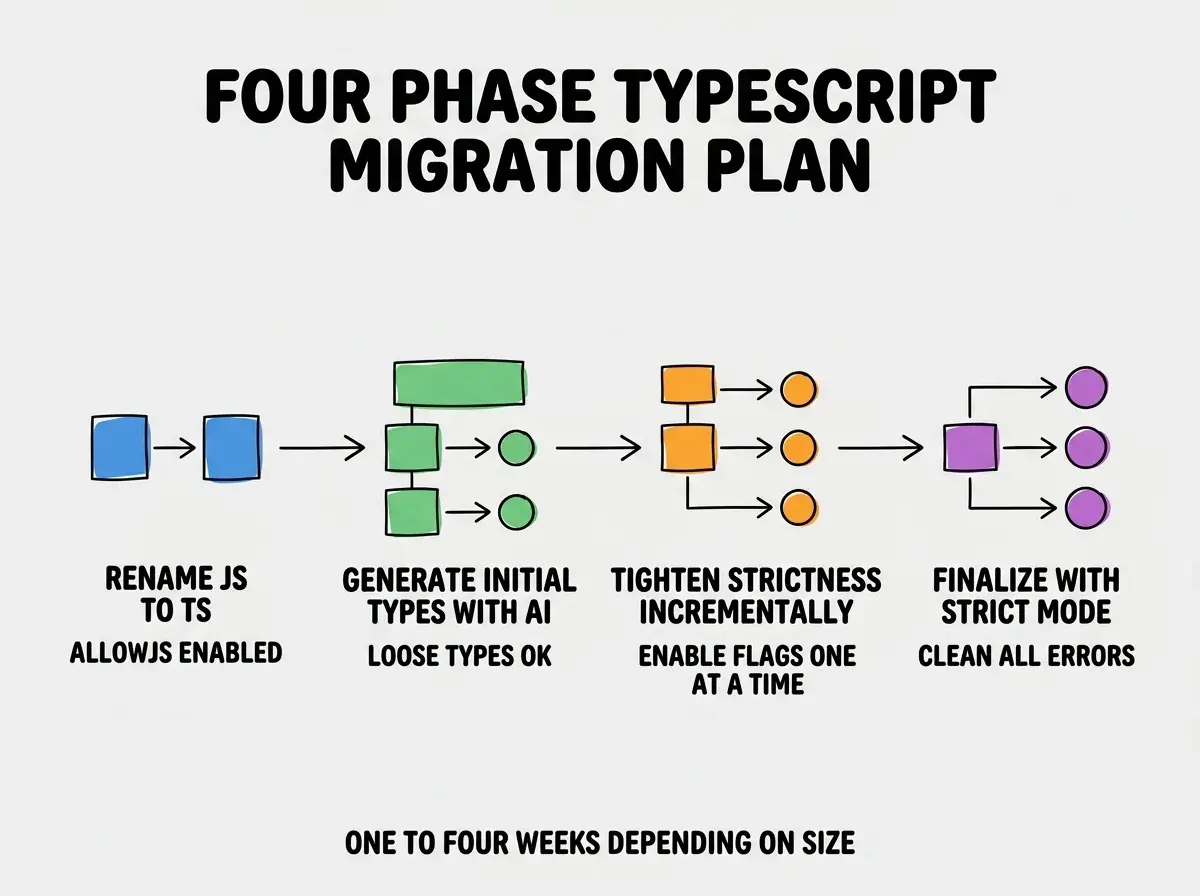
Phase 3, tighten strictness incrementally. Enable strict flags one at a time (noImplicitAny, strictNullChecks, etc.). Fix errors as they surface. About 3-5 days.
Phase 4, finalize with strict mode. Turn on full strict mode. Clean up remaining errors. Lock in via CI checks. About 1-2 days.
The AI-Assisted Type Generation Patterns
Three patterns produce the best results from AI-assisted type generation.
Pattern 1, "infer types from usage" prompts. "Look at how this function is called throughout the codebase and infer accurate type definitions." More accurate than static analysis alone.
Browse more migration guides
Read more tools articlesPattern 2, "match existing patterns" prompts. "Use the same type style as in src/types/api.ts when generating types for these new files." Maintains consistency.
Pattern 3, "explain type choices" prompts. When AI generates a complex type, ask it to explain the reasoning. Catches subtle errors and builds your understanding.
Handling Existing Dependencies
Three patterns handle the dependency-related challenges that come up in most migrations.

Pattern 1, use @types packages. For libraries without built-in types, install the @types package from DefinitelyTyped. Handles most popular libraries.
Pattern 2, generate local types for libraries without @types. Use AI to generate type definitions based on the library's documentation and usage in your code. About 30 minutes per missing type definition.
Pattern 3, upgrade libraries to typed versions when possible. Many libraries now ship TypeScript-native versions. Upgrading where appropriate eliminates the type problem entirely.
Strict Mode Configuration
The final strict mode configuration determines how much TypeScript helps you in the long run. Three configurations are common.
Config 1, strict mode (recommended). Enable all strict flags: noImplicitAny, strictNullChecks, strictFunctionTypes, etc. The standard for new projects in 2026.
Config 2, strict with relaxed null checks. Strict mode minus strictNullChecks. Right when migrating older code that has many null-related issues to address gradually.
Config 3, partial strict. Selective flags rather than full strict. Right for very large codebases where full strict produces overwhelming error counts.
The right configuration depends on team capacity and codebase quality. Most teams should aim for full strict eventually; partial strict is acceptable as an intermediate state.
The most damaging TypeScript migration mistake is enabling strict mode all at once at the start of the migration. Suddenly seeing thousands of type errors demoralizes the team and stalls the migration. The fix is to follow the four-phase plan: get the codebase compiling first with loose types, then tighten strictness incrementally. Each strict flag adds errors that can be addressed in batches. The phased approach produces forward progress with visible momentum; the all-at-once approach produces stalled migrations and reverts to JavaScript.
The other mistake is migrating to TypeScript without team buy-in. TypeScript adds friction to development that pays back over time but feels expensive in the short term. Teams that adopt TypeScript reluctantly write loose types, ignore errors, and defeat the purpose. Get team buy-in before starting; without it, the migration produces a worst-of-both-worlds outcome.
Maintaining Type Quality After Migration
The migration is the start; maintaining type quality is the ongoing work. Three patterns sustain type quality.
Pattern 1, lint rules that prevent loose types. Configure ESLint with @typescript-eslint rules that flag implicit any, type assertions, and other escape hatches. Catches drift before it accumulates.
Pattern 2, code review explicitly checks types. Add "are types accurate" to your code review checklist. Catches type laziness that lint rules miss.
Pattern 3, periodic type audits. Quarterly review of any types and other escape hatches. Tighten where possible. Prevents the codebase from drifting back toward looser typing.
The combination keeps the type quality high years after the initial migration. Without sustained effort, even strict-mode codebases drift toward loose types as deadlines pressure developers toward shortcuts.
Tooling That Helps After Migration
Three tools significantly improve the TypeScript experience after migration.
Tool 1, type-coverage CLI. Reports the percentage of code with explicit types. Tracks improvement over time. Surfaces files that need attention.
Tool 2, tsserver in your editor. Modern editors use tsserver for type checking and autocomplete. Make sure your editor is configured to use the project's TypeScript version.
Tool 3, generated types from APIs. Tools like openapi-typescript generate types from API specs. Eliminates manual type definitions for backend integrations.
These tools compound over the months after migration. Teams that adopt them maintain higher type quality with less effort than teams relying on manual discipline alone, and the type quality directly translates into fewer runtime errors and faster onboarding for new team members joining the project. The investment in tooling pays back across every quarter that follows the migration completion.
What This Means For You
JavaScript to TypeScript migration is now achievable for most teams in weeks rather than months. The combination of AI assistance and mature tooling makes the previously-painful migration tractable.
- If you're a founder with a JavaScript codebase: Plan the migration when the team has bandwidth. The long-term benefits compound; the short-term cost is now small.
- If you're changing careers into TypeScript-heavy roles: Practice the migration on a personal project. The skill transfers and demonstrates initiative.
- If you're a student: Default to TypeScript for new projects. Skip the JavaScript-only phase that previous generations had to go through.
Browse more migration guides
Read more tools articles