Migrating from Heroku to modern alternatives in 2026 has become a near-universal recommendation because Heroku's pricing increased substantially while the alternatives improved dramatically. The four destinations that work for most apps are Fly.io (best for apps that fit Heroku's compute model directly), Railway (most similar Heroku replacement, easiest migration), Render (mature managed PaaS with good DX), and Vercel plus Supabase (the modern split for new-style apps). Each destination has clear right use cases, the migration takes 1 to 4 weeks depending on app complexity, and the cost savings are typically 40 to 70 percent for the same workload.
This piece walks through why migration is justified now, the four destinations with their trade-offs, the migration path that minimizes downtime, and the four pitfalls that delay most Heroku exits unnecessarily even when teams have made the right destination choice.
The patterns described here apply equally to small startups with a single dyno and to mid-sized teams running dozens of dynos across multiple apps; the destination choice changes but the migration discipline is the same.
Why Now Is the Right Time
Heroku was the gold standard for managed PaaS from 2010 to roughly 2020. Then several things happened: Salesforce bought Heroku and stopped investing meaningfully in the platform, the free tier was killed, dyno pricing increased multiple times, and the ecosystem stagnated. Meanwhile, Fly.io, Railway, Render, and others built modern alternatives that offered the same simplicity at substantially lower cost.
The 2026 reality is that staying on Heroku is roughly 2 to 4x more expensive than equivalent modern alternatives, with no compensating advantage. The migration cost is real (1 to 4 weeks of engineering time), but the ROI is fast (typically pays back in 4 to 8 months from cost savings alone, before counting reliability and DX improvements).
A 2025 Northflank cost study compared 200 apps across Heroku and modern alternatives. The median Heroku app cost $312 per month and the equivalent setup on Fly.io or Railway cost $98 per month, a 69 percent reduction. Performance was equivalent or slightly better on the alternatives. Reliability was equivalent. The only Heroku advantage that remained was the brand familiarity, which is not worth the price differential for most teams.
The pattern to copy is the way teams migrated off MySpace to Facebook in the late 2000s, or off SVN to git in the early 2010s. The platform you started on stops investing, the alternatives become better, and at some point the cost of staying exceeds the cost of moving. The Heroku migration is now in that phase.
The Four Destinations and Their Right Use Cases
Each destination fits a specific app profile. Choosing well makes the migration easier; choosing poorly creates rework.
Destination 1, Fly.io. Best for apps that fit Heroku's compute model directly: stateful processes, persistent connections, multi-region deployment. The migration mental model is closest to Heroku. About a week of work for a typical app.
Destination 2, Railway. Most similar to Heroku in DX. Push to git, automatic deploys, simple environment management. Best for teams that want minimal change in workflow. Often a 2 to 4 day migration.
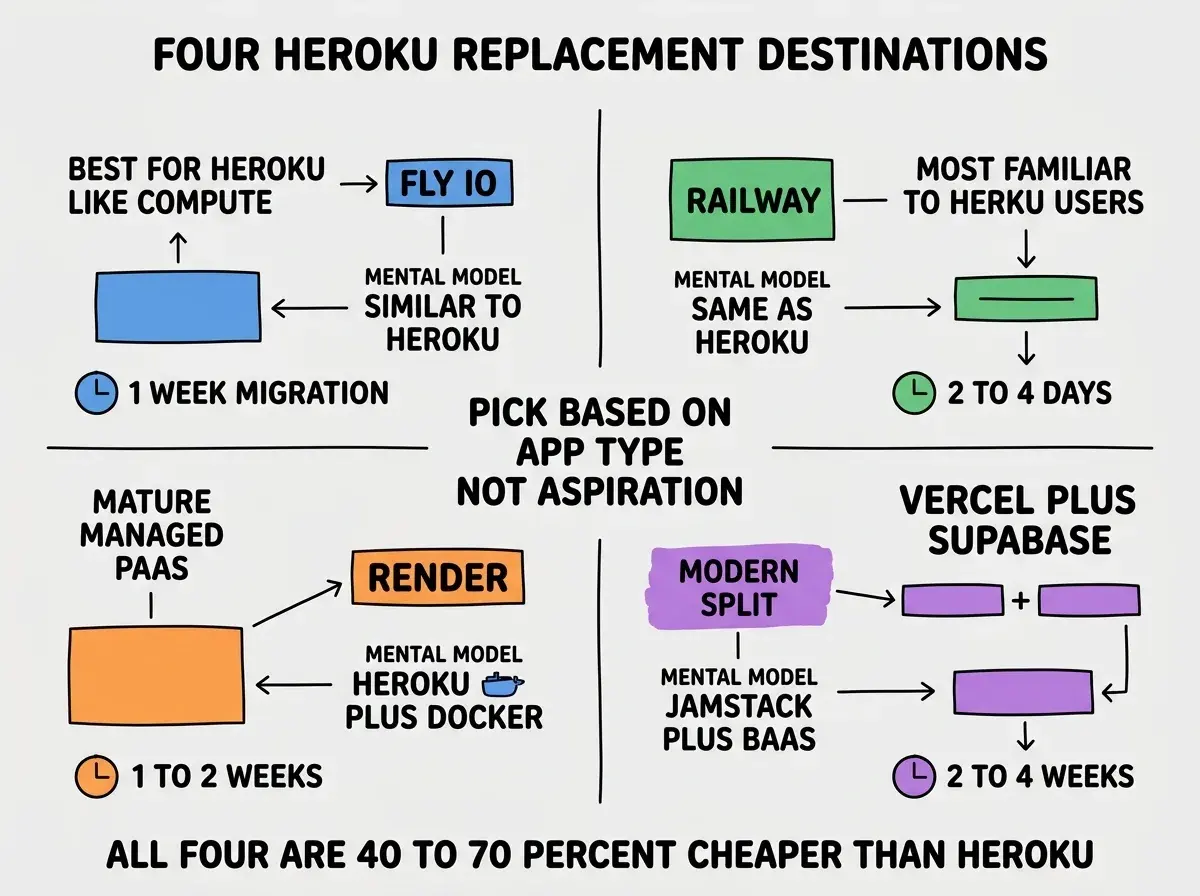
Destination 3, Render. Mature PaaS with good Docker support and managed databases. Best for apps that need slightly more flexibility than Railway provides. About 1 to 2 weeks of work.
Destination 4, Vercel + Supabase. The modern split: frontend on Vercel, backend on Supabase Edge Functions, database on Supabase Postgres. Best for newer apps or teams willing to refactor. Takes 2 to 4 weeks but produces a more modern architecture.
The Migration Path That Minimizes Downtime
Three patterns minimize downtime during the actual migration. Each one is a small upfront investment that prevents a substantial outage.
Pattern 1, dual-write during transition. Run both Heroku and the new platform in parallel for a week. Write data to both, read from Heroku. Lets you verify the new platform works correctly before cutting traffic over.
Browse more migration and tooling guides
Read more tools articlesPattern 2, DNS-based traffic shift. Use weighted DNS or a load balancer to gradually shift traffic from old to new (10 percent, 50 percent, 100 percent over a few days). Catches issues at low traffic before they affect everyone.
Pattern 3, database last. Migrate compute first, leave the database on Heroku Postgres until everything else is verified. Then do a planned database migration with a maintenance window. Database migrations are the highest-risk part; isolate them and run them only after the surrounding compute has proven itself stable on the new platform.
The Four Pitfalls That Delay Migrations
Each of these is preventable with deliberate planning and consistently delays Heroku migrations more than expected.
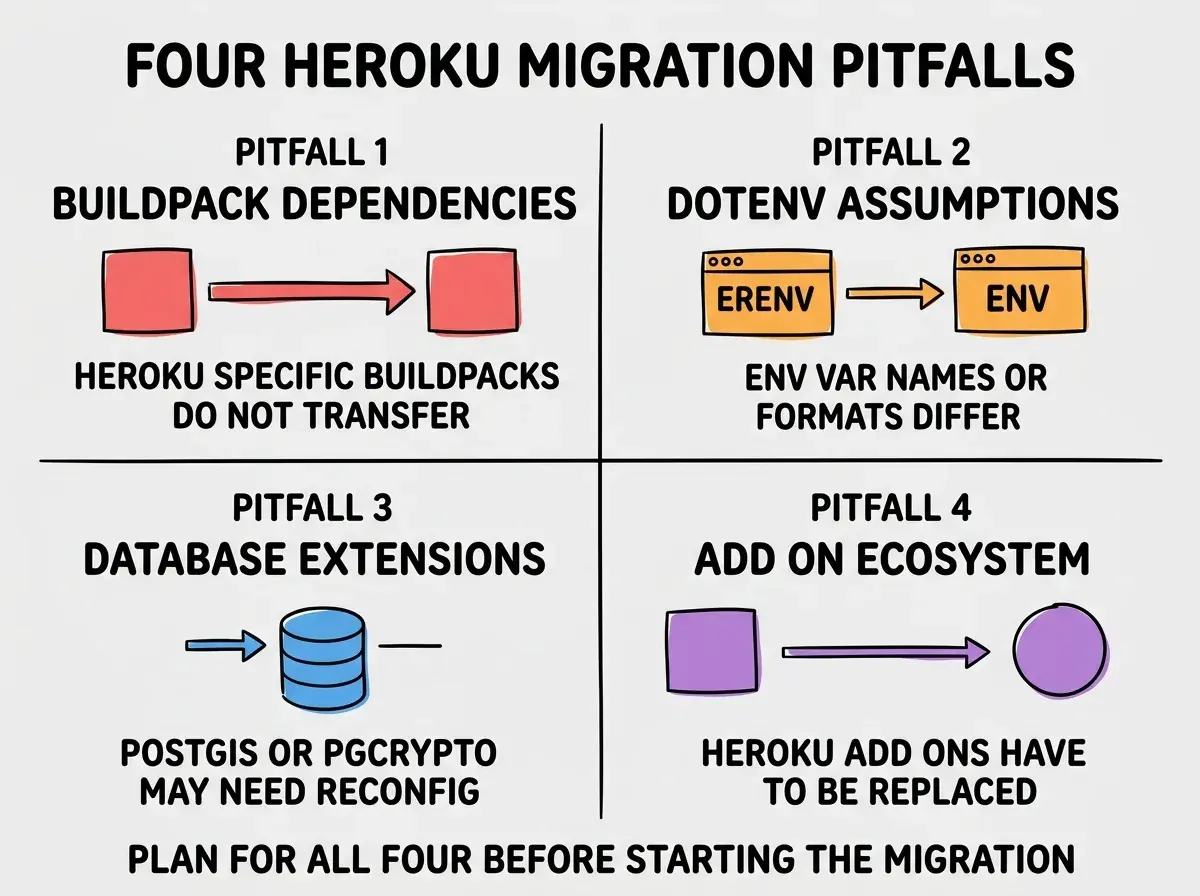
Pitfall 1, buildpack dependencies. Heroku-specific buildpacks do not transfer. If your app relies on a custom buildpack, you need to recreate the same logic on the new platform, often via Docker. Plan for this upfront.
Pitfall 2, environment variable assumptions. Heroku's environment variable handling has quirks (DATABASE_URL format, DYNO_ID, etc.). Application code that assumes Heroku-specific variables needs updating.
Pitfall 3, database extensions. PostGIS, pg_cron, pgcrypto. The new platform may not enable these by default or may require explicit configuration. Verify before you migrate the database.
Pitfall 4, add-on ecosystem. Heroku's add-on marketplace (Redis, search, monitoring) needs to be replaced one-by-one on the new platform. Most have direct equivalents but the integration work is non-trivial.
The most expensive migration mistake is moving everything at once on a hard cutover. The risk is enormous: any single component failing in the new environment takes down the whole app, and rolling back is painful. The right approach is incremental: migrate one service or one route at a time, verify it works, move on. The total time is similar but the risk is dramatically lower. Most successful Heroku migrations took 2 to 4 weeks of incremental work; most failed ones tried to do everything in one weekend.
The other mistake is migrating to chase the lowest price without considering DX. A platform that is 30 percent cheaper but takes 3x longer to debug is not a win. Optimize for the total cost of ownership (price plus engineering time), not for the headline price.
A useful exercise during destination selection is to actually deploy a small test app to each candidate platform and measure how long it takes to ship a real change end-to-end. The deployment friction varies dramatically across platforms, and the real friction is what you live with for years after the migration. A few hours of testing prevents picking a platform you will regret six months later.
What This Means For You
Migrating off Heroku in 2026 is the right move for almost every team still on the platform. The cost savings are substantial, the alternatives are mature, and the migration is achievable with planning.
- If you're a founder: Schedule a Heroku migration in the next quarter if you are still on it. The savings compound and the alternatives are genuinely better in 2026.
- If you're changing careers: Migration experience is valuable. Helping a team move off Heroku is a great way to demonstrate engineering judgment in interviews.
- If you're a student: Skip Heroku entirely for new projects. Start on Fly.io, Railway, or Vercel; these are the platforms you will actually use professionally.
Browse more migration and tooling guides
Read more tools articles