Lovable is like a furnished apartment. You moved in fast, everything worked on day one, and you did not have to think about plumbing or electrical wiring. But now your app is growing. You need custom features the builder cannot handle. You want to switch hosting providers, or you have realized the monthly costs are stacking up faster than expected. It is time to move into your own place, one where you control every room, every wall, and every outlet.
Migrating from Lovable to a real local development codebase is not as scary as it sounds. Lovable generates actual React code backed by Supabase, which means you are not starting from zero. You are taking furniture you already own and arranging it in a space that gives you full control. This guide walks you through the entire process step by step.
When You Should Actually Migrate
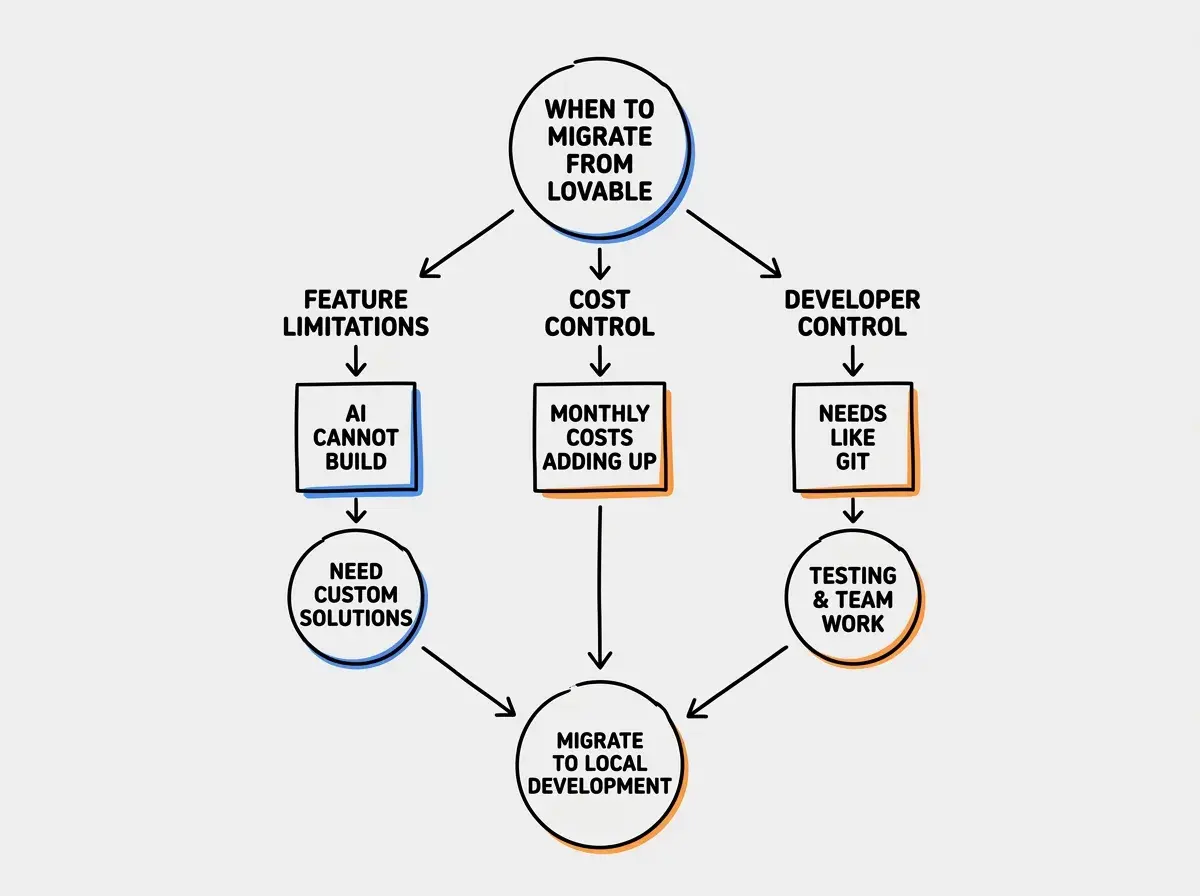
Not every Lovable project needs to be migrated. If your app is a simple internal tool or a landing page collecting emails, the convenience of staying in the builder might outweigh the effort of moving out. But there are clear signals that it is time to make the switch.
The first signal is feature limitations. You have hit the wall where the AI chat interface cannot build what you need. Maybe you need a complex payment flow, a custom algorithm, or an integration with an API that Lovable does not support natively. You have tried rephrasing your prompts six different ways and the AI keeps generating something that is not quite right.
The second signal is cost. Lovable's subscription plus Supabase's paid tier can run $45 to $75 per month. Once your app is stable and you are not actively using the AI to generate new features, you are paying rent on that furnished apartment even though you have stopped rearranging the furniture. Running the same app locally and deploying to Vercel or Netlify on a free tier costs nothing until you hit real scale.
The third signal is control. You want to use Git properly, set up automated tests, add monitoring, or bring on a developer who needs a real development environment. These are signs your project has graduated from prototype to product, and products deserve proper infrastructure.
What You Actually Get When You Export
Before you start the migration, it helps to understand what Lovable has been building behind the scenes. When you export your project, you get a React application built with Vite as the bundler, Tailwind CSS for styling, and shadcn/ui components for the interface. The code connects to Supabase for your database, authentication, and any file storage you set up.
The code quality is functional but not what a senior developer would write. Think of it like the furniture that came with your apartment. It works, it looks decent, but it was not custom-built for your taste. You will find repetitive patterns, components that could be broken into smaller pieces, and some naming conventions that are inconsistent. None of this is a dealbreaker. It runs, it works, and you can refactor it over time.
The important thing is that the Supabase project is separate from Lovable. Your database, your users, your stored files, they all live on Supabase's infrastructure regardless of where the frontend code runs. This is the key fact that makes migration possible without losing any data.
Step-by-Step Migration to Local Development
Here is the actual process. Set aside about an hour for your first time through this. Once you have done it once, future projects take fifteen minutes.
Get the Code on Your Machine
Lovable stores your project in a GitHub repository. If you have not already connected GitHub, go to your project settings in Lovable and connect it now. Once connected, Lovable pushes all your code to a repo under your GitHub account.
Open your terminal and clone the repository. If you have never used a terminal before, think of it as the building's maintenance room. It is where the real controls live.
git clone https://github.com/your-username/your-project-name.git
cd your-project-name
Now install the dependencies. These are all the code libraries your app uses, like the building materials that make everything work.
npm install
This will take a minute or two depending on your internet connection. You will see a progress bar and then a summary of installed packages. If you see warnings, that is normal. Warnings are not errors. Only stop if you see red text that says "ERR" or "error."
Set Up Your Environment Variables
This is the step where most people get stuck on their first migration. Environment variables are the private settings your app needs to connect to services like Supabase. In your furnished apartment, these were handled for you. In your own place, you need to set them up yourself.
Create a file called .env.local in the root of your project. Lovable projects typically need these variables:
VITE_SUPABASE_URL=https://your-project-id.supabase.co
VITE_SUPABASE_ANON_KEY=your-anon-key-here
You can find both values in your Supabase dashboard. Go to supabase.com, open your project, navigate to Settings then API, and copy the Project URL and the anon/public key. The anon key is safe to use in frontend code because Supabase relies on Row Level Security policies to protect data, not on keeping this key secret.
Do not copy the service_role key into your frontend environment variables. The service_role key bypasses all security rules and should never appear in client-side code. If you see SUPABASE_SERVICE_ROLE_KEY in your Lovable project, it belongs only in server-side code or edge functions, never in a file prefixed with VITE_.
Start the Development Server
With dependencies installed and environment variables set, you can run your app locally:
npm run dev
Your terminal will show a local URL, usually http://localhost:5173 for Vite projects. Open that in your browser and you should see your app running exactly as it did in Lovable's preview. Same data, same users, same functionality, just running on your machine instead of Lovable's servers.
If the page loads but shows errors in the console, check that your environment variables are correct. The most common issue is a typo in the Supabase URL or using the wrong key.
Verify Your Database Connection
Click through your app and test everything. Log in, create some data, verify that existing data loads. Your app is talking directly to the same Supabase database it always used. Nothing changed on the backend. You just moved the frontend to your machine.
This is like moving out of the apartment but keeping your storage unit at the same facility. All your stuff is still there, accessible from your new address.
Review Your Supabase Security
Your Supabase connection stays the same during migration. Database, auth, storage buckets, and RLS policies all remain where they are. This means migration does not require any data export or import.
However, take this opportunity to review your security setup. Lovable's AI does not always generate proper Row Level Security policies. Log into your Supabase dashboard, go to Authentication, and verify that RLS is enabled on every table containing user data. If RLS is disabled on any table, fix that immediately regardless of whether you are migrating.
Common Pitfalls and How to Fix Them
After helping several builders through this process, these are the issues that come up most often.
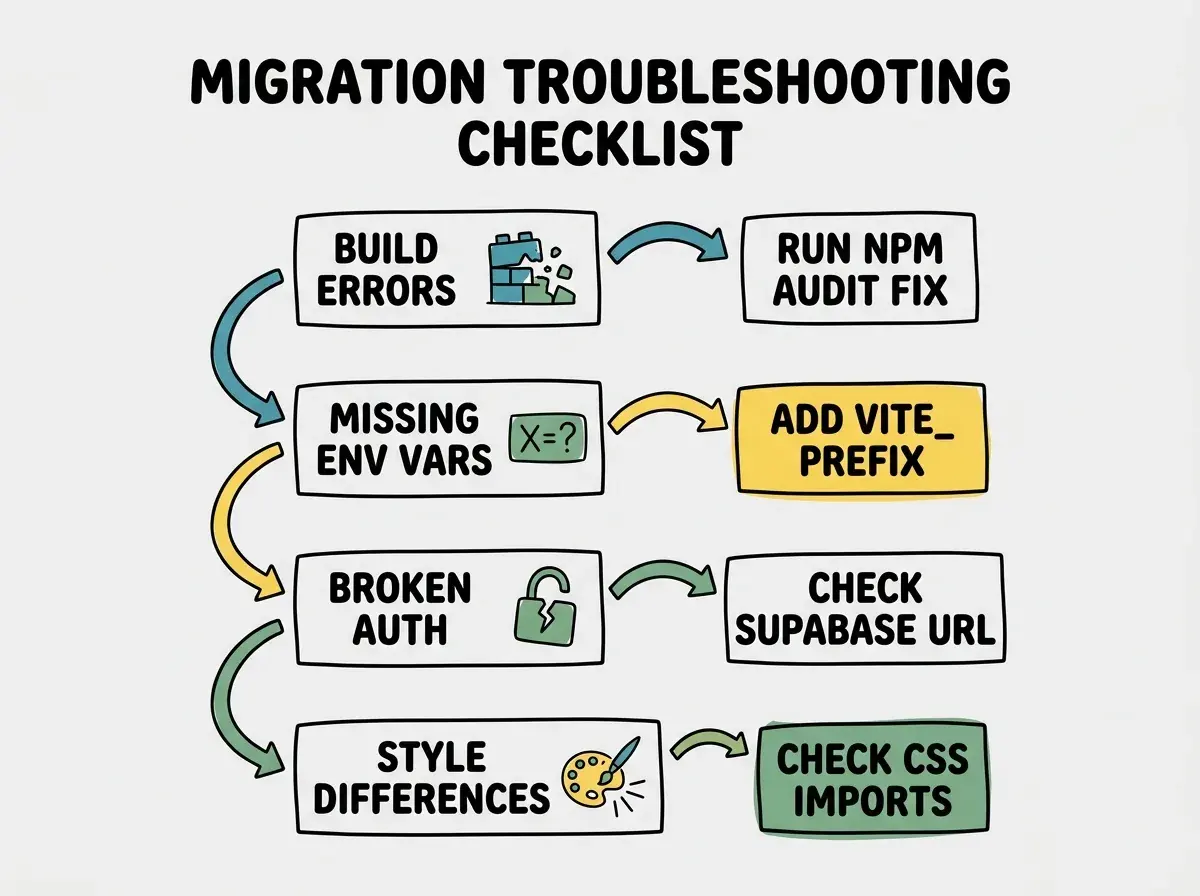
Build errors after npm install. Lovable's generated code sometimes uses conflicting package versions. Run npm audit fix first. If that does not help, check the error message for which package is the problem and update it with npm install package-name@latest.
Missing environment variables. Your app loads but features are broken. Open your browser's developer console (F12) and look for errors mentioning "undefined" or "null" related to Supabase. This means an env var is missing or misspelled. Remember that Vite requires frontend variables to start with VITE_.
Authentication stops working. Go to your Supabase dashboard, then Authentication, then URL Configuration. Update the Site URL to http://localhost:5173. Lovable sets this to its own preview URL, so redirects break until you change it. You will update it again when you deploy to production.
Styles look different. Check for missing CSS imports in your main.tsx or App.tsx file. Usually adding import './index.css' at the top resolves any visual differences.
What to Do After Migration
Once your app is running locally, you have left the furnished apartment. Welcome to your own place. Here is what to do next.
First, deploy independently. Vercel is the easiest option for React apps. Connect your GitHub repo, add environment variables in the Vercel dashboard, and push a commit. Your app will be live within minutes, completely independent of Lovable.
Second, start cleaning up the code. You do not need to rewrite everything on day one. Begin organizing files into logical folders, extracting repeated code into shared components, and adding comments where the AI-generated code is unclear. This is you decorating your new place.
Third, add professional development tools over time. ESLint catches code issues automatically. TypeScript prevents entire categories of bugs. Vitest lets you verify features work before deploying. None are urgent, but each makes your codebase more resilient.
Migrating from Lovable is not about abandoning what you built. It is about graduating to an environment where you have full control. Your data stays on Supabase, your code is real React that runs anywhere, and the skills you pick up during migration are the same ones professional developers use every day. A 2024 Stack Overflow survey found that 92% of developers use AI tools daily, so learning to work with real code alongside AI puts you exactly where the industry is headed.
The Migration is Worth It
Moving out of a furnished apartment takes effort. You have to pack, transport, unpack, and set things up. But once you are in your own place, you never have to ask a landlord for permission to knock down a wall or install a better kitchen. You just do it.
The same is true for your app. Every feature you want to add, every integration you need, every performance optimization you dream about, it is all available to you now. No prompt limitations, no subscription tier restrictions, no waiting for Lovable to support a new feature. Lovable reports that 60% of its users are non-developers, and if you are one of them, completing this migration puts you ahead of everyone still waiting for the AI to figure out what they need.
Now that you own your codebase, explore which development tools will help you build faster and ship with confidence.
Find the Right Tools for Your StackYour code is on your machine. Your deployment pipeline is yours. Your database has been yours all along. The apartment was great for getting started. Your own place is where you will actually build something lasting.
Understand the fundamentals that make your migrated codebase tick, from APIs and databases to deployment and security.
Learn the Concepts Behind Your Code