Migrating from Firebase to Supabase is a lot like switching banks. You need to transfer all your accounts, update every direct deposit, redirect automatic payments, and make absolutely sure nothing bounces during the transition. Rush it and you lose data. Drag your feet and you end up paying two bills for months. With 92% of developers using AI tools daily in 2026, many Firebase projects were scaffolded fast and are now hitting the walls that make migration worth the effort.
This guide walks through the full Firebase to Supabase migration, from mapping Firestore documents to PostgreSQL tables, moving your auth users, transferring storage files, and choosing the right migration strategy for your situation.
Why Developers Are Making This Move
Not every Firebase project needs to migrate. But three patterns consistently push teams toward Supabase.
Pricing surprises. Firebase's pay-per-read pricing model can produce shocking bills when your app grows. A dashboard that refreshes Firestore documents every few seconds can cost more than the revenue it generates. Supabase's PostgreSQL-based pricing is more predictable because you pay for compute and storage, not individual reads.
The need for SQL. Firestore's document model works beautifully for simple CRUD apps. The moment you need joins, aggregations, or complex queries across collections, you start fighting the data model instead of building features. PostgreSQL gives you the full power of SQL, and Supabase layers a REST API and real-time subscriptions on top of it.
Open-source preference. Firebase locks you into Google Cloud. Supabase is open-source, built on PostgreSQL, and can be self-hosted if you ever need to leave. For indie hackers building products they want to control long-term, that portability matters.
Do not migrate just because Supabase is trendy. Migrate when Firebase's pricing model, query limitations, or vendor lock-in are actively hurting your product. A working Firebase app that fits your budget and query patterns is better than a half-finished migration to Supabase.
Mapping Firestore Documents to PostgreSQL Tables
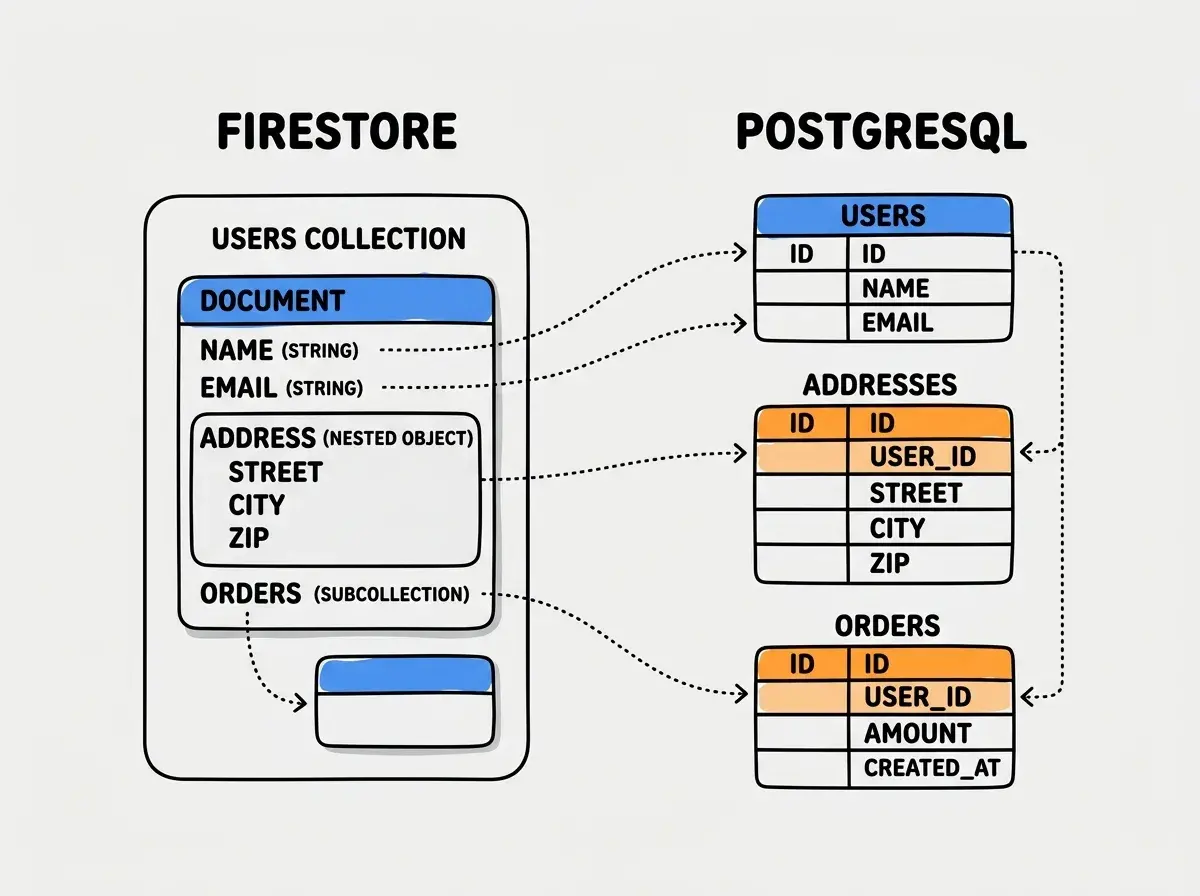
Think of this as converting your bank's account records from filing cabinets (documents in folders) into a proper spreadsheet system (rows in tables). Every document becomes a row, every collection becomes a table, and every subcollection needs a foreign key relationship.
Here is how the core concepts translate.
| Firestore Concept | PostgreSQL Equivalent |
|---|---|
| Collection | Table |
| Document | Row |
| Subcollection | Related table with foreign key |
| Document ID | Primary key (UUID or text) |
| Nested object | JSONB column or normalized table |
| Array field | JSONB array or junction table |
| Timestamp | timestamptz column |
Start with your most critical collection. Export it from Firestore using the Firebase Admin SDK or the firebase-admin CLI. A simple Node.js script handles this well.
import { initializeApp, cert } from 'firebase-admin/app'
import { getFirestore } from 'firebase-admin/firestore'

const app = initializeApp({ credential: cert('./service-account.json') })
const db = getFirestore(app)

async function exportCollection(name: string) {
  const snapshot = await db.collection(name).get()
  const docs = snapshot.docs.map(doc => ({
    id: doc.id,
    ...doc.data(),
    _createdAt: doc.createTime?.toDate(),
    _updatedAt: doc.updateTime?.toDate()
  }))
  return docs
}
Flatten nested objects intentionally. Firestore encourages deeply nested documents. PostgreSQL rewards flat, normalized structures. A Firestore user document with an embedded address object and a preferences map might become three PostgreSQL tables, or you might keep preferences as a JSONB column if you rarely query its individual fields. The rule of thumb is that anything you filter or sort by deserves its own column.
Migrating Authentication Users
This is the part of the bank switch where you transfer every account holder's credentials. Firebase Auth and Supabase Auth both support email/password, OAuth providers, and phone auth, but the user records need careful handling.
Export Firebase Auth users. The Firebase Admin SDK provides listUsers() which returns user records in batches. Export all of them including their uid, email, emailVerified, displayName, photoURL, providerData, and critically, their passwordHash and passwordSalt if they used email/password auth.
import { getAuth } from 'firebase-admin/auth'

async function exportAllUsers() {
  const users: any[] = []
  let pageToken: string | undefined

  do {
    const result = await getAuth().listUsers(1000, pageToken)
    users.push(...result.users.map(u => u.toJSON()))
    pageToken = result.pageToken
  } while (pageToken)

  return users
}
Import into Supabase Auth. Supabase uses GoTrue under the hood. You can insert users directly into the auth.users table using Supabase's admin API or a direct PostgreSQL connection. For email/password users, Firebase uses a modified scrypt hash. Supabase's GoTrue does not natively understand Firebase's scrypt format, so you have two options.
The first option is to import users without passwords and force a password reset on first login. This is cleaner but creates friction for every user.
The second option is to write a custom auth hook in Supabase that verifies the Firebase scrypt hash on first login, then re-hashes with bcrypt for subsequent logins. This is transparent to users but requires more engineering work.
For OAuth users (Google, GitHub, etc.), you only need to map the provider data correctly. Users will re-authenticate through the same OAuth flow, and Supabase will link them based on email or provider ID.
Transferring Storage Files
Firebase Storage (backed by Google Cloud Storage) to Supabase Storage is the most mechanical part of the migration. Think of it as moving your safe deposit boxes from one bank to another. The contents do not change, just the location.
Download everything from Firebase Storage. Use the gsutil CLI or the Firebase Admin SDK to recursively download all files. Maintain the folder structure.
gsutil -m cp -r gs://your-firebase-bucket ./firebase-export
Upload to Supabase Storage. Create matching buckets in Supabase, then upload using the Supabase client or the S3-compatible API. Supabase Storage supports the same S3 protocol, so tools like aws s3 sync work if you configure the endpoint.
import { createClient } from '@supabase/supabase-js'

const supabase = createClient(SUPABASE_URL, SUPABASE_SERVICE_KEY)

async function uploadFile(bucket: string, path: string, file: Buffer) {
  const { error } = await supabase.storage
    .from(bucket)
    .upload(path, file, { upsert: true })

  if (error) throw error
}
Update all file references in your database. Every URL pointing to firebasestorage.googleapis.com needs to point to your Supabase storage URL instead. This is where a SQL migration script saves hours. Run an UPDATE query across every table and column that stores file URLs.
Forgetting to update file URLs in your database after moving storage files. Your images and documents will 404 silently because the old Firebase Storage URLs still work during the free tier's grace period, then break permanently once Firebase resources are cleaned up. Audit every table for URL columns before declaring the migration complete.
Gradual Migration vs Big-Bang Cutover
Back to the bank analogy. You can either move everything in one weekend (big-bang) or run both accounts in parallel while you transfer services one at a time (gradual). Both approaches work. The right choice depends on your app's complexity and your tolerance for maintaining two systems.
Big-bang migration means you freeze writes to Firebase, export everything, import into Supabase, update your app code, test, and flip the switch. This works for smaller apps with a few collections and a user base where a few hours of downtime is acceptable.
Gradual migration means you run Firebase and Supabase simultaneously. New features write to Supabase while existing features continue reading from Firebase. You migrate collections one at a time, verifying data integrity at each step, then decommission Firebase.
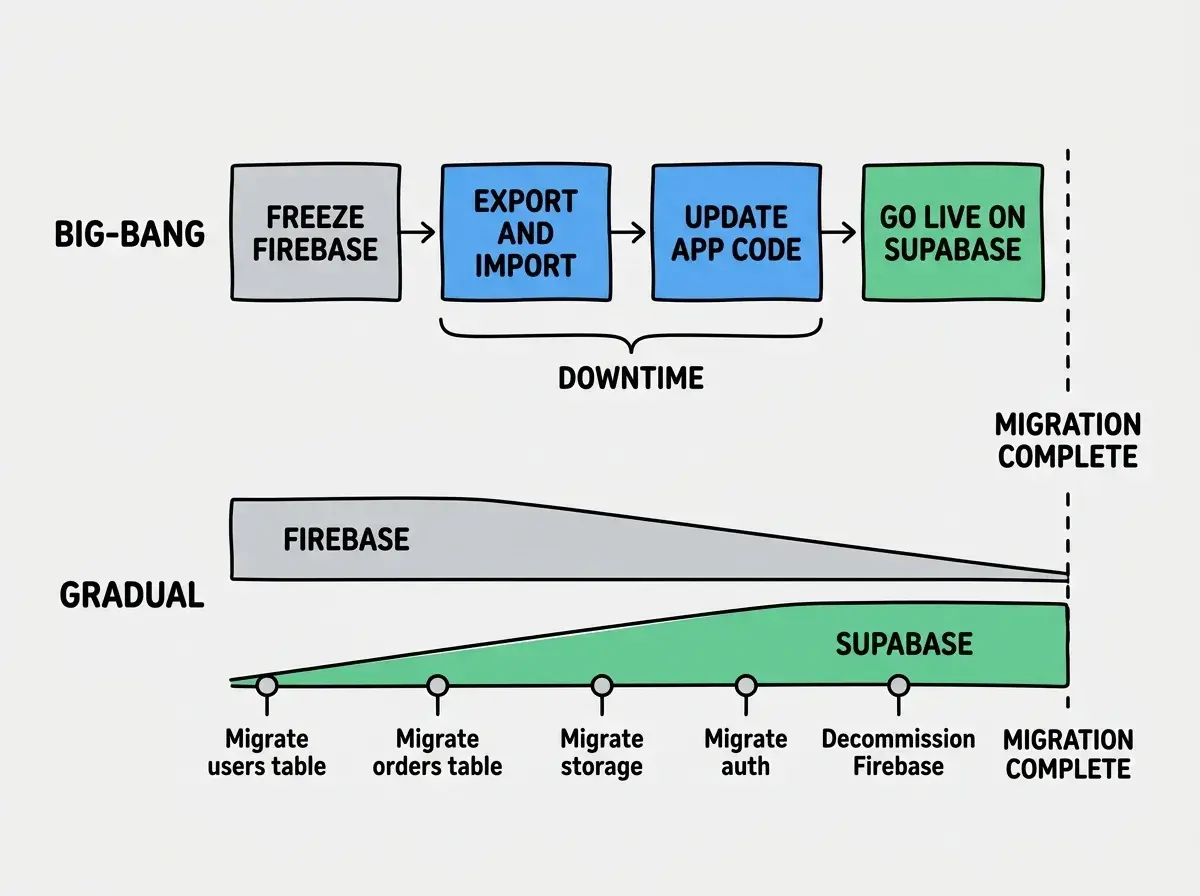
For most indie hackers, the gradual approach is safer. You can take weeks instead of a stressful weekend. The tradeoff is maintaining compatibility code that reads from both sources during the transition.
Here is a practical pattern for the gradual approach.
// Compatibility layer during migration
async function getUser(userId: string) {
  // Try Supabase first (migrated users)
  const { data } = await supabase
    .from('users')
    .select('*')
    .eq('id', userId)
    .single()

  if (data) return data

  // Fall back to Firebase (not yet migrated)
  const doc = await firestore.collection('users').doc(userId).get()
  return doc.exists ? { id: doc.id, ...doc.data() } : null
}
Get the full database comparison to make an informed decision before you start.
Compare database toolsThe Migration Checklist
Before you start, run through this list. Missing any item turns a smooth transition into a scramble.
- Export and verify all Firestore data. Run checksums or row counts to confirm nothing was lost in export.
- Design your PostgreSQL schema. Map every collection, subcollection, and nested object to tables and columns. Write and test your CREATE TABLE statements.
- Migrate auth users. Export from Firebase Auth, import into Supabase, and decide your password migration strategy.
- Transfer storage files. Download from Firebase Storage, upload to Supabase Storage, and update all URL references.
- Set up Row Level Security. Supabase without RLS policies is an open database. Define policies for every table before going live.
- Update application code. Replace Firebase SDK calls with Supabase client calls. This includes auth state listeners, database queries, storage uploads, and real-time subscriptions.
- Update Firestore Security Rules to RLS. Your Firestore rules need PostgreSQL RLS equivalents. Do not skip this step.
- Test with production-like data. A migration that works on 50 test records might fail on 50,000. Test at scale.
- Set up monitoring. Watch for 404s on old Firebase URLs, auth failures, and missing data after cutover.
- Keep Firebase active for 30 days post-migration. Your safety net in case something was missed.
Learn the tools that pair best with your new backend.
Explore the toolsWhat This Means For You
A Firebase to Supabase migration is not a weekend project for any app with real users. It rewards patience and planning over speed. The gradual approach, migrating one collection at a time while running both systems in parallel, protects your users from disruption even if something goes wrong.
The biggest wins after migration are usually unexpected. Queries that took three round trips in Firestore become a single SQL join. Billing becomes predictable instead of a monthly surprise. And your data lives in PostgreSQL, with the full ecosystem of tools, ORMs, and backup solutions that come with it.
Start with your least critical collection. Build confidence before you touch your users table or auth system. Like switching banks, the best migrations are the ones where your users never notice the change.