Firebase vs Supabase is the backend choice that defines how your entire application stores data, authenticates users, and scales. With 92% of builders now using AI tools daily, the backend you pick on day one determines whether your AI-generated code runs smoothly or fights the platform at every turn. Here is the honest comparison.
Quick Verdict
| Firebase | Supabase | |
|---|---|---|
| Best for | Mobile-first apps, Google ecosystem, rapid prototyping | SQL-native apps, open-source preference, complex queries |
| Database | Firestore (NoSQL document) | PostgreSQL (relational SQL) |
| Price | Generous free tier, usage-based scaling | Generous free tier, predictable Pro at $25/mo |
| Strength | Google infrastructure, massive ecosystem, real-time sync | Full Postgres power, Row Level Security, self-hostable |
| Weakness | Vendor lock-in, complex pricing, hard to migrate away | Smaller ecosystem, fewer integrations, younger platform |
The table gives you the quick answer. The deeper question is which database model fits how your AI tools generate code, and that is what actually matters for vibe coders in 2026.
The Firebase vs Supabase decision is really a NoSQL vs SQL decision. If your app has deeply nested, flexible data (chat messages, user activity feeds, IoT sensor readings), Firestore's document model is a natural fit. If your app has structured, relational data (users with orders with products with reviews), Postgres gives you joins, constraints, and queries that NoSQL cannot match. Pick the database model first, then the platform follows.
The Database Question That Drives Everything
This is the most important section of this comparison because your database choice shapes every line of code your AI tool generates.
Firestore (Firebase) stores data as documents inside collections. A user document might contain their profile, nested arrays of preferences, and subcollections of their posts. This feels intuitive for simple apps. You fetch a user document and everything about that user comes back in one read. But the moment you need to query across collections ("find all posts by users in California who signed up this month"), you hit Firestore's limitations. Complex queries require denormalization, composite indexes, and architectural decisions that AI tools frequently get wrong.
PostgreSQL (Supabase) stores data in tables with rows and columns. Users in one table, posts in another, connected by foreign keys. This is the model that has powered the internet for decades. Joins let you query across tables with precision. Constraints prevent bad data from entering your database. And critically, nearly every AI coding tool in 2026 generates better SQL than it generates Firestore query code. Claude, GPT, and Copilot were all trained on mountains of SQL. Their Firestore output is noticeably less reliable.
If you are building with AI tools and your data has relationships between entities, Supabase's Postgres gives your AI assistant a massive advantage in code quality.
Pricing Compared at Every Tier
Pricing is where these platforms diverge in ways that matter.
Free Tier
Firebase's Spark plan gives you 1 GiB of Firestore storage, 50,000 daily reads, 20,000 daily writes, 5 GB of Cloud Storage, and 10 GB/month of hosting bandwidth. Supabase's free tier gives you 500 MB of Postgres storage, unlimited API requests, 1 GB file storage, 5 GB bandwidth, and 50,000 monthly active users for auth.
Both free tiers are generous enough to build and validate an MVP. Firebase gives you more storage. Supabase gives you unlimited API requests, which matters more for data-heavy apps.
Paid Tier
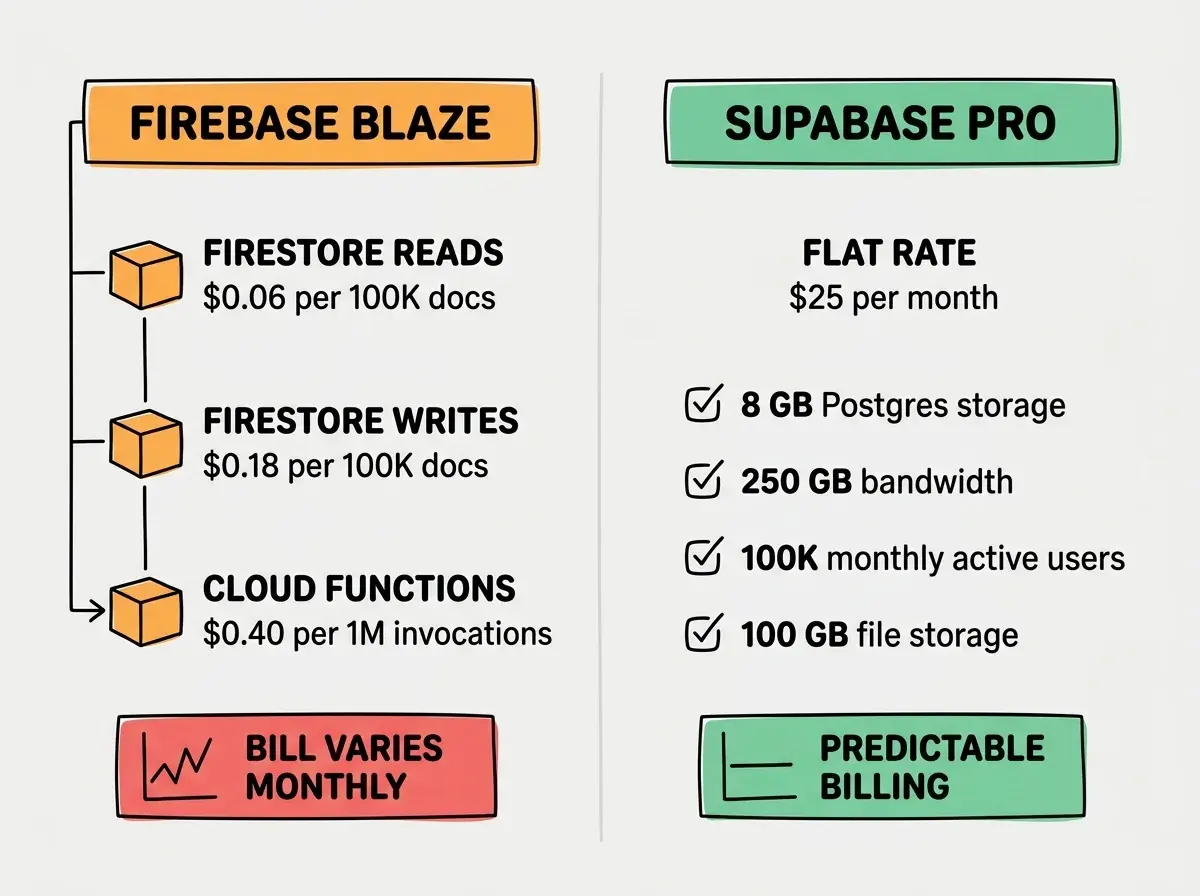
Firebase's Blaze plan is purely usage-based. You pay for what you consume with no monthly minimum, but the bill is unpredictable. Firestore reads cost $0.06 per 100,000 documents. Writes cost $0.18 per 100,000. Cloud Functions cost $0.40 per million invocations plus compute time. A moderately active app with 10,000 daily users can generate bills anywhere from $25 to $200/month depending on how efficiently your code queries data. AI-generated code is often inefficient with Firestore reads, fetching entire collections when it should be paginating.
Supabase Pro costs $25/month flat and includes 8 GB of Postgres storage, 250 GB bandwidth, 100,000 monthly active users, and 100 GB file storage. Overages are clearly priced. The predictability alone is worth the comparison. You know what your bill will be, which is not something Firebase can promise.
Authentication Compared
Both platforms offer authentication out of the box, and both are genuinely good.
Firebase Auth supports email/password, phone, Google, Apple, Facebook, Twitter, GitHub, and anonymous auth. It integrates with Google Identity Platform for enterprise features like SAML and multi-tenancy. The SDK is mature, well-documented, and works seamlessly across web, iOS, Android, and Flutter. If you are building a mobile app, Firebase Auth is the gold standard.
Supabase Auth supports email/password, magic links, phone, and OAuth providers including Google, Apple, GitHub, Discord, and dozens more. It is built on GoTrue and integrates directly with Postgres, meaning your auth users live in the same database as your application data. This is a significant architectural advantage. You can write a single SQL query that joins your users table with your application tables, something that requires extra steps with Firebase.
The winner depends on your platform. Mobile-first apps benefit from Firebase Auth's native SDK maturity. Web apps benefit from Supabase Auth's database integration.
Storage Compared
Firebase Cloud Storage runs on Google Cloud Storage. It handles file uploads, serves files through a CDN, and integrates with Firebase Security Rules for access control. The SDKs make uploading from mobile apps trivially easy.
Supabase Storage is S3-compatible object storage with built-in CDN, image transformations, and resumable uploads. Access control is handled through Postgres Row Level Security policies, the same system that protects your database. The S3 compatibility means you can use any S3-compatible tool or library, reducing vendor lock-in.
Firebase wins on mobile SDK polish. Supabase wins on flexibility and portability.
Realtime Compared
Firebase Realtime Database and Firestore were built for realtime from the ground up. Listeners sync data across clients instantly. If you are building a chat app, collaborative editor, or multiplayer game, Firebase's realtime capabilities are best-in-class. The offline persistence is particularly strong on mobile, where Firestore caches data locally and syncs when connectivity returns.
Supabase Realtime listens to Postgres changes via websockets. You subscribe to INSERT, UPDATE, and DELETE events on any table. It works well for dashboards, notifications, and live feeds. But it is not as deeply integrated as Firebase's realtime sync. Conflict resolution, offline persistence, and multi-device sync require more manual work on Supabase.
Firebase wins on realtime, and it is not particularly close for apps that need bidirectional sync.
Which AI Tools Default to Which
This is the practical question that most comparison articles miss.
Supabase is the default backend for most AI coding tools in 2026. Lovable, Bolt, and Replit all scaffold Supabase backends when you ask them to add a database. The reason is straightforward: these tools generate SQL, and Supabase speaks SQL natively. The generated code tends to be correct, efficient, and production-ready because the AI is working in its strongest language.
Firebase requires more specific prompting. When you ask an AI tool to "add a database," it rarely generates Firestore code by default. When you specifically request Firebase, the generated code is functional but often suboptimal. AI tools tend to create inefficient Firestore queries, miss composite index requirements, and generate security rules that are either too permissive or too restrictive. This is not a Firebase flaw; it is a training data distribution issue. There is simply more SQL training data than Firestore training data.
Assuming that because your AI tool generated working Firebase or Supabase code, the security rules are correct. Both platforms default to open access in development mode. Firebase Security Rules and Supabase Row Level Security policies must be explicitly written and tested before going to production. AI tools frequently generate placeholder rules that allow all reads and writes. Always review your access control layer manually.
Learn what databases do and why your app needs one before choosing a provider.
Read the fundamentalsWhen Firebase Wins
Mobile-first applications. Firebase's iOS, Android, and Flutter SDKs are the most mature in the industry. Offline persistence, background sync, push notifications (via FCM), analytics, crashlytics, and remote config create an integrated mobile development platform that Supabase cannot match. If you are building a mobile app that needs to work offline and sync when connectivity returns, Firebase is the clear choice.
Google Cloud ecosystem. If your organization already uses Google Cloud, Firebase integrates natively with BigQuery, Cloud Functions, Cloud Run, and Vertex AI. The data pipeline from Firebase Analytics to BigQuery for custom analysis is particularly powerful for growth-focused teams.
Rapid prototyping with flexible schemas. Firestore's schemaless document model lets you iterate on your data structure without migrations. During early prototyping when your data model changes daily, this flexibility saves time. You add a field to a document and it just works. No ALTER TABLE, no migration file, no deployment step.
When Supabase Wins
SQL-native applications with relational data. Any app where your data has clear relationships (users have orders, orders contain products, products have reviews) benefits from Postgres. Joins, foreign keys, constraints, and complex queries are first-class features, not workarounds.
Open-source and self-hosting preference. Supabase is fully open-source. You can self-host the entire stack on your own infrastructure. This matters for compliance (data residency requirements), cost control at scale (running your own Postgres is cheaper than paying per-read), and the fundamental assurance that your backend will exist even if the company does not. Firebase is proprietary Google infrastructure with no self-hosting option.
Row Level Security for fine-grained access control. Supabase's RLS lets you define access policies directly in Postgres. A single policy like "users can only read rows where user_id matches their auth ID" applies to every query automatically, whether it comes from your API, your dashboard, or a direct database connection. This is more powerful and more auditable than Firebase Security Rules, which use a separate rules language that does not compose as cleanly.
Cost predictability at scale. Supabase Pro at $25/month with clear overages versus Firebase's per-operation pricing where a single inefficient query loop can spike your bill. For founders and indie hackers watching every dollar, knowing your backend costs $25 next month is worth a lot.
Whichever platform you choose, security rules and RLS policies need to be right.
Learn about backend securityWhat This Means For You
The Firebase vs Supabase decision comes down to three questions.
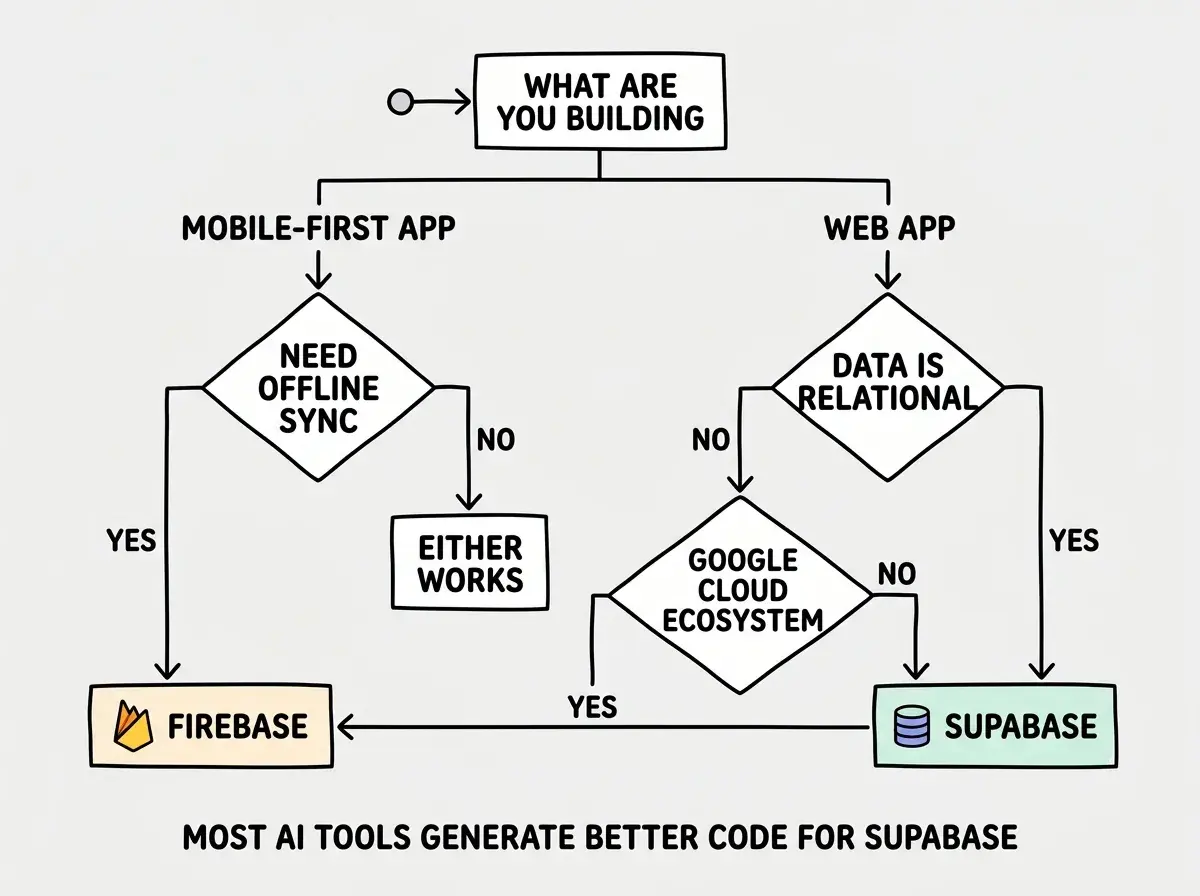
- Is your app mobile-first with offline requirements? Firebase. Its mobile SDKs, offline persistence, and Google ecosystem integration are unmatched. The vendor lock-in is real, but for mobile apps the tradeoff is worth it.
- Is your data relational and your app web-first? Supabase. Postgres gives you better queries, your AI tools generate better code for it, and the pricing is predictable. The open-source foundation means you always have an exit strategy.
- Are you prototyping and unsure about your data model? Start with Supabase anyway. SQL skills transfer to every database platform. Firestore patterns are Firebase-specific. If your prototype succeeds and you need Firebase's mobile capabilities later, migrating with a clear data model is easier than migrating from a tangled document structure.
For most vibe coders building web applications in 2026, Supabase is the safer default. Not because Firebase is bad (it is genuinely excellent for its use cases) but because SQL is the language your AI tools speak most fluently, and a predictable $25/month bill lets you focus on building instead of monitoring your usage dashboard.