Feature flags in production let you deploy code without activating it. You ship the feature to all users at the code level, then turn it on for specific groups using a configuration toggle. No new deployment needed to roll out, roll back, or A/B test. It is one of the highest-leverage techniques available to a small team.
This is a tutorial for two kinds of people: senior developers who want the right architecture, and product managers who want to understand what their engineers are actually building when they say "we'll put it behind a flag."
Why Feature Flags Matter for AI-Built Apps
Most AI coding tools generate working features quickly. The bottleneck shifts from "can we build it" to "can we ship it safely." Feature flags solve that bottleneck.
When you build with AI assistance, you often produce more working code per day than a traditional team might. That speed means you also accumulate more unshipped changes. Without flags, you are forced to batch everything into large releases, which increases risk. One bad feature can take down everything else in the same deployment.
Flags let you decouple deployment from release. Your AI-built calendar integration can sit in the codebase for two weeks while you test it with a handful of internal users. When it is solid, you flip the switch for everyone. If something breaks, you flip it back in seconds without a rollback deployment.
There is also a PM-specific angle here. Feature flags make beta programs trivial. Instead of maintaining a separate staging app and coordinating invites, you add a user to a flag audience in a dashboard and they see the new experience immediately. That shortens the feedback loop between engineering and real users from weeks to hours.
The Simplest Feature Flag Implementation
Before you reach for a third-party service, understand what you are actually building. At its core, a feature flag is a function that returns a boolean.
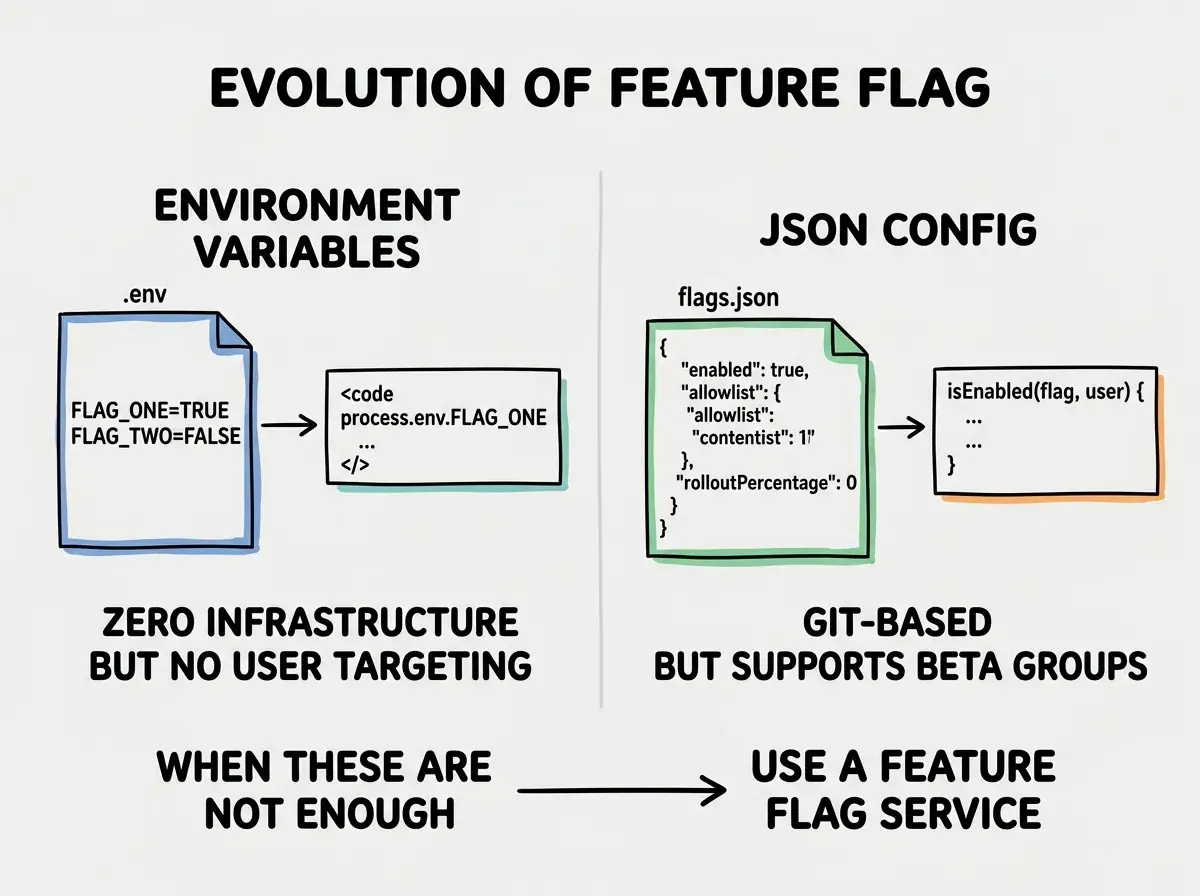
Start with environment variables. This is the zero-infrastructure approach and it is fine for small teams.
// lib/flags.ts
export const flags = {
  newCheckoutFlow: process.env.FEATURE_NEW_CHECKOUT === 'true',
  aiRecommendations: process.env.FEATURE_AI_RECS === 'true',
  redesignedDashboard: process.env.FEATURE_NEW_DASHBOARD === 'true',
} as const;

export type FeatureFlag = keyof typeof flags;
// In your component
import { flags } from '@/lib/flags';

export function CheckoutButton() {
  if (flags.newCheckoutFlow) {
    return <NewCheckout />;
  }
  return <LegacyCheckout />;
}
The advantage: zero dependencies, zero latency, works everywhere including Cloudflare Workers. The limitation: you need a redeploy to change any flag value, and you cannot target specific users.
Move to JSON config for more control. When you need to enable a flag for specific users without redeploying, a JSON config file checked into your repo gives you more flexibility while staying simple.
// config/flags.json
{
  "flags": {
    "newCheckoutFlow": {
      "enabled": false,
      "allowlist": ["user_123", "user_456", "user_789"]
    },
    "aiRecommendations": {
      "enabled": true,
      "rolloutPercentage": 25
    }
  }
}
// lib/flags.ts
import flagConfig from '@/config/flags.json';

type FlagConfig = {
  enabled: boolean;
  allowlist?: string[];
  rolloutPercentage?: number;
};

export function isEnabled(flagName: string, userId?: string): boolean {
  const flag = flagConfig.flags[flagName as keyof typeof flagConfig.flags] as FlagConfig | undefined;

  if (!flag) return false;
  if (flag.enabled) return true;

  // Check allowlist for beta users
  if (userId && flag.allowlist?.includes(userId)) {
    return true;
  }

  // Percentage rollout using consistent hashing
  if (userId && flag.rolloutPercentage) {
    const hash = userId.split('').reduce((acc, char) => acc + char.charCodeAt(0), 0);
    return (hash % 100) < flag.rolloutPercentage;
  }

  return false;
}
This pattern covers most small-team use cases. You still need a git commit to change flag values, but you can do targeted rollouts without a dedicated service.
Feature Flag Services Compared
When you need real-time flag changes (no deploys) and richer targeting rules (user attributes, segments, geolocation), a dedicated service is worth the cost.
| Service | Free Tier | Paid Starts At | Self-Hostable | Open Source |
|---|---|---|---|---|
| LaunchDarkly | 1 seat, unlimited flags | $15/seat/month | No | No |
| Flagsmith | 50k requests/month | $45/month | Yes | Yes |
| ConfigCat | 1k users, unlimited flags | $8/month | No | No |
| Unleash | Unlimited (self-hosted) | $80/month (cloud) | Yes | Yes |
LaunchDarkly is the industry standard. Its SDK is excellent, the targeting rules are the most sophisticated, and the reliability is proven at enterprise scale. It is also the most expensive by far. For a solo builder or small team, the cost is hard to justify at early stages. Where LaunchDarkly shines is experimentation (A/B testing with statistical significance) and audit logs for compliance.
Flagsmith hits a sweet spot for small teams. The free tier is genuinely useful, the self-hosted option means you can run it on your own infrastructure at no cost, and the API is clean. The TypeScript SDK is well-maintained. If you are building on Vercel or Railway, Flagsmith's cloud is the most cost-effective managed option.
ConfigCat is the most beginner-friendly. The dashboard is simple, the integration is fast, and the free tier is generous for small apps. It lacks some advanced targeting features but covers 90% of what most apps actually need.
Unleash is for teams who want full control. The self-hosted option is completely free and the feature set is comprehensive. The tradeoff is operational complexity: you are running another service, managing its database, and handling uptime yourself.
For a vibe-coded app at early traction, ConfigCat or Flagsmith is almost always the right call. Use LaunchDarkly when your company has a budget and compliance requirements. Use Unleash when your team is already comfortable running infrastructure.
One thing to evaluate before committing to any paid service: SDK quality in your language and framework. All four services have JavaScript and TypeScript SDKs, but the quality varies. LaunchDarkly's SDKs are the most battle-tested; ConfigCat and Flagsmith both have clean, well-documented TypeScript packages. Check whether the SDK you need works in your deployment target. Some SDKs assume a Node.js runtime and will not work in Cloudflare Workers without a workaround. If you are deploying to the edge, verify edge compatibility before signing up.
There is also a privacy consideration worth naming. When you use a hosted flag service, every feature flag evaluation sends data to a third-party server. For most consumer apps this is not a problem. For apps with strict data residency requirements or healthcare compliance needs, self-hosted Flagsmith or Unleash become the practical options regardless of team size.
The right feature flag tool depends on your stage. At zero to one thousand users, environment variables or a JSON config file are enough. At one thousand to fifty thousand users, ConfigCat or Flagsmith free tiers handle it. Beyond that, evaluate based on your actual targeting complexity, not the feature lists on vendor marketing pages.
Feature Flag Lifecycle Management
Here is the part most tutorials skip: flags accumulate technical debt faster than almost any other pattern. Each flag you add is a branch in your codebase that must be maintained until you clean it up.
Picture a two-year-old codebase with forty feature flags, half of which were for experiments that concluded twelve months ago. The flags are still evaluated on every request, but nobody knows which ones are safe to remove. The code has if (flags.oldCheckoutFlow) branches wrapping the legacy payment path that was replaced in Q2 last year. Every developer who touches checkout has to mentally track which flags affect that code.
This is not hypothetical. It is the default trajectory for any team that adds flags without a removal process.
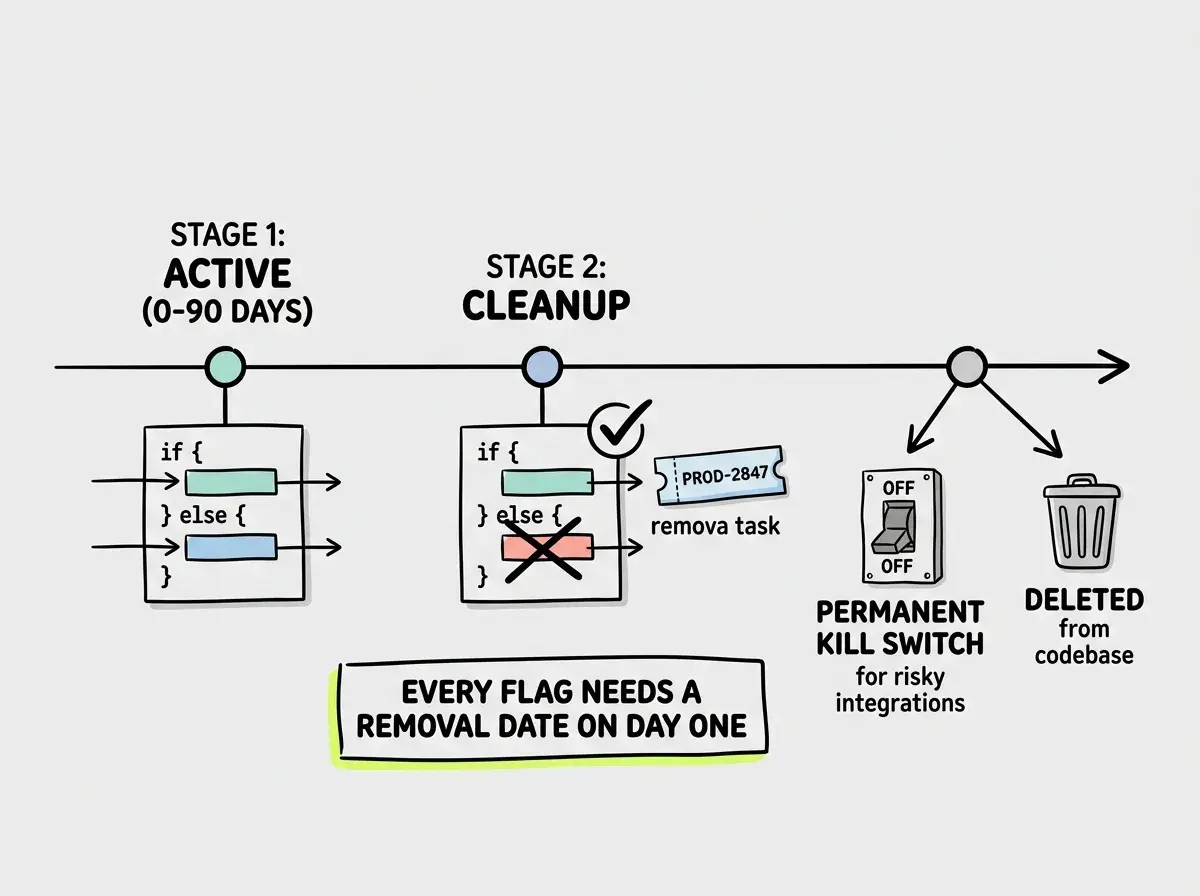
When you create a flag, set a removal date. Add a comment in the code and a ticket in your project management tool.
// TODO: Remove by 2026-06-01 - experiment concluded
// Ticket: PROD-2847
if (isEnabled('newCheckoutFlow', userId)) {
  return <NewCheckout />;
}
return <LegacyCheckout />;
Three lifecycle stages for every flag:
- Active (0-90 days): The flag is being used to control a rollout or experiment. Both code paths are maintained.
- Cleanup (after decision): The experiment is over or the rollout is complete. Remove the losing code path. Commit the winning one as permanent behavior. Delete the flag from your service.
- Emergency only: Some flags are permanent kill switches for risky integrations. These stay. Everything else should not.
The stale flag audit. Once a quarter, look at your flag dashboard and ask: which flags have been at 100% or 0% for more than sixty days? Those are cleanup candidates. A flag sitting at 100% on for sixty days means you shipped the feature. Remove the conditional and the old code path.
The removal process itself is straightforward:
// Before cleanup
function CheckoutPage({ userId }: { userId: string }) {
  if (isEnabled('newCheckoutFlow', userId)) {
    return <NewCheckout />;
  }
  return <LegacyCheckout />;
}

// After cleanup (new checkout won, legacy removed)
function CheckoutPage() {
  return <NewCheckout />;
}
Delete the flag from your feature flag service too, not just the code. An orphaned flag in your dashboard that no code reads is just noise that makes the dashboard harder to manage.
Adding feature flags without a written removal plan. Every flag you add without a scheduled cleanup becomes permanent by default because nobody wants to be the person who removes code they do not fully understand. Create a removal ticket before you create the flag, assign it to yourself, and put a date on it.
What This Means For You
Feature flags are a professional practice that compounds over time. The first flag you add will feel like overhead. By the tenth flag, controlled rollouts will feel like the only way to ship.
-
If you are a senior developer or tech lead: The architecture decision that matters most is whether flags are evaluated server-side or client-side. Server-side evaluation (in your API layer or React Server Components) prevents flag values from leaking to the client and avoids layout shift from flag-based conditional rendering. Build that infrastructure once and everyone on the team benefits.
-
If you are a product manager building prototypes: Feature flags give you a release schedule that is decoupled from deployment schedules. You can tell the engineering team to ship everything to staging whenever it is ready, then you control when each feature goes live for users. That separation of concerns makes sprint planning more predictable and reduces the pressure to delay deployments.
-
If you are an indie hacker shipping solo: Start with the environment variable approach. It costs nothing and it covers controlled rollouts between environments. When you have paying users and you want to run beta programs or A/B tests, ConfigCat's free tier is probably all you will need for your first year.
Feature flags are one technique. There are more in the deployment and production management category.
Explore more tutorialsThe goal is not to have the most sophisticated feature flag system. The goal is to ship new features with confidence and roll back without drama when something goes wrong. Even a simple boolean in a JSON file gets you most of the way there.
From idea to deployed product, this blog covers every step of the vibe coding journey.
Start building