With 92% of developers now using AI daily in their workflows, the real question is no longer whether to use AI coding tools but which kind of AI coding tool fits how you actually work. Devin and Claude Code represent two fundamentally different philosophies. Think of it like hiring a contractor versus having a skilled assistant. Devin is the contractor you hand a spec to and check back on later. Claude Code is the assistant who sits beside you, working through problems in real time. Both get the job done, but the experience of working with each one is completely different.
The Core Difference in Architecture
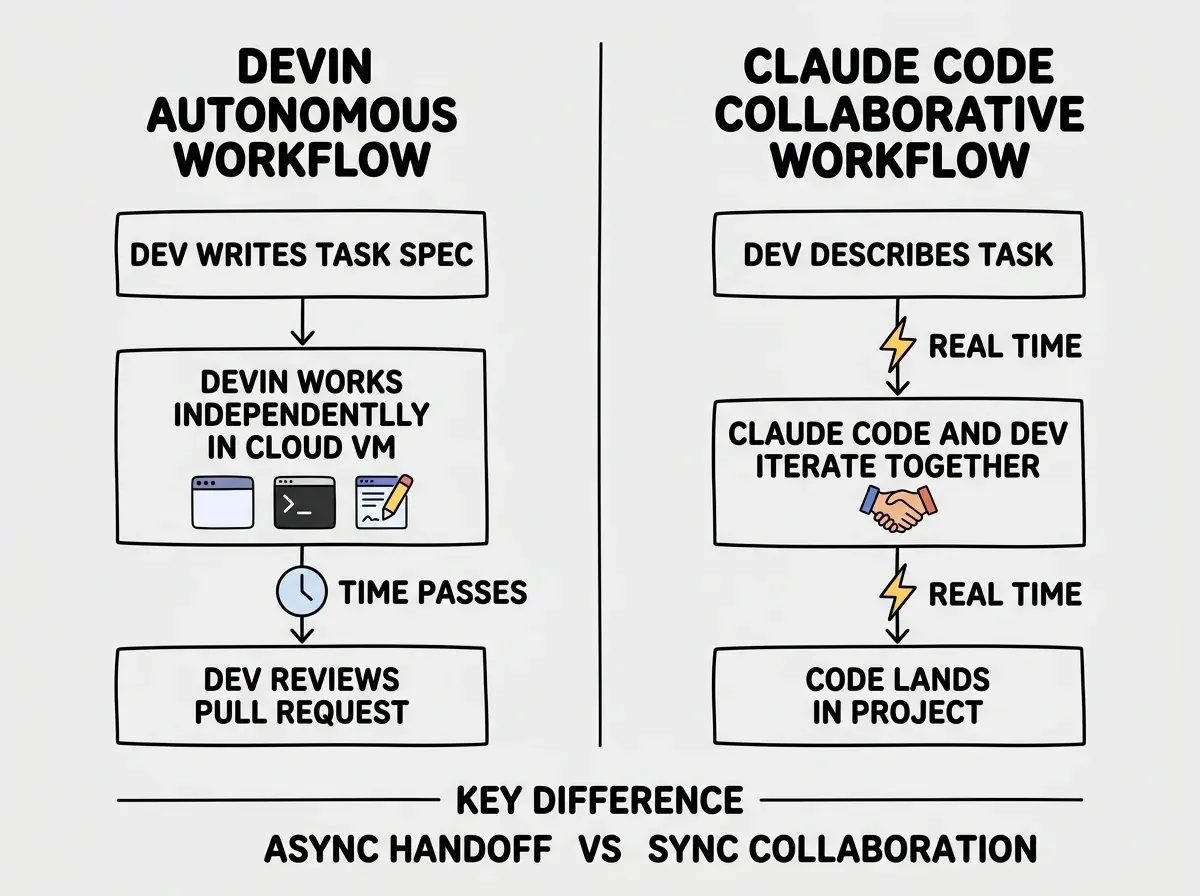
Devin operates as a fully autonomous software engineer running in its own cloud environment. When you assign it a task, it spins up a virtual machine with a browser, terminal, and code editor, then works through the problem independently. It plans, writes code, runs it, debugs errors, searches documentation, and iterates until the task is done. You interact with Devin through a Slack-like interface, checking in on progress the way you would check in on that contractor renovating your kitchen.
Claude Code takes the opposite approach. It runs directly in your terminal, inside your project, alongside your existing tools. When you describe a task, Claude Code reads your files, proposes changes, runs commands, and asks for your input when it hits decision points. You are always in the room with your assistant. You see what it is doing, you can redirect it mid-task, and you maintain full control over every commit that lands in your codebase.
This architectural difference shapes everything else about the two tools, from pricing to reliability to the types of tasks they handle well.
How Each Tool Handles Real Work
Autonomous Execution with Devin
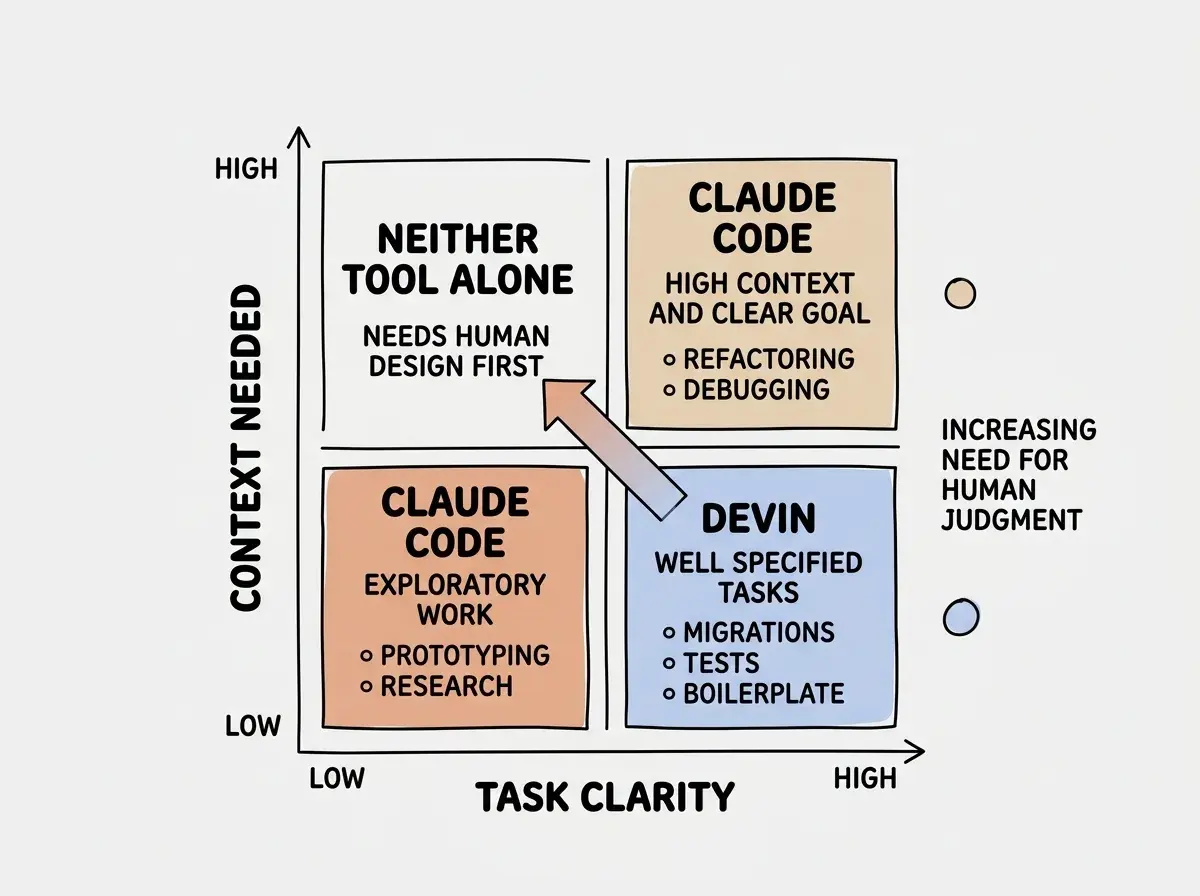
Devin excels when you can clearly define a task, walk away, and come back to a finished result. Bug fixes with clear reproduction steps. Boilerplate generation for new services. Writing tests for existing code. Migrating a library from one version to another. These are tasks where the spec is unambiguous and the contractor does not need to call you every ten minutes with questions.
Where Devin struggles is when the task requires deep understanding of your team's conventions, architectural decisions that are not documented, or judgment calls about trade-offs. The contractor analogy holds here too. A good contractor can tile your bathroom beautifully, but if you have not specified the tile pattern, you might come back to something that is technically correct but not what you wanted. Devin can produce working code that solves the literal problem while missing the spirit of how your team builds software.
Collaborative Coding with Claude Code
Claude Code shines when the work benefits from back-and-forth. You are refactoring an authentication system and realize halfway through that the session management approach needs to change too. You are debugging a production issue and need to explore multiple hypotheses, checking logs, reading code paths, and testing fixes iteratively. Your assistant is right there with you, adapting to new information as it emerges.
The trade-off is that Claude Code requires your attention. You cannot hand it a task at 9 AM and review the result at lunch. You are actively involved, which means the time savings come from speed and accuracy rather than from freeing you to do other work entirely. The assistant makes you faster at the task you are doing, but you are still doing the task.
That said, Claude Code's autonomy dial goes further than most developers realize. Stop hooks let you instruct it to keep iterating until a condition is met, without you sitting at the terminal watching.
If the tests don't pass, keep going. Essentially you can just make the model keep going.
This changes the calculus. Claude Code is not a purely synchronous tool. With the right configuration it can handle extended runs on its own, blending collaborative and autonomous modes in a way Devin does not support.
Pricing and the Hidden Costs
Devin charges $500/month for teams, which gives you a set number of Agent Compute Units (ACUs). Each task consumes ACUs based on complexity and compute time. Simple tasks are cheap per run. Complex, long-running tasks can burn through your allocation quickly. The pricing model makes sense if you have a steady stream of well-defined tasks, because the per-task cost becomes predictable over time.
Claude Code runs on Anthropic's API with pay-per-use pricing, or through the Claude Max subscription at $100-200/month for heavy users. API costs vary based on token usage. A quick question might cost pennies. A deep multi-file refactor with lots of back-and-forth could cost several dollars. Most developers report spending between $50 and $200 per month depending on intensity.
The hidden cost with Devin is rework. If the autonomous agent misunderstands the task and produces code that technically works but does not match your conventions, someone on your team has to fix it. That rework time is real and easy to undercount. The hidden cost with Claude Code is your attention. Every minute you spend working with Claude Code is a minute you are not doing something else. Both costs are real, and which one matters more depends on whether your bottleneck is engineer time or engineer focus.
Devin vs Claude Code is not a question of which tool is smarter. It is a question of whether your bottleneck is having enough hands to do the work (use Devin to multiply capacity) or needing to do complex work faster and more accurately (use Claude Code to amplify your own abilities). The contractor builds while you are away. The assistant makes you better while you are present.
Task Suitability
Not every task fits both tools equally. Here is where each one delivers the most value.
Devin handles well:
- Writing tests for existing, well-documented code
- Migrating dependencies to newer versions
- Creating boilerplate services from clear specifications
- Fixing bugs with reproducible steps and clear expected behavior
- Generating documentation from existing code
Claude Code handles well:
- Complex refactors that require architectural judgment
- Debugging production issues with incomplete information
- Building new features where requirements evolve during development
- Code reviews and explanations of unfamiliar codebases
- Multi-step tasks where each step depends on the outcome of the previous one
The pattern is clear. Devin works best when the destination is well-defined and the path to get there is mostly predictable. Claude Code works best when you need to figure out the destination as you go, adapting your approach based on what you discover along the way.
Workflow Integration
Devin integrates through pull requests and Slack. You assign a task, Devin creates a branch, does its work, and opens a PR for review. This fits naturally into team workflows that already use code review as a quality gate. The downside is latency. Devin might take 30 minutes to an hour on a task that Claude Code could help you finish in 10 minutes of collaborative work, because Devin is doing everything from scratch in an isolated environment without the benefit of your real-time guidance.
Claude Code integrates directly into your terminal and editor workflow. It reads your project files, respects your CLAUDE.md configuration, and operates within your existing development environment. Changes happen locally, so you can test them immediately, run your app, and verify behavior before committing anything. There is no waiting for a PR to appear. The code is right there in your project, ready to go.
Developers often try Devin on tasks that require deep context about team conventions, then blame the tool when the output does not match their expectations. Devin works best when you invest time writing clear specifications. If your task description is "fix the auth bug," you will get mediocre results from any autonomous agent. If your description includes reproduction steps, expected behavior, relevant files, and coding conventions, the results improve dramatically.
When to Use Each Tool
Think back to the contractor and assistant analogy. You would not hire a contractor to help you brainstorm kitchen layouts. That is what the assistant is for. And you would not ask your assistant to tile the bathroom while you watch. That is what the contractor does best.
Use Devin when you have a backlog of clearly defined tasks that do not require your active involvement. You have ten microservices that need their logging updated to a new format. You have a hundred test files that need to be migrated from Jest to Vitest. You have a straightforward CRUD API to build from a detailed spec. Hand those to the contractor.
Use Claude Code when the work requires your brain in the loop. You are designing a new caching layer and need to think through invalidation strategies. You are untangling a race condition that only appears under specific load patterns. You are reviewing a large PR and want to understand every implication before approving. Work with your assistant.
Many senior developers will end up using both tools, just as many companies hire both contractors and in-house staff. The tools are not competing for the same slot in your workflow. They are competing for different types of your time.
Explore honest comparisons of every major AI coding tool to find what fits your workflow.
Browse comparisonsWhat This Means Going Forward
The autonomous vs collaborative distinction will blur over time. Devin will get better at asking clarifying questions. Claude Code will get better at running tasks in the background. But the core tension, between handing off work and doing work together, reflects a real difference in how developers prefer to operate.
Claude Code's long-running mode is already closing this gap in practice.
Claude consistently runs for minutes, hours, and days at a time, using Stop hooks.
That is not the profile of a purely interactive assistant. It is a tool that, when configured deliberately, behaves like a hybrid: collaborating when you are present, running autonomously when you step away.
Neither preference is wrong. What matters is matching the tool to the task and your working style. If you are evaluating both, catalog the types of tasks you do in a typical week. Count how many are clearly specifiable and how many require ongoing judgment. That ratio will tell you how to split your investment between autonomous and collaborative AI coding.
No hype, no affiliate links. Just practical guidance for developers building real products.
See all articles