These Lovable tips come from building dozens of projects and watching what separates people who finish apps in an afternoon from those who burn through credits and give up. With 92% of developers now using AI tools daily and Lovable surpassing 8 million users (60% of them non-developers), the platform works. But knowing these shortcuts makes it work significantly faster.
I wasted my first week on Lovable doing everything the slow way. Rebuilding features I could have gotten right the first time. Running out of credits on prompts that went nowhere. Exporting code too late and losing track of changes. Every tip below is something I learned by making the mistake first, so you do not have to.
Getting Started Right
The first five minutes of a Lovable project determine whether the next five hours go smoothly or sideways. These tips set your foundation.
1. Connect Supabase before you build anything. This is the single most important tip on this list. If you start building features and then connect Supabase later, Lovable has to restructure your existing code to integrate the database. That restructuring burns credits and sometimes introduces bugs. Go to your project settings, connect Supabase first, and let every feature you build afterward have database access from the start.
2. Be specific about your layout in the first prompt. Do not type "build me a dashboard." Type "build a dashboard with a fixed left sidebar navigation (240px wide), a top header bar with a search input and user avatar, and a main content area with a grid of metric cards (2 columns on mobile, 4 on desktop)." The more layout detail you provide upfront, the fewer revision rounds you spend later. Every revision costs credits. Specificity is free.
3. Describe a real user, not an abstract feature set. Instead of "build a CRM," try "build a tool where freelance designers track client projects, log communication history, attach contract PDFs, and see which invoices are overdue." Lovable generates dramatically better code when it understands who uses the app and what they are trying to accomplish. Abstract descriptions produce generic output that needs heavy revision.
4. Start with one core screen, not the whole app. Resist the urge to describe ten features in your first prompt. Build the single most important screen first, verify it works the way you want, and then add features one at a time. If you describe everything at once and the AI misinterprets one requirement, the cascade of errors affects every screen. One screen at a time keeps each iteration manageable.
5. Name your project clearly from day one. This sounds trivial until you have twelve projects named "Untitled" and you cannot find the one you were working on Tuesday. Give it a real name that reflects what it does. Your future self, coming back after a week away, will thank you.
Connect Supabase before building any features. Retrofitting a database connection later forces Lovable to restructure existing code, burning credits and introducing bugs that would not exist if the connection was there from the start. This single step prevents the most common frustration new builders face.
Building Efficiently
Once your project foundation is solid, these tips keep your build sessions productive instead of circular.
6. Work in one continuous conversation. Every new chat you start loses the context Lovable accumulated about your project. If you close the tab and come back tomorrow, continue in the same conversation thread. Lovable remembers what it built, what you asked for, and what patterns it established. Starting a fresh chat means re-explaining your app structure and risking inconsistency.
7. Describe what you see, not what you want changed. When something looks wrong, tell Lovable what you observe: "The signup button is below the fold on mobile. The card titles are truncated after two words. The sidebar overlaps the main content." Do not say "fix the layout." Describing the specific problem gives the AI enough information to solve it in one pass. Vague complaints lead to guessing, which leads to multiple failed attempts.
8. Reference screenshots when describing bugs. You can paste screenshots directly into the Lovable chat. When a button overlaps text, a spacing issue exists, or colors look wrong, screenshot it and paste. A screenshot communicates more spatial information in one second than three paragraphs of description. Use them liberally.
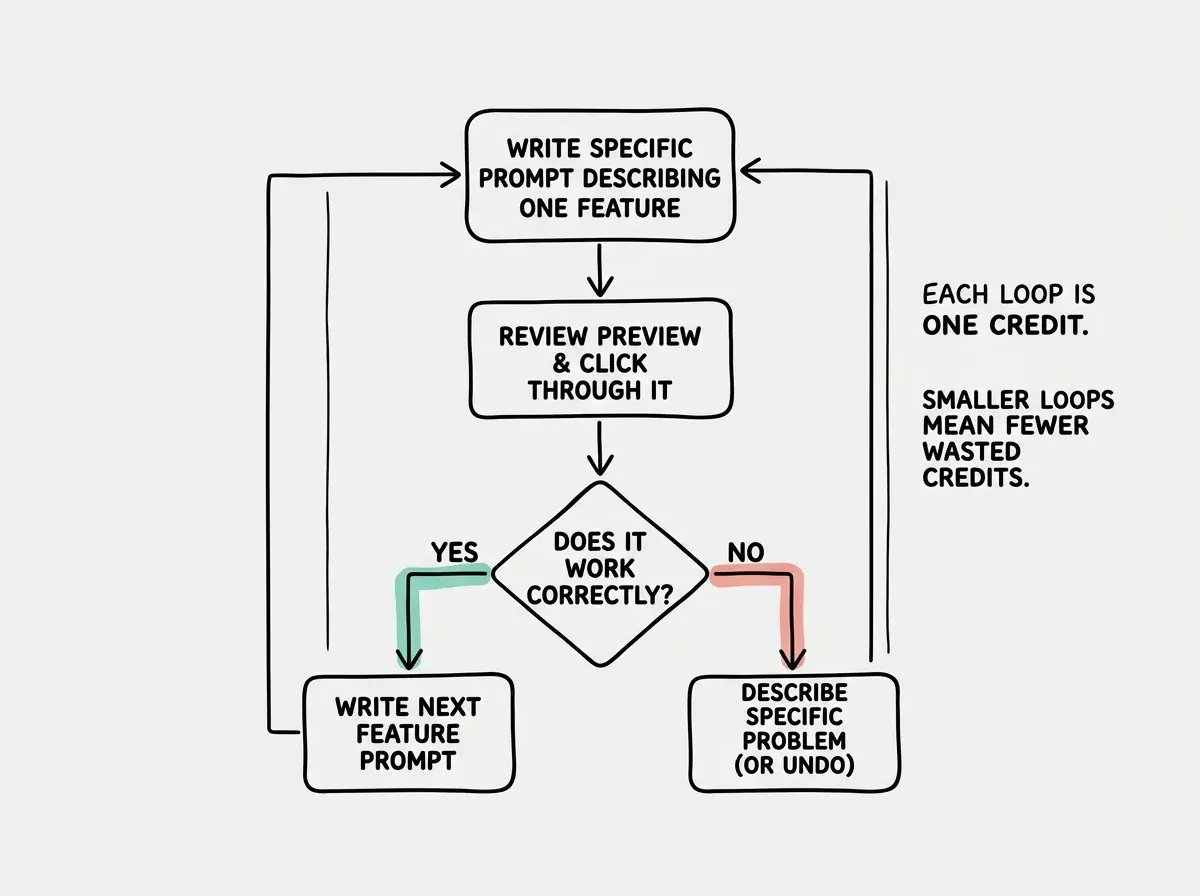
9. Iterate in small, testable steps. After each change, click through the preview and verify it works before asking for the next feature. If you stack five requests without checking, and something breaks, you do not know which change caused it. Small steps also mean easier rollbacks. Lovable keeps version history, and small increments make it obvious which version to revert to.
10. Use the "undo" button aggressively. Lovable tracks every change. If a prompt makes things worse, hit undo instead of trying to fix the fix. Fixing the fix costs another credit and often makes things more tangled. Undo is free, fast, and returns you to a known-good state. There is no shame in undoing three prompts in a row until you find the right instruction.
Saving Credits
Credits are real money. These five tips stretch your allocation further without slowing you down.
11. Write longer, more detailed prompts instead of short ones. A detailed first prompt that nails the feature in one shot costs one credit. Three short prompts that incrementally get closer cost three credits. Front-load your detail. Describe the layout, the behavior, the data model, the edge cases. One thorough prompt beats three lazy ones.
12. Use the edit mode for small changes. When you need to change a button label, swap a color, or adjust padding, use Lovable's code editor directly instead of prompting the AI. You can find the component in the file tree, make the edit yourself, and save. No credit spent. Reserve AI prompts for structural changes and new features where the AI adds genuine value.
13. Plan your session before you start prompting. Open a notes app and list the five or six features you want to build today. Order them by dependency. Write rough descriptions for each prompt before you type anything into Lovable. Planning costs zero credits. Discovering mid-session that you need to restructure costs several.
14. Do not ask Lovable to redesign the whole page. If you want to change the header, ask about the header. If the footer needs work, prompt about the footer. Full-page redesign prompts are expensive, unpredictable, and often break components that were working fine. Targeted prompts give targeted results.
15. Check the Supabase dashboard before blaming Lovable. When data does not appear, forms do not save, or login fails, the issue is often a Supabase configuration problem, not a Lovable code problem. Open your Supabase dashboard, check the table data, review the authentication settings, and look at the edge function logs. Diagnosing the real problem before prompting saves you from wasting credits on "fix the database" prompts that address the wrong layer.
Sending rapid-fire short prompts like "make it bigger," "no, smaller," "add some padding," "actually move it left." Each adjustment costs a full credit. Instead, batch your visual feedback into one detailed prompt: "Increase the card width to 320px, add 16px padding inside, and align it 24px from the left edge." One prompt, one credit, done.
Going Further
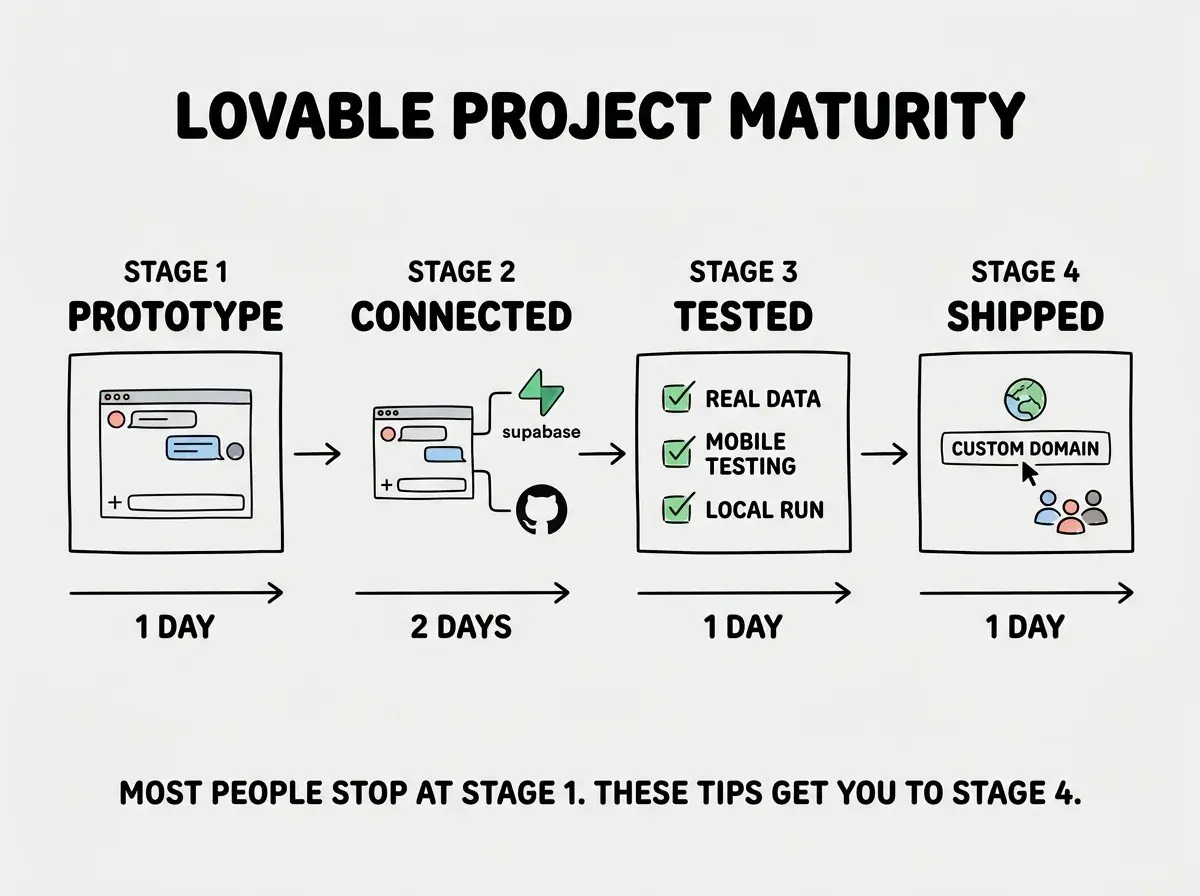
These tips separate people who build a prototype from people who ship a product.
16. Connect GitHub early, not after you finish. Lovable has built-in GitHub integration. Connect it to a repository from the beginning so every change is versioned. If you wait until the project is "done," you get a single massive commit with no history. Early GitHub connection gives you a safety net, makes collaboration possible, and lets you continue development in a real code editor later if you outgrow Lovable.
17. Export and run the code locally at least once. Even if you never plan to edit code yourself, pull the repository to your computer and run it locally with npm install and npm run dev. This proves the code actually works outside of Lovable's preview environment and catches dependencies on Lovable-specific infrastructure. It also gives you a backup that exists entirely on your machine.
18. Use Lovable for the frontend, Supabase for the logic. Complex business rules, calculations, and data processing belong in Supabase edge functions or database functions, not in AI-generated frontend code. The more logic you move to Supabase, the more reliable your app becomes. Frontend code generated by AI is harder to debug than backend functions with clear inputs and outputs.
19. Test with real data before you show anyone. Lovable's preview shows your app with the data you entered during development, which is usually one or two test entries. Create 50 realistic records. Enter names that are actually long. Upload images of varying sizes. Fill every optional field. Apps that look polished with two rows of data often fall apart visually with fifty.
20. Build a second small project before going big. Your first Lovable project teaches you the platform. Your second project teaches you your workflow. By the third project, you know exactly how to structure prompts, when to use the editor versus the AI, and how to plan a session that uses credits efficiently. Do not make your most important app your first app.
What This Means For You
Twenty tips is a lot to absorb at once. You do not need to memorize all of them. Start with three: connect Supabase first, write detailed prompts, and iterate in small steps. Those three alone will cut your build time roughly in half and dramatically reduce credit waste.
The builders who get real results from Lovable are not the ones with the best ideas. They are the ones who learned the platform's patterns and work with them instead of against them. These tips represent hundreds of hours of collective learning from the Lovable community, compressed into a list you can reference every time you start a new project.
Pick one tip you have not tried, apply it to your next build session, and see the difference yourself.
New to Lovable? Start with our complete beginner's guide covering features, pricing, and everything you need to build your first app.
Read the Full Lovable GuideWondering if Lovable is the right AI builder for your project? Read our side-by-side comparison of Lovable, Bolt, and Replit.
See How Lovable Compares