If you have used Bolt.new for more than a couple of sessions, you already know the feeling. You start a project, iterate on it for an afternoon, and then check your token balance to discover half your monthly allocation is gone. These Bolt.new tips come from builders who have learned (the expensive way) how to get real results without burning through tokens on prompts that go nowhere. About 92% of vibe coders now use AI tools daily, and the ones who last are the ones who learn to use them efficiently.
The difference between someone who builds a working app for $30 in tokens and someone who spends $500 on the same app is not talent. It is strategy. Everything in this guide is about spending less to get more.
How Bolt's Token Economy Actually Works
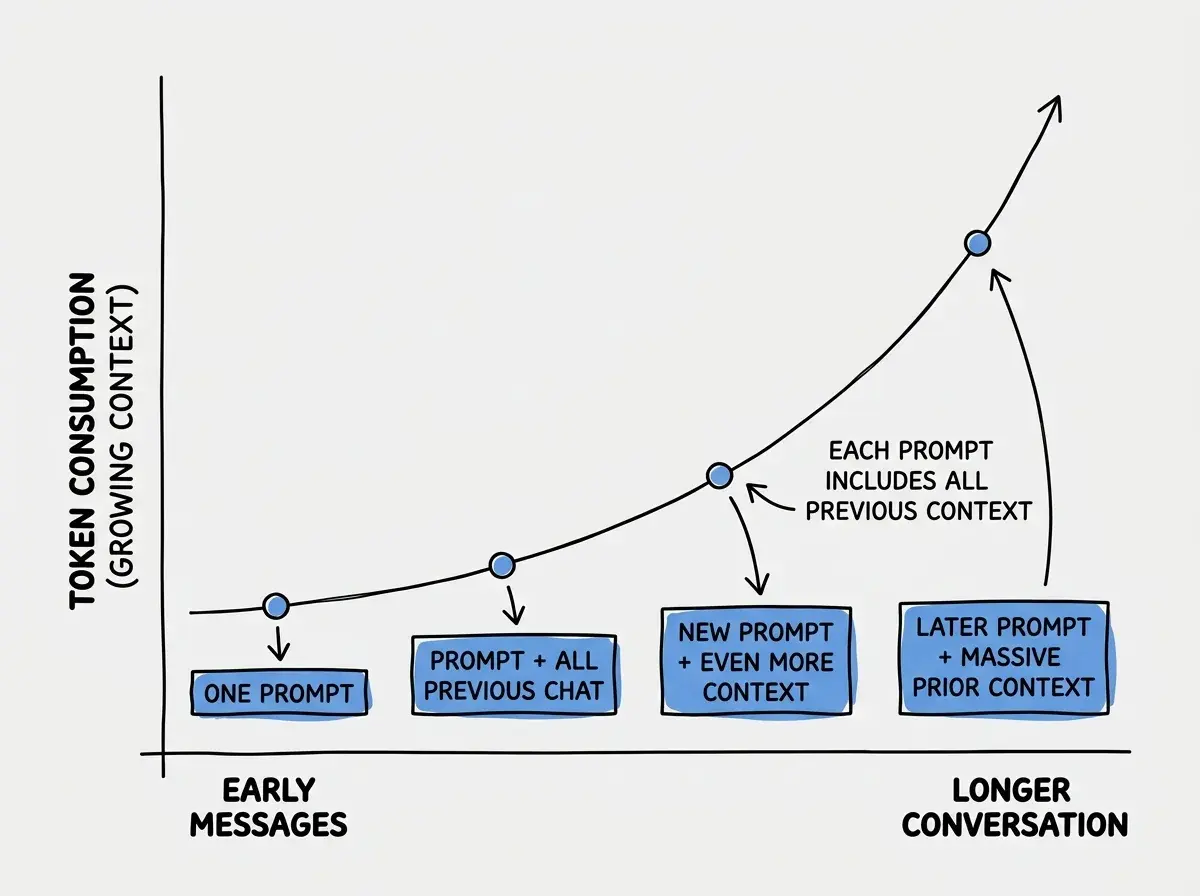
Before you can save tokens, you need to understand how they get consumed. Bolt.new charges tokens for every interaction between you and the AI. That includes the prompt you send, the full AI response, and every file the AI reads or writes during that response. Longer conversations mean more context gets sent with each prompt, which means each successive message costs more than the last.
This creates a compounding cost problem. Early in a project, a prompt might cost a few hundred tokens. An hour later, with twenty messages of conversation history, the same type of prompt costs several times more because the entire conversation is sent as context every time. By message thirty or forty, you are paying a premium just for the weight of the conversation.
The pricing tiers ($20/month Starter, $50/month Pro) include a fixed token allocation. When you exceed that allocation, you can purchase additional tokens, and those costs add up fast. Users on Reddit and Twitter regularly report spending $200 to $1,000+ on a single project because they did not realize how quickly tokens compound in long sessions.
Plan Before You Prompt
The single most effective Bolt.new tip is also the simplest. Spend ten minutes planning before you type your first prompt. Users who plan their projects in a separate document before opening Bolt consistently report saving 40 to 50% of their token spend compared to diving in and figuring it out as they go.
Here is what effective planning looks like. Before you open Bolt, write down three things in a plain text file or even on paper. First, a one-paragraph description of the complete app you want. Second, a list of every feature you need in the first version (and nothing more). Third, the tech stack you want to use, including framework, styling approach, and any key libraries.
Your first prompt to Bolt should contain all of this information in one comprehensive message. A detailed first prompt that describes the entire app, its features, and its tech stack will generate far better initial code than a vague "build me a habit tracker" prompt that you then spend twenty follow-up messages refining.
Think of it this way. If each prompt costs money, you want the first prompt to do as much work as possible. A prompt that takes you ten minutes to write but generates 80% of your app in one shot is dramatically cheaper than twenty quick prompts that each generate 5% of your app.
The One Thing at a Time Rule
After your initial comprehensive prompt, switch to the opposite strategy. Make each follow-up prompt about exactly one change. "Fix the login button alignment" is a good prompt. "Fix the login button alignment, add a dark mode toggle, and change the font" is a prompt that frequently causes Bolt to make mistakes on all three, which then costs you additional prompts to fix.
This sounds contradictory to the planning advice, but it is not. The first prompt should be comprehensive because you are establishing the foundation. Every prompt after that should be surgical because you are making targeted changes to an existing codebase. Mixing multiple changes in a single follow-up prompt is how you end up in a loop where fixing one thing breaks another, and each fix attempt costs more tokens.
Be specific. Instead of "the styling looks off," say "the header nav links should be horizontally aligned with 16px spacing between them, and the active link should have a blue underline." The more precisely you describe what you want, the fewer round trips you need, and each round trip is a token expense.
Use Screenshots Instead of Describing What You See
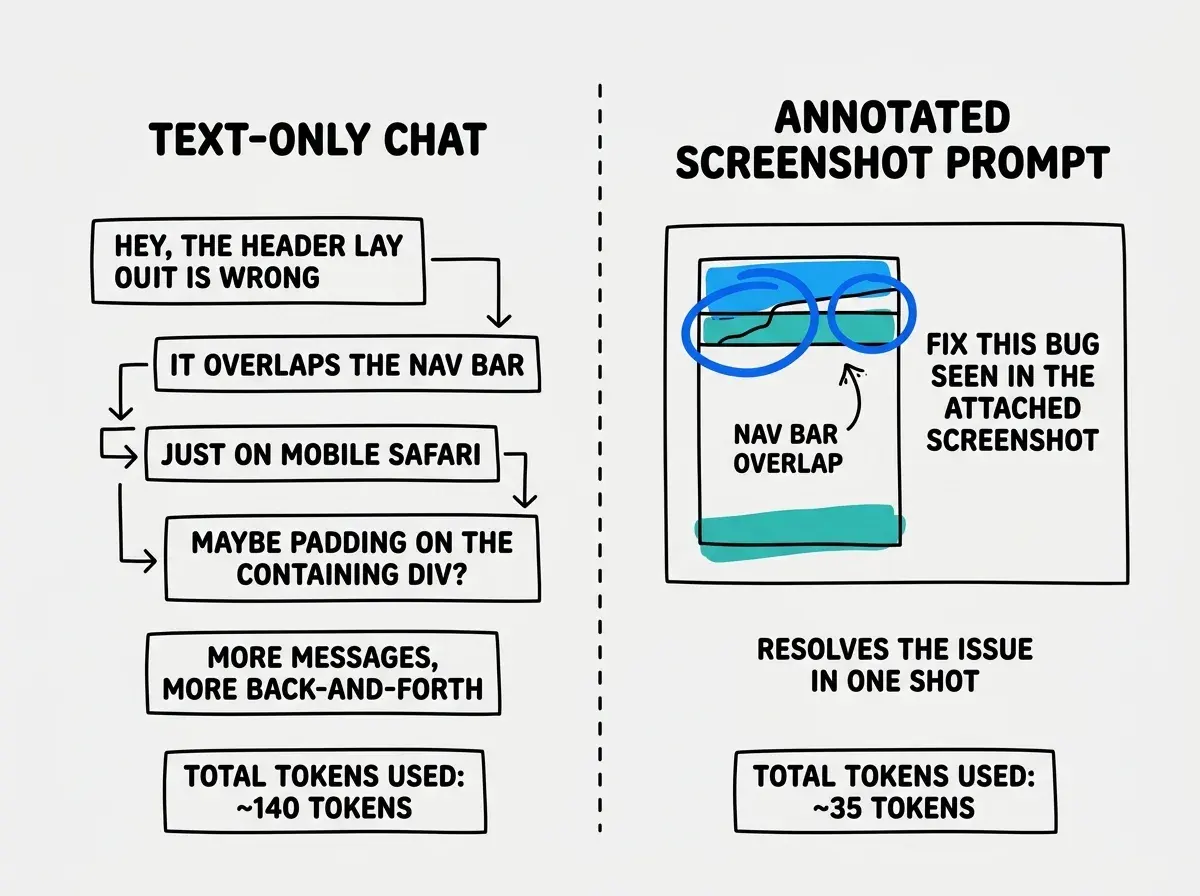
When something looks wrong in your Bolt preview, your instinct is to describe the problem in words. "The sidebar is overlapping the main content" or "the button is in the wrong position." The problem is that these descriptions are ambiguous, and the AI often interprets them differently than you intend. You end up going back and forth for three or four messages trying to get the AI to understand what you are seeing.
Bolt.new supports image attachments. Take a screenshot of the problem, paste it into the chat, and add a brief annotation like "the red circled area should be aligned with the header." One screenshot with a short note replaces three or four text-only messages. At the token prices Bolt charges, this habit alone can save you meaningful money over a project.
Know When to Export to Cursor
Bolt is excellent for rapid prototyping and getting a project started. It is expensive for detailed refinement. Once your app has its core features working and you are spending most of your prompts on small tweaks, bug fixes, and styling adjustments, that is your signal to export.
Download the project from Bolt (it gives you a zip file or GitHub integration), open it in Cursor or another local IDE, and continue there. Cursor's pricing model is based on a fixed number of requests per month regardless of conversation length, which makes it dramatically cheaper for the "polish and refine" phase of development. The export also gives you version control through Git, which means you can experiment freely without worrying about breaking things permanently.
The practical rule of thumb is this. Use Bolt to go from zero to a working prototype. Use Cursor (or another local tool) to go from working prototype to finished product. Trying to do the entire journey inside Bolt is where the $500 to $1,000 bills come from.
If you have not set up Cursor yet, our complete guide walks you through everything from installation to your first AI-assisted editing session.
Read the Complete Cursor GuideAvoiding the Regeneration Loop
The regeneration loop is the most expensive mistake Bolt users make. It works like this. You ask for a feature, the AI generates code with a bug, you ask the AI to fix the bug, the fix introduces a new bug, you ask for that to be fixed, and now you are five messages deep with a codebase that has layers of patches on top of patches. Each message costs more than the last because the conversation is getting longer, and the code quality is getting worse with every iteration.
When you notice this pattern starting (usually by the second or third fix attempt for the same feature), stop. Do not send another "fix this" prompt. Instead, read the code the AI generated and identify the root cause of the problem. Then write a single, detailed prompt that explains what is wrong and exactly how to fix it. "The authentication check on line 23 of auth.ts is comparing the raw password instead of the hashed version. Replace the comparison with bcrypt.compare()" will resolve in one message what "it is still not working" would take five messages to fix.
The moment you find yourself sending a third "fix this" prompt for the same issue, stop and read the code. One specific, informed prompt costs a fraction of what five vague debugging prompts cost, and it actually solves the problem.
When to Start Fresh vs. Fix What You Have
Sometimes a Bolt project goes sideways and you face a choice. Keep trying to fix it, or start a new project with better prompts. The sunk cost fallacy pushes most people toward "keep fixing," but that is often the more expensive option.
Start a new project when the core architecture is wrong. If your app is built with the wrong framework, has a fundamentally broken data model, or the file structure is a mess of AI-generated spaghetti, no amount of follow-up prompts will efficiently fix it. You are better off taking what you learned, writing a much better initial prompt, and generating a clean starting point.
Keep fixing when the foundation is solid but specific features have bugs. If the routing works, the data model makes sense, and the main UI is close to what you want, it is cheaper to fix individual issues than to regenerate everything.
The decision point is usually around message fifteen to twenty. If your app is working but imperfect at that point, keep refining. If it is fundamentally broken at that point, start over. The new project will cost fewer tokens because your first prompt will be better informed by everything you learned in the failed attempt.
Spending $200 in tokens trying to fix a broken project because you already spent $50 building it. The $50 is gone regardless. A fresh start with a better first prompt often costs $20 to $30 and produces better results than $200 of fixes on a broken foundation.
Tracking Your Costs
Bolt shows your remaining token balance, but it does not break down cost per message or cost per project. You need to track this yourself. Before starting a session, note your current token balance. When you finish, note it again. Log the difference in a simple spreadsheet alongside what you accomplished.
After a few projects, patterns emerge. You will see which types of prompts burn the most tokens and which sessions were efficient versus wasteful. Most people discover that their first session on any project is relatively cheap, while sessions where they are debugging or making many small changes are expensive. This data lets you make informed decisions about when to keep building in Bolt and when to export.
Set a per-project budget before you start. "I will spend no more than 20% of my monthly allocation on this project" is a simple rule that prevents the cost spiral. When you hit your budget, stop and export, even if the project is not finished. You can always continue in Cursor.
What This Means For You
Every token you spend in Bolt.new is an investment, and like any investment, the returns depend on your strategy. Plan before you prompt. Write one detailed first message instead of twenty vague ones. Use screenshots instead of text descriptions. Follow the one-thing-at-a-time rule for changes. Watch for the regeneration loop. Know when to export. Track your spending.
These are not complicated strategies. They are habits that separate builders who ship projects on budget from builders who end up in forum threads asking "is it normal to spend $500 on a single Bolt project?" It is normal if you do not have a strategy. It does not have to be.
If you have not used Bolt.new before, start with our complete guide that covers setup, features, and pricing before diving into optimization.
Read the Complete Bolt.new Guide