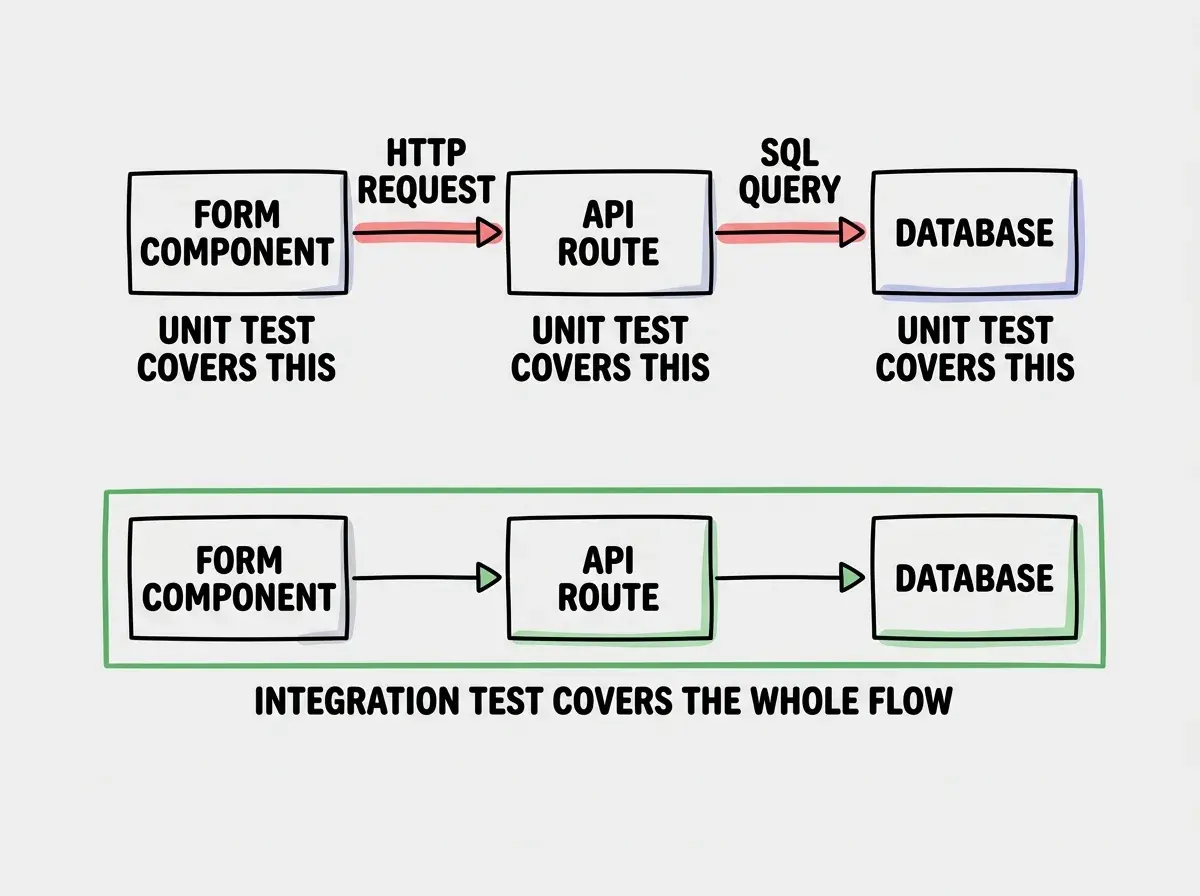
Integration testing is the practice of verifying that multiple components of your application work correctly when connected together. A unit test checks one function in isolation. An integration test checks whether that function, your API route, your database call, and the frontend form that triggered it all behave as a system. It is the layer of testing where real bugs live.
Why Unit Tests Are Not Enough
Unit tests are fast, focused, and genuinely useful. They tell you that a validation function handles null input. They tell you that a utility correctly formats a date. But they test each piece in isolation, with fake dependencies replacing the real ones. That isolation is the point of unit tests, and also the limitation.
The failure mode that unit tests cannot catch is this: every individual piece passes its tests, and the system still breaks when they run together. The validation function works correctly. The API route works correctly. The database query works correctly. But the API route passes data to the database in a format the schema does not expect, and the whole flow fails at runtime.
This happens constantly in AI-built apps. AI generates each component competently, in isolation. The function signatures match, the types look right, and everything passes unit tests. But AI rarely has a complete picture of the contract between layers. The mismatch lives at the boundary, and the boundary is exactly what integration tests cover.
A useful way to think about the three testing layers: unit tests check that individual functions behave correctly; integration tests check that connected components communicate correctly; end-to-end tests check that the full user flow works in a real browser. Unit tests run in milliseconds. End-to-end tests run in minutes. Integration tests sit in the middle, giving you high signal on the contracts between components at reasonable speed.
What Integration Tests Actually Check
The most valuable integration tests cover the paths data travels through your application. A form submission triggers an API call, the API call writes to a database, the database returns a result, and the API returns a response the frontend can use. That is a chain of four components. An integration test verifies the whole chain.
The specific things integration tests catch that unit tests miss fall into a few categories.
Data shape mismatches. Your API handler expects { userId: string } but your frontend sends { user_id: string }. Every unit test for both sides passes. The integration fails.
Missing error propagation. A database write fails silently. The API returns a 200 anyway. The user thinks their data was saved. An integration test that checks the full flow catches this; a unit test on the API handler alone will not.
Middleware side effects. An authentication middleware mutates the request object in a way a downstream handler does not account for. The handlers pass unit tests in isolation. Connected, they fail.
Database constraint violations. A function generates data that looks valid in a unit test but violates a unique constraint or foreign key relationship when it actually hits the database. Integration tests with a real (or realistic) database surface this immediately.
For AI-built applications specifically, these boundary failures are the most common source of production bugs. AI generates each layer correctly within its own context. It does not always get the contracts between layers right.
There is also a class of bug that only emerges under real load patterns: a function that works fine when called once but corrupts state when called in rapid succession, or a database query that works correctly against an empty table but slows to a crawl with real data volumes. Integration tests with seeded test data start exposing these issues far earlier than unit tests can.
Writing Your First Integration Test
The best setup for integration testing in a Next.js or Vite project is Vitest with MSW (Mock Service Worker) for API mocking. Vitest handles the test runner; MSW intercepts HTTP requests at the network level so you test real fetch calls without needing a live server.
Why MSW over mocking fetch directly? Because MSW intercepts at the service worker level (in browsers) and at the Node.js native fetch level (in tests). Your component code does not change. It calls fetch exactly as it would in production. MSW sits in the network layer and returns whatever response you configure. This means your tests exercise the same request-building code your users will trigger, including URL construction, headers, and request body serialization.
Install the dependencies.
npm install -D vitest @vitest/ui jsdom
npm install -D @testing-library/react @testing-library/jest-dom
npm install -D msw
Initialize MSW.
npx msw init public/ --save
Create your MSW server setup at src/test/server.ts.
import { setupServer } from 'msw/node'
import { http, HttpResponse } from 'msw'

export const server = setupServer()
Add the server lifecycle to your Vitest setup file at src/test/setup.ts.
import '@testing-library/jest-dom'
import { server } from './server'

beforeAll(() => server.listen())
afterEach(() => server.resetHandlers())
afterAll(() => server.close())
Now write the integration test. This example tests a contact form: the user fills it out, submits it, the form hits the API, and the UI shows a success message.
import { render, screen, fireEvent, waitFor } from '@testing-library/react'
import { http, HttpResponse } from 'msw'
import { server } from '../test/server'
import { ContactForm } from './ContactForm'

describe('ContactForm integration', () => {
  it('submits the form and shows a success message', async () => {
    // Set up the API handler
    server.use(
      http.post('/api/contact', async ({ request }) => {
        const body = await request.json() as { email: string; message: string }

        // Verify the shape of data the frontend actually sends
        if (!body.email || !body.message) {
          return HttpResponse.json({ error: 'Missing fields' }, { status: 400 })
        }

        return HttpResponse.json({ success: true }, { status: 200 })
      })
    )

    render(<ContactForm />)

    // Fill the form
    fireEvent.change(screen.getByLabelText('Email'), {
      target: { value: 'user@example.com' }
    })
    fireEvent.change(screen.getByLabelText('Message'), {
      target: { value: 'Hello there' }
    })

    // Submit
    fireEvent.click(screen.getByRole('button', { name: 'Send' }))

    // Verify the UI responds correctly
    await waitFor(() => {
      expect(screen.getByText('Message sent successfully')).toBeInTheDocument()
    })
  })

  it('shows an error when the API returns 400', async () => {
    server.use(
      http.post('/api/contact', () => {
        return HttpResponse.json({ error: 'Invalid email' }, { status: 400 })
      })
    )

    render(<ContactForm />)

    fireEvent.change(screen.getByLabelText('Email'), {
      target: { value: 'bademail' }
    })
    fireEvent.click(screen.getByRole('button', { name: 'Send' }))

    await waitFor(() => {
      expect(screen.getByText('Invalid email')).toBeInTheDocument()
    })
  })
})
This test does more than a unit test can. It verifies that the form component actually calls the API endpoint, that it sends data in the correct shape, that it handles the API response correctly, and that it updates the UI based on what the API returns. Any mismatch between the form and the API breaks this test, which is exactly the point.
MSW intercepts HTTP requests at the network level, not by mocking the fetch function. This means your integration tests exercise the actual request-building code in your component, not a mocked version of it. When your frontend sends data in the wrong shape, MSW catches it. When your error handling is missing, the test fails. This is significantly more realistic than mocking fetch directly.
Testing Database, API, and Frontend Together
For the most realistic integration tests, you want to test against something closer to a real database rather than a mocked response. There are two practical approaches depending on your project setup.
Option 1: In-memory database. If you are using SQLite (directly or via an ORM like Drizzle or Prisma), you can spin up an in-memory database for your test suite. Every test gets a fresh database, migrations run at the start of the suite, and tests write and read real data.
import Database from 'better-sqlite3'
import { drizzle } from 'drizzle-orm/better-sqlite3'
import { migrate } from 'drizzle-orm/better-sqlite3/migrator'

let db: ReturnType<typeof drizzle>

beforeAll(async () => {
  const sqlite = new Database(':memory:')
  db = drizzle(sqlite)
  await migrate(db, { migrationsFolder: './drizzle' })
})

afterEach(async () => {
  // Clean up between tests
  await db.delete(contacts)
})
Option 2: Test database environment. For PostgreSQL or MySQL, point your test suite at a separate test database using a .env.test file. Most CI environments can spin up a Postgres container. Locally, you run a Docker container alongside your dev server.
# .env.test
DATABASE_URL=postgresql://localhost:5432/myapp_test
With Vitest, you can load environment-specific config.
// vitest.config.ts
import { defineConfig } from 'vitest/config'

export default defineConfig({
  test: {
    environment: 'node',
    env: {
      NODE_ENV: 'test',
    },
    setupFiles: ['./src/test/setup.ts'],
  },
})
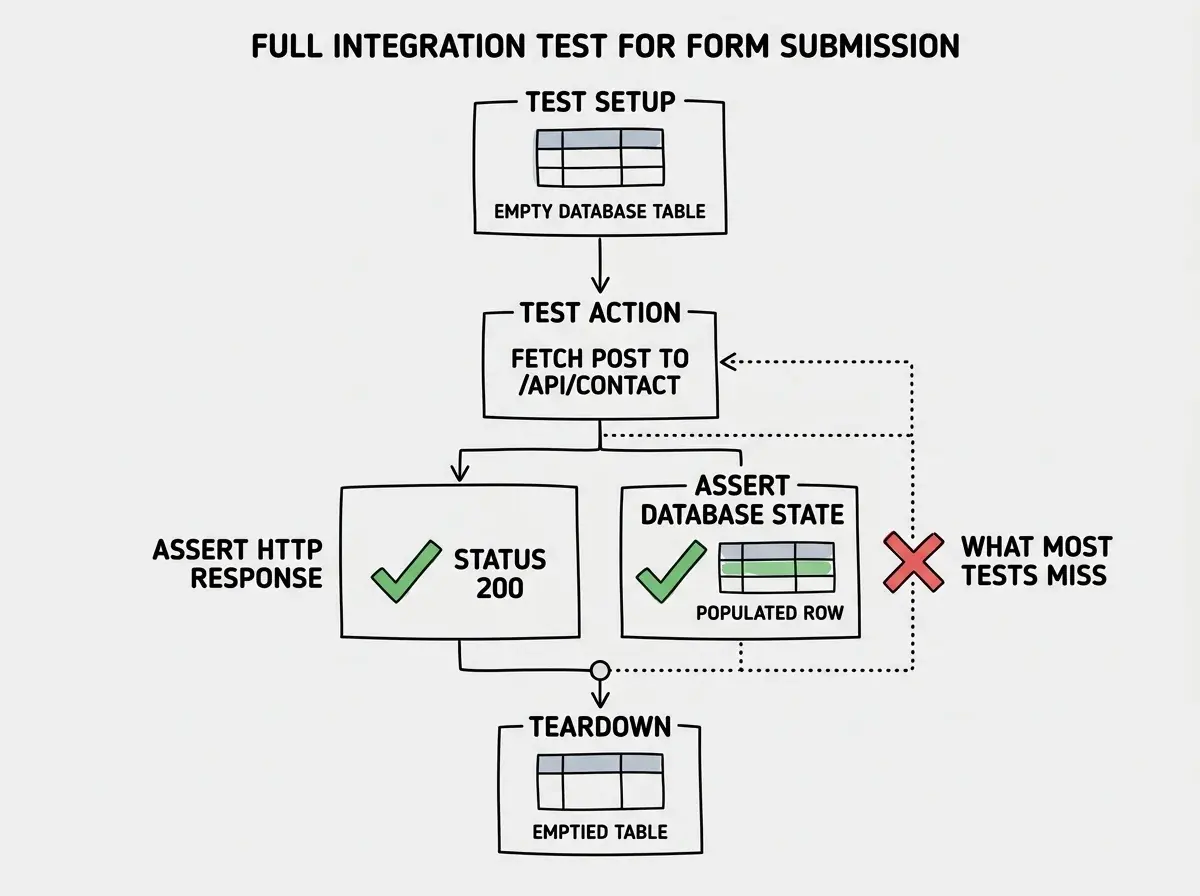
A full database integration test for a form submission flow looks like this.
describe('POST /api/contact', () => {
  it('saves the submission and returns success', async () => {
    const response = await fetch('http://localhost:3000/api/contact', {
      method: 'POST',
      headers: { 'Content-Type': 'application/json' },
      body: JSON.stringify({
        email: 'user@example.com',
        message: 'Integration test message',
      }),
    })

    expect(response.status).toBe(200)

    const body = await response.json()
    expect(body.success).toBe(true)

    // Verify it was actually saved to the database
    const saved = await db.select().from(contacts)
      .where(eq(contacts.email, 'user@example.com'))

    expect(saved).toHaveLength(1)
    expect(saved[0].message).toBe('Integration test message')
  })

  it('rejects submissions with missing fields', async () => {
    const response = await fetch('http://localhost:3000/api/contact', {
      method: 'POST',
      headers: { 'Content-Type': 'application/json' },
      body: JSON.stringify({ email: 'user@example.com' }), // missing message
    })

    expect(response.status).toBe(400)

    // Confirm nothing was written to the database
    const saved = await db.select().from(contacts)
    expect(saved).toHaveLength(0)
  })
})
The second assertion in the success test is the important one: checking that the data was actually persisted. Many API handlers return a success response without confirming the database write succeeded. This test catches that bug directly.
Testing an API route by only checking the HTTP response status. A handler can return 200 and fail silently on the database write. An integration test that checks both the response AND the database state is the only way to verify the full operation completed. For any endpoint that mutates data, always add an assertion that queries the database after the request.
What This Means For You
The value of integration testing varies depending on where you are in your development practice.
If you are a founder or indie hacker building with AI: Integration tests are the highest-leverage tests you can write. You probably do not have time for comprehensive unit tests, and end-to-end tests take too long to iterate on. Integration tests catch the bugs that matter most (broken flows, missing error handling, data not saving) in a few seconds per run. Focus on one integration test per critical path: signup, checkout, core feature.
If you are a career changer or student: Understanding the boundaries between layers is one of the most valuable things you can learn right now. Integration tests make those boundaries visible. Write them even when you do not have to. The feedback will teach you more about how systems fit together than reading any tutorial.
If you are a senior developer managing AI-generated codebases: Integration tests are your most reliable signal that AI-generated changes did not break the contracts between layers. Add them to your review checklist. Before merging any AI-generated change that touches more than one layer, ask whether there is an integration test covering the boundary that changed.
The practical starting point for any of these situations is the same: identify the most important flow in your application, the one that, if broken, would be the worst possible user experience. Write one integration test that covers that flow end to end (within your backend, from HTTP request to database confirmation). Run it on every commit. Fix it when it fails.
One test covering one critical path is more valuable than a comprehensive test suite nobody runs.
Build confidence in your AI-generated code with hands-on testing patterns.
Explore all guidesClosing Thoughts
Unit tests and integration tests are not competing approaches. They answer different questions. Unit tests tell you a function handles its inputs correctly. Integration tests tell you the functions that depend on each other actually work when connected.
For AI-built applications, integration tests are especially important because AI generates each layer competently but does not always get the boundaries right. The most common production bugs in AI-built apps are not logic errors inside a single function; they are shape mismatches and missing error handling at the connections between components.
Writing integration tests is the practice that makes those connections visible before your users find them.
Integration tests are one layer. See how all three layers of testing fit together.
See the full guide