Input validation security is the single most skipped step in AI-generated code. 92% of developers now use AI tools daily, and Veracode's research shows 45% of that output ships with exploitable vulnerabilities. AI builds the feature, the feature works in testing, and nobody checks whether it handles malicious input. That gap is where attackers walk in.
What Untrusted Input Actually Means
Untrusted input is any data that originates outside your server-side code. Form submissions, URL parameters, API request bodies, webhook payloads, cookies. Even data from your own frontend is untrusted, because an attacker can bypass your frontend entirely and send requests directly to your API.
Your frontend is a suggestion. Your backend is the law. A user can open browser dev tools, modify any form field, alter request headers, and send whatever they want to your server. Your React validation, your HTML required attributes, your character limits in the UI, none of that matters if the server does not independently verify every value it receives.
AI coding tools almost never generate server-side validation unless you explicitly ask for it. They build the happy path. The form collects a name, email, and message. The API route receives those values and writes them to the database. It works when the input is what you expect. It breaks catastrophically when it is not.
The Attack Vectors You Need to Know
Three attack types exploit missing input validation more than any others. Each one has been around for decades, and each one shows up constantly in AI-generated code.
SQL injection happens when user input gets embedded directly into a database query string. An attacker types a value that changes the query itself, turning a simple lookup into a command that dumps the entire user table or grants admin access. Parameterized queries prevent this completely, but AI tools default to string concatenation because it is the most common pattern in their training data.
Cross-site scripting (XSS) happens when user input gets rendered as HTML in the browser without sanitization. A comment containing a script tag executes in every visitor's browser, stealing session cookies or redirecting to phishing pages. React escapes output by default, but dangerouslySetInnerHTML and server-rendered templates bypass that protection.
Prototype pollution happens when user input modifies the prototype chain of JavaScript objects. If your code merges user-supplied JSON using a deep merge function, an attacker can inject a __proto__ property that adds malicious values to every object in your application. This can bypass authentication checks or escalate privileges. AI tools almost never guard against it.
Every piece of data entering your application from the outside world is a potential attack vector. SQL injection, XSS, and prototype pollution all exploit the same root cause: code that processes user input without verifying its type, format, and content first. Input validation is not an extra feature. It is a requirement for any application that accepts data from users.
Using Zod for Runtime Validation
TypeScript types disappear at runtime. Your type UserInput = { email: string; age: number } tells the compiler what to expect, but it does nothing when an actual request hits your server. At runtime, that request body could contain anything. This is where Zod comes in.
Zod is a schema validation library that checks data at runtime. You define a schema describing the shape and constraints of valid input, then parse incoming data against it. If the data matches, you get a typed, validated object. If not, you get structured error messages explaining exactly what failed.
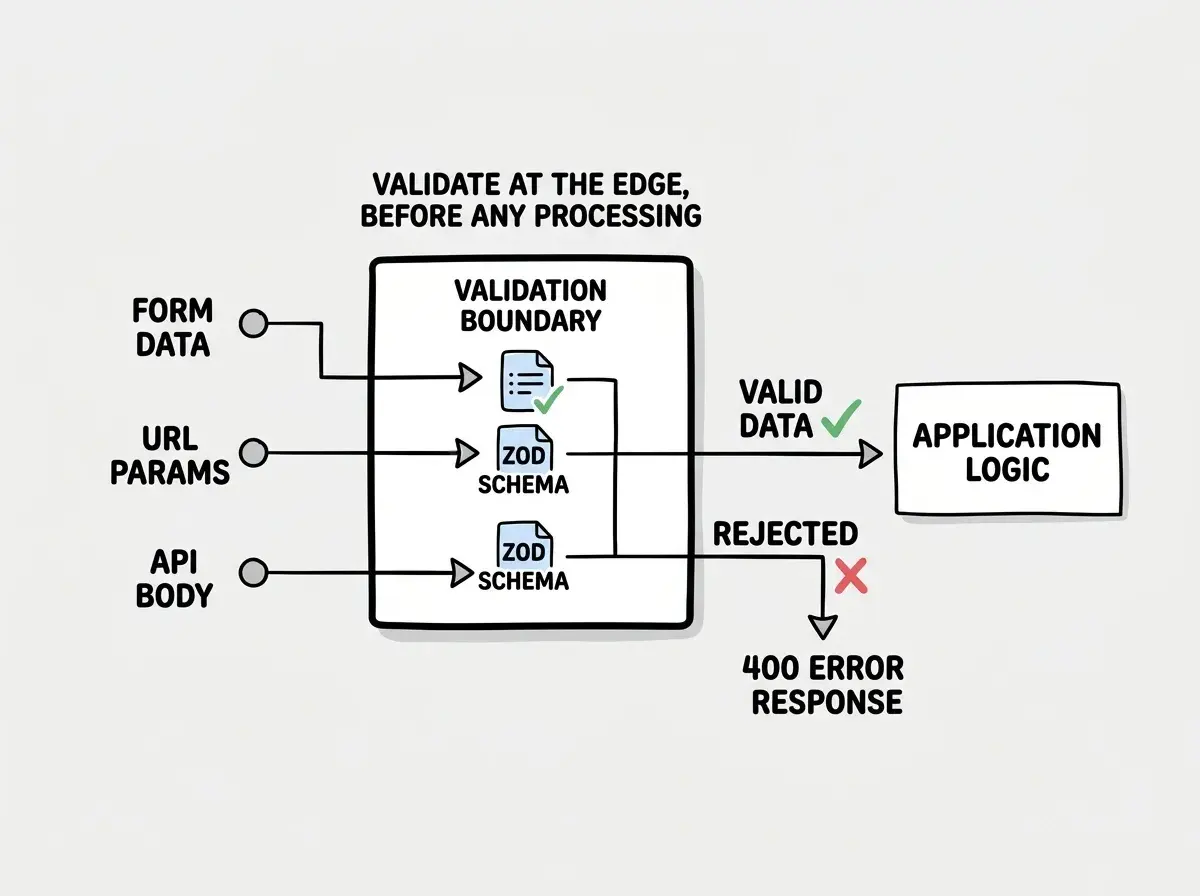
For a contact form, you define a Zod schema specifying that name must be a string between 1 and 100 characters, email must be a valid email format, and message must be between 10 and 5000 characters. In your API route, parse the request body against that schema before doing anything else. Parsing fails? Return a 400 with the validation errors. Passes? Proceed with validated data.
This gives you runtime type checking, automatic TypeScript type inference, and structured error messages you can send back to the client. All from one schema definition.
The critical detail is where you put the validation. It goes at the boundary, the exact point where external data enters your system. For API routes, that means the first lines of your handler function. For form submissions, that means both the client (for UX) and the server (for security). For URL parameters, that means parsing them before using them in queries or rendering.
Validation vs Sanitization
These two concepts are related but different. Mixing them up creates false confidence.
Validation checks whether data meets your requirements and rejects it if it does not. "Is this a valid email? Is this number between 1 and 100?" If not, validation stops processing and returns an error.
Sanitization transforms data to make it safe. "Strip HTML tags. Escape special characters." Sanitization does not reject bad input. It cleans it up and lets it through.
You need both, but validation comes first. If you only sanitize without validating, you might clean up an attack payload but still process data that makes no sense for your application, like a negative number for a quantity field or a 50,000-character name. AI tools tend to skip both. When they do add protection, they add sanitization without validation, which stops XSS but not logic bugs or data corruption.
Where to Validate in Your Application
Input validation must happen at every system boundary. Not just forms. Here are the specific places you need to check.
API route handlers. Every endpoint that accepts a request body, query parameter, or URL parameter needs validation at the top of the function. Parse and validate before you touch the database or perform any logic.
Form submissions. Validate on the client for user experience and on the server for security. Never treat client-side validation as a security measure. It is a UX feature only.
URL and query parameters. If your page reads ?page=2 or ?sort=price, validate that page is a positive integer and sort is one of your allowed values. An attacker can put anything in URL parameters, including page=DROP TABLE users.
Webhook payloads. If your app receives webhooks from Stripe or GitHub, verify the webhook signature first, then validate the payload body against a schema before processing.
Environment variables at startup. Validate your environment variables when your application starts. If a required API key is missing or a URL is malformed, fail immediately with a clear error instead of failing later when a user triggers that code path.
Relying on client-side validation for security. HTML form attributes like required and maxlength, React form libraries, and JavaScript validation in the browser are all UX features. They improve the user experience by giving instant feedback. They provide zero security because any attacker can bypass the browser entirely and send raw HTTP requests to your API. Every validation check that matters for security must run on the server.
What Happens Without Validation
The consequences are specific and predictable.
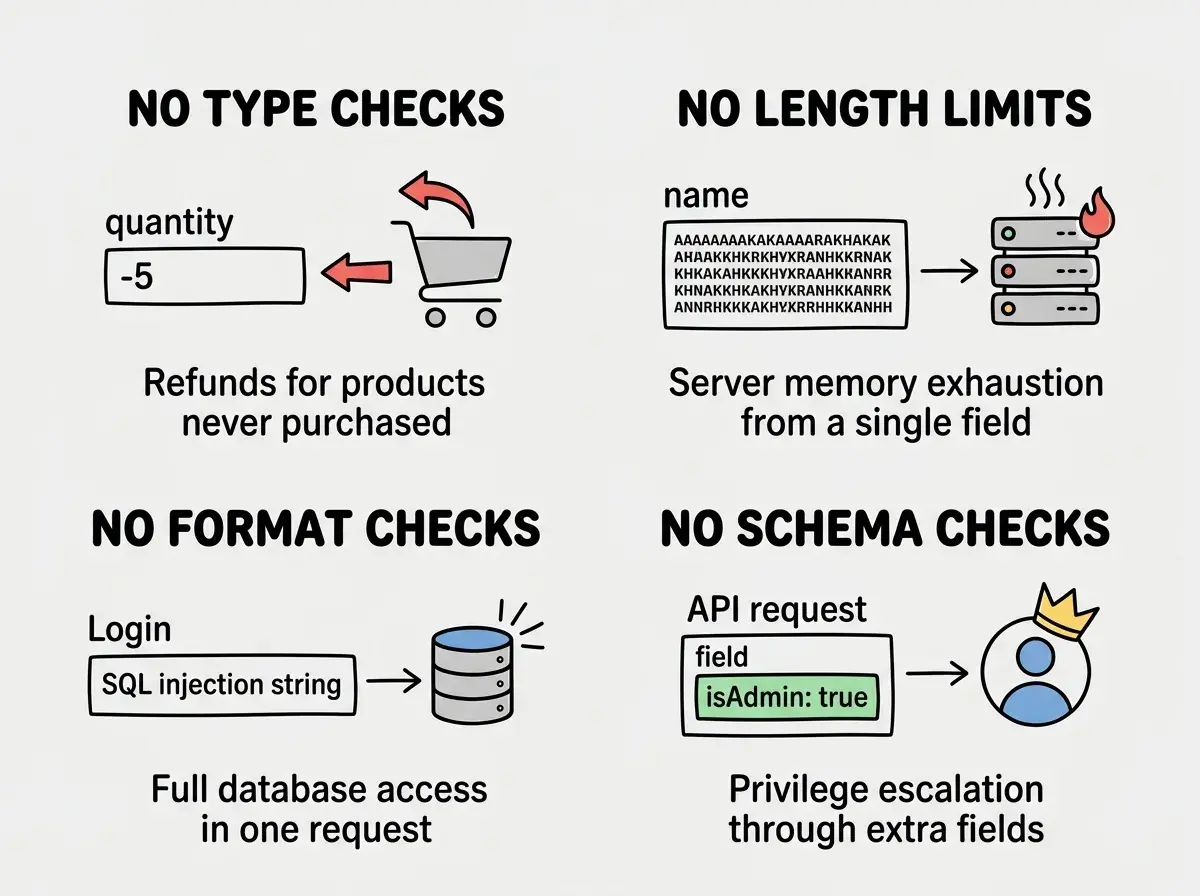
Without type validation, a string in a number field crashes your app or produces wrong calculations. An e-commerce app that does not validate quantity as a positive integer can process orders for negative quantities, issuing refunds for products never purchased.
Without length validation, an attacker submits megabytes in a single form field, consuming server memory and causing denial of service.
Without format validation, SQL injection and XSS become trivial. Automated scanners run these tests against every publicly accessible application, constantly.
Without schema validation, an attacker sends unexpected fields your code processes in unintended ways. A user update endpoint that merges the request body into the database record without checking which fields are present lets an attacker add isAdmin: true to their request.
Start with the full survival guide that covers every critical security check for AI-built apps.
Read the security survival guideA Practical Validation Pattern
Here is the pattern I use in every project. Create a validation utility that takes a Zod schema and request data, runs the parse, and either returns validated data or throws a structured error. Use that utility as the first line of every API route handler. This keeps validation consistent and makes it impossible to forget.
For forms, define Zod schemas once in a shared file. Import into your React form for client-side validation and into your API route for server-side validation. One schema, two enforcement points, zero drift between them.
For URL parameters, create small Zod schemas for each page. A pagination schema validates page as a positive integer with a default of 1. A sort schema validates sortBy as one of your allowed column names. The overhead is minimal. A few lines of code per schema, one function call per request, and comprehensive protection against entire categories of attacks.
What This Means For You
Input validation is not optional and it is not something you add later. It is the first line of defense between your application and every piece of data that enters it from the outside world. AI tools skip it because their training data skips it. That makes it your responsibility.
- If you are shipping a product: Every unvalidated input is a door you left unlocked. Automated scanners will find your endpoints and test them regardless of how small your app is. Add Zod schemas to every API route this week. A few hours of work prevents entire categories of attacks.
- If you are an indie hacker: Speed matters, but so does not getting your database dumped three weeks after launch. Build the validation pattern once, reuse it everywhere, and make it part of your workflow. The time investment is tiny compared to recovering from a security incident.
- If you are a senior dev using AI tools: You already know this, but the AI does not. Every time you accept generated code that handles user input, check for validation at the boundary. The AI builds the happy path and leaves the door wide open for everything else.
This is part of Security from Scratch, covering every vulnerability AI tools introduce.
Start from the beginning