Imagine a warehouse that expands when a shipment arrives and shrinks back down when the trucks leave. You only pay for the square footage you actually used, not the entire building sitting empty at 3 AM. That is Neon Postgres serverless in a sentence. It is fully managed Postgres that scales compute up and down automatically, including all the way to zero, so your database stops costing money when nobody is using it.
With 92% of developers now using AI tools daily, the projects being shipped have changed. People spin up apps in an afternoon, test ideas over a weekend, and abandon half of them by Monday. Traditional database provisioning, where you pick a server size and pay for it 24/7, does not match that rhythm. Neon does.
What Makes Neon Different
Neon is not just "Postgres in the cloud." You can get that from a dozen providers. What sets Neon apart is a storage architecture built from scratch around the idea that compute and storage should be completely independent. Traditional managed Postgres ties your CPU and memory to your disk. Neon separates them so each can scale independently.
Think of the elastic warehouse again. The loading docks (compute) can open and close as needed, while the shelving (storage) stays organized regardless. You are not paying for idle forklifts when no shipments are coming in.
This architecture enables three features that matter most for builders shipping with AI tools.
Database Branching Like Git
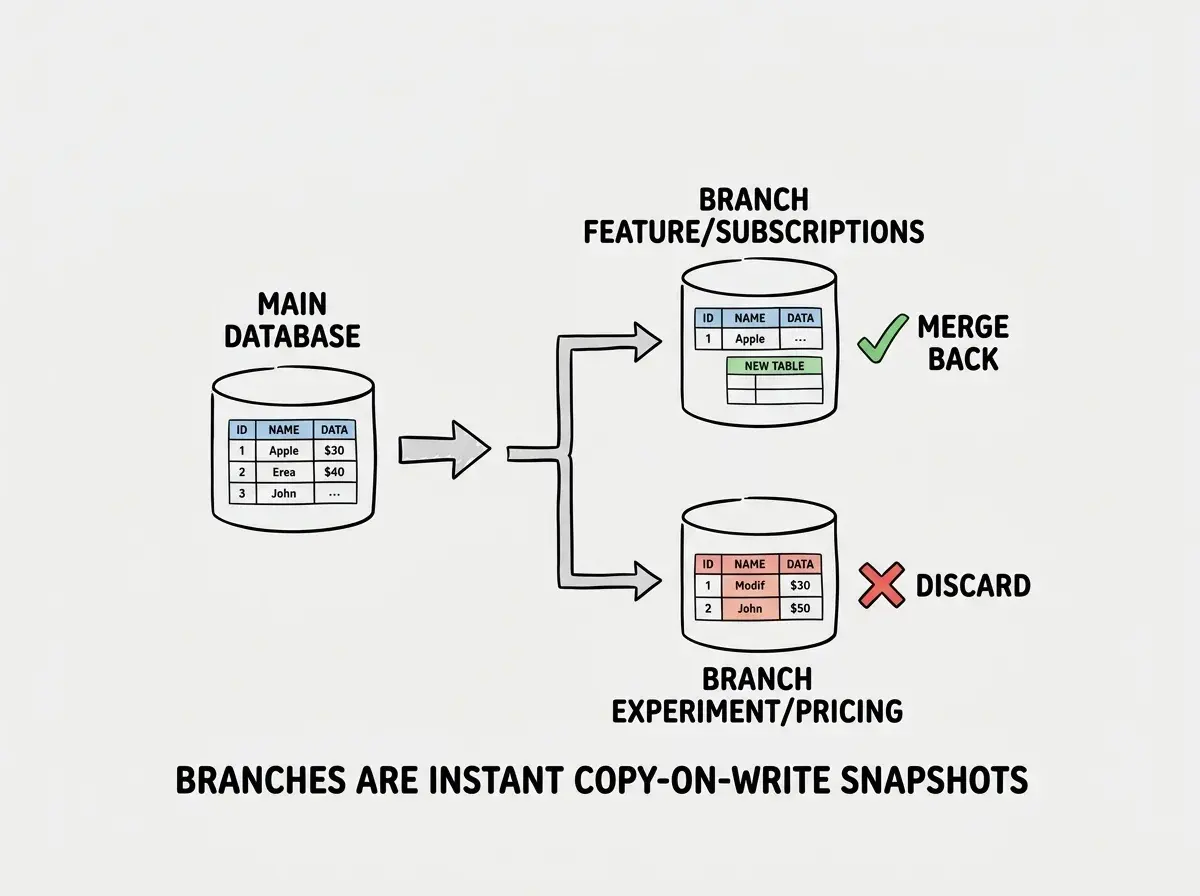
This is Neon's headline feature, and it genuinely changes how you work with databases. You can create a branch of your entire database, including schema and data, in under a second. The branch is a copy-on-write snapshot, so it does not duplicate your storage. It uses the same underlying pages until you start making changes.
Why does this matter? Because when you are iterating on a feature with Cursor or Claude Code, you often need to test schema changes, seed different data, or try a migration before committing to it. With traditional Postgres, you either run changes against your dev database and hope for the best, or you maintain a separate staging database that drifts from production.
With Neon branching, you spin up a branch, run your migrations, test them, and either merge the changes or throw the branch away. It feels like creating a git branch for your code, except it is your entire database. Each branch gets its own connection string, so you can point different environments at different branches without any configuration gymnastics.
The practical workflow looks like this. You create a branch called feature/subscriptions, run your Drizzle or Prisma migration against it, test your app, and verify everything works. If it does, apply the same migration to your main branch. If it breaks something, delete the branch and start over. Zero risk to your production data.
Auto-Scaling to Zero
Most serverless databases scale down but not to zero. Neon actually suspends your compute endpoint when there is no activity, and you pay nothing for compute during that time. When a connection comes in, the compute wakes up in under a second.
For the elastic warehouse analogy, this is like turning off the lights and sending all the workers home when no shipments are scheduled. The building is still there, but you are not running the electricity bill for an empty floor.
The cold start penalty is real but manageable. Neon's wake-up time sits around 500 milliseconds to 1 second. For a production app with constant traffic, this never triggers because the compute stays warm. For side projects, staging environments, and preview deployments, scaling to zero means you can have dozens of database branches running without paying for idle compute on any of them.
This is where Neon fits the AI builder workflow perfectly. You spin up projects fast, you have multiple experiments running in parallel, and most of them sit idle 90% of the time. Paying for a provisioned database on each one would add up quickly.
Connection Pooling Built In
Serverless functions and database connections have always been a messy pairing. Each function invocation wants its own connection, and Postgres has a hard limit on concurrent connections. The classic fix is running PgBouncer as a sidecar, which works but adds another piece of infrastructure to manage.
Neon includes a built-in connection pooler that works automatically. You get two connection strings for each database: a direct connection for long-running processes like migrations, and a pooled connection for serverless functions and short-lived queries. No extra setup, no PgBouncer configuration files, no additional billing.
If you are deploying to Vercel, Cloudflare Workers, or any serverless platform, the pooled connection string is what you use in your app. It handles the connection lifecycle for you, opening and closing connections from a shared pool rather than hammering Postgres with hundreds of direct connections.
Neon Postgres serverless solves the three biggest pain points of running Postgres in serverless environments: connection pooling is built in rather than bolted on, compute scales to zero so you stop paying for idle databases, and branching gives you isolated environments for every feature without duplicating storage costs. For AI-built apps where you are iterating fast and running multiple experiments, this combination is hard to beat.
Drizzle and Prisma Integration
Neon works with both major TypeScript ORMs without friction. For Drizzle, you use the @neondatabase/serverless driver with Drizzle's postgres adapter. The setup is about five lines of code. For Prisma, you use the Neon adapter as a driver, which routes Prisma queries through Neon's serverless driver instead of the default TCP connection.
Both integrations support the pooled connection string, which is what you want for serverless deployments. The direct connection string works for migrations, where you need a persistent connection that does not go through the pooler.
The important detail is that Neon speaks standard Postgres wire protocol. Any tool, ORM, or library that works with Postgres works with Neon. You are not locked into a proprietary query language or a custom SDK. If you move to a different Postgres provider later, your application code stays the same.
How Neon Compares to Supabase and PlanetScale
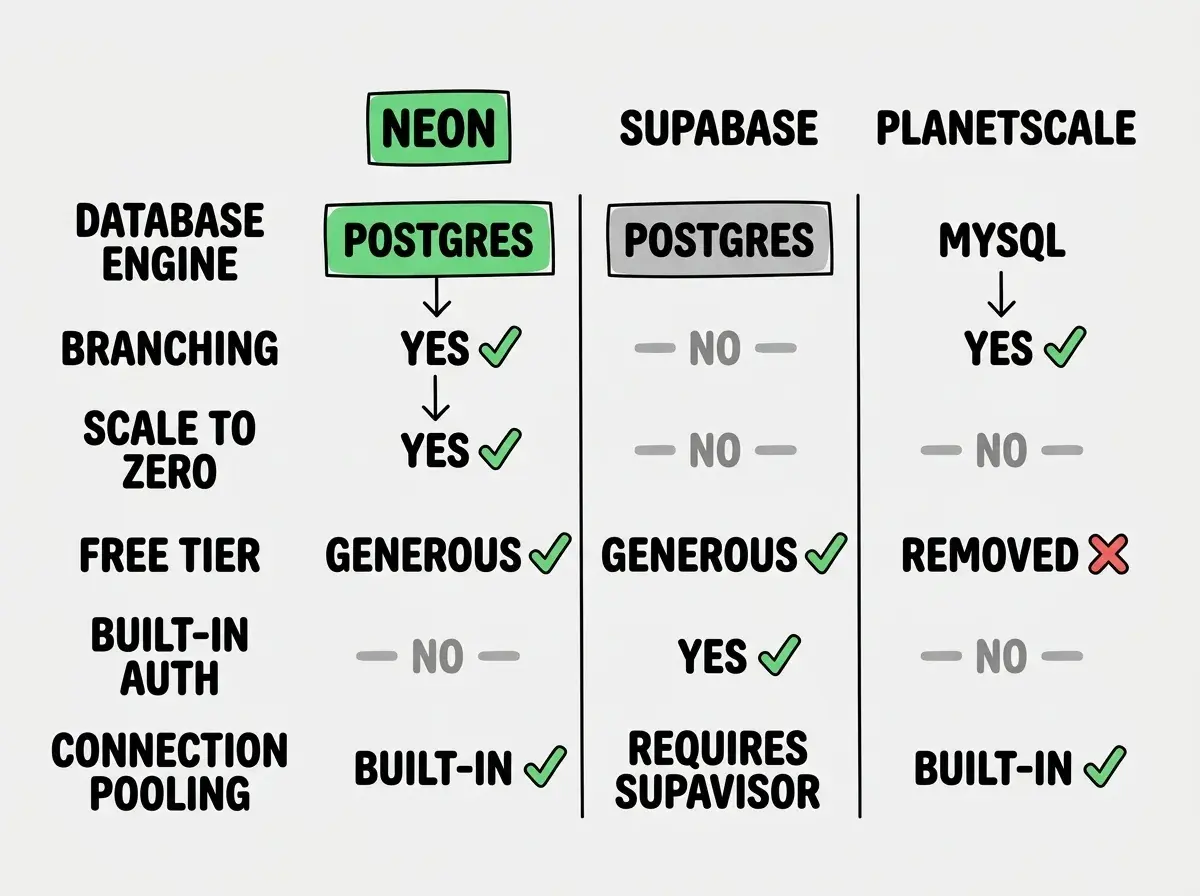
Neon vs Supabase. Supabase bundles Postgres with authentication, storage, edge functions, and a real-time engine. It is a platform, not just a database. Neon is purely a database service. If you want a full backend-as-a-service, Supabase gives you more out of the box. If you want the best possible managed Postgres experience with branching and auto-scaling, Neon is more focused and (arguably) more polished on the database layer itself. Supabase does not offer database branching or scale-to-zero compute.
Neon vs PlanetScale. PlanetScale originally offered MySQL with a branching workflow similar to Neon's. However, PlanetScale removed their free tier in 2024 and has shifted focus toward enterprise customers. Neon's free tier is generous (0.5 GiB storage, 190 compute hours per month), and the branching experience on Postgres is at least as good as what PlanetScale offered on MySQL. For new projects in 2026, Neon has effectively taken PlanetScale's spot as the "developer-friendly database with branching."
The elastic warehouse comparison helps here too. Supabase is like a warehouse that also includes office space, a shipping department, and a call center. Very convenient if you need all of it. Neon is a warehouse that does one thing exceptionally well, with the best loading docks, the smartest space management, and the most flexible lease terms.
Choosing Neon when you actually need a full backend platform. Neon gives you a database and nothing else. If your project needs authentication, file storage, and real-time subscriptions, you will end up stitching together Neon plus Clerk plus Cloudflare R2 plus a websocket service. Supabase bundles all of that into one dashboard. Pick the scope that matches your project's needs before committing to a provider.
Free Tier and Pricing
Neon's free tier includes one project with 10 branches, 0.5 GiB of storage, and 190 compute hours per month on a shared compute instance. For side projects and prototypes, this is genuinely free, not "free for 14 days" free.
The paid Launch plan starts at $19/month and adds 10 GiB storage, 300 compute hours, and more branches. The Scale plan at $69/month unlocks autoscaling, higher compute limits, and more storage. For most indie projects and small startups, the free tier or Launch plan covers everything.
The billing model is consumption-based for compute, meaning you pay for the hours your database is actually running. Combined with scale-to-zero, this means a staging database that only runs during work hours costs a fraction of what an always-on provisioned instance would.
Where Neon Falls Short
Cold starts on scale-to-zero. The 500ms to 1 second wake-up time is fine for most apps but noticeable on the first request after inactivity. If you need consistently low-latency responses, you will need to keep the compute endpoint active, which reduces the cost savings.
No built-in services beyond the database. Neon does not give you auth, file storage, or edge functions. You assemble those pieces yourself. For experienced developers, this is fine. For someone shipping their first app with AI tools, the integration work can slow things down.
Regional limitations. Neon offers several regions but fewer than major cloud providers. If you need a database close to users in specific geographic areas, check available regions before committing.
What This Means For You
Neon Postgres serverless fits a specific and increasingly common workflow. You are building fast with AI tools, shipping multiple projects or features in parallel, and you need databases that match your pace without matching your credit card limit.
If your project needs a standalone, high-quality Postgres database with branching, auto-scaling, and a real free tier, Neon is the strongest option in 2026. If you need a full backend platform with auth and storage included, look at Supabase. If you are locked into MySQL, look at PlanetScale's paid plans.
Understand what a database actually does before picking a provider.
Learn the fundamentalsThe elastic warehouse metaphor holds all the way through. Neon gives you exactly the space you need, when you need it, and turns off the lights when you leave. For the way most developers build today, that is the right tradeoff.
See how database choices fit into the bigger picture of shipping AI-built apps.
Explore the full stack