To build effective in-app messaging and announcements in 2026, focus on the four message types that consistently produce engagement (contextual help that appears at moments of confusion, feature announcements for new capabilities users care about, behavioral nudges that guide users toward value, and survey or feedback prompts at key moments), use a proper tool like Intercom, Userpilot, or Beamer rather than rolling your own, target messages by user segment rather than blasting everyone, and ruthlessly archive messages that no longer add value. Good in-app messaging guides users to value; bad in-app messaging trains them to dismiss everything reflexively.
This piece walks through the four message types, the tooling options, the segmentation patterns, and the four mistakes that turn in-app messaging into the modal-fatigue users hate.
Why In-App Messaging Matters and Goes Wrong
In-app messaging is the most direct channel to communicate with active users. They are already in your product; they are already paying attention. The opportunity is enormous and the failure mode is severe: bad messaging trains users to dismiss everything, including the messages that matter.
The 2026 reality is that users have developed strong reflexes for ignoring in-app messages because most products use them poorly (every login prompts them, every feature interrupts them, every survey blocks them). Products that use messaging restrainedly stand out and get higher engagement on the messages they do send.
A 2025 Userpilot engagement study of 1,500 SaaS products found that products with fewer than 3 active in-app messages at any time had 4.2x higher click-through rates on those messages than products with 10+ active messages. The mechanism is straightforward: scarcity creates attention. Products that send constant messages train users to ignore them; products that send few messages get reads and actions on each one. Restraint is the highest-leverage in-app messaging principle.
The pattern to copy is the way professional newsletter writers think about send frequency. Daily newsletters get unsubscribes; weekly newsletters get reads. Same content, different cadence, dramatically different engagement. In-app messaging follows the same logic; less is consistently more.
The Four Message Types That Engage
Four message types consistently produce engagement when used appropriately. Pick the right type for each situation.
Type 1, contextual help. Messages that appear when users seem confused (hovering on an unclear button, abandoning a form, completing a complex task incorrectly). High value because they appear at moments of need.
Type 2, feature announcements. Notifications about new capabilities users will care about. High value when targeted to users who would benefit; low value when blasted to everyone.
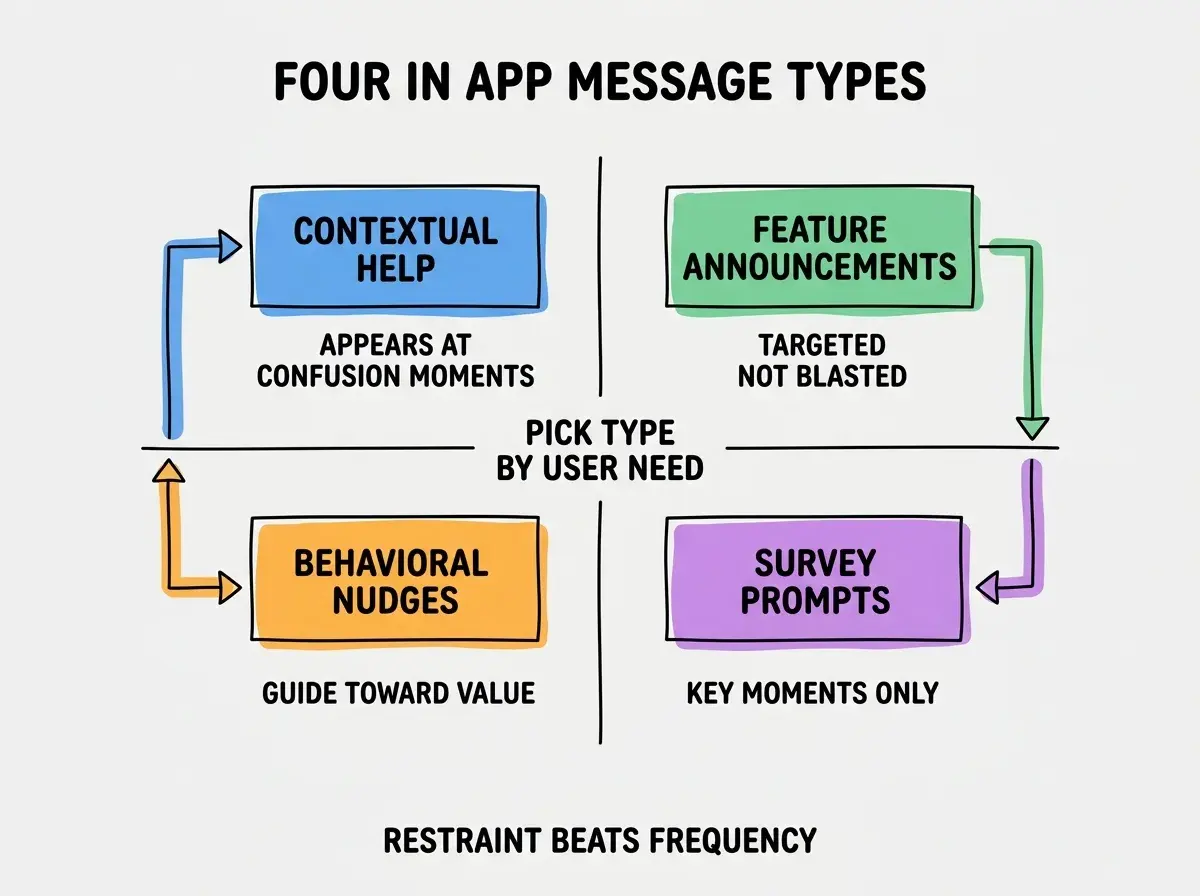
Type 3, behavioral nudges. Gentle prompts toward actions that produce user value (try this feature, complete your profile, invite teammates). High value when behavior change is meaningful.
Type 4, surveys and feedback prompts. Requests for user input at key moments (after completing a workflow, after reaching a milestone, at risk of churning). High value when timed right; corrosive when constant.
The Tooling Options
Three categories of tools cover most in-app messaging needs. Pick based on team size and complexity needs.
Tool 1, Intercom. Comprehensive in-app messaging with strong customer support integration. Best for teams that want messaging plus support in one tool.
Browse more product engagement guides
Read more grow articlesTool 2, Userpilot or Pendo. Specialized in-product engagement platforms. Best for teams that want sophisticated targeting and analytics on messaging.
Tool 3, Beamer or Frill for announcements. Lightweight feature announcement tools. Best for teams that need only the announcement use case without broader messaging features.
How to Segment Messages Effectively
Three segmentation patterns make messages relevant rather than spammy.
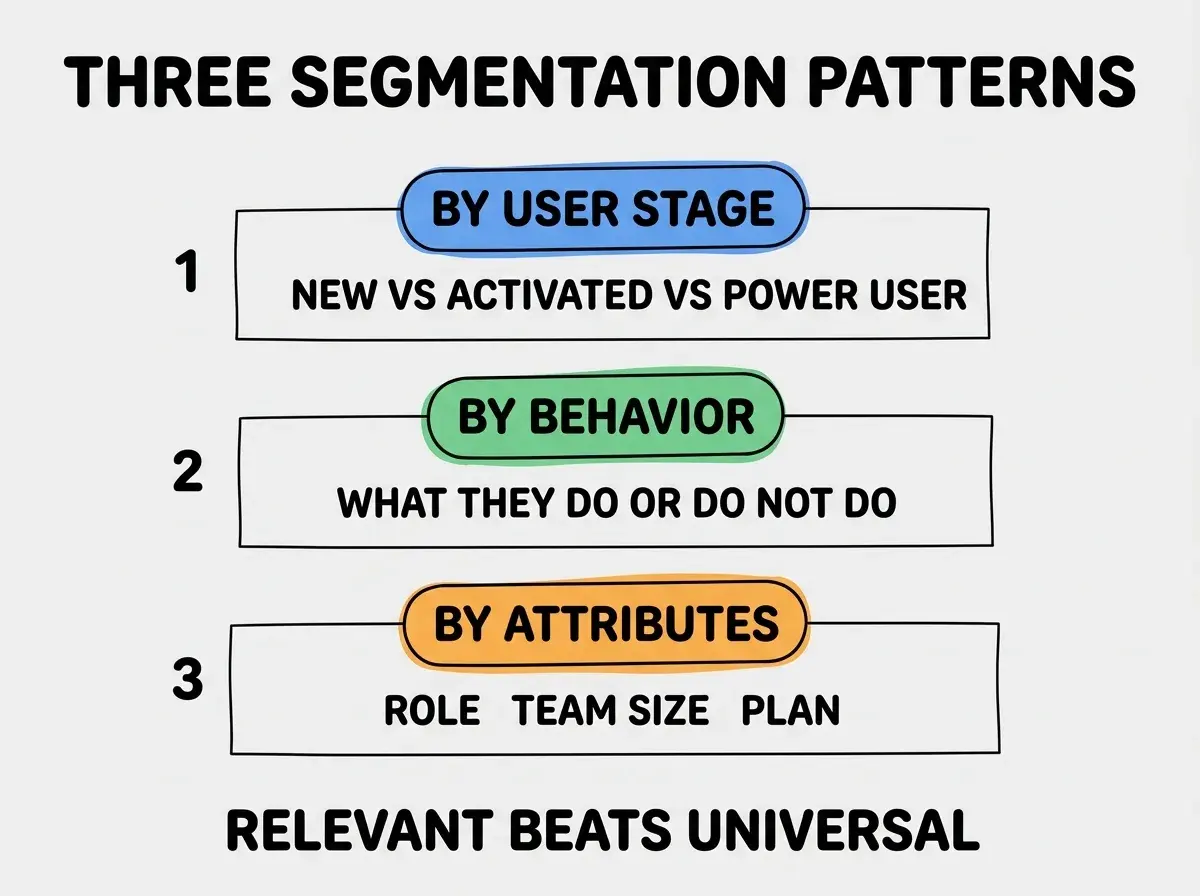
Pattern 1, by user stage. New users get onboarding messages; activated users get feature announcements; power users get advanced tips. Stage-based messaging matches the user's journey.
Pattern 2, by behavior. Users who used feature X get messages about related features; users who abandoned a workflow get help offering. Behavioral messaging is the most relevant kind.
Pattern 3, by attributes. Account type, role, team size, plan tier. Attribute-based messaging targets the right audience for each message.
How to Write Messages That Get Read
Three writing principles separate messages users read from messages they dismiss reflexively.
Principle 1, lead with the user benefit, not the feature name. "Track teammate progress in one view" beats "Introducing Team Dashboard." Users care about outcomes; feature names are insider language.
Principle 2, keep messages under 25 words. Long messages feel like work to read. Short messages get scanned and acted on. The discipline of 25-word maximum forces clarity.
Principle 3, include exactly one CTA per message. Multiple CTAs split attention and reduce action rates. One CTA produces clear decisions; multiple CTAs produce no decision.
The combination produces messages that feel like helpful prompts rather than marketing. Without these principles, messages feel like noise even when they convey useful information.
The Cadence That Preserves Engagement
Three cadence principles prevent the modal-fatigue that kills in-app messaging effectiveness.
Principle 1, never more than 1-2 messages per session. Multiple messages per session feel like nagging. One message is information; two is the maximum before users start dismissing reflexively.
Principle 2, archive old messages aggressively. Messages have shelf life; an announcement from 6 months ago is just clutter. Archive monthly to keep the active set small.
Principle 3, measure dismiss rate, not just click rate. High dismiss rate signals the message is unwanted. Low dismiss rate plus low click rate signals indifference. Adjust messages where either rate signals problems.
The combination produces in-app messaging that users tolerate and sometimes act on. Without these principles, messaging becomes the modal-fatigue users learn to ignore.
The most damaging in-app messaging mistake is using it for marketing rather than user value. Founders often add messages for announcements, promotions, and CTAs that benefit the company more than the user. The fix is to ensure every message either helps the user accomplish something or informs them of something they explicitly care about. Messages that serve user needs see 5x higher engagement than messages that serve company needs. The bias toward user-value messaging compounds over time as users learn your messages are worth reading.
The other mistake is treating in-app messaging as a substitute for product improvements. If users are confused at a particular point, the right answer is usually to redesign that point in the product, not to add a contextual help message that explains the confusion. In-app messages are bandages; product improvements are cures. Use messages where appropriate but recognize when they signal underlying product problems that deserve fixing.
A third mistake is failing to coordinate with email and other channels. Users do not separate channels; they perceive your communication as one stream. Sending the same announcement via email, in-app, and push notification in the same hour feels like spam even though each individual message is reasonable. The fix is to coordinate across channels; pick one primary channel per announcement and only escalate to others when the message genuinely warrants the escalation.
A fourth mistake is over-personalizing in ways that feel surveillance-like. Messages that reference behavior patterns ("we noticed you have not used X in 3 weeks") often feel creepy even when the underlying data is innocuous. The fix is to use targeting to control who sees messages, but write the message itself in general terms. The targeting produces relevance; the general phrasing prevents the surveillance feeling.
What This Means For You
In-app messaging is a high-leverage engagement channel when used restrainedly. The discipline of messaging less and segmenting better produces dramatically better outcomes than messaging more.
- If you're a founder: Set up basic in-app messaging once you have meaningful daily active users (typically 100+). Below that, the operational overhead exceeds the value.
- If you're changing careers into product or marketing: In-app messaging fluency is increasingly expected for product roles. Practice on side projects to build the skill.
- If you're a student: Study how successful products use in-app messaging. Notion, Linear, and Figma all have notable patterns worth studying.
Browse more user engagement guides
Read more grow articles