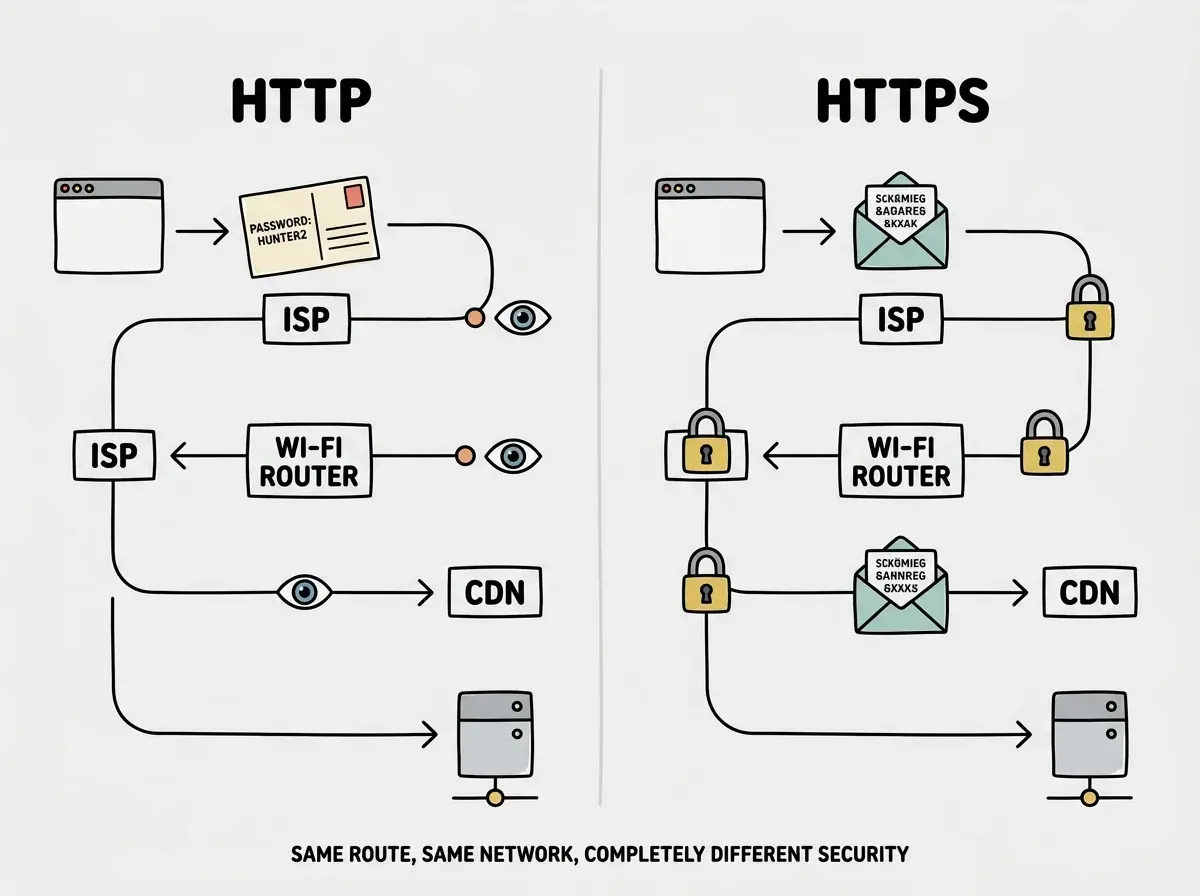
Every time you visit a website, your browser is sending and receiving information. Without HTTPS, that information travels as a postcard. Anyone along the route (your ISP, the coffee shop Wi-Fi operator, a bored hacker on the same network) can read it. With HTTPS, that same information travels inside a sealed envelope. The data moves through the same networks, but nobody can peek inside except the sender and the recipient.
If you are building apps with AI tools, understanding HTTPS SSL TLS setup is not optional. It is the minimum bar for any app that handles user data, processes payments, or wants to show up in Google search results. The good news is that modern hosting platforms handle most of the work. The bad news is that "most" is not "all," and the gaps will bite you at the worst time.
92% of US developers now use AI coding tools daily, and many are founders, career changers, and creators who never had to think about certificates before. This guide covers what HTTPS actually does, why it matters, how platforms handle it, and what to do when things go wrong.
What HTTPS, SSL, and TLS Actually Mean
Let's stick with the sealed envelope analogy. HTTP (without the S) is the postcard version of web communication. Your browser sends a request in plain text, the server responds in plain text, and anyone between you and the server can read everything.
HTTPS adds a seal to that envelope. Before your browser and the server exchange any real data, they perform a "handshake" where they agree on an encryption method and exchange keys. After the handshake, everything is encrypted. If someone intercepts the data, they see scrambled nonsense instead of your password or credit card number.
SSL (Secure Sockets Layer) was the original protocol that powered this encryption. It had several versions, all with security flaws. TLS (Transport Layer Security) replaced SSL and is what every modern website actually uses. But the industry still says "SSL certificate" because the name stuck. When you see "SSL certificate" on a hosting dashboard, it means a TLS certificate. They are the same thing in practice.
The certificate itself is a small file that proves your server is who it claims to be. Think of it as the wax seal on that envelope, with a signature from a trusted authority confirming the sender is legitimate. Certificate Authorities (CAs) like Let's Encrypt, DigiCert, and Cloudflare issue these certificates after verifying you control the domain.
Why HTTPS Matters for Your Vibe-Coded App
You might think HTTPS is only for banks and e-commerce stores. It is not. Here is why every web app needs it, including the side project you vibe-coded last weekend.
Browsers flag HTTP sites as insecure. Chrome, Firefox, and Safari all display a "Not Secure" warning in the address bar for HTTP sites. Visitors see that warning before they see a single pixel of your UI. For a new app trying to build trust, that warning is a deal-breaker.
Google ranks HTTPS sites higher. HTTPS has been a ranking signal since 2014. If your competitor's landing page is identical to yours but served over HTTPS, theirs ranks above yours. For vibe coders trying to get organic traffic, skipping HTTPS is like entering a race with a flat tire.
APIs refuse insecure connections. If your app calls third-party APIs (Stripe, OpenAI, Auth0), many reject requests from HTTP origins. Your AI tool might generate working API integration code that breaks in production because it is not running on HTTPS.
Legal compliance requires it. GDPR, CCPA, and PCI-DSS all require encryption of data in transit. If your app collects emails, passwords, or payment info over HTTP, you are non-compliant.
HTTPS is not a nice-to-have security upgrade. It is the baseline expectation of every modern browser, search engine, and API provider. Without it, your app looks broken, ranks poorly, and may violate data protection laws before you get your first user.
How Modern Platforms Handle HTTPS Automatically
Here is the good news. If you deploy to any of the major platforms, HTTPS works out of the box with zero configuration. The envelope seals itself.
Vercel provisions a free SSL certificate from Let's Encrypt the moment you deploy. It covers your .vercel.app subdomain and any custom domain you connect. Renewal happens automatically every 60-90 days. You never see it, never think about it, never configure it.
Cloudflare Pages does the same thing. Deploy your site, connect your domain through Cloudflare's DNS, and you get a free certificate with automatic renewal. Cloudflare also offers "Full (Strict)" SSL mode, which encrypts traffic between the visitor and Cloudflare, and between Cloudflare and your origin server.
Netlify handles certificates through Let's Encrypt as well. Deploy, add a custom domain, and HTTPS is live within minutes. Netlify even forces HTTPS by default, redirecting HTTP requests to HTTPS automatically.
Railway, Render, and Fly.io all provision certificates automatically for custom domains. The pattern is the same. Modern platforms treat HTTPS as a default, not an option.
For most vibe coders deploying to these platforms, HTTPS SSL TLS setup is a solved problem. You push your code, the platform handles the rest. But there are situations where this automatic process fails, and that is when you need to understand what is happening underneath.
When HTTPS Breaks and How to Fix It
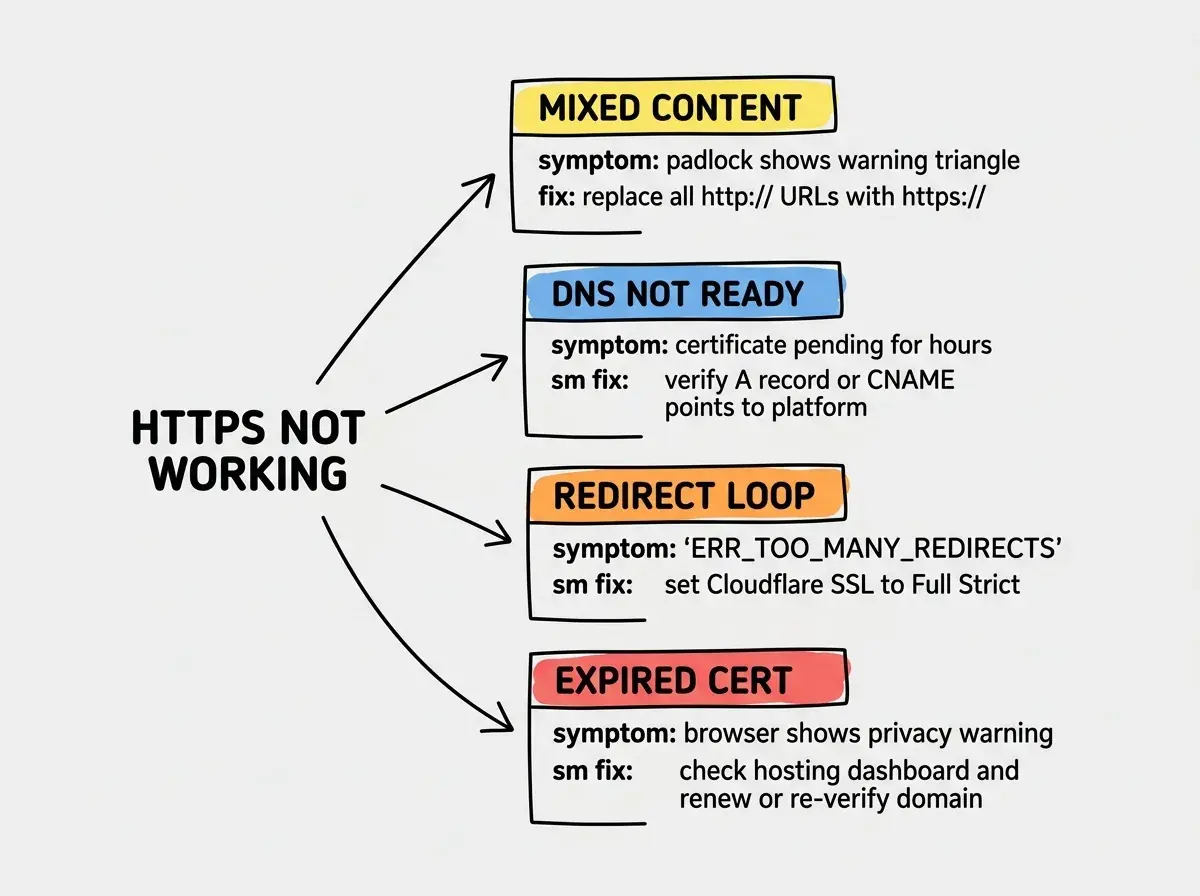
Back to the sealed envelope. Imagine the wax seal expires, or the postal service cannot verify the sender, or someone mixes sealed and unsealed letters in the same package. Those are the HTTPS equivalents of the most common problems.
Mixed content warnings. Your page loads over HTTPS, but it includes images, scripts, or stylesheets loaded over plain HTTP. The browser flags this as "mixed content" because your sealed envelope contains a postcard. Search your codebase for URLs starting with http:// and change them to https://. AI-generated code frequently hardcodes HTTP URLs for image sources and API endpoints.
Certificate not provisioned for custom domain. You connected a custom domain, but DNS propagation has not finished or you pointed your domain at the wrong address. Most platforms show certificate status on their dashboard. If it says "pending" for more than an hour, check that your DNS records (A record or CNAME) point to the correct platform-specific address.
Redirect loops. Your hosting platform forces HTTPS, but your app also has code that redirects HTTP to HTTPS. The two redirects bounce off each other infinitely. If you use Cloudflare with another host, set "SSL/TLS" to "Full" or "Full (Strict)," not "Flexible." Flexible mode connects to your origin over HTTP, which triggers the loop.
Expired certificates. Let's Encrypt certificates last 90 days. Platforms auto-renew them, but if your DNS changed, your domain expired, or you hit a rate limit, renewal can fail silently. Check your hosting dashboard periodically.
When You Actually Need Manual Certificate Setup
Most vibe coders will never need to configure certificates manually. But there are scenarios where automatic provisioning does not cover you.
Self-hosted servers. If you are running your app on a VPS (DigitalOcean, AWS EC2, Hetzner), nobody provisions a certificate for you. The standard approach is Certbot, a free tool from Let's Encrypt that generates certificates and configures your web server to use them. Certbot handles auto-renewal too.
Wildcard certificates. If you need HTTPS on multiple subdomains (app.yourdomain.com, api.yourdomain.com, docs.yourdomain.com), you may need a wildcard certificate covering *.yourdomain.com. Let's Encrypt supports wildcards, but they require DNS-based validation instead of HTTP validation.
Enterprise requirements. Some corporate environments require certificates from specific Certificate Authorities or Extended Validation (EV) certificates. These cost money and involve verification. Unless a client or employer specifically asks, you do not need it.
For the vast majority of projects, the platform-provided certificate is exactly what you need. Do not over-engineer your HTTPS SSL TLS setup. Use what the platform gives you.
Buying an expensive SSL certificate when a free one from Let's Encrypt does the same job. Some hosting providers and domain registrars upsell $50-200/year certificates alongside domain purchases. For almost every use case, the free certificate your platform provisions automatically is identical in security and browser compatibility. The paid certificate does not encrypt your data any better.
Run through the quick post-deploy checklist to make sure everything works, not just HTTPS.
Get the 5-minute checklistTesting Your HTTPS Setup
After deploying, verify that your sealed envelope is actually sealed. These checks take under two minutes.
-
Visit your site and check the padlock. Click the padlock icon in your browser's address bar. It should say "Connection is secure" with a valid certificate. If you see a warning triangle, you have mixed content.
-
Test with an online tool. Go to
ssllabs.com/ssltest/and enter your domain. It gives you a letter grade. Aim for an A. Most platform-provisioned certificates score A or A+ automatically. -
Check for mixed content. Open your browser's developer console (right-click, Inspect, Console tab) and look for "mixed content" warnings. Each one tells you which resource is loading over HTTP.
-
Verify the redirect. Type your domain with
http://in the address bar and press enter. It should redirect to HTTPS automatically. If it does not, enable "Force HTTPS" in your hosting platform's settings.
What This Means for You
If you are a founder: HTTPS is table stakes for credibility. Before you share your app with investors, partners, or early users, check that padlock. A "Not Secure" warning in the address bar kills trust faster than a slow-loading page or a minor UI bug. The good news is that if you are deploying to Vercel, Cloudflare, or Netlify, you probably already have it.
If you are a career changer: Understanding HTTPS shows you think beyond just getting code to run. In interviews and portfolio reviews, mentioning that you verified SSL configuration and fixed mixed content warnings signals a professional mindset. It separates builders who ship production-ready apps from those who only demo on localhost.
The sealed envelope is free, automatic, and essential. Make sure yours is sealed before you invite anyone to read what is inside.
Browse tutorials and project guides to find your next vibe-coded app.
Explore project guides