Your app works on your laptop. You deploy it. It crashes. You check the logs, and they say something unhelpful about "undefined" or "cannot read properties of null." You search the error, try three random fixes, and nothing changes. Then someone tells you it is an environment variable problem. You stare at the screen and think, "What is an environment variable?"
This is one of the most common moments in the entire vibe coding journey. Environment variables trip up nearly everyone the first time, and they are responsible for roughly 80% of deployment failures. Not because they are complicated, but because nobody explains them clearly enough the first time around.
This tutorial will fix that.
The Combination Lock Analogy
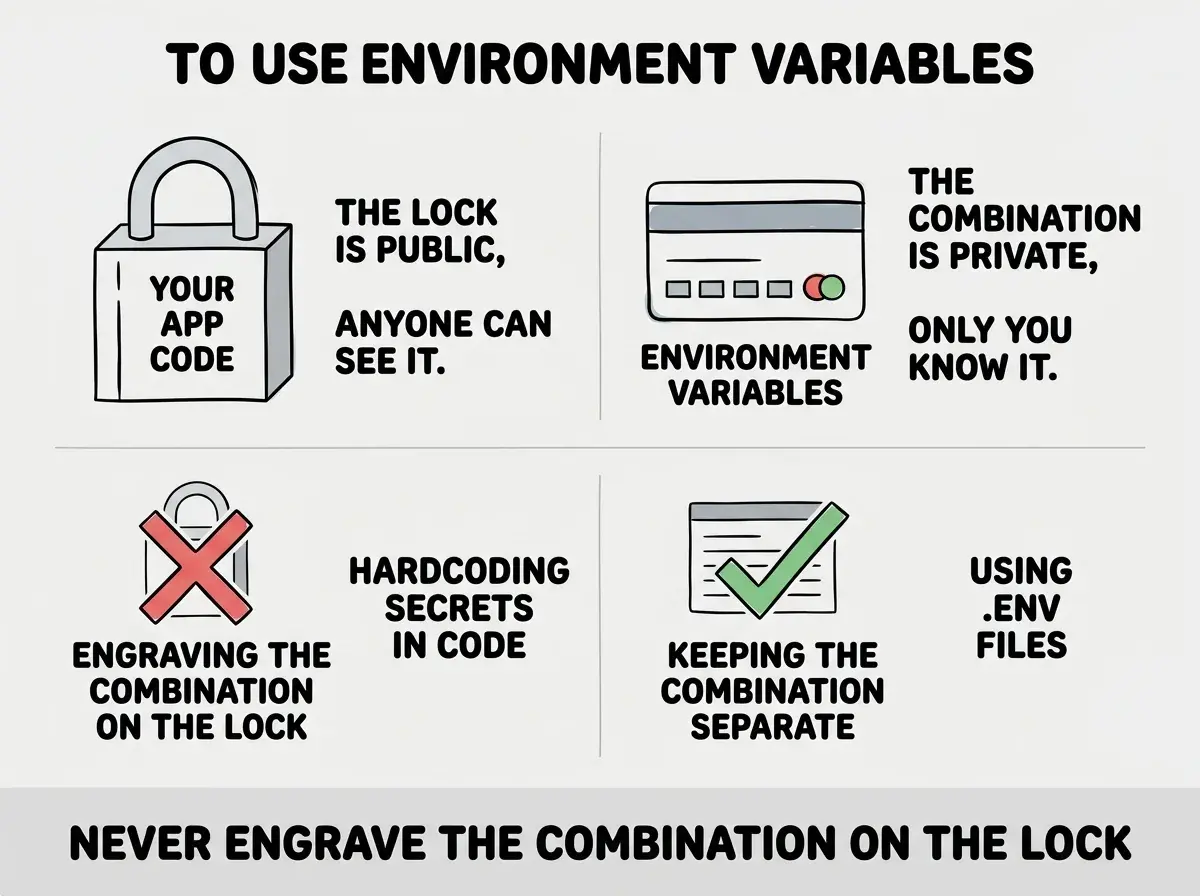
Think of your app as a combination lock. The code is the lock itself: the mechanism, the structure, the logic. Environment variables are the combination, the specific numbers that make it open.
You would never engrave the combination on the outside of the lock. That defeats the entire purpose. Anyone who picks it up could open it. Instead, you write the combination down somewhere private, separate from the lock itself.
Your app works the same way. The code says "connect to the database," but it does not contain the database password. The code says "charge this credit card through Stripe," but it does not contain the Stripe API key. Those secrets live in environment variables, stored separately from the code, shared only with the environments that need them. This separation is not optional. It is the single most important security practice in software development.
What a .env File Actually Looks Like
In practice, environment variables live in a plain text file called .env (pronounced "dot env") in the root of your project folder. Here is what one looks like:
DATABASE_URL=postgresql://user:password@db.example.com:5432/myapp
STRIPE_SECRET_KEY=sk_live_abc123def456
OPENAI_API_KEY=sk-ant-xyz789
NEXT_PUBLIC_SITE_URL=https://myapp.com
Each line is a name-value pair separated by an equals sign. The names use ALL_CAPS_WITH_UNDERSCORES by convention, which makes them easy to spot in your code. No spaces around the equals sign. No quotes needed (unless your value contains spaces).
When your app starts, it reads this file and loads the values into memory. Then, anywhere your code needs the database password, it asks for process.env.DATABASE_URL instead of containing the actual password. The app knows where to look. The secret itself never touches the code.
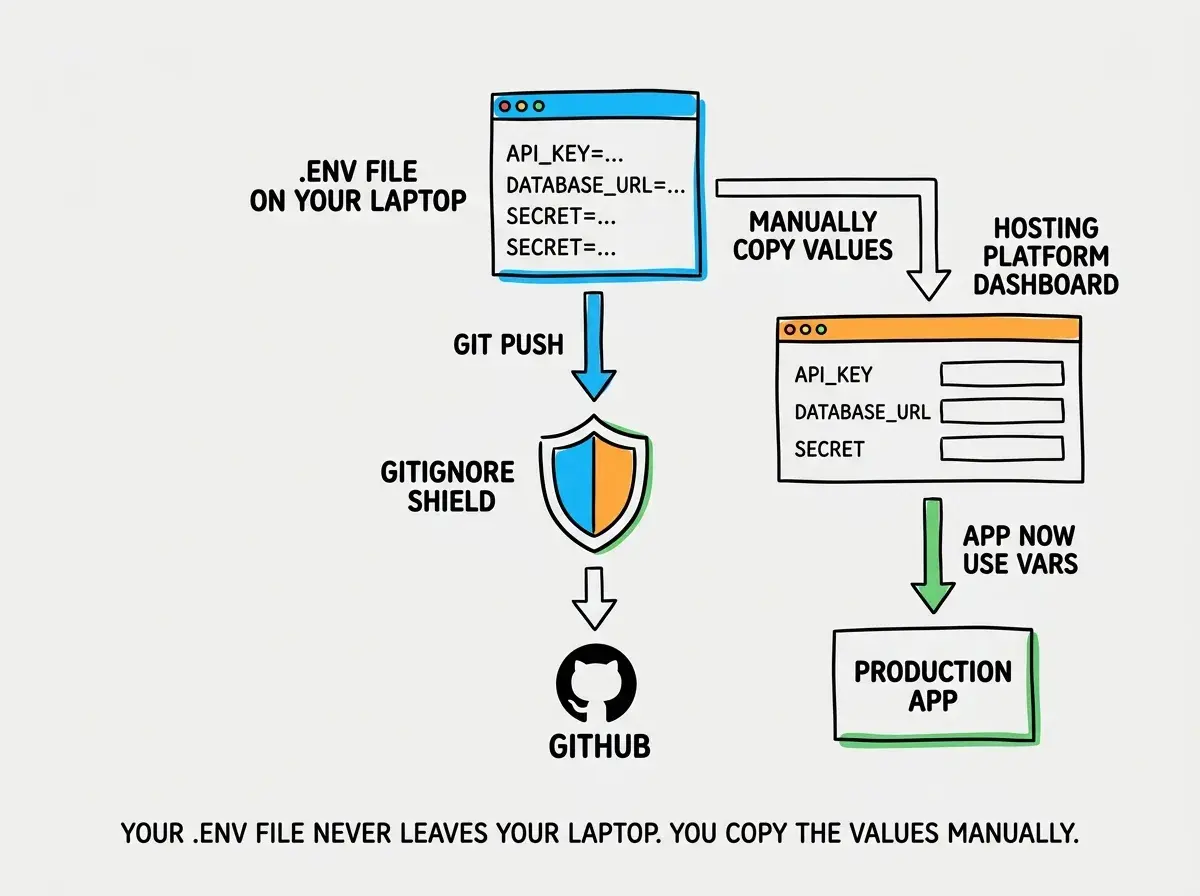
Creating this file is simple. In your project's root directory (the folder where package.json lives), create a new file called .env. Open it in any text editor, add your variables one per line, and save.
Why .gitignore Is the Most Important File You Have Never Thought About
Here is where things get serious. Git tracks every file in your project and stores the history on GitHub. If your .env file gets committed to Git, your database passwords, API keys, and secret tokens become visible to anyone who can see that repository. Even if you delete the file later, Git remembers. The secrets stay in the history forever.
This is not a theoretical risk. Automated bots scan GitHub around the clock, looking for accidentally committed API keys. Within minutes of pushing a .env file, your keys can be stolen and abused. People have woken up to thousands of dollars in cloud charges because a bot found their credentials on GitHub and spun up cryptocurrency miners on their account.
The protection is a file called .gitignore. It tells Git which files to skip when tracking changes. Your .env file should always be listed there.
Open your project's .gitignore file (it should already exist if you used any modern framework or AI tool). Look for a line that says .env or .env* or .env.local. If it is there, you are safe. If it is not, add this line:
.env
Save the file. From now on, Git will ignore your .env file and it will never reach GitHub.
Your .env file and your .gitignore file work as a team. The .env file holds your secrets. The .gitignore file prevents those secrets from ever leaving your laptop. If you remember nothing else from this tutorial, remember this: check your .gitignore before you ever push code to GitHub. One missing line can expose every credential your app uses.
The .env.example Pattern
If your .env file never leaves your laptop, how does anyone else on your team know which variables the app needs? You create a file called .env.example that shows the structure without the real values:
DATABASE_URL=your_database_url_here
STRIPE_SECRET_KEY=your_stripe_key_here
OPENAI_API_KEY=your_openai_key_here
NEXT_PUBLIC_SITE_URL=https://yoursite.com
This file gets committed to Git. It travels with the code. When someone new joins the project (or when future-you clones the repo on a new machine), they copy .env.example to .env and fill in their own credentials. The template is public. The actual values never are.
Setting Up Environment Variables on Your Hosting Platform
Your .env file works locally. But when you deploy, that file does not come along (because .gitignore prevents it, exactly as it should). You need to add those variables directly to the hosting platform's dashboard.
Every major platform has the same concept in the same place. On Vercel, go to your project's Settings, then "Environment Variables." On Netlify, go to Site Configuration, then "Environment variables." On Cloudflare Pages, go to Settings, then "Environment variables." The interface differs slightly, but the process is identical: enter each variable name and value, save, and redeploy.
Here is the exact workflow that prevents failures:
- Open your local
.envfile in one window - Open your hosting platform's environment variables dashboard in another
- Go through every line in your
.envfile and add each variable to the dashboard - Choose which environments should receive each variable (production, preview, or both)
- Save and trigger a new deployment
A practical tip: do not skip variables you think might be optional. If your code references a variable and it does not exist on the platform, the feature that depends on it will break, often with a vague error that never mentions the missing variable by name.
Learn the foundational concepts that make everything else click.
Start learningThe Naming Conventions That Save You Time
Environment variable names follow patterns that tell you what each one does at a glance. Database variables start with DATABASE or DB (like DATABASE_URL). API keys contain KEY, SECRET, or TOKEN in the name (like STRIPE_SECRET_KEY) and must always be kept private. Public variables start with NEXT_PUBLIC_ in Next.js or VITE_ in Vite projects, meaning they are safe for the browser because they contain no secrets. Service-specific variables use the service name as a prefix: RESEND_API_KEY connects to Resend, SUPABASE_URL connects to Supabase.
When you see a variable name you do not recognize, the prefix almost always tells you which service's documentation to check.
The Three Errors You Will Hit (and How to Fix Each One)
Almost every environment variable problem falls into one of three categories.
"Undefined" or "null" errors. Your code tries to read a variable that does not exist. This means you either forgot to add it to your .env file, misspelled the name (capitalization matters), or deployed without adding it to your hosting platform. The fix: compare the variable name in your code against your .env file character by character, then check that it exists in your hosting dashboard.
App works locally but crashes in production. This is the classic environment variable symptom. Your local .env file has everything. Your production environment is missing one or more variables. The fix: go through your .env file line by line and confirm every single variable exists in your hosting platform's settings. Not most of them. All of them.
Using test keys in production (or production keys in development). Charging real credit cards during testing because you pasted your live Stripe key into your development .env file. Sending real emails to real users from your test environment. The fix: keep separate .env files or use your hosting platform's environment-specific settings to ensure test credentials stay in testing and production credentials stay in production.
A Pre-Deployment Checklist
Before you deploy any project, run through this list. It takes two minutes and prevents hours of debugging.
- Does your
.gitignorefile include.env? - Does your
.envfile contain every variable your app references? - Does your
.env.examplefile exist and list every variable name (without real values)? - Have you added every variable to your hosting platform's dashboard?
- Are you using test credentials for development and production credentials for production?
If you can answer yes to all five, your deployment will not fail because of environment variables. Given that they cause roughly 80% of deployment failures, you have just eliminated the biggest risk factor.
Copying your entire .env file from one project to another without reviewing it. When you clone an old project to start a new one, the .env file often carries over with values that belong to the previous project. You end up writing to the wrong database, charging the wrong Stripe account, or sending emails from the wrong address. Every new project deserves a fresh review of every environment variable. Take five minutes to verify each one points to the right place.
What This Means For You
Environment variables are the bridge between "it works on my laptop" and "it works for everyone." Getting them right is not glamorous, but it is the work that separates apps that ship from apps that stall at deployment.
- If you are a founder building a product: Environment variables are a security responsibility, not just a technical detail. When you hand off a project, make sure credentials are transferred securely (never over Slack or email), rotated when team members leave, and stored properly in your hosting platform. A leaked API key can cost real money within hours, and "I did not know" is not a defense your customers will accept.
- If you are changing careers into tech: This is one of those topics that experienced developers assume everyone already knows, which is why it is so poorly taught. Now you know it. The next time a deployment fails and someone says "check the env vars," you will know exactly what to do and where to look. That confidence compounds with every project you ship.
Now that your environment is configured, learn the full deployment process.
Learn to deploy