Every app you build needs private information to function. Database passwords, API keys for services like Stripe or OpenAI, secret tokens that prove your app is allowed to do what it does. This private information cannot live inside your code where anyone could read it. So where does it go?
Environment variables. They are one of those concepts that sounds more complicated than it is, and once you understand what they actually do, a huge category of confusing errors starts making sense.
The Keys to Your Restaurant
Imagine you own a restaurant. To operate each day, your staff needs access to certain things. The combination to the safe. The alarm code. The password for the point-of-sale system. The account credentials for your food supplier's ordering portal.
You would never print those codes on the menu for customers to see. You would never tape the safe combination to the front door. Instead, you keep that information separate from the restaurant itself, shared only with the people who need it.
Environment variables work exactly the same way. They are the private codes and credentials your app needs to operate, stored separately from the app's actual code.
When your app needs to connect to a database, it checks its environment variables for the password. When it needs to charge a credit card through Stripe, it checks for the Stripe API key. When it needs to send an email, it looks up the email service credentials. The app knows where to look, but the secrets themselves are never baked into the code.
Why "Environment" Is the Key Word
This confuses everyone at first. Why are they called "environment" variables and not just "secret settings" or "configuration"?
Because the environment changes.
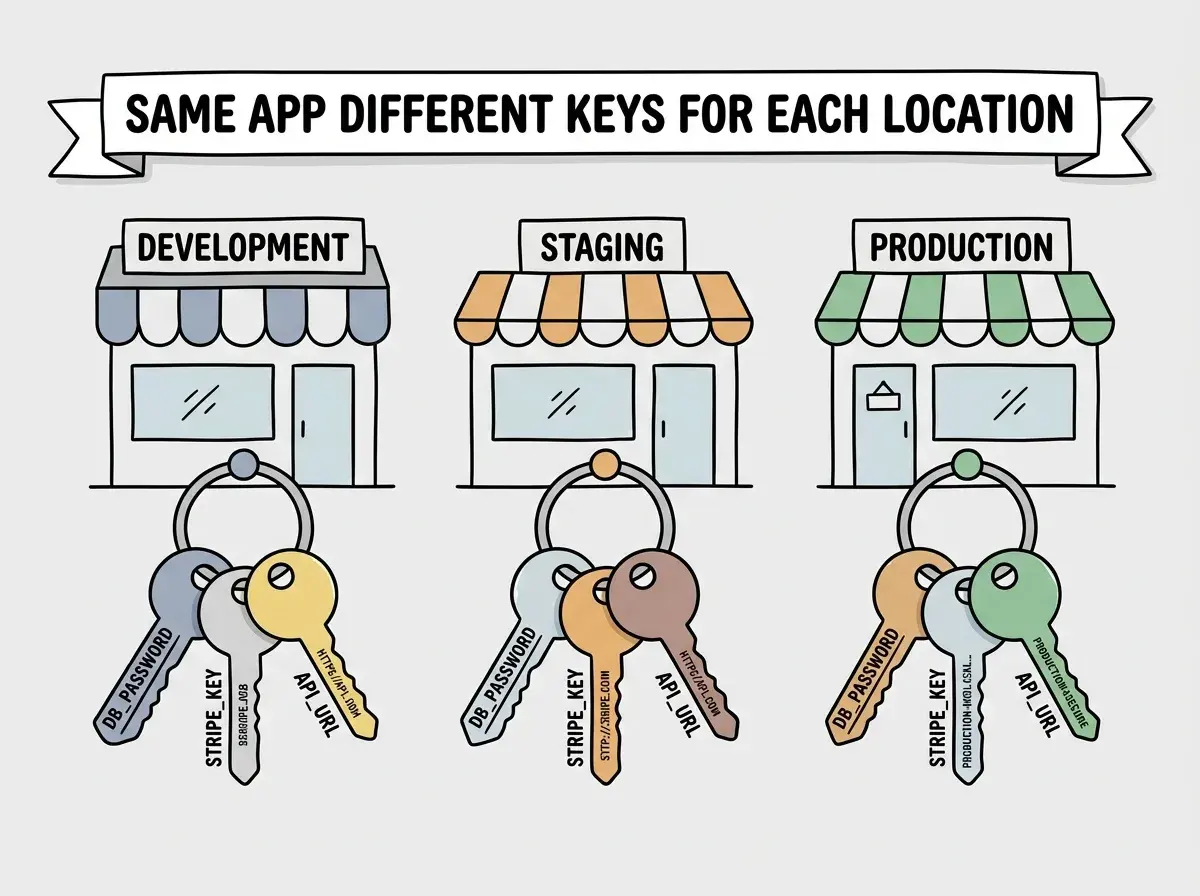
Think about your restaurant again. Say you open a second location across town. Both restaurants need safe combinations, alarm codes, and supplier credentials. But the codes are different for each location. The downtown safe has one combination; the uptown safe has another. Same restaurant, same menu, same recipes, but different keys for different locations.
Your app works identically. You have a development environment (your laptop, where you are building and testing), a staging environment (a test server where you check things before going live), and a production environment (the real thing, where actual users interact with your app).
Each environment needs its own set of credentials. Your development database has one password. Your production database has a completely different, much stronger password. Your test Stripe account uses fake money; your production Stripe account processes real charges. Same app, different keys for different locations.
What a .env File Actually Looks Like
In practice, environment variables live in a simple text file called .env (pronounced "dot env"). It sits in your project folder and looks like this:
DATABASE_URL=postgresql://user:password@db.example.com:5432/myapp
STRIPE_SECRET_KEY=sk_live_abc123def456
OPENAI_API_KEY=sk-ant-xyz789
NEXT_PUBLIC_SITE_URL=https://myapp.com
That is it. Each line is a name and a value, separated by an equals sign. The names are written in all caps with underscores, which is a convention that makes them easy to spot in code.
When your app starts up, it reads this file and loads those values into memory. Then, anywhere in your code that needs the database password, it just asks for DATABASE_URL instead of containing the actual password.
You might think these files seem too simple to matter much. But actually, the .env file is one of the most important files in your entire project, and mishandling it is one of the most common and most dangerous mistakes in software.
Environment variables separate your app's secrets from your app's code. The code says "look up the database password." The environment variable provides the actual password. This separation means the same code can run anywhere, connecting to different services depending on which set of keys it has been given.
The One Rule You Cannot Break
Here is the single most important rule about environment variables: never, ever commit your .env file to Git.
Git is the version control system that tracks every change to your code and stores it in a repository (often on GitHub). If your .env file gets committed, your database passwords, API keys, and secret tokens become visible to anyone who can see that repository. Even if you delete the file later, Git remembers everything. The secrets remain in the history forever.
This is not a theoretical risk. Automated bots scan GitHub constantly, looking for accidentally committed API keys. Within minutes of pushing a .env file, your keys can be stolen and misused. People have woken up to thousands of dollars in charges on their cloud accounts because they accidentally committed credentials.
The fix is simple. Every project has a file called .gitignore that tells Git which files to skip. Your .env file should always be listed there. Most project templates include this by default, but it is worth checking.
Instead of committing your real .env file, teams share a file called .env.example that shows the structure without the actual values:
DATABASE_URL=your_database_url_here
STRIPE_SECRET_KEY=your_stripe_key_here
OPENAI_API_KEY=your_openai_key_here
New team members copy this file, rename it to .env, and fill in their own credentials. The template travels with the code; the secrets never do.
Learn the core concepts that help you understand what your tools are doing.
Start learningWhere Environment Variables Live in Production
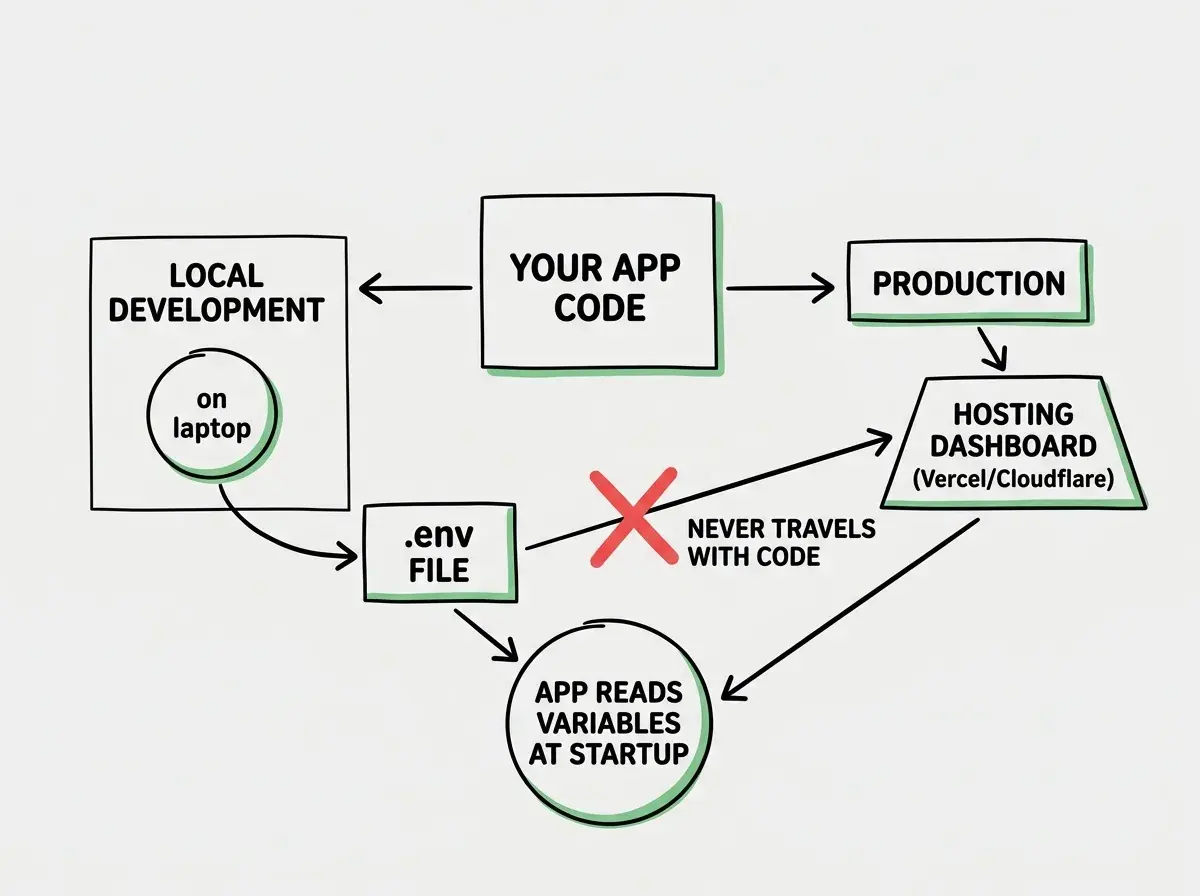
On your laptop, environment variables live in a .env file. But when you deploy your app to a hosting service like Vercel, Cloudflare, or Netlify, the .env file does not go with it (because it is in .gitignore, remember?).
Instead, you enter your environment variables directly into the hosting platform's dashboard. Every major hosting service has a settings page where you paste in your key-value pairs. Vercel has an "Environment Variables" section in project settings. Cloudflare has the same. They store these values securely on their servers, and your app reads them at runtime.
This is actually more secure than a file. The hosting platform encrypts the values, restricts who can view them, and injects them into your app's runtime environment without ever writing them to disk.
Most platforms also let you set different values for different environments. You can have one set of variables for your preview deployments and a different set for production. Same app, different keys, different locations.
Common Problems and How to Fix Them
Most environment variable errors fall into three categories, and all of them are straightforward once you know what to look for.
"Undefined" or "null" errors. Your app tries to read an environment variable that does not exist. This usually means you added a new variable to your code but forgot to add it to your .env file, or you deployed without adding it to your hosting dashboard. The fix is always the same: check that the variable name matches exactly (capitalization matters) and that it exists in the right environment.
The app works locally but breaks in production. This almost always means your production environment is missing variables that your local .env file has. Go through your .env file line by line and confirm every variable exists in your hosting platform's settings.
Using the wrong keys for the wrong environment. Charging real credit cards during testing because you used production Stripe keys in development. Sending real emails to real users from your test environment. This is why the separation matters. Development environments should use test credentials that cannot affect real users or real money.
Copying environment variables between projects without understanding what each one does. When you start a new project by cloning an old one, the .env file often carries over with values that belong to the previous project. You end up writing to the wrong database or charging the wrong Stripe account. Always review every variable when starting a new project, and update each one to point to the correct services for that specific project.
The Naming Pattern That Makes Everything Clearer
Environment variable names follow a convention that tells you what each one connects to. Variables starting with DATABASE or DB connect to your database. Variables with KEY or SECRET in the name are credentials for external services. Variables starting with NEXT_PUBLIC_ (in Next.js projects) are safe to expose to the browser, meaning they do not contain secrets. Everything else should be treated as private.
When you see STRIPE_SECRET_KEY, you know immediately what it does, what service it connects to, and that it must be kept private. When you see NEXT_PUBLIC_SITE_URL, you know it is safe to use in frontend code because it contains no secrets.
What This Means For You
Environment variables are the private operating codes for your app. Understanding them means understanding one of the most common sources of deployment errors, security breaches, and "it works on my laptop" frustrations.
- If you are a founder building a product: Environment variables are a security concern you need to understand. When you hand off a project, make sure credentials are transferred securely (never over email or Slack messages), rotated when team members leave, and stored properly in your hosting platform. A leaked API key can cost real money within hours.
- If you are a career changer learning to build: Get comfortable with
.envfiles early. Every project you build will have them, and "environment variable not found" is one of the most common errors you will encounter. When your app breaks after deployment, checking your environment variables should be the first thing you do, not the last. - If you are a student exploring development: Think of environment variables as part of a bigger concept called "configuration management." The principle of separating configuration from code applies everywhere in software, from small side projects to massive enterprise systems. Learning this pattern now builds a habit that will serve you throughout your career.
Now that you understand how apps manage their secrets, learn what else goes into building a working product.
Keep exploring