Your app is live and users are signing up. Then someone in Tokyo tweets about it. Someone in Berlin shares it on Hacker News. Suddenly your single-origin server in Virginia is handling requests from every continent, and page loads start crawling. Ninety-two percent of developers use AI tools daily to build faster, but all that speed disappears if your assets take three seconds to cross the Pacific Ocean. This is where a CDN changes everything.
Think of it like a pizza delivery network. Right now, you are running one central kitchen. Every order, no matter where the customer lives, gets made in that single kitchen and driven across town. A CDN is like opening local pizza shops in every neighborhood. You still create the recipes at headquarters, but the actual pizzas get made and served from the shop closest to each customer. Faster delivery, happier customers, and your central kitchen stops catching fire during rush hour.
What a CDN Actually Does for Your App
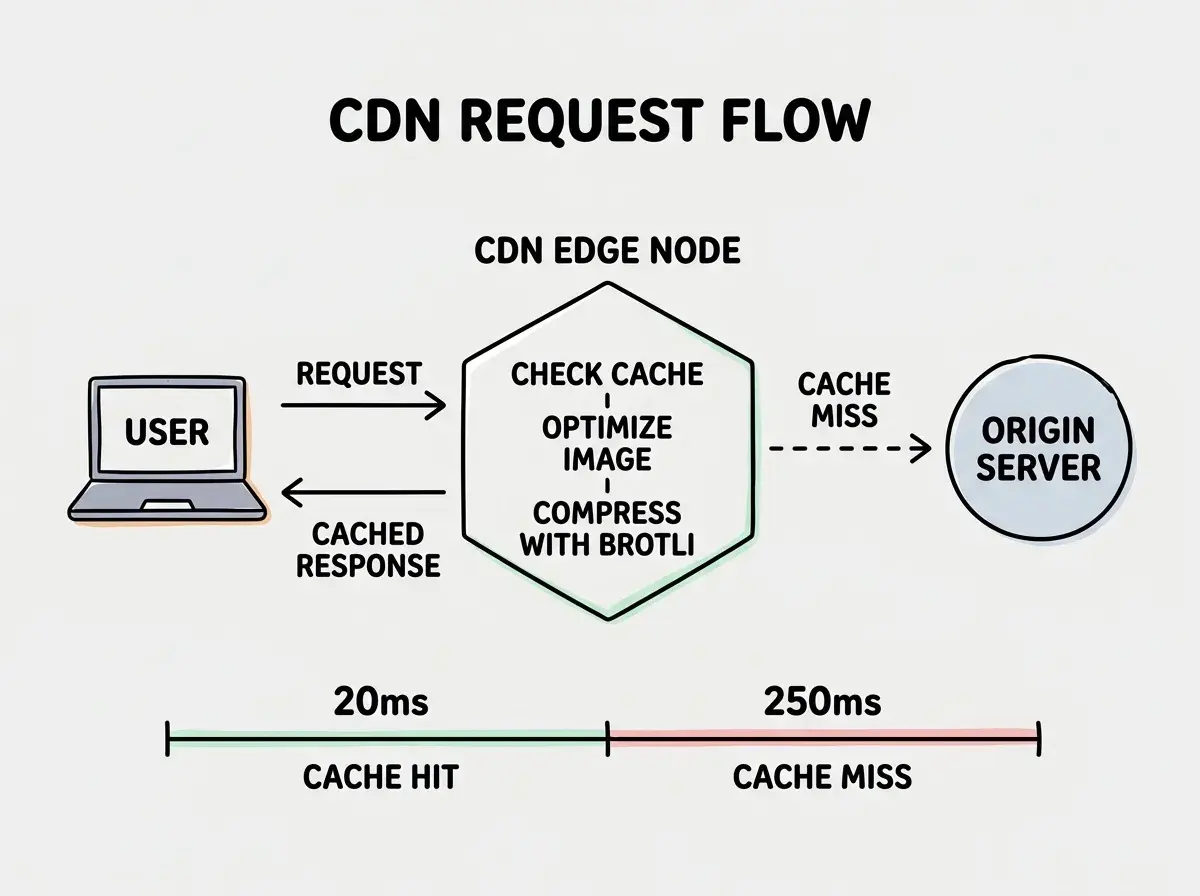
A Content Delivery Network copies your static assets (JavaScript bundles, CSS files, images, fonts) to servers distributed across the globe. When a user in Sydney requests your homepage, instead of that request traveling to your origin server in Virginia, it gets served from an edge node in Sydney. The physical distance drops from 15,000 kilometers to maybe 50.
This matters more than most developers realize. A round trip from Sydney to Virginia takes roughly 200 milliseconds just for the physics of light through fiber. Add DNS lookup, TLS handshake, and server processing, and you are looking at 400 to 600 milliseconds before a single byte loads. A CDN cuts that to 20 to 40 milliseconds for cached assets.
Modern CDNs also handle SSL termination at the edge, compress assets on the fly, optimize images automatically, and even run serverless functions close to your users. Think of your neighborhood pizza shops not just reheating pies, but prepping ingredients and handling the full customer experience. The central kitchen focuses on new recipes. That division of labor is exactly how a well-configured CDN works with your origin server.
A CDN is not just for large-scale apps. Even a small SaaS with 500 users spread across three continents will see meaningful performance gains. The latency savings on static assets compound across every page load, every navigation, and every interaction. If your users are not all in one city, you need a CDN.
Comparing Cloudflare, Vercel, and Fastly
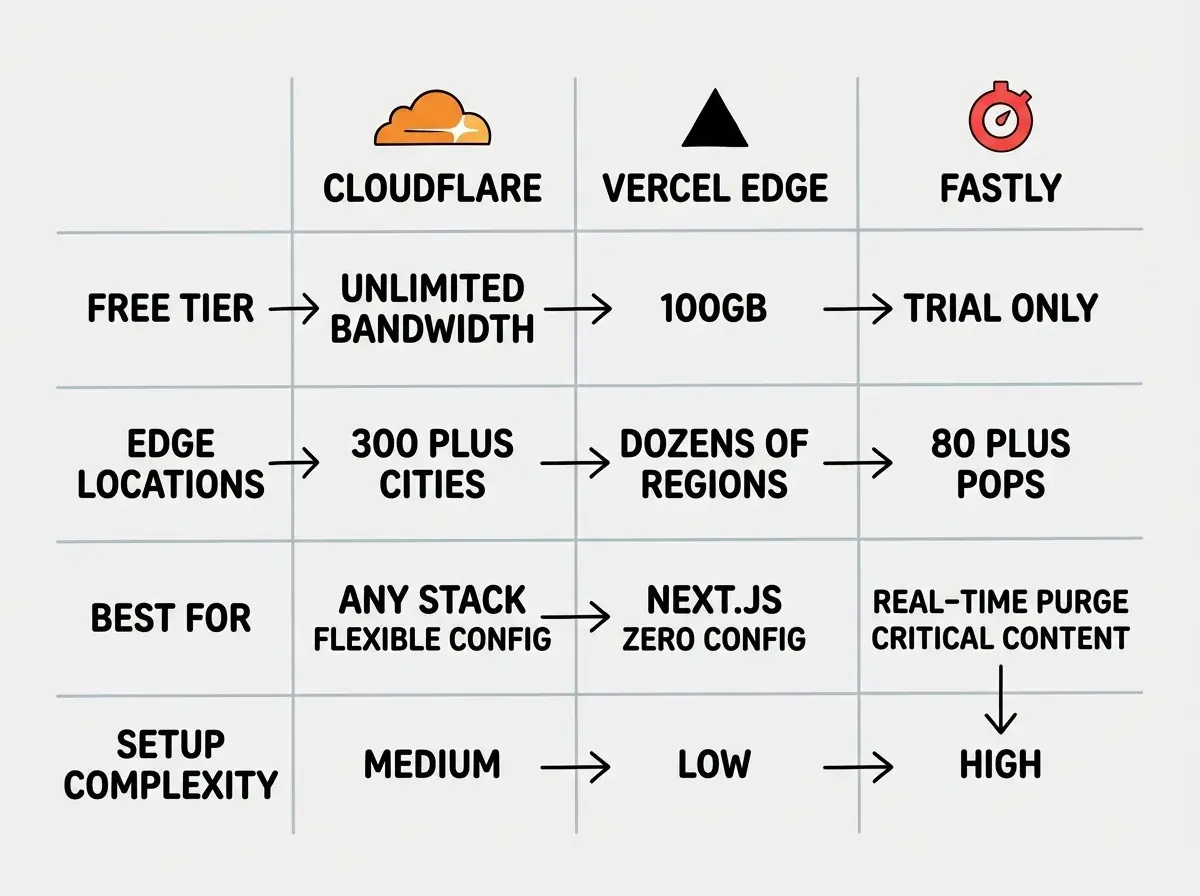
The three CDN options most indie hackers and senior devs encounter are Cloudflare, Vercel's Edge Network, and Fastly. Each has a different philosophy and a different sweet spot.
Cloudflare is the most versatile with the most generous free tier. Their network spans over 300 cities with unlimited bandwidth on the free plan. It works with any stack as a reverse proxy. The tradeoff is configuration complexity, with cache rules, page rules, and transform rules spread across different dashboards.
Vercel's Edge Network is the most seamless if you are already on Vercel. Deploy a Next.js app and static assets automatically serve from the edge. Zero configuration for basics, but you hit the limits of their abstraction once you need fine-grained cache headers or custom purging logic.
Fastly is the most powerful for real-time cache control. Their instant purge (under 150 milliseconds globally) is best-in-class. If stale content costs you money, Fastly earns its premium pricing. The tradeoff is complexity and cost, with their VCL configuration language adding a learning curve.
For most indie hackers, Cloudflare is the right starting point. Free, powerful, and you will not outgrow it until well past the "scaling past launch" phase.
Configuring Cache Rules That Actually Work
This is where most developers mess up their CDN setup. You turn it on, assume everything is cached, and wonder why Time to First Byte is still slow. The problem is almost always cache rules.
Every CDN uses HTTP cache headers to decide what to cache and for how long. The two you need to understand are Cache-Control and CDN-Cache-Control (Cloudflare) or Surrogate-Control (Fastly).
For static assets with hashed filenames (e.g., main.a1b2c3.js), set aggressive caching. These files never change because a new hash means a new filename. Use Cache-Control: public, max-age=31536000, immutable to cache for one year with no revalidation.
For HTML pages, use shorter caching with revalidation. Cache-Control: public, max-age=0, s-maxage=3600, stale-while-revalidate=86400 tells browsers to always check for fresh content while letting the CDN serve cached versions for up to an hour.
For API responses, be careful. Set Cache-Control: private, no-store for anything user-specific. Public endpoints returning the same data for everyone can use a short TTL with purging for updates.
In Cloudflare, you would set up Cache Rules matching your asset paths. Here is a typical setup:
Match: URI path starts with /_next/static/
Cache TTL: 1 year
Browser TTL: 1 year

Match: URI path starts with /images/
Cache TTL: 30 days
Browser TTL: 7 days

Match: URI path ends with .html
Cache TTL: 1 hour
Browser TTL: 0 (always revalidate)
Back to the pizza analogy: cache rules tell each neighborhood shop how long to keep pre-made pizzas on the warmer. Pepperoni (static assets) stays good all day. The daily special (HTML pages) gets refreshed every hour. Custom orders (API responses) always come from the kitchen fresh.
Purging and Cache Invalidation Strategies
Cache invalidation is famously one of the two hard problems in computer science. With a CDN, you need a reliable way to tell edge nodes to drop cached copies when you deploy.
Full purge clears everything. Use it for major updates or when something is broken. The downside is that all traffic hits the origin while caches repopulate.
Path-based purge is more surgical. Specify which URLs to invalidate. If you publish a new blog post, purge just / and /blog. The rest of your cached assets stay warm.
Tag-based purge is the most elegant but requires setup. You tag cached responses with labels and purge by tag. Fastly excels here. Cloudflare supports it on Enterprise plans. For free or Pro plans, path-based purging works fine.
The practical advice: set up automatic purging in your deployment pipeline. Add a step that calls the Cloudflare API to purge HTML pages after each deploy. Static assets with content-hashed filenames never need purging.
# Example: Cloudflare cache purge in a deploy script
curl -X POST \
  "https://api.cloudflare.com/client/v4/zones/YOUR_ZONE_ID/purge_cache" \
  -H "Authorization: Bearer YOUR_API_TOKEN" \
  -H "Content-Type: application/json" \
  --data '{"files":["https://yourapp.com/","https://yourapp.com/blog"]}'
Purging your entire CDN cache on every deployment instead of targeting specific paths. A full purge means every user's next request hits your origin server, which creates a traffic spike exactly when you least want one, right after shipping new code. Use path-based or tag-based purging so only the changed content gets invalidated. Your static assets with hashed filenames never need purging at all.
Custom Domains and SSL at the Edge
The basic flow for custom domains is straightforward: point your domain's DNS to the CDN, and it handles SSL certificates and proxies requests to your origin.
With Cloudflare, you change your nameservers to theirs and they provision a free SSL certificate automatically. Set SSL mode to "Full (Strict)" so traffic is encrypted both between users and the edge, and between the edge and your origin. "Flexible" mode only encrypts the first hop, leaving the origin connection unencrypted. That is a security hole you do not want.
With Vercel, custom domains just work. Add the domain in their dashboard, update DNS records, done. With Fastly, you will need to provision a TLS certificate and configure a CNAME manually, which gives more control at the cost of more setup.
Learn the patterns that help your app grow from launch to scale.
Explore growth strategiesAsset Optimization at the Edge
Modern CDNs can optimize your assets on the fly, which means less work for your build pipeline and smaller payloads for your users.
Image optimization is the biggest win. Cloudflare Images and Vercel's Image Optimization can resize, compress, and convert images to WebP or AVIF automatically based on the requesting browser. Upload one high-quality original and let the CDN serve the right format and size. This alone can cut image payloads by 40 to 60 percent.
Automatic compression with Brotli should be enabled. Brotli compresses 15 to 25 percent better than gzip for text-based assets. Most CDNs support it out of the box, but double-check your settings.
HTTP/2 and HTTP/3 are usually handled automatically. These protocols allow multiplexing (multiple files over one connection) and reduce overhead when loading many small assets.
When You Need a CDN vs When Hosting Handles It
If you deploy on Vercel, Netlify, or Cloudflare Pages, your static assets are already served from a global edge network. You get CDN behavior without setting anything up.
You need explicit CDN configuration when your setup is more custom. Running a Node.js server on Railway, a Django app on Render, or anything on a traditional VPS means responses come from a single location. Adding Cloudflare in front of that server is a meaningful upgrade.
You also need it when the defaults fall short. Maybe Vercel's built-in caching is serving stale API responses, or your images are not being optimized, or you need cache rules that differ by path. The rule of thumb: if your users are geographically distributed and your hosting does not include an edge network, add a CDN. If your hosting includes one but performance is not where it should be, learn to configure the cache rules properly.
What This Means for Your App
A well-configured CDN is one of the highest-leverage performance improvements you can make. You are not refactoring code or rearchitecting your database. You are just putting your existing assets closer to your users and setting smart rules for how long they stay there.
- If you are a senior dev scaling past launch: Set up Cloudflare with proper cache rules for static assets, short TTLs for HTML, and automatic purging in your CI/CD pipeline. Enable Brotli compression and image optimization. These changes will cut your global P95 latency dramatically and cost you nothing on the free tier.
- If you are an indie hacker watching your app grow: Start with your hosting platform's built-in CDN and monitor Core Web Vitals. When LCP times creep up for international users, that is your signal to configure CDN rules properly. The pizza shops are ready to open. You just need to give them the recipes.
Your app deserves to be fast everywhere, not just in the data center's neighborhood.
Discover more strategies for growing your app beyond the first hundred users.
See scaling guides