GraphQL vs REST is the API design decision that shapes how every piece of data flows through your application. With 92% of developers now using AI tools daily, the API style your coding assistant generates on the first pass tends to stick. Understanding what each approach actually gives you, and what it costs, matters more than following whatever your tool scaffolds by default.
Think of it this way. REST is a set menu at a restaurant. You order "the chicken entree" and you get the chicken, the sides, the garnish, and the bread whether you wanted them or not. GraphQL is a buffet. You walk up with your plate and take exactly what you want, nothing more, nothing less. Both feed you. But depending on how hungry you are and how many people you are serving, one approach is clearly better than the other.
Quick Verdict
| REST | GraphQL | |
|---|---|---|
| Best for | Standard CRUD apps, simple data needs | Complex UIs with varied data requirements |
| Learning curve | Low, most developers already know it | Moderate, requires schema design upfront |
| AI tool support | Excellent, every tool generates REST by default | Limited, usually requires manual setup |
| Overfetching | Common (fixed responses) | Eliminated (client picks fields) |
| Caching | Simple (HTTP caching works natively) | Complex (requires dedicated tooling) |
The buffet sounds better in theory. Who would not want to pick exactly what they need? But running a buffet takes more kitchen infrastructure than plating set meals. That tradeoff defines the entire GraphQL vs REST decision.
AI coding tools default to REST because it dominates their training data. This is not a quality judgment. REST has decades more open-source examples, tutorials, and Stack Overflow answers than GraphQL. When Cursor or Claude Code scaffolds a REST API for you, it is reaching for the pattern it has seen ten thousand times, not making an architectural recommendation. Your job is to decide whether that default fits your project.
How REST Works
REST (Representational State Transfer) organizes your API around resources and HTTP methods. You have endpoints like /api/users/123 and /api/posts?author=123, each returning a fixed JSON shape. GET reads data, POST creates it, PUT updates it, DELETE removes it. The server decides what fields come back in each response.
Going back to the restaurant analogy, each REST endpoint is a dish on the menu. The /api/users/123 endpoint returns the full user object every time. Name, email, avatar, preferences, creation date, last login. If you only needed the user's name for a greeting banner, too bad. You ordered the full plate.
This simplicity is REST's greatest strength. Every developer understands HTTP verbs. Every framework supports them natively. Every deployment platform caches them effortlessly.
For vibe-coded apps, REST is the path of least resistance. When you ask an AI tool to "add a user profile endpoint," it generates a clean REST route in seconds. The code works immediately. Testing is as simple as opening a browser or running curl. No schema to define, no resolver to write, no client library to install.
The problems show up as your frontend gets more complex. A dashboard page might need data from users, projects, recent activity, and notifications. With REST, that is four separate API calls, four round trips, four response payloads full of fields you do not need. You wanted a quick bite, but the waiter made you sit through four courses.
How GraphQL Works
GraphQL is a query language where the client specifies exactly which fields it needs. Instead of hitting multiple endpoints, you send a single query describing the shape of the data you want. The server resolves that query against a typed schema and returns precisely what was requested.
query DashboardData {
  user(id: "123") {
    name
    avatar
  }
  projects(limit: 5) {
    title
    status
  }
  notifications(unread: true) {
    message
    createdAt
  }
}
One request. One response. Only the fields you asked for. That is the buffet in action. You walked up with your plate and took exactly what your dashboard page needs, nothing extra.
The schema is both documentation and contract. Every GraphQL API has a typed schema that describes all available data, relationships, and operations. This schema is introspectable, meaning your tools can autocomplete queries, validate them before they run, and generate TypeScript types automatically. For a senior developer, this is genuinely powerful.
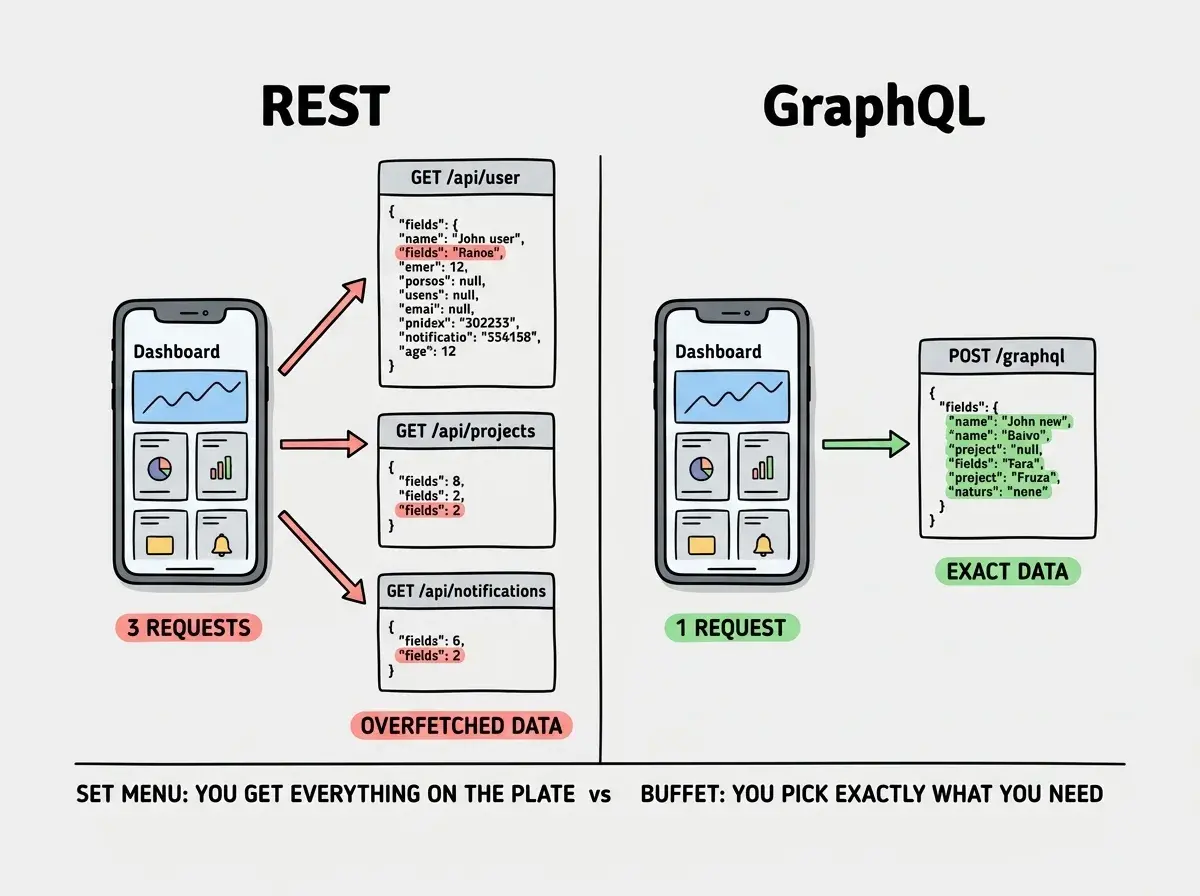
But the buffet requires more kitchen work. You need to define a schema, write resolvers for every field, handle query complexity limits (to prevent someone from requesting your entire database in one nested query), and set up specialized caching since standard HTTP caching does not apply to POST requests hitting a single /graphql endpoint.
Why AI Tools Default to REST
This matters most for anyone building with AI coding tools, and the answer is straightforward.
REST dominates the training data. GitHub has millions of REST API examples. Every backend tutorial starts with REST endpoints. AI models generate what they have seen most, and they have seen REST a hundred times for every GraphQL example.
REST requires less coordinated code. A REST endpoint is self-contained. An AI tool can generate a single route file that handles one resource. GraphQL requires a schema definition, resolver functions, and often a separate client-side query layer. These pieces must work together, and AI tools are less reliable when generating interdependent code across multiple files.
REST works without additional dependencies. Next.js, Express, Flask, Rails, every framework supports REST natively. GraphQL requires a server library (Apollo Server, GraphQL Yoga, or similar) and usually a client library like Apollo Client or urql on the frontend. More dependencies means more places for AI-generated code to break.
The practical result is that about 90% of AI-generated APIs are REST. If you want GraphQL in a vibe-coded app, you will likely need to set it up intentionally and guide your AI tool through the schema design process rather than expecting it to scaffold everything correctly.
Adding GraphQL to a simple CRUD application because it sounds more modern. If your app has straightforward data needs and a small number of pages, GraphQL adds schema complexity, resolver boilerplate, and caching challenges without meaningful benefit. The buffet is overkill when you are ordering for one. Use REST until you hit real pain from overfetching or endpoint sprawl, then consider GraphQL for the parts of your app that need it.
When REST Wins
Simple CRUD applications. If your app is a blog, a todo list, a basic SaaS with standard pages, REST endpoints map cleanly to your data model. One resource, one endpoint, minimal complexity.
Server-rendered or static applications. When the server controls the HTML output, overfetching barely matters. You fetch what you need in your server component and render it. The extra fields in the response cost almost nothing when you are not shipping them to a client.
Rapid prototyping. REST gets you from zero to working API in minutes, especially with AI tools. When you are validating an idea and speed matters more than architectural elegance, REST wins every time.
Teams with mixed experience levels. Every developer on your team already knows REST. GraphQL requires learning the query language, understanding resolvers, and thinking in graphs instead of endpoints. For a team that needs to move fast, REST eliminates the learning curve entirely.
When GraphQL Wins
Complex frontend applications with varied data needs. If your app has dashboards, admin panels, and mobile clients that all need different slices of the same data, GraphQL eliminates the "build a custom endpoint for every view" problem.
Mobile applications where bandwidth matters. Fetching exactly 200 bytes instead of 4KB per request adds up across thousands of daily users on slower mobile networks. The buffet approach shines when carrying capacity is limited.
Microservice architectures. GraphQL can sit as a unified layer in front of multiple backend services, giving the client a single coherent API even when data comes from five different sources.
Rapid frontend iteration. When your product team changes what data appears on a page every week, GraphQL lets frontend developers adjust their queries without waiting for backend changes. With REST, every new data requirement potentially means a new endpoint or a modified response shape.
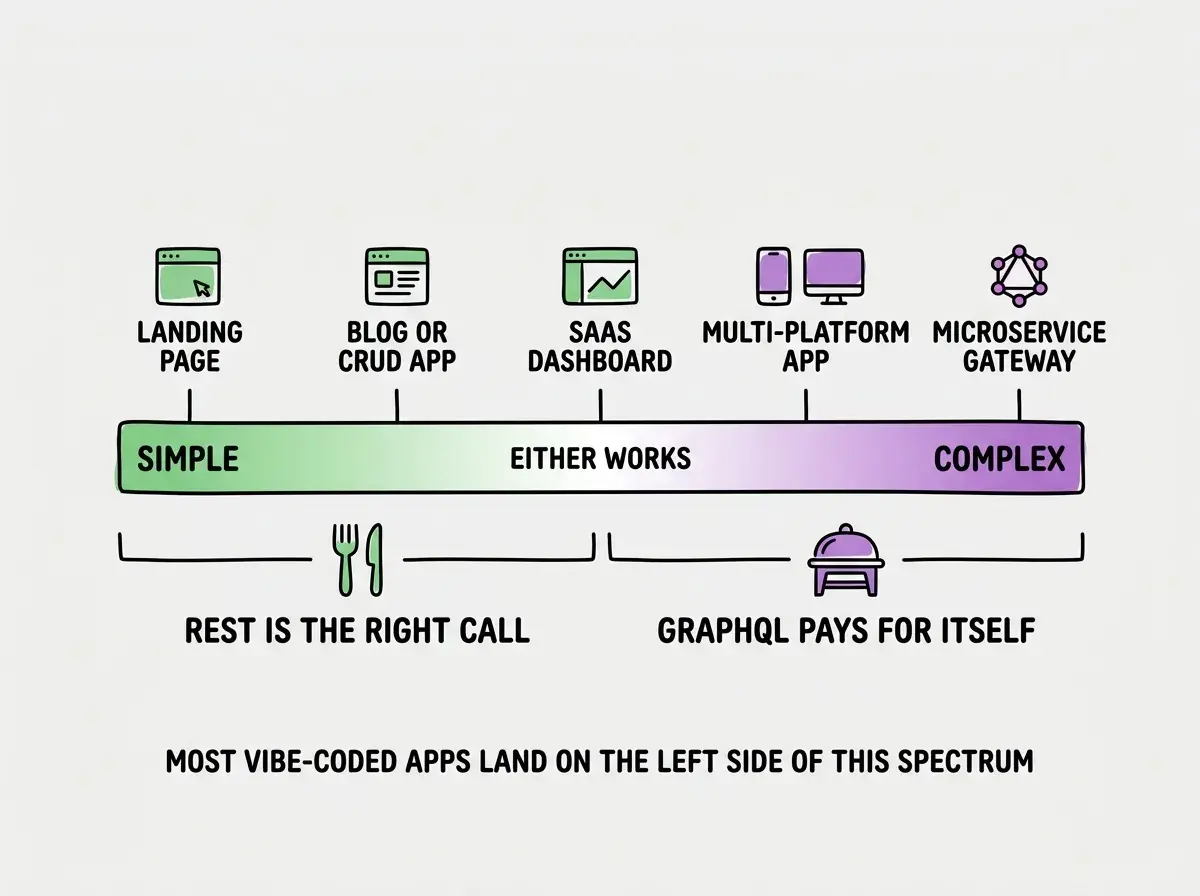
Most vibe-coded apps sit on the left side of this spectrum, where REST handles everything without additional complexity.
Get the fundamentals right before choosing between API styles.
Start buildingThe Hybrid Approach
Here is something comparison articles rarely mention. You do not have to choose one exclusively.
Many production applications use REST for their core CRUD operations and add a GraphQL layer for complex data-fetching scenarios. Your user registration, authentication, and file uploads stay as REST endpoints (simple, well-understood, easy to cache). Your dashboard, analytics, and admin interfaces use GraphQL queries (flexible, efficient, one request per page).
Let your AI tool scaffold REST endpoints for most features, then intentionally add GraphQL for the views where multiple data sources converge.
What This Means For You
If you are building a vibe-coded app right now, start with REST. Not because it is better in the abstract, but because your AI tools will generate it reliably, your deployment platform will cache it automatically, and your first priority is shipping something that works.
When you find yourself maintaining dozens of endpoints, constantly building new response shapes, or watching your mobile app groan under overfetched data, that is when GraphQL earns its place. REST will start feeling like ordering four full entrees when you just wanted a snack.
The buffet is wonderful when you are feeding a crowd with diverse tastes. The set menu is perfect when you know exactly what everyone wants. Most vibe-coded apps start as a table for two. Order the set menu, ship the product, and upgrade to the buffet when the guest list grows.
The API layer is one piece of a production-ready application.
Explore the guides