The landscape of artificial intelligence in software development is shifting from simple code completion to autonomous task execution. Developers are increasingly looking for tools that can handle entire feature requests rather than just predicting the next line of code. Google entered this specific arena with a new approach to developer tools, integrating multiple agent capabilities directly into the local environment.
Retrospective edition for March 2026. Researched and published September 9, 2026. Product details reflect documentation checked at publication unless explicitly identified as historical.
In a November 18, 2025 announcement detailing Gemini 3 developer tools, Google introduced Antigravity as a public preview for Mac, Windows, and Linux. This documentation based review examines the core workflow proposed by Google, which gives agents access to editor, terminal, and browser workflows and communicates work through artifacts. We will explore how to practically evaluate these features using a structured test project, ensuring you understand both the capabilities and the boundaries of this agent first system.
Understanding the Agent First Workflow Architecture
Antigravity departs from the traditional chat window model by distributing its intelligence across your operating system and development environment. The November 2025 announcement describes agents operating across an editor, terminal, and browser. These are working surfaces, not evidence that every task uses three separate specialized agents. An agent can edit files, run commands, and inspect the application as the task requires.
These agents do not simply make changes and leave you to figure out what happened. Instead, they compile their work into review artifacts. Artifacts communicate work for review. Do not assume every artifact contains every type of evidence or that there is one mandatory all-or-nothing approval flow. Request the plan, changed files, validation output, and browser evidence appropriate to your task.
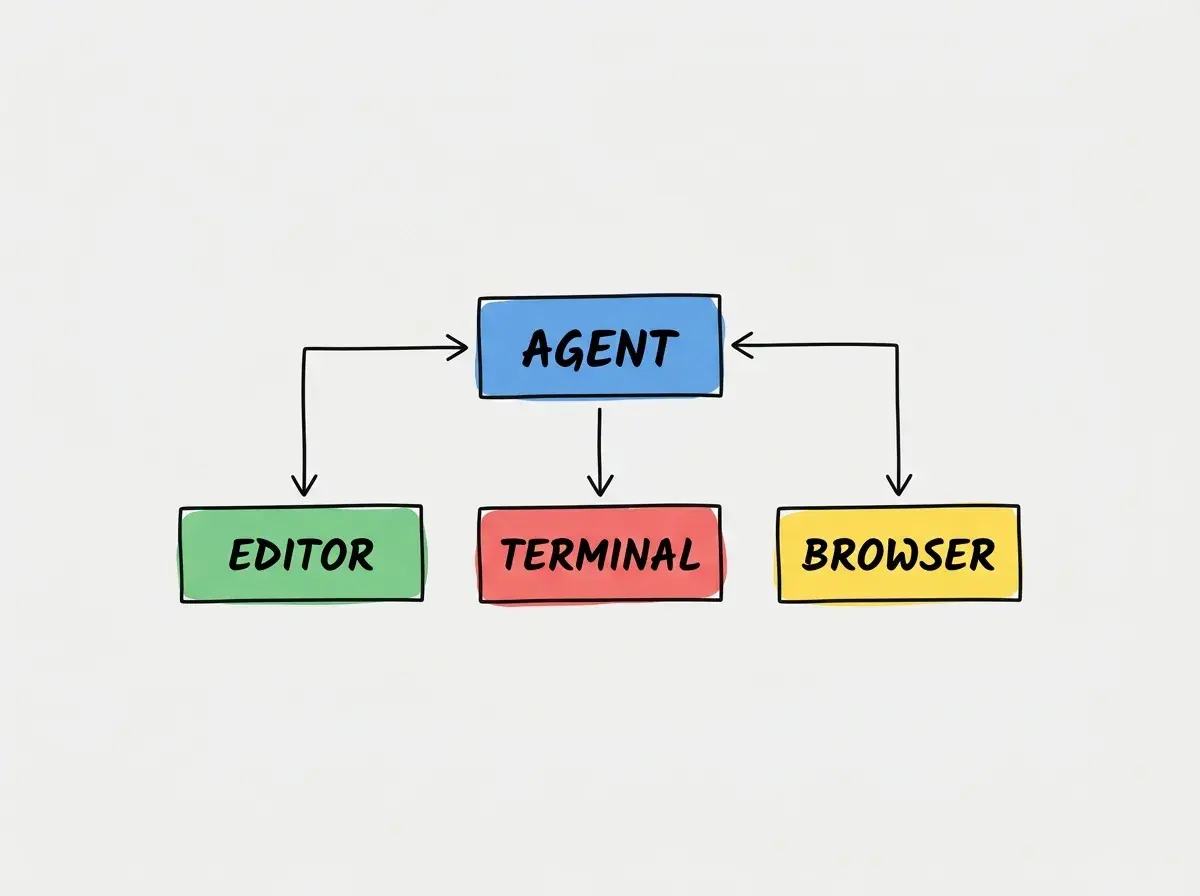
To truly understand how this works in practice, you need to step away from trivial examples like printing text to a console. You need a project that requires file creation, package management, and visual verification. This is where a structured evaluation becomes necessary.
Proposed Evaluation Task Building an Issue Board
When evaluating an agent first workflow, you should propose a task that touches multiple layers of a modern application stack. A small issue board application is perfect for this. It requires a frontend interface for dragging and dropping tasks, a backend API to save the state, and a database connection to persist the data.
Start the evaluation in the planning phase. Provide Antigravity with a detailed prompt asking it to scaffold a basic issue board with three columns for tasks. First inspect the proposed framework and dependencies. Then check whether the agent follows the agreed plan, reuses existing packages where appropriate, and produces a reproducible setup.
The true test of an agent first workflow is not how fast it writes code, but how accurately it orchestrates terminal commands and file system operations without manual intervention.
Once the scaffolding is complete, instruct the agent to build the user interface. This is where the browser agent comes into play. The documentation suggests the browser agent can navigate to the local development server and verify that the columns render correctly. In your evaluation, look for browser evidence in the review artifact. Did the agent actually load the page? Did it capture the state of the DOM to ensure the drag and drop targets are present?
You must carefully inspect the review artifact for this evidence. If expected evidence is missing, ask for it or mark that part of the task unverified. Missing evidence alone does not establish which internal execution mode the product used.
Explore clear explanations of AI coding tools, project context, and reliable development workflows.
Explore the blogHandling Artifact Review and Rejected States
The most critical phase of the Antigravity workflow is the artifact review. When the system presents a completed issue board feature, you are tasked with auditing the work. The review artifact will present the modified frontend components, the updated backend routes, and the terminal output from the build process.
During your evaluation, you should intentionally introduce a complex requirement that the agent might fail to implement correctly. For example, ask it to implement optimistic UI updates for the drag and drop action, ensuring the task visually moves before the backend confirms the database write. This often introduces race conditions or state management bugs.
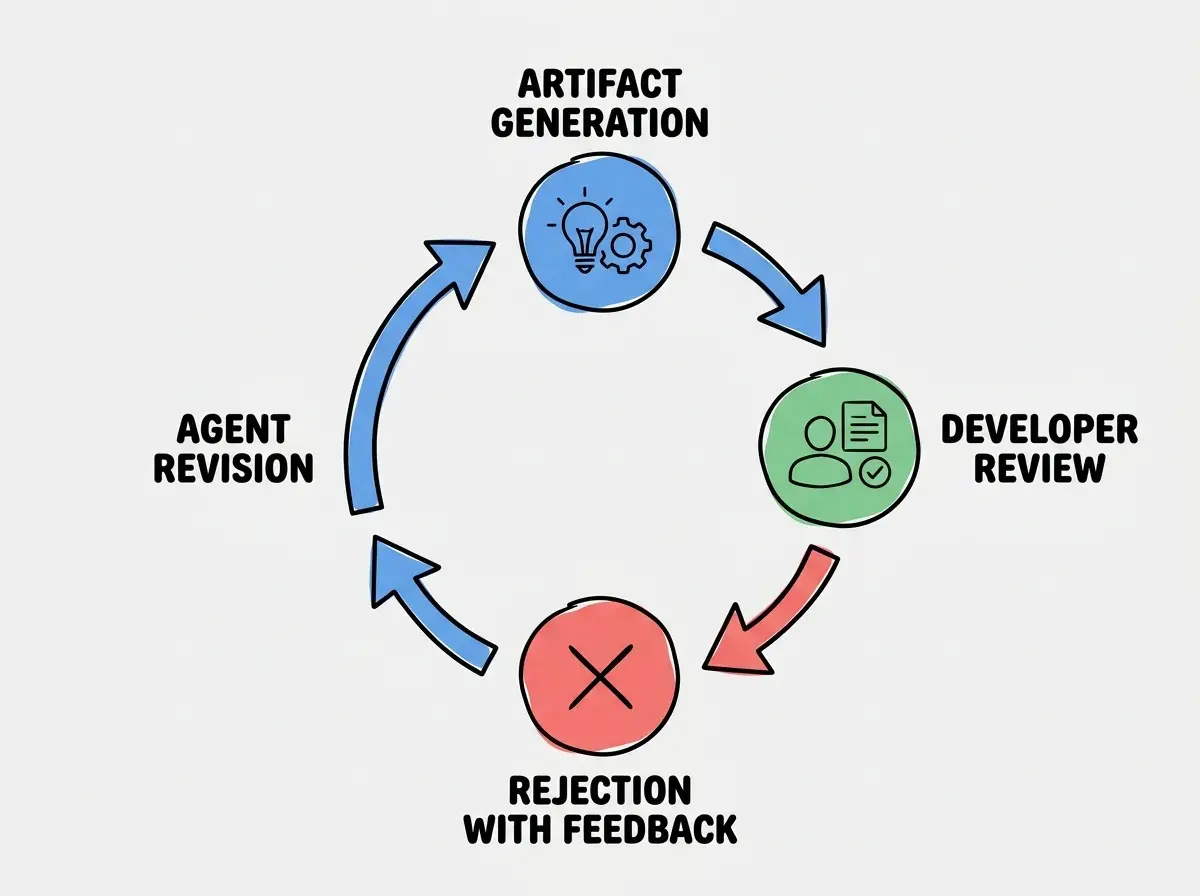
If you find a mistake, provide a focused revision request. Rejecting an artifact is not simply clicking a button; it requires providing context. You must explain to the agent why the optimistic update failed. Did the item snap back to its original column? Did the database throw a constraint error?
This is a crucial evaluation point. How well does Antigravity handle failure? Does it understand your feedback and revise the specific problematic files, or does it attempt to rewrite the entire feature from scratch? A mature agent system should isolate the failure, use the terminal agent to read the new error logs, and issue a targeted fix in a subsequent review artifact.
Do not assume that a successful browser screenshot in the review artifact guarantees backend correctness. Visual evidence does not prove that database transactions are completing successfully.
Developers often look at a screenshot of a completed issue board and assume the task is done. However, you must manually verify the backend state. Check your database tables to ensure the tasks are actually moving between columns and persisting their new status. Browser interactions can exercise application behavior, but a screenshot alone cannot establish database integrity. Verify persistence through an appropriate readback or integration test.
Access Limits and Budget Considerations
When adopting a new tool, understanding the operational limits is just as important as evaluating the technical features. Google outlined historical access parameters in its December 5 rate-limit update.
The documentation states that the public preview includes a free weekly quota for developers. However, for teams requiring sustained usage, Google noted that AI Pro and Ultra subscribers receive higher limits and a five hour refresh priority. It is important to remember that these historical announcements do not serve as a current price guarantee, and you should verify the exact quotas in the billing console before committing to a large scale evaluation.
| Evidence | What to check in the issue-board exercise |
|---|---|
| Plan | Requirements, dependencies, and scope are explicit |
| Diff | Changes match the requested feature |
| Execution | Build and test output supports the claimed result |
| Browser | The interaction was exercised, including failure states |
| Persistence | Saved data survives a reload and matches the backend |
When planning your evaluation budget, consider how the agent workflow consumes resources. Agent requests and the context returned by tools can affect usage. A build also consumes execution resources, but it is not itself a fixed number of model tokens. A single complex task like building the issue board might require dozens of internal agent loops before generating the final review artifact. If you are on the free weekly quota, you may find your access restricted if you attempt to build too many complex features in a single afternoon.
Check failure behavior as carefully as the happy path
Keep the issue board deliberately small so you can understand the entire state transition. Move a card, reload the page, and verify the saved status. Then simulate a failed save in the test environment and check whether the interface restores the previous state and explains the failure. A disappearing error is not a successful recovery.
Ask for an accessible alternative to dragging, such as a status selector usable with a keyboard. This makes the evaluation more representative than a screenshot of three attractive columns. Record which requirements passed, which failed, and how much review was needed before the change became acceptable.
Who Should Evaluate Antigravity Right Now
Based on the documentation and the proposed evaluation workflow, Antigravity is best suited for developers who are comfortable relinquishing granular control in exchange for higher level feature delivery. If you prefer to write every line of code yourself and only use AI for syntax suggestions, the artifact review process may feel cumbersome and intrusive.
However, if you are an engineering manager looking to accelerate prototyping or a full stack developer who wants to offload boilerplate scaffolding, Antigravity offers a compelling model. The ability to delegate terminal commands and basic visual verification to background agents can significantly reduce the cognitive load required to start a new project or add a standard CRUD feature.
You should assign your most experienced developers to evaluate the system first. They possess the architectural knowledge required to properly audit the review artifacts and identify subtle bugs in state management or database interactions that the agents might miss.
Frequently Asked Questions
What This Means For You
The shift toward agent first workflows represents a fundamental change in how developers interact with their tools. By moving away from simple text generation and embracing specialized agents that manipulate the terminal and browser, Google Antigravity attempts to automate the tedious mechanics of software engineering.
Successful adoption depends on task definition, environment reliability, model behavior, and your ability to review the result. You must learn to write comprehensive planning prompts, rigorously inspect review artifacts, and provide precise feedback during rejected states. By running a structured evaluation using a practical project like an issue board, you can determine if your team is ready to integrate autonomous agents into your daily development cycle.
Read more practical articles for choosing tools, reviewing changes, and shipping useful software.
Read more guides