Something is broken. You know it was not broken a week ago. But between then and now, your AI coding tool made forty-seven commits while you were iterating on features, fixing things it broke, and asking it to try a different approach. The bug could be hiding in any of them.
This is the new shape of the debugging problem. With AI tools, commit velocity is orders of magnitude higher than it used to be. 92% of US developers now use AI coding tools daily, and the code moves fast. That same speed creates a new kind of mess: 41% of AI-generated code gets reverted within two weeks, and even the code that stays often introduces subtle bugs that only surface later. Hunting through dozens of commits by eye is not a strategy. It is a way to lose a full day and still not find the culprit.
Git bisect is the tool that makes this problem tractable. It applies binary search to your commit history, cutting the suspect range in half with each step. Instead of checking forty-seven commits, you check six. It is the detective approach: start in the middle, figure out which half contains the suspect, eliminate the clean half, repeat.
What Git Bisect Actually Does
Binary search is probably the most useful algorithm you have never thought about in a practical context. Given a sorted list of items, instead of checking every item from left to right, you check the middle item first. If what you are looking for is in the upper half, throw the lower half away. If it is in the lower half, throw the upper half away. Keep halving until you find it.
Git bisect applies this to your commit history. You mark two commits: one where the bug definitely does not exist ("good"), and one where it definitely does ("bad"). Git picks the commit exactly halfway between them and checks it out. You test, tell git whether that commit is good or bad, and git halves the range again. In as few as six steps, you can narrow down a range of sixty-four commits to a single one.
The math is straightforward: binary search finds a target in a list of N items in at most log₂(N) steps. For a hundred commits, that is seven steps. For a thousand commits, it is ten. No matter how many commits your AI tool has been generating, bisect makes the problem manageable.
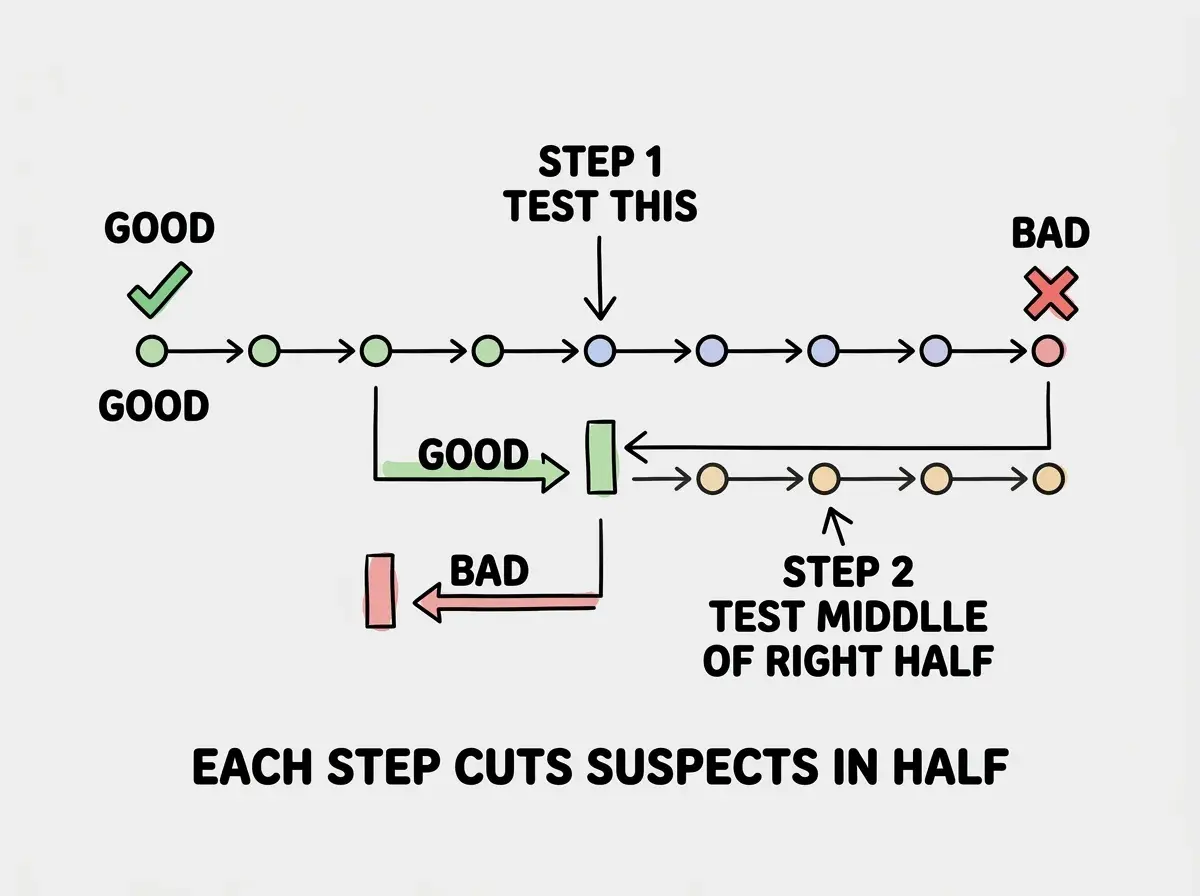
That visual captures the core idea. You are not reading every page of a book to find a sentence. You are opening to the middle, deciding which half contains it, and throwing the other half away.
Starting a Bisect Session
Before you run anything, you need two pieces of information: a commit where things worked, and a commit where they do not. The "bad" commit is usually easy (HEAD, your current broken state). The "good" commit takes a minute of thinking.
Check your git log for reference points:
git log --oneline -30
Look for commits with messages like "working login," "before authentication refactor," or anything that sounds like a stable state. If you are not sure, think about when the bug first showed up and pick a commit from before that.
Once you have both commits identified, start the session:
git bisect start
git bisect bad HEAD
git bisect good abc1234
Replace abc1234 with the hash of your known-good commit. Git will immediately check out the commit halfway between them and tell you something like:
Bisecting: 23 revisions left to test after this (roughly 5 steps)
That message is telling you exactly how many steps remain. Now you test.
Run your app, reproduce the bug (or confirm it is absent), and report back:
git bisect good   # bug is NOT present in this commit
# or
git bisect bad    # bug IS present in this commit
Git moves to the next midpoint. Repeat until git prints:
abc5678 is the first bad commit
That is your culprit. One commit, identified with certainty, in at most a handful of steps.
Git bisect does not tell you what is wrong with the code. It tells you which commit introduced the problem. Once you have that commit, run git show abc5678 to see exactly what changed. The diff is usually small enough that the bug becomes obvious immediately. Finding when the bug appeared is often 90% of the work.
When you are done, clean up so your repo returns to its current state:
git bisect reset
Do not skip this step. If you leave a bisect session running and start editing files, you will confuse yourself and potentially corrupt your working state.
Automating With Git Bisect Run
Manual bisect is powerful. Automated bisect is faster and removes human error from the testing step. If you can write a script that exits with code 0 when the bug is absent and exits with a non-zero code when the bug is present, git can run the entire bisect session for you with a single command.
This is where git bisect run comes in.
Say you have a test that specifically covers the broken behavior:
git bisect start
git bisect bad HEAD
git bisect good abc1234
git bisect run npm test -- --testNamePattern="user login"
Git will now run that test command at each bisect step, interpret the exit code, mark the commit good or bad automatically, and keep going until it finds the first bad commit. You walk away, come back in a few minutes, and the culprit is identified.
For situations where the regression is not covered by a test, you can write a tiny script:
#!/bin/bash
# bisect-test.sh
node -e "
const app = require('./dist/index.js');
const result = app.processPayment({ amount: 100 });
if (result.status === 'success') process.exit(0);
else process.exit(1);
"
Then run:
git bisect run bash bisect-test.sh
The key constraint: the script must be deterministic and fast. If your test is slow or flaky, automated bisect becomes unreliable. For network-dependent tests, mock the external calls. For UI-dependent regressions, look at headless testing tools that can give you a reliable exit code.
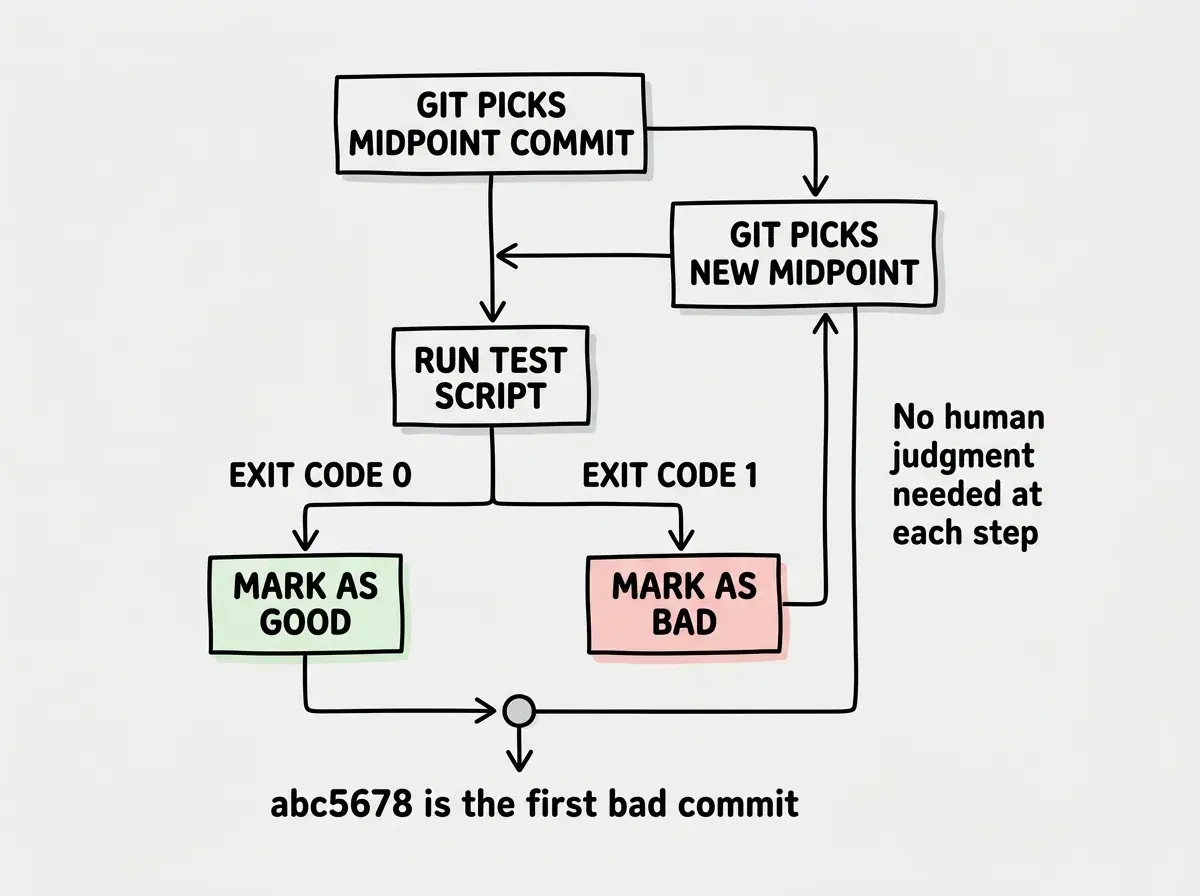
One practical note about AI-generated codebases: if your build step is part of what changed across commits, you may need to run a build before testing each commit. Wrap your bisect script to handle this:
#!/bin/bash
npm run build 2>/dev/null && node scripts/check-regression.js
The 2>/dev/null suppresses build output so you only see failures when they matter.
Reading the Result
When bisect lands on the culprit commit, the real investigation begins. Run this to see the full diff:
git show abc5678
You will see the commit message, the author, the timestamp, and every line that changed. In an AI-generated codebase, commit messages are often unhelpful ("update components" or "fix bug") but the diff does not lie.
Look for:
- Deleted lines that might have been load-bearing (validation checks, error handling, configuration values)
- Changed function signatures that subtly altered behavior
- Added dependencies or imports that introduced side effects
- Reformatted code that accidentally changed logic (this happens more often than you would expect with AI refactors)
Once you see the problem, you have two options. If the fix is small and isolated, you can patch it directly. If the entire commit is suspect, you can revert just that commit with:
git revert abc5678
This creates a new commit that undoes the changes without rewriting history. Your bisect breadcrumbs stay intact, which matters if the same bug surfaces again later.
Skipping commits during a bisect session because "that commit could not possibly be the problem." This ruins the binary search. If you skip based on a guess and the skipped commit was actually the culprit, bisect will report a misleading result. If a commit is genuinely untestable (broken build, missing dependencies), use git bisect skip instead of guessing. Bisect will work around skipped commits and give you a range rather than a single commit, which is still much better than nothing.
Why This Matters in an AI Codebase
Traditional debugging advice assumes human-paced commits: a few per day, each with a clear purpose, each reviewed before it landed. AI-assisted development breaks that assumption. You might have twenty commits from a single hour-long session, each touching multiple files, each generated by a model that has no long-term memory of what it changed before.
That 41% revert rate is not just a productivity statistic. It means that nearly half the time an AI modifies your code, the modification eventually needs to be undone. The question is not whether you will need to track down a bad AI commit. It is when. Bisect is the tool that makes that investigation take minutes instead of days.
The workflow becomes: reproduce the bug reliably, identify a good commit before the bug appeared, run bisect (manually or automated), read the diff on the culprit commit, and patch or revert. That is a complete loop. No guessing, no reading through dozens of commit diffs by hand, no three-hour debugging sessions that end with "I just rewrote it from scratch."
Git bisect is not flashy. It is one of those tools that most developers vaguely know exists but never actually use. In an AI-heavy workflow, it becomes essential. The same speed that makes AI coding tools so productive is also what makes the commit history hard to navigate manually. Bisect turns that speed from a liability into something you can work with.
Git bisect is one piece of the puzzle. There are more techniques worth knowing when AI tools are writing most of your code.
Explore more debugging guidesWhat to Do Right Now
If you have a bug you have been unable to track down, try this before you do anything else. Find a commit from your git log where the app definitely worked. Run git bisect start, mark the good and bad commits, and test your way to the culprit. The first time you do it, the whole session will feel surprisingly quick.
For future sessions, think about whether you can write a test script that captures the broken behavior. Even a small Node script that checks a specific output and exits with the right code is enough to automate the whole process. Once you have that habit, bisect becomes something you can start and walk away from.
The investigation mindset is the right one here. You are not reading every page of the case file. You are making strategic cuts, eliminating suspects in bulk, and closing in on the one commit that changed everything. Git gave you the perfect tool for this. Use it.
Version control habits are the foundation of reliable AI-assisted development.
See all shipping guides