Clerk vs Auth.js vs Supabase Auth represents the core authentication decision for every vibe-coded app in 2026. With 92% of AI-assisted developers using their tools daily, the auth solution your AI generates on the first pass often becomes the one you ship. Choosing intentionally matters more than most builders realize.
Quick Verdict
| Clerk | Auth.js | Supabase Auth | |
|---|---|---|---|
| Best for | Fast launch, beautiful UI out of the box | Full control, zero vendor lock-in | Apps already using Supabase for data |
| Price | Free to 10K MAU, then $0.02/MAU | Free forever (self-hosted) | Free to 50K MAU, then $0.00325/MAU |
| Strength | Pre-built components, managed infrastructure | No cost ceiling, maximum flexibility | Database + auth in one platform |
| Weakness | Costs grow with every user | You build and maintain everything yourself | Auth tied to Supabase ecosystem |
The surface-level pitch is simple. Clerk handles everything for you. Auth.js gives you total freedom. Supabase Auth bundles authentication with your database. But the real differences show up when you look at what happens after your first 1,000 users sign up, and what your AI coding tool actually generates when you ask it to "add authentication."
Your AI tool's default auth suggestion is not a recommendation. It is whatever appeared most in its training data. Cursor and Claude Code lean toward Auth.js because it dominates open-source examples. Lovable and Bolt default to Supabase Auth because they scaffold full-stack apps with Supabase already wired in. The "best" auth is the one that fits your app's architecture, not the one your tool picks first.
How Clerk Works
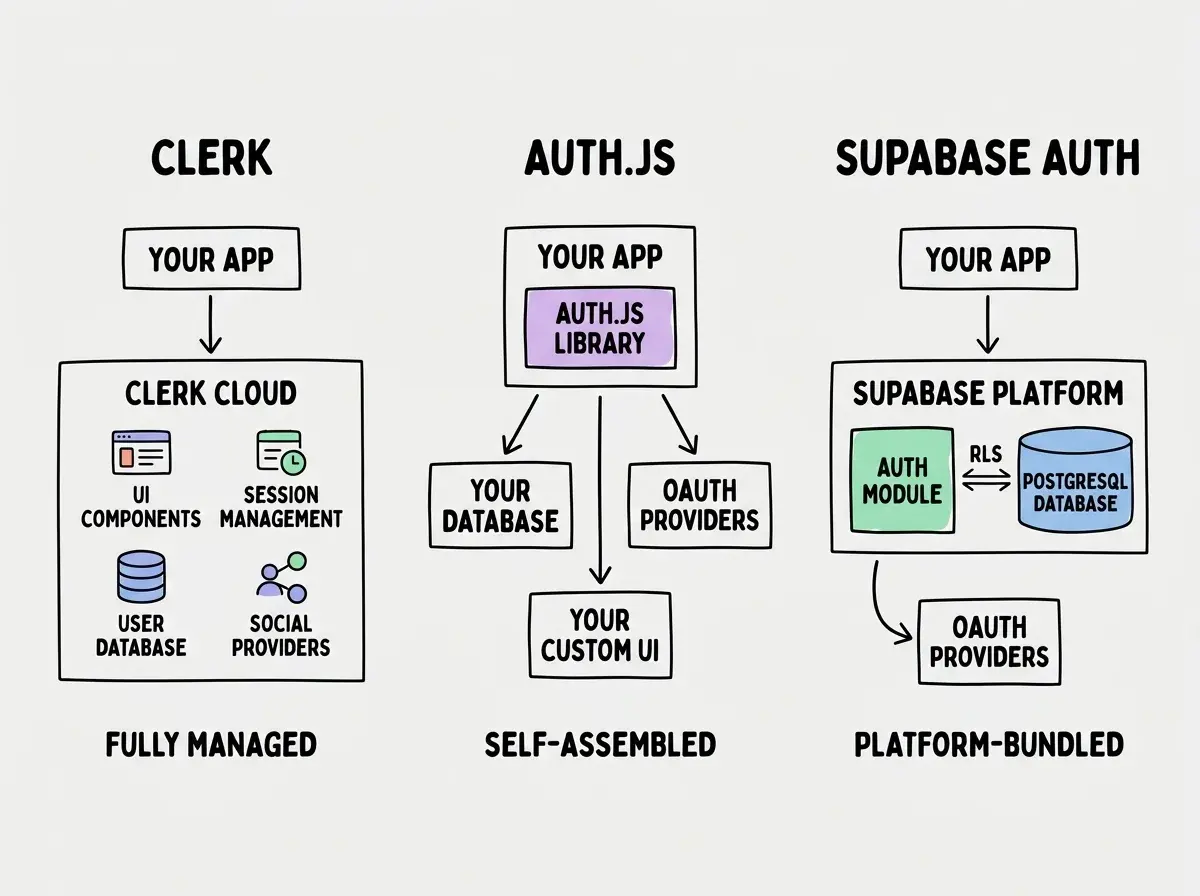
Clerk is a fully managed authentication service. You install the SDK, drop in pre-built React components, and get sign-up, sign-in, user profiles, multi-factor authentication, organization management, and session handling without writing a single auth function. The UI components are polished and customizable through a dashboard. For a vibe coder who wants authentication solved in under an hour, Clerk delivers.
The developer experience is genuinely excellent. Clerk's <SignIn /> and <UserButton /> components work immediately in Next.js, Remix, and other React frameworks. Middleware for route protection takes about five lines. The dashboard shows active sessions, user analytics, and lets you configure social providers with clicks instead of code.
Where Clerk earns its price. Organization management, role-based access control, and multi-tenant support are built in. If you are building a SaaS where teams need separate workspaces, Clerk saves weeks of development. These features are complex to build from scratch and even more complex to build securely.
The catch is cost at scale. The free tier covers 10,000 monthly active users, which is generous for validation. After that, the Pro plan starts at $25/mo plus $0.02 per additional MAU. An app with 50,000 MAU runs roughly $825/mo. At 100,000 MAU, you are looking at $1,825/mo. For a B2C app with high user counts but low revenue per user, Clerk becomes a significant line item fast.
How Auth.js Works
Auth.js (formerly NextAuth.js) is a free, open-source authentication library. You install it, configure your providers, set up a database adapter, and handle sessions yourself. There is no hosted service, no dashboard, and no monthly bill. The code runs entirely on your infrastructure.
Maximum flexibility, maximum responsibility. Auth.js supports OAuth providers (Google, GitHub, Discord, dozens more), email/password (via credentials provider), magic links, and WebAuthn. You can use any database through adapters for Prisma, Drizzle, Supabase, and others. Every aspect of the auth flow is configurable through callbacks.
The UI is entirely on you. Auth.js provides the backend logic for sessions, tokens, and provider callbacks, but the sign-in page, the sign-up form, the profile screen, and every other user-facing element is your responsibility. For a senior developer, this is fine. For someone who just asked Cursor to "add Google login," the gap between Auth.js's callback URL configuration and a working sign-in page can be frustrating.
What AI tools generate with Auth.js. When you ask Claude Code or Cursor to add authentication, they frequently reach for Auth.js because it is the most represented library in open-source Next.js projects. The generated code usually works for the basic OAuth flow. But edge cases like session refresh, CSRF protection configuration, and database adapter setup often need manual fixes. The AI gets you 70-80% of the way; you debug the rest.
How Supabase Auth Works
Supabase Auth is built into the Supabase platform. When you create a Supabase project, authentication is already there. Email/password, magic links, phone OTP, and social OAuth providers work through the Supabase client library with minimal configuration. The user data lives in the same PostgreSQL database as the rest of your app data.
Row Level Security is the differentiator. Supabase Auth integrates directly with PostgreSQL's Row Level Security (RLS). You write policies like "users can only read rows where user_id matches auth.uid()" and the database enforces access control at the query level. This eliminates an entire category of authorization bugs where your API accidentally returns data belonging to another user. For apps that store sensitive per-user data, RLS is a meaningful security advantage.
The free tier is the most generous. Supabase gives you 50,000 monthly active users on the free plan. The Pro plan at $25/mo extends that, with additional MAU charged at $0.00325 each. At 100,000 MAU, Supabase Auth costs roughly $187/mo compared to Clerk's $1,825. The pricing gap widens as you grow.
The tradeoff is ecosystem lock-in. Supabase Auth works best when your entire backend is Supabase. Using it with a separate database, a different ORM, or a non-Supabase hosting provider adds friction. If you decide later to migrate off Supabase, extracting auth is not trivial because your security policies, user sessions, and access control are all woven into Supabase's infrastructure.
Picking Supabase Auth just because it is free without planning for RLS policies. The authentication part works immediately, but without proper Row Level Security, your Supabase database is effectively open to any authenticated user. Vibe coders frequently ship apps where signing in grants access to every row in every table. Auth without authorization is a security hole, not a feature.
Pricing at Scale
This is where the decision gets concrete. Here is what each solution costs as your user base grows.
| Monthly Active Users | Clerk | Auth.js | Supabase Auth |
|---|---|---|---|
| 1,000 | $0 | $0 | $0 |
| 10,000 | $0 | $0 | $0 |
| 25,000 | $325/mo | $0 | $0 |
| 50,000 | $825/mo | $0 | $0 (free tier limit) |
| 100,000 | $1,825/mo | $0 | ~$187/mo |
Auth.js will always cost $0 for the library itself. But "free" is misleading if you factor in the engineering hours spent building, debugging, and maintaining everything Clerk gives you out of the box. A senior developer's time building a custom auth UI, handling edge cases, and setting up email verification is worth something. For a solo indie hacker, that time might be better spent on the product itself.
Clerk's pricing works well for B2B SaaS where you have fewer users paying higher prices. A project management tool with 5,000 paying teams at $50/mo can easily absorb $825/mo in auth costs. A consumer social app with 100,000 free users and thin monetization cannot.
Understand the fundamentals before picking a provider.
Learn auth basicsWhat AI Tools Default To
This category does not appear in most comparison articles, but it matters enormously for vibe coders because the default choice becomes the shipped choice about 80% of the time.
Cursor and Claude Code generate Auth.js configurations most frequently. They pull from the massive volume of open-source Next.js projects using NextAuth/Auth.js. The generated code typically includes a basic Google OAuth setup, a session provider wrapper, and middleware for protected routes. It works for the happy path but often needs refinement for production use.
Lovable and Bolt scaffold Supabase Auth by default. These tools generate full-stack applications with Supabase as the backend, so authentication comes pre-wired. The generated code includes Supabase client initialization, auth state management, and basic protected route logic. The integration is tighter because the tools assume a Supabase architecture.
Clerk rarely appears as a default generation because it requires an API key and account setup before any code works. AI tools cannot scaffold a working Clerk integration without credentials. You need to choose Clerk intentionally, create an account, and then ask your AI tool to integrate it.
Who Should Use What
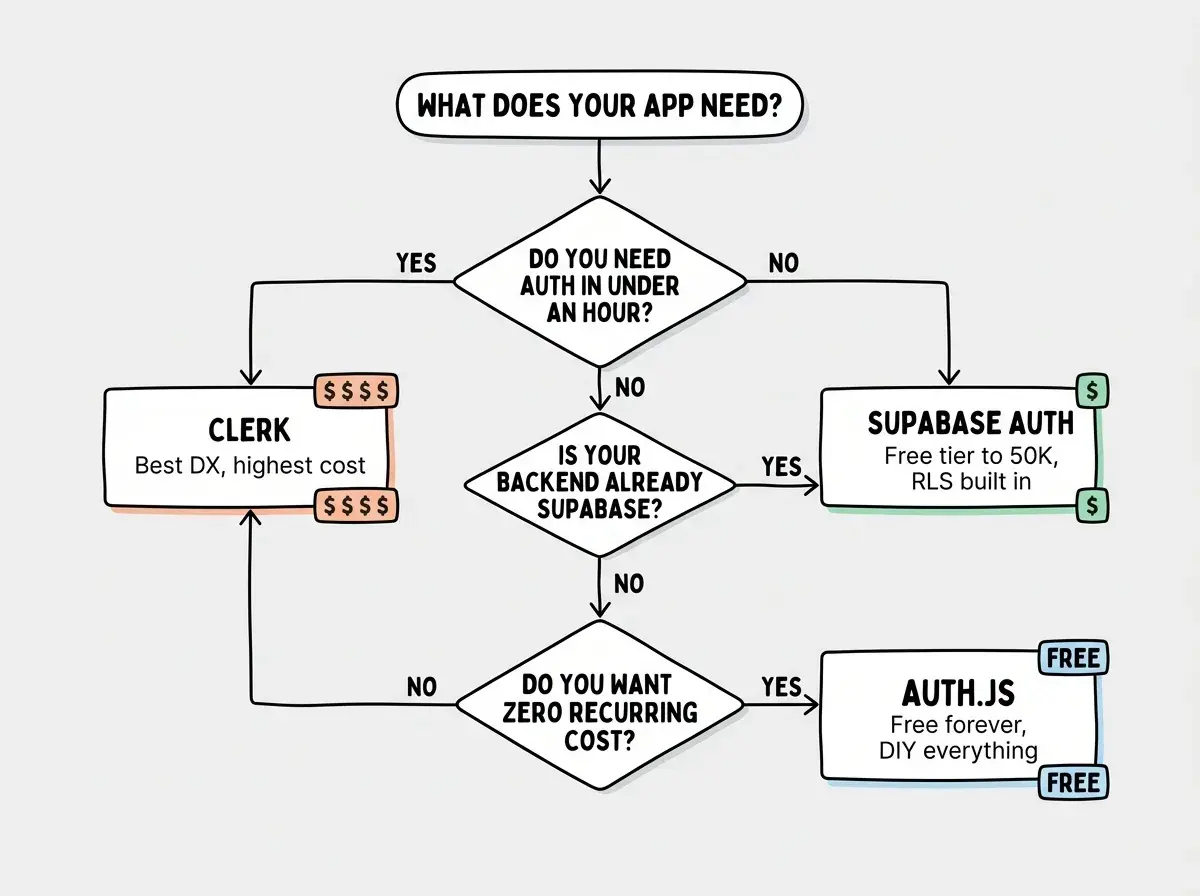
Use Clerk if you:
- Want authentication working in under an hour with zero custom UI
- Are building B2B SaaS with organization and role management needs
- Can budget $25-2,000/mo for auth as a managed service
- Value polished, pre-built components that look professional immediately
Use Auth.js if you:
- Are a developer comfortable configuring OAuth flows and database adapters
- Need complete control over every aspect of the auth experience
- Are building on a tight budget where $0 recurring cost matters
- Want zero vendor dependency and the ability to switch providers freely
Use Supabase Auth if you:
- Are already using Supabase for your database and backend
- Want authentication and authorization integrated at the database level
- Need a generous free tier (50K MAU) with affordable scaling
- Are building apps where Row Level Security provides real value
Authentication is just the first layer of a production-ready application.
Read the security guideWhat This Means For You
The auth decision is really a business decision disguised as a technical one.
If you are validating an idea and need to ship this week, Clerk gets you there fastest. The cost is irrelevant at 100 users and the pre-built UI makes your app look polished from day one. You can always migrate later if costs become a problem (though migration is never painless).
If you are already building on Supabase, using anything other than Supabase Auth adds complexity for no clear gain. The RLS integration alone is worth the ecosystem commitment, and the free tier covers most indie projects for their entire lifetime.
If you are a senior developer building for the long term, Auth.js gives you the most control and the lowest floor on recurring costs. You pay in setup time instead of monthly fees, and the result is auth infrastructure that you own completely.
The worst choice is the one you make by default. When your AI tool scaffolds auth for you, pause and ask whether that is the right solution for your app's trajectory, not just the easiest one to generate. Authentication touches every user interaction in your product. Getting it right early saves more headaches than almost any other architectural decision you will make.