The app builder vs code editor decision is the first real fork in the road for anyone building with AI in 2026. With 92% of developers using AI tools daily and 63% of app builder users coming from non-technical backgrounds, both paths are legitimate. But they lead to very different places, and picking wrong costs you weeks.
Two Categories, Two Philosophies
App builders turn descriptions into complete applications. Tools like Lovable, Bolt, and Replit Agent take your natural language prompt and generate a full working app with a user interface, database connections, authentication, and deployment. You describe what you want, the tool builds it, and you refine through conversation. You never see raw code unless you choose to.
Code editors help you write code with AI assistance. Tools like Cursor, Claude Code, and GitHub Copilot assume you are working in code. They suggest completions, generate functions, refactor files, and debug errors. You see every file, every line, every change. The emphasis is on control and precision.
App builders put you in the director's chair. Code editors put you in the pilot's seat. Both can produce production-grade software. The difference is where you sit in the process.
What App Builders Do Well
Going from zero to something real in minutes. Lovable's average time from prompt to deployed prototype is under ten minutes. You type "build me a project management tool with kanban boards and team assignments," and you get a working app with drag-and-drop cards, user accounts, and a live URL. You can test three concepts before lunch instead of committing weeks to one.
Removing the technical barrier entirely. If you do not know what a React component is or how authentication tokens work, app builders handle all of that invisibly. The 63% of non-developer users building with these tools are producing real applications that serve real customers. The tool abstracts away complexity so you can focus on what the product should do rather than how it should be implemented.
Providing a visual, iterative workflow. You see your app as your users will see it. You click on a button and say "make this larger and change the color to blue." The feedback loop is immediate and visual. For people who think in terms of interfaces rather than code structures, this is the natural way to build.
App builders and code editors are not good versus bad or beginner versus advanced. They optimize for different priorities. App builders optimize for speed to first version. Code editors optimize for control over every detail. Most projects need both priorities at different stages, which is why understanding the tradeoff matters more than picking a side.
What Code Editors Do Well
Full visibility into every decision the AI makes. When Cursor suggests a change, you see the exact diff. When Claude Code refactors a module, you can review every modified file before accepting. Nothing happens behind a curtain. For projects where you will maintain, extend, or hand off the codebase, this transparency is essential.
Handling complex, interconnected changes. A code editor shines when the task involves coordinating changes across multiple files and dependencies. "Update the API to return paginated results, modify the frontend to handle infinite scroll, and update the tests." App builders struggle with cross-cutting work because their interface is optimized for one screen at a time. Code editors treat your entire project as a connected system.
Growing with your skills. The more you learn about code, the more powerful a code editor becomes. Cursor's suggestions get smarter when you understand the patterns it is completing. Claude Code becomes more useful when you can write precise task descriptions referencing specific files and functions. The tool scales with your ability in a way that app builders, by design, do not.
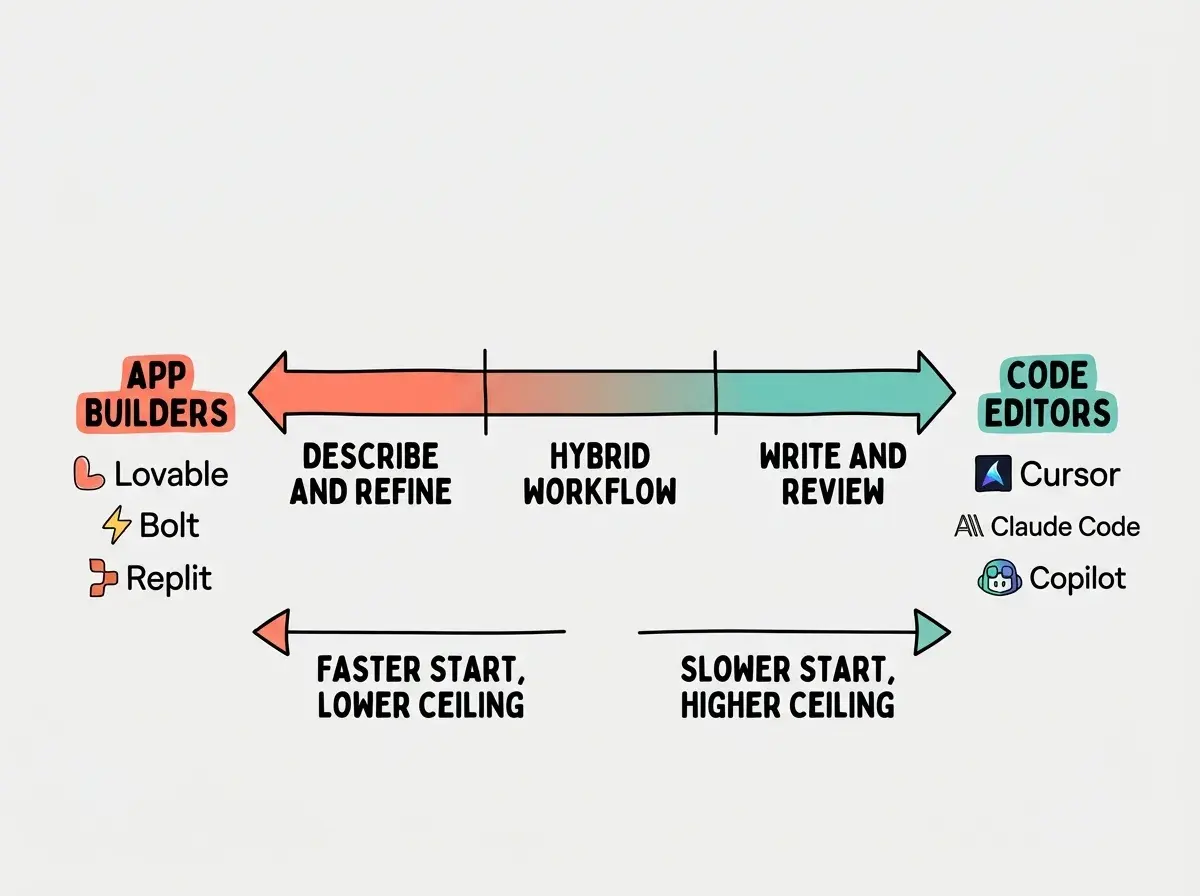
The Skill Spectrum Matters More Than You Think
People frame this as technical versus non-technical, but that oversimplifies it. The real spectrum is how much control you want right now, and that changes over time.
If you have never written code, app builders let you build immediately. You will produce something useful on day one. The learning curve is about communicating with AI effectively, not about learning programming concepts.
If you understand some technical concepts but do not write code fluently, app builders will get you further faster, but you will notice their limitations sooner because you can imagine features that exceed what the visual interface supports.
If you are comfortable reading and modifying code, a code editor gives you dramatically more leverage. You can catch AI mistakes, guide the tool toward better solutions, and handle the debugging that comes with any project.
If you are an experienced developer, code editors are almost certainly your primary tool. The speed advantage of app builders does not outweigh the loss of control for someone who can already build fast in code.
The important insight is that this spectrum is not fixed. Someone who starts with Lovable today might graduate to Cursor in six months as they absorb programming concepts through exposure to AI-generated code.
The Control vs Speed Tradeoff
Being honest about where you need to land on this tradeoff saves you from a painful false start.
App builders are faster when you need a prototype, an MVP, or a standalone tool that does not integrate with existing systems. They excel at self-contained applications with standard features like user accounts, dashboards, and forms.
Code editors are faster when you need to modify existing code, integrate with specific APIs, implement custom business logic, or build something outside standard patterns. They also become faster over time, because the skills you build transfer to every future project.
The most expensive mistake is picking an app builder for a project that will need deep customization, then discovering the limits after you have built your entire product on it. Before choosing, ask yourself honestly whether this project will eventually need features that require custom code. If the answer is "probably yes," starting with a code editor saves you from a full rebuild later.
| Scenario | Better choice | Why |
|---|---|---|
| Validating a startup idea | App builder | Speed to test matters more than code quality |
| Internal tool for your team | App builder | Standard patterns, limited users, low complexity |
| Customer-facing SaaS product | Code editor | You will need custom features and full control |
| Personal portfolio or landing page | App builder | Simple scope, visual output, one-time build |
| Project integrating multiple APIs | Code editor | Integration work needs code-level precision |
| Learning to build with AI | App builder first | Lower barrier to entry, faster wins, build confidence |
The Graduation Path
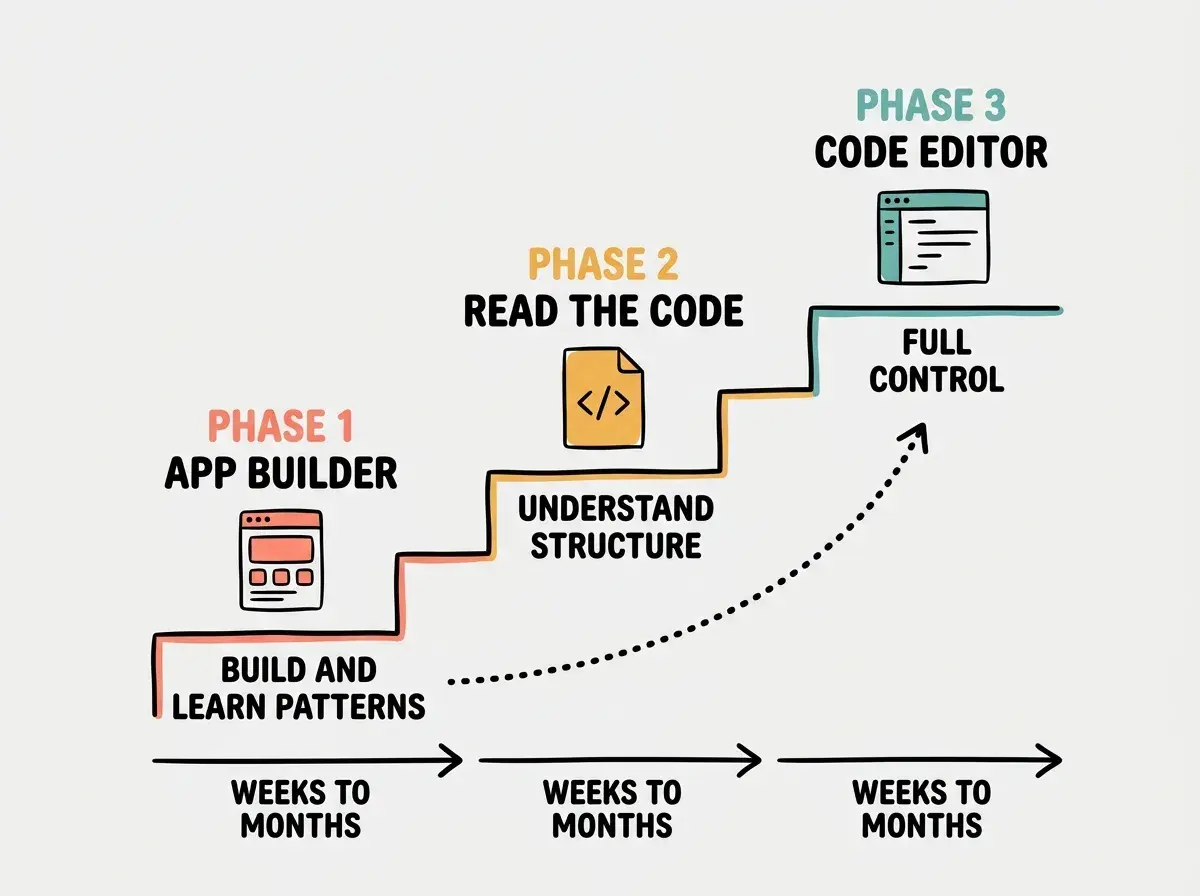
The most practical approach for many people is sequential. Start with an app builder, absorb concepts, and graduate to a code editor when your ambitions outgrow what the builder can do.
Phase one is building with an app builder. You learn to describe what you want clearly. You learn how authentication works by using it, not studying it. You build three or four small projects and start noticing patterns in how applications are structured.
Phase two is reading the code your builder generates. Lovable and Bolt both let you view and export source code. Start reading it. You do not need to understand every line. Just notice the structure. "This file handles the login page. This one talks to the database. This one defines what the API returns." You are building a mental map without formal study.
Phase three is switching to a code editor for your serious project. When you start a project that matters, you use Cursor or Claude Code. Your time with the app builder gave you enough context to communicate effectively with the AI at the code level. You are not starting from zero. You are building on months of pattern recognition.
This path is not mandatory. Some people stay with app builders permanently, and others skip straight to code editors. But for the largest group of new builders, the graduation path is the lowest-risk way to develop real skills while shipping real products.
The Hybrid Approach
Smart builders use both categories for what each does best.
Prototype in an app builder, then rebuild in a code editor. Use Lovable to test whether anyone wants your product. Get ten users. Validate the concept. Then rebuild the validated version in Cursor or Claude Code with proper architecture and production-grade infrastructure. The prototype was never meant to be the final product. It was meant to save you from building the wrong thing well.
Use an app builder for non-core features. Your main product lives in a code editor, but you need an admin dashboard for your support team. Build it in Bolt. It does not need to be perfect. Save your code editor time for the features your customers actually touch.
Use a code editor for the one thing your app builder cannot do. Maybe 90% of your app works perfectly in Lovable, but one feature requires a custom integration. Export the code, open it in Cursor, add the integration, and deploy. Builder for leverage, editor for precision.
We have in-depth guides for Lovable, Bolt, Cursor, Claude Code, and every major AI building tool.
Find your toolWhat This Means For You
This decision comes down to what you need right now and where you expect to go next.
- If you are a founder validating an idea: Start with an app builder. Speed to market matters more than code ownership at this stage. You can always rebuild once you have proven demand. The fastest path to learning whether your idea works is to build it and put it in front of people.
- If you are changing careers into tech: Start with an app builder to build confidence and ship real projects, then graduate to a code editor as your understanding grows. Every app you build teaches you something about how software works, and the graduation path avoids the frustration of starting at the deep end.
- If you already have some technical background: Skip straight to a code editor. Your existing knowledge gives you enough context to communicate with AI at the code level, and the control will be more valuable than the speed of an app builder.
Pick a tool, follow a guide, and ship your first project this week.
Get started