You open your laptop. You check your app. It is broken. Nothing loads, or something that worked perfectly twelve hours ago now throws an error. You did not touch anything. You did not deploy anything. You went to sleep and woke up to chaos.
This is one of the most disorienting experiences in building software, and it happens to everyone. A 2025 Stack Overflow survey found that 92% of developers use AI tools daily, and 63% of people building with vibe coding tools are non-developers. Millions of builders are shipping apps without traditional debugging instincts. When something breaks overnight, the first instinct is panic. The second is to start changing things randomly. Both make the situation worse.
There is a better way, and it works exactly like troubleshooting a coffee maker that refuses to brew on a Monday morning.
The Coffee Maker Method
Think about what you do when you stumble into the kitchen and your coffee maker is not working. You do not immediately take it apart. You do not order a new one. You follow a natural sequence of checks, starting with the simplest explanation and working outward.
Is it plugged in? Is there water in the reservoir? Did the power go out overnight and reset the timer? Is the outlet working, or did a breaker trip? Each check takes seconds, and you move through them in order of likelihood. Only after ruling out the simple causes do you consider that the machine itself might be broken.
Your app deserves the same calm, methodical approach. Most overnight failures have simple explanations. The trick is checking them in the right order instead of jumping to the most dramatic possibility first.
When your app was working yesterday and is broken today, the cause is almost always something that changed in the environment around your code, not in your code itself. Hosting providers, SSL certificates, DNS records, third-party services, and API keys all have expiration dates and maintenance windows that happen without your permission. Start by checking what changed outside your control before assuming you broke something.
The Overnight Checklist
Work through these items in order. Each one takes less than two minutes to verify, and together they cover the vast majority of "it was working yesterday" failures.
Step 1. Check your hosting provider's status page. This is the equivalent of checking if the power went out. Visit your hosting provider's status page (Vercel has status.vercel.com, Netlify has netlifystatus.com, Cloudflare has cloudflarestatus.com). If there is an active incident, you have your answer. You did not break anything. Their infrastructure is having a bad day. Bookmark these status pages now, before you need them.
Step 2. Check if your SSL certificate renewed. SSL certificates expire. Many hosting platforms handle renewal automatically, but automatic renewal can fail silently. If your visitors see a "Your connection is not private" warning, an expired SSL certificate is likely the cause. Check by clicking the padlock icon in your browser's address bar and looking at the certificate's expiration date. If it expired overnight, your hosting provider's renewal process hit a snag.
Step 3. Check your DNS records. DNS changes can take up to 48 hours to fully propagate, and sometimes DNS providers make changes that affect your routing. Use whatsmydns.net to see how your domain resolves from different locations. If the records look wrong or inconsistent, someone (possibly your domain registrar) made a change that broke the connection between your domain and your hosting.
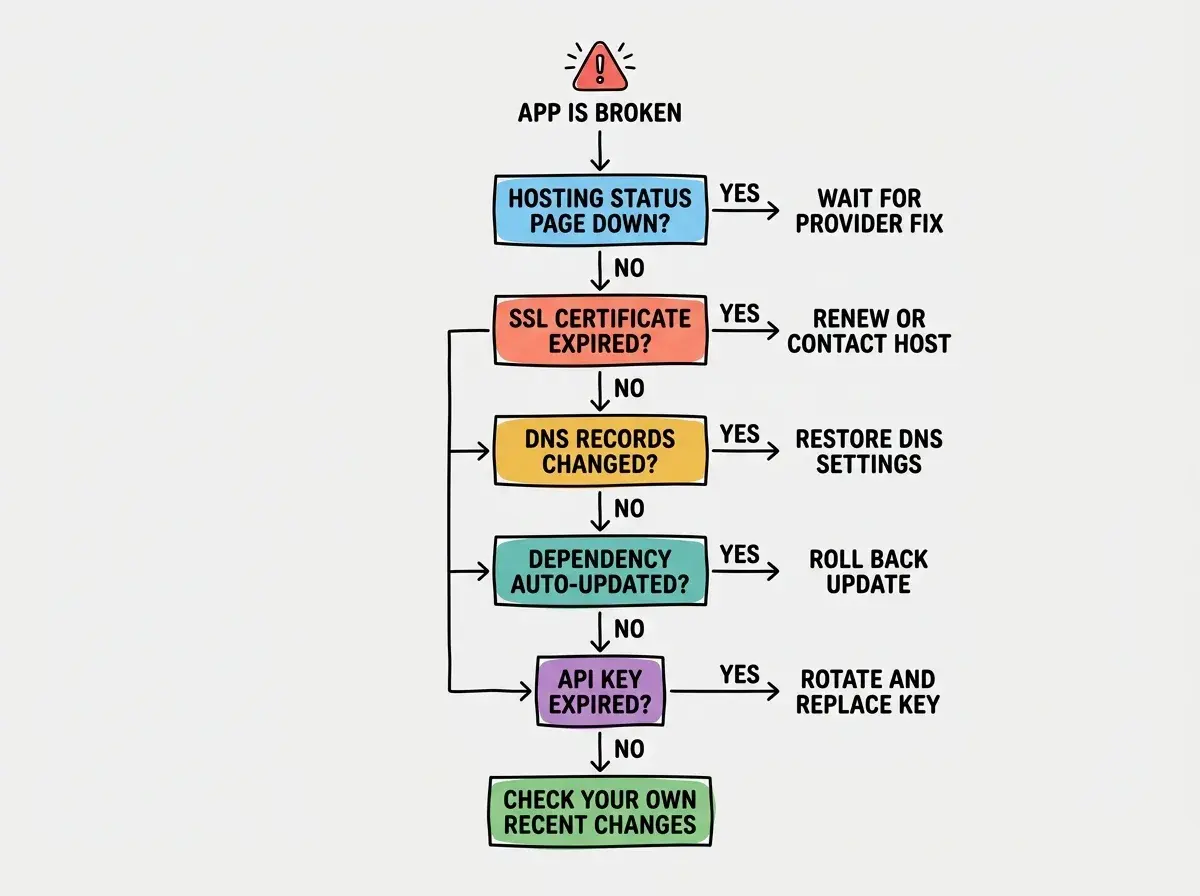
Step 4. Check for automatic dependency updates. If you use Dependabot, Renovate, or any automated update tool, check whether a pull request was merged overnight. A dependency update that seemed harmless can introduce breaking changes. Check your GitHub repository's recent activity for any merged PRs you did not review. If you find one, reverting that merge is your fastest path to recovery.
Step 5. Check your API keys and tokens. API keys expire. OAuth tokens expire. Trial periods end. Free tier credits run out. Log into every third-party service your app uses (your database provider, your authentication service, your email provider, your AI API) and check for warnings, expired credentials, or billing issues. A single expired API key can make your entire app appear broken when the underlying code is perfectly fine.
Step 6. Check your database limits. Free-tier databases have storage limits, connection limits, and row limits. If your app grew overnight (maybe a social media post drove unexpected traffic), you might have hit a ceiling. Check your database provider's dashboard for usage warnings. Supabase, PlanetScale, Neon, and Railway all show current usage against your plan's limits.
Quick Verification Tools
You do not need fancy tools for these checks. For hosting status, visit the provider's status page or search social media for their name plus "outage." For SSL, click the padlock icon in your browser or use ssllabs.com/ssltest. For DNS, use whatsmydns.net to see how your domain resolves globally. For dependency updates, check your repository's "Recently merged" pull requests tab. For API keys and database limits, visit each service's dashboard and look for red warning banners or usage alerts.
Learn the fundamentals every builder needs before their first deployment.
Start with the basicsYour Fault vs. Their Fault
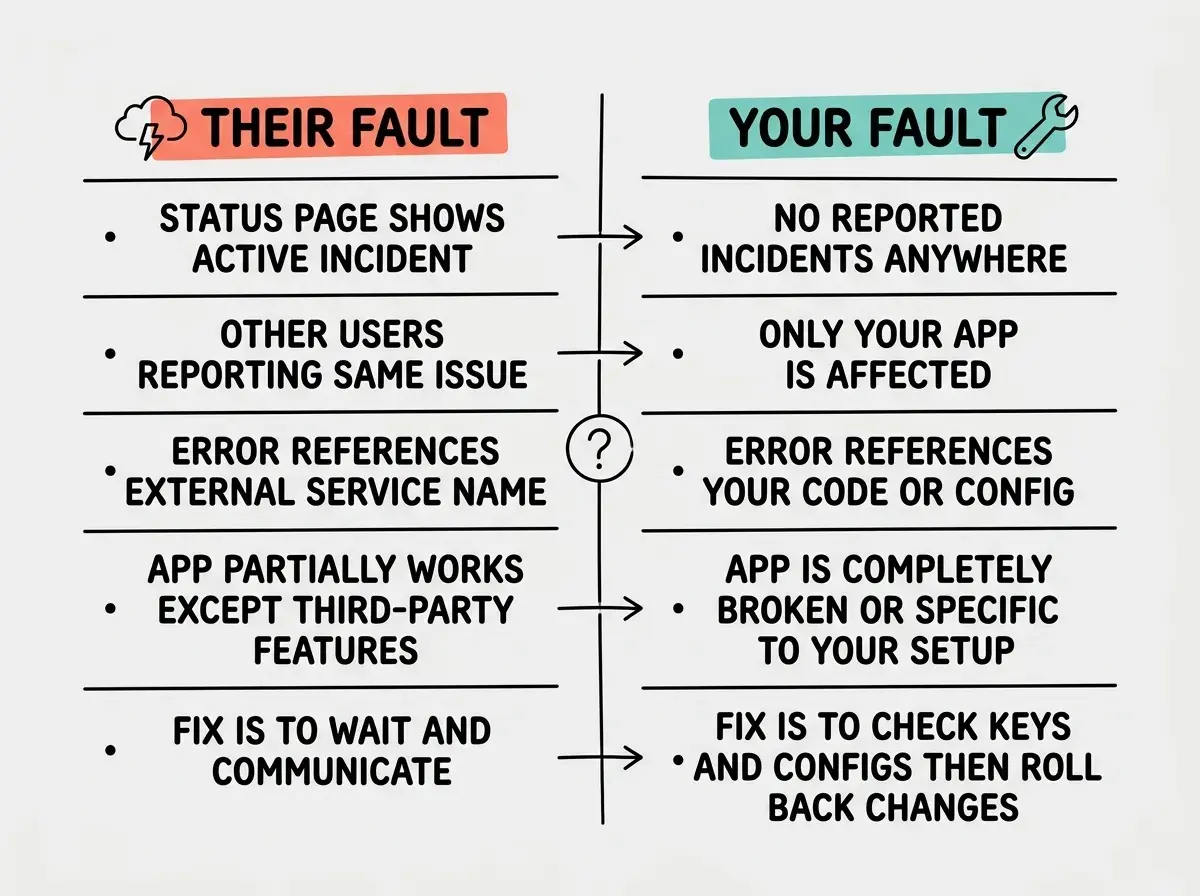
One of the most important skills in troubleshooting is figuring out whether the problem is on your side or someone else's. This distinction matters because the fix is completely different in each case.
Signs it is a third-party outage. Your status page check found an active incident. Multiple users on social media are reporting the same issue. The error references a service you do not control (like a CDN, an auth provider, or a payment processor). Your app works for some things but not others, specifically the features that depend on that external service.
When the problem is on their side, the fix is patience. You cannot repair Vercel's infrastructure or speed up Supabase's incident response. What you can do is communicate with your users. Post a quick note explaining that a third-party service is experiencing issues. Then wait. Resist the urge to "work around" a temporary outage, because those workarounds create new problems when the service comes back online.
Signs it is on your side. No hosting or service incidents are reported. Your app works in some environments but not others. The error message references your code, your configuration, or your specific account. You recently made changes (even if you do not remember making them).
When the problem is yours, work through the checklist methodically. Check the simplest explanations first. Did a free trial expire? Did an automatic update break something? Only after eliminating these simple causes should you start looking at your actual code.
The Three-Minute Triage
When you are staring at a broken app and your heart rate is elevated, you need a fast decision framework. Here is the three-minute version of everything above.
Open three browser tabs. Tab one is your hosting provider's status page. Tab two is your app. Tab three is your GitHub repository's recent activity.
If the status page shows an incident, close your laptop and check back in an hour. If your app shows an SSL or connection error, check your certificate and DNS. If your repository shows a recently merged automated PR, revert it. If none of those apply, log into your third-party services one by one and look for red warning banners.
That sequence resolves most overnight failures in under ten minutes. It is almost never a hacker. It is almost never a catastrophic server failure. It is almost always an expired key, a failed renewal, or an automatic update that nobody reviewed.
Changing multiple things at once while troubleshooting. When your app is broken and you are stressed, the temptation is to update your API keys, revert a dependency, and change a DNS setting all at the same time. If the app starts working again, you have no idea which change fixed it, and the other changes might cause new problems later. Change one thing at a time, test after each change, and document what you tried. The coffee maker rule applies here too. You would not simultaneously replace the power cord, refill the water, and swap the filter. You check one thing, see if it fixed the problem, then move on.
Building Your Morning Routine
The best way to handle overnight failures is to prevent the panic entirely. Spend two minutes each morning on a quick health check. Glance at your hosting status page, load your app's main page, check your error tracking dashboard, and scan your email for billing or expiration warnings.
This is the equivalent of glancing at your coffee maker's water level the night before. Most overnight failures send warning signs hours or days before they cause an outage. An API key that expires in three days shows a warning today. A database at 80% capacity sends an alert before it hits the limit. Catching these signals early turns a potential crisis into a routine fix.
Learn how to catch problems before they reach production with a complete deployment checklist.
See the checklistWhat This Means For You
- If you are a founder, this checklist is your first responder kit. Bookmark the status pages for every service you use and keep a list of your third-party dashboards in a shared document. When something breaks, spend your time identifying the problem, not remembering where to look.
- If you are a marketer or designer, you are not expected to debug code. But you are expected to communicate with users during an outage. Knowing the difference between "their fault" and "our fault" helps you write accurate status updates instead of guessing. That clarity builds trust with your audience even when things go wrong.
- If you are a creative builder, your instinct might be to tear everything down and rebuild. Resist it. The coffee maker is almost certainly not broken. Something in the environment changed, and a calm, step-by-step check will find it faster than a panicked rebuild ever could.