92% of US developers now use AI tools daily. Most of them are pushing code they did not write line by line. They prompted an AI, reviewed the output roughly, and shipped it. And the truth is, that works right up until it does not.
The problem with AI-built apps is not that the code is bad. It is that nobody has a complete mental model of how the whole thing fits together. The developer did not write every conditional, every form handler, every auth redirect. So when you push a change, you genuinely cannot tell whether something unrelated just broke. You click around for a few minutes, it seems fine, and you move on. Then a user emails you that the checkout flow is completely broken.
End to end testing with Playwright is the solution. You write automated scripts that click through your app the way a real user would, across real browsers, and run them every time you push. If something breaks, the test fails and you find out before your users do.
This tutorial walks through setting up Playwright from zero, writing tests that cover the flows that matter, handling auth, and running everything in CI.
What End to End Testing Actually Means
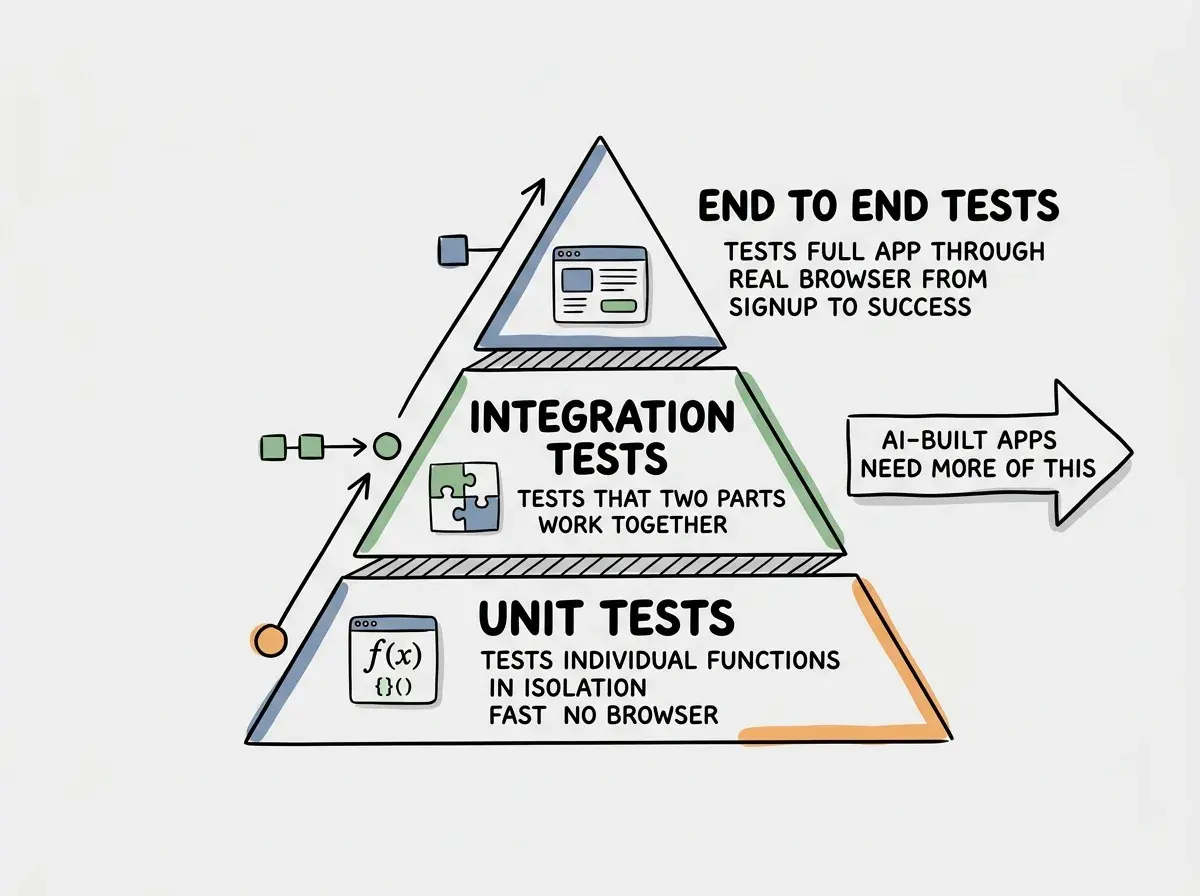
There are three layers of testing. Unit tests check individual functions in isolation. Integration tests check that two pieces of the system work together. End to end tests check the entire system from the user's perspective, browser included.
End to end testing with Playwright means spinning up a real browser (or a headless browser that behaves exactly like one), navigating to your app, clicking buttons, filling forms, and asserting that the right things appear on screen. Playwright supports Chromium, Firefox, and WebKit. It runs headless by default, so there is no visible browser window in CI. You just get pass or fail.
The reason end to end tests matter more for AI-built apps than for traditionally written ones is accountability. When you write every line of code, you understand the side effects of each change. When AI writes the code, you are working with a black box. An end to end test suite is the verification layer that substitutes for that missing mental model. You describe the expected behavior, and the tests tell you whether it holds.
Installing Playwright
You need Node.js and an existing project. From your project root, run:
npm init playwright@latest
The installer asks a few questions. Choose TypeScript if your project uses it. Choose to put tests in a tests folder. When it asks whether to add a GitHub Actions workflow, say yes. That gives you CI out of the box.
After installation, your project has:
playwright.config.tswhere you configure browsers, base URLs, and timeoutstests/folder where your test files live.github/workflows/playwright.ymlfor running tests on every push
Open playwright.config.ts and set your base URL:
export default defineConfig({
  use: {
    baseURL: 'http://localhost:3000',
  },
});
Run your dev server in one terminal and then run:
npx playwright test
Playwright opens the example tests, runs them, and prints results. Those example tests will fail because they point at a demo site. Delete them and write your own.
Writing Your First Test
Playwright tests describe what a user does and then assert what they should see. The API reads almost like plain English.
Start with the most important flow in your app. For most apps, that is either signup or the core feature. Here is a signup test:
// tests/signup.spec.ts
import { test, expect } from '@playwright/test';

test('user can sign up with email and password', async ({ page }) => {
  await page.goto('/signup');

  await page.getByLabel('Email').fill('test@example.com');
  await page.getByLabel('Password').fill('password123');
  await page.getByRole('button', { name: 'Create account' }).click();

  await expect(page).toHaveURL('/dashboard');
  await expect(page.getByText('Welcome')).toBeVisible();
});
Breaking down each line:
page.goto('/signup')navigates to the signup page relative to yourbaseURLpage.getByLabel('Email')finds the email input by its associated label (which is the accessible way to query it).fill('test@example.com')types into the fieldpage.getByRole('button', { name: 'Create account' })finds the button by its visible text.click()clicks itexpect(page).toHaveURL('/dashboard')asserts the browser navigated to the dashboardexpect(page.getByText('Welcome')).toBeVisible()asserts the welcome text appears
Run this with npx playwright test tests/signup.spec.ts and watch it pass or fail. If it fails, the error message tells you exactly what it expected versus what it found.
Use getByLabel, getByRole, and getByText to find elements instead of CSS selectors like #signup-button or .form-input. These selectors break whenever your styles change. Label and role selectors are tied to the visible, accessible content of your UI, so they stay stable even when you redesign.
Testing Auth Flows Without Logging In Every Time
The biggest slowdown in end to end testing is auth. If every test starts from a logged-out state and needs to log in before testing anything behind a login wall, your test suite gets slow and brittle. Playwright solves this with storage state.
You save the browser's cookies and local storage after a successful login, then reuse that saved state across tests. This means login happens once per test run, not once per test.
First, create a setup file that logs in and saves the state:
// tests/auth.setup.ts
import { test as setup } from '@playwright/test';
import path from 'path';

const authFile = path.join(__dirname, '../.playwright/auth.json');

setup('authenticate', async ({ page }) => {
  await page.goto('/login');
  await page.getByLabel('Email').fill(process.env.TEST_USER_EMAIL!);
  await page.getByLabel('Password').fill(process.env.TEST_USER_PASSWORD!);
  await page.getByRole('button', { name: 'Sign in' }).click();
  await page.waitForURL('/dashboard');

  await page.context().storageState({ path: authFile });
});
Then reference that saved state in playwright.config.ts:
export default defineConfig({
  projects: [
    { name: 'setup', testMatch: /auth\.setup\.ts/ },
    {
      name: 'chromium',
      use: {
        ...devices['Desktop Chrome'],
        storageState: '.playwright/auth.json',
      },
      dependencies: ['setup'],
    },
  ],
});
Add .playwright/ to your .gitignore so the auth file does not get committed. Set TEST_USER_EMAIL and TEST_USER_PASSWORD as environment variables in your local .env file and in your CI secrets.
Now every test in the chromium project starts already logged in. Testing the dashboard, account settings, or any protected route takes no extra work.
Covering the Flows That Actually Break
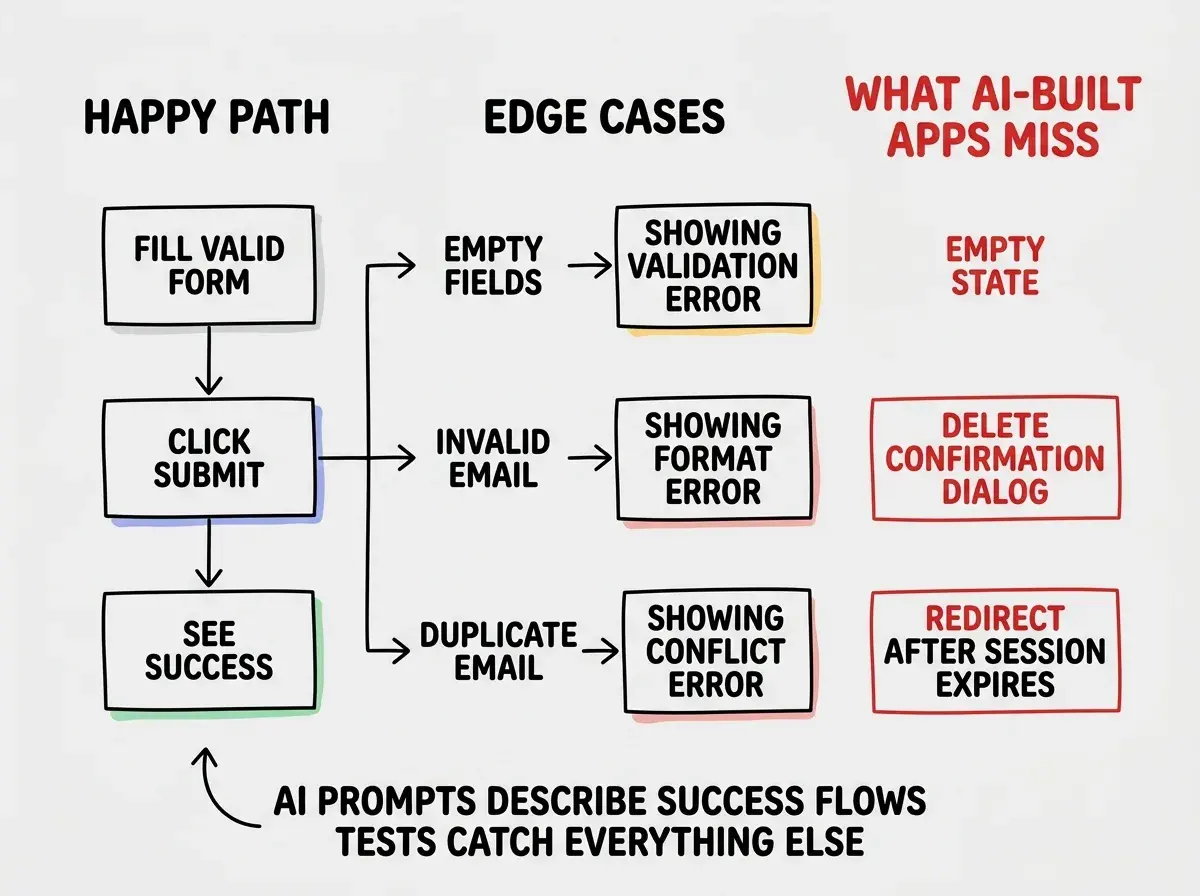
Most end to end test guides have you test happy paths: enter valid data, click submit, see the success screen. That covers less ground than you think. The flows that actually break in AI-built apps are the ones the original prompt never mentioned.
Write tests for these:
Form validation. What happens when required fields are empty? When an email is malformed? When a password is too short? AI-generated form handlers often skip these cases.
test('signup form shows error for invalid email', async ({ page }) => {
  await page.goto('/signup');
  await page.getByLabel('Email').fill('notanemail');
  await page.getByRole('button', { name: 'Create account' }).click();
  await expect(page.getByText('Please enter a valid email')).toBeVisible();
});
Navigation and protected routes. Does visiting /dashboard while logged out redirect to /login? Does visiting /login while logged in redirect back to /dashboard? These redirect rules are exactly the kind of thing an AI adds inconsistently.
test('visiting dashboard while logged out redirects to login', async ({ page }) => {
  // Use a fresh context with no auth state
  await page.goto('/dashboard');
  await expect(page).toHaveURL('/login');
});
Core user actions. Create a record, update it, delete it. The create often works. The update and delete frequently have edge cases.
Running Tests in CI
The GitHub Actions workflow that Playwright installed looks like this:
# .github/workflows/playwright.yml
name: Playwright Tests

on:
  push:
    branches: [main]
  pull_request:
    branches: [main]

jobs:
  test:
    runs-on: ubuntu-latest

    steps:
      - uses: actions/checkout@v4

      - uses: actions/setup-node@v4
        with:
          node-version: 20

      - name: Install dependencies
        run: npm ci

      - name: Install Playwright browsers
        run: npx playwright install --with-deps

      - name: Start dev server
        run: npm run dev &
        env:
          DATABASE_URL: ${{ secrets.TEST_DATABASE_URL }}

      - name: Wait for server
        run: npx wait-on http://localhost:3000 --timeout 30000

      - name: Run Playwright tests
        run: npx playwright test
        env:
          TEST_USER_EMAIL: ${{ secrets.TEST_USER_EMAIL }}
          TEST_USER_PASSWORD: ${{ secrets.TEST_USER_PASSWORD }}

      - uses: actions/upload-artifact@v4
        if: failure()
        with:
          name: playwright-report
          path: playwright-report/
Two things to configure in your GitHub repository settings under Secrets:
TEST_USER_EMAILandTEST_USER_PASSWORD: the test account credentialsTEST_DATABASE_URL(if you use a database): point this at a test database, not production
When a test fails in CI, the workflow uploads the Playwright report as an artifact. Download it and open index.html. You get screenshots, videos, and a trace of every action the test took before it failed. This is more useful for debugging than a bare error message.
Running end to end tests against your production database. Create a separate test database (or a seeded copy) and point your CI environment at that. Tests that create, modify, and delete records will make a mess of production data, and sooner or later a test will delete something real. The test environment should be disposable.
Keeping Your Test Suite Fast
End to end tests are slower than unit tests by nature. But a suite that takes 20 minutes to run on every push is a suite people start skipping. A few habits keep it manageable.
Run only Chromium in CI unless cross-browser coverage is genuinely critical. Testing three browsers triples your test time. Chromium covers the vast majority of real user behavior.
Use the storageState pattern for every test that needs auth. Login flows are among the slowest operations in a test suite.
Parallelize by default. Playwright runs test files in parallel unless you tell it not to. Keep your tests independent so parallelization works correctly. Tests should not share state, write to shared records, or depend on each other's execution order.
Keep tests focused on user-facing behavior. Do not test implementation details. If a test would still pass after a complete internal refactor, it is testing the right things.
What This Means For You
End to end testing with Playwright gives you something AI tools cannot: a repeatable, automated answer to "does this still work?" You run the suite before every deploy and you know.
Start with the three most important flows in your app. Signup or login. The core feature. The most common error state. Write one test for each. Run them on push with GitHub Actions. That is a real test suite, and it is genuinely more coverage than most AI-built apps ship with.
As your app grows, add tests when bugs reach production. Every bug that slips through is a test case you now know you need. The suite grows alongside your confidence in the product, and at some point you realize you are shipping changes without clicking around manually at all.
That is the whole point. You built with AI. The tests verify the AI was right.
Testing is one piece. See how CI/CD fits the whole picture together.
Explore the workflowThe setup takes an afternoon. The time it saves starts paying back the week after, when you push a change and the tests catch a broken auth redirect you never would have noticed clicking around manually. That is the moment end to end testing stops feeling like overhead and starts feeling like a superpower.
Ship with confidence by understanding the full build and deploy cycle.
Start from the beginning