Cypress end to end testing lets you write scripts that open a real browser, click through your app, fill out forms, and assert the right things happen. If a flow breaks after an AI makes changes, Cypress catches it before your users do. Setup takes under 30 minutes.
The core problem with AI-built apps is the missing mental model. A human who writes every line of code builds a feel for which changes break what. When you prompt an AI to add a feature, refactor a component, or fix a bug, you get working-looking code but no intuition about side effects. You click around a bit, it looks fine, and you ship. Then a user emails you that the login form stopped working on Firefox or the checkout button does nothing after you added a discount code field.
Cypress end to end testing is the layer that substitutes for that intuition. You write the expected behavior once, run it on every push, and the suite tells you whether your AI's latest change broke anything.
Why Cypress Works Well for AI-Built Apps
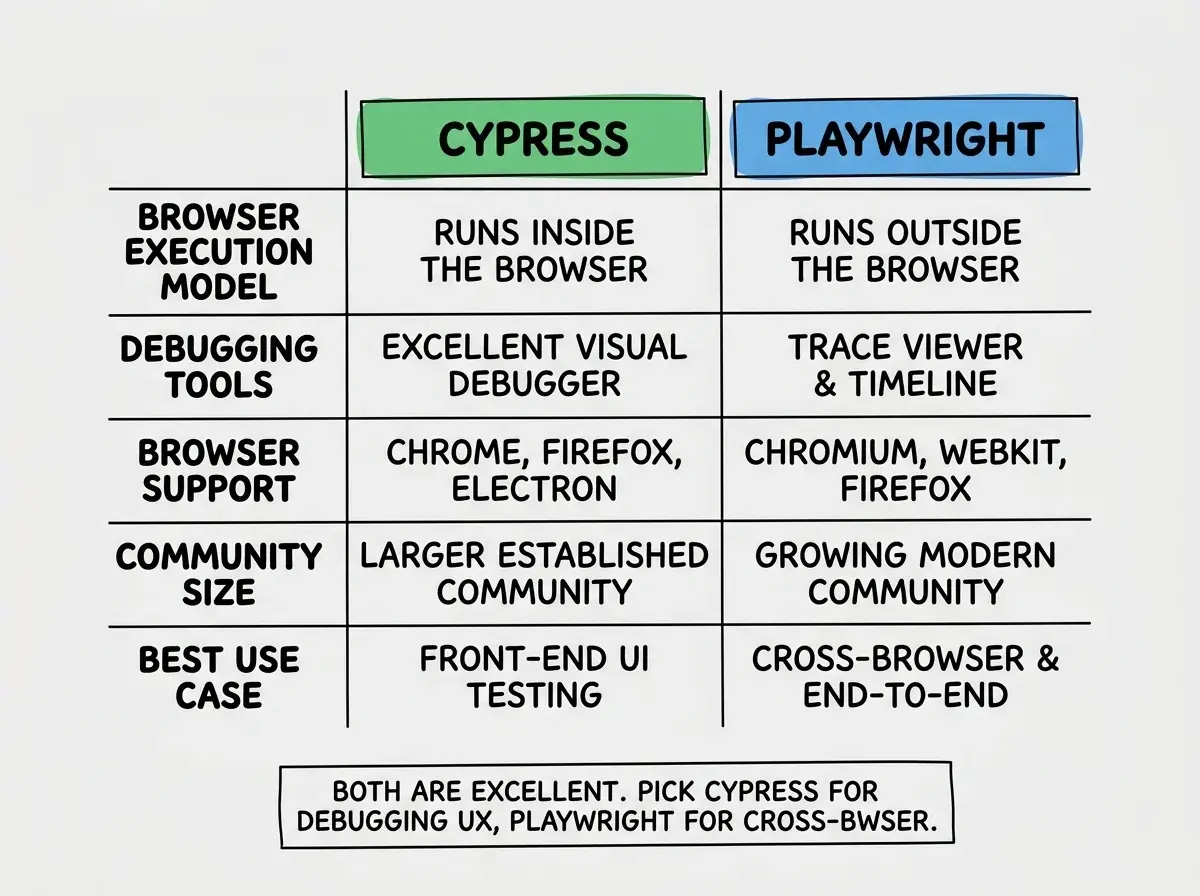
Cypress was built specifically for web apps. Unlike Selenium, which was designed for general browser automation, Cypress runs directly inside the browser alongside your app. That makes it faster, more reliable, and significantly easier to debug when something goes wrong.
The interactive test runner is the killer feature. When a test fails in development, Cypress shows you a live replay of everything that happened: every click, every assertion, every network request. You can time-travel through the test by hovering over steps in the command log and see exactly what the DOM looked like at the moment an assertion failed. For developers who did not write the underlying code, this is invaluable. The failure is not just a line number and an error message. It is a visual record of what went wrong.
Cypress also has strong documentation and a massive community, which matters when you are debugging a setup problem at 11pm before a launch. The tradeoff compared to Playwright is that Cypress only runs tests in Chromium-based browsers by default (Firefox support exists but is less mature). For most indie projects and production apps, that covers enough ground.
Installing and Configuring Cypress
You need Node.js and an existing project. From your project root, run:
npm install cypress --save-dev
Then open the Cypress launcher to complete the setup:
npx cypress open
Cypress walks you through choosing between E2E Testing and Component Testing. Pick E2E Testing. It then asks which browser to use and generates a cypress.config.ts file in your project root. After the setup wizard finishes, close the launcher.
Open cypress.config.ts and set your base URL so you do not have to type the full URL in every test:
import { defineConfig } from 'cypress';

export default defineConfig({
  e2e: {
    baseUrl: 'http://localhost:3000',
    setupNodeEvents(on, config) {
      // Add plugins here if needed
    },
  },
});
Your project now has a cypress/ folder containing:
e2e/where your test files livefixtures/for static test data (JSON files your tests can load)support/for shared setup code that runs before each test
Run your dev server in one terminal, then in another terminal run:
npx cypress run
This runs all tests headlessly and prints pass/fail results. Use npx cypress open when you want the interactive runner during development.
Cypress needs your dev server running before it starts tests. In local development you run both yourself. In CI you start the dev server as a background process before the Cypress step. The start-server-and-test package handles this cleanly in CI by waiting for the server to be ready before executing the test command.
Writing Your First Cypress Test
Delete the example tests Cypress generates in cypress/e2e/ and create your first real test file. Start with the most important flow in your app, which for most apps is authentication.
// cypress/e2e/login.cy.ts
describe('Login flow', () => {
  it('logs in with valid credentials', () => {
    cy.visit('/login');

    cy.get('[data-cy="email-input"]').type('test@example.com');
    cy.get('[data-cy="password-input"]').type('password123');
    cy.get('[data-cy="login-button"]').click();

    cy.url().should('include', '/dashboard');
    cy.contains('Welcome back').should('be.visible');
  });

  it('shows an error with wrong password', () => {
    cy.visit('/login');

    cy.get('[data-cy="email-input"]').type('test@example.com');
    cy.get('[data-cy="password-input"]').type('wrongpassword');
    cy.get('[data-cy="login-button"]').click();

    cy.contains('Invalid email or password').should('be.visible');
    cy.url().should('include', '/login');
  });
});
The data-cy attributes are custom HTML attributes you add to your elements. They exist purely for testing and do not affect styling or behavior. Using them makes your selectors stable: they survive CSS refactors, class renames, and component restructuring. Add them to any element your tests need to interact with:
<input
  data-cy="email-input"
  type="email"
  name="email"
  placeholder="you@example.com"
/>
Breaking down the key Cypress commands:
cy.visit('/login')navigates to the login page relative to yourbaseUrlcy.get('[data-cy="email-input"]')finds the element with that attribute.type('text here')types into an input field, clearing it first.click()clicks the elementcy.url().should('include', '/dashboard')asserts the URL changedcy.contains('Welcome back')finds any element containing that text.should('be.visible')asserts the element is visible in the viewport
Testing Auth Flows and Form Submissions
The login test above works, but running a full login before every single test is slow and brittle. Cypress handles this with cy.session(), which caches browser cookies and local storage after a login and reuses them across tests without repeating the full UI flow.
Create a custom command in cypress/support/commands.ts:
// cypress/support/commands.ts
Cypress.Commands.add('loginAsTestUser', () => {
  cy.session('testUser', () => {
    cy.visit('/login');
    cy.get('[data-cy="email-input"]').type(Cypress.env('TEST_EMAIL'));
    cy.get('[data-cy="password-input"]').type(Cypress.env('TEST_PASSWORD'));
    cy.get('[data-cy="login-button"]').click();
    cy.url().should('include', '/dashboard');
  });
});
Now any test that needs an authenticated user calls cy.loginAsTestUser() instead of repeating the full login sequence. Cypress restores the cached session on subsequent runs, skipping the UI interaction entirely.
Set the environment variables in cypress.config.ts so they do not get committed to your repo:
export default defineConfig({
  e2e: {
    baseUrl: 'http://localhost:3000',
    env: {
      TEST_EMAIL: process.env.TEST_EMAIL,
      TEST_PASSWORD: process.env.TEST_PASSWORD,
    },
  },
});
For form submission tests, here is a realistic example covering a contact form with validation:
// cypress/e2e/contact-form.cy.ts
describe('Contact form', () => {
  beforeEach(() => {
    cy.visit('/contact');
  });

  it('submits successfully with valid data', () => {
    cy.get('[data-cy="name-input"]').type('Jane Smith');
    cy.get('[data-cy="email-input"]').type('jane@example.com');
    cy.get('[data-cy="message-input"]').type('Hello, I have a question about pricing.');
    cy.get('[data-cy="submit-button"]').click();

    cy.contains('Message sent').should('be.visible');
  });

  it('blocks submission when required fields are empty', () => {
    cy.get('[data-cy="submit-button"]').click();

    cy.contains('Name is required').should('be.visible');
    cy.contains('Email is required').should('be.visible');
  });

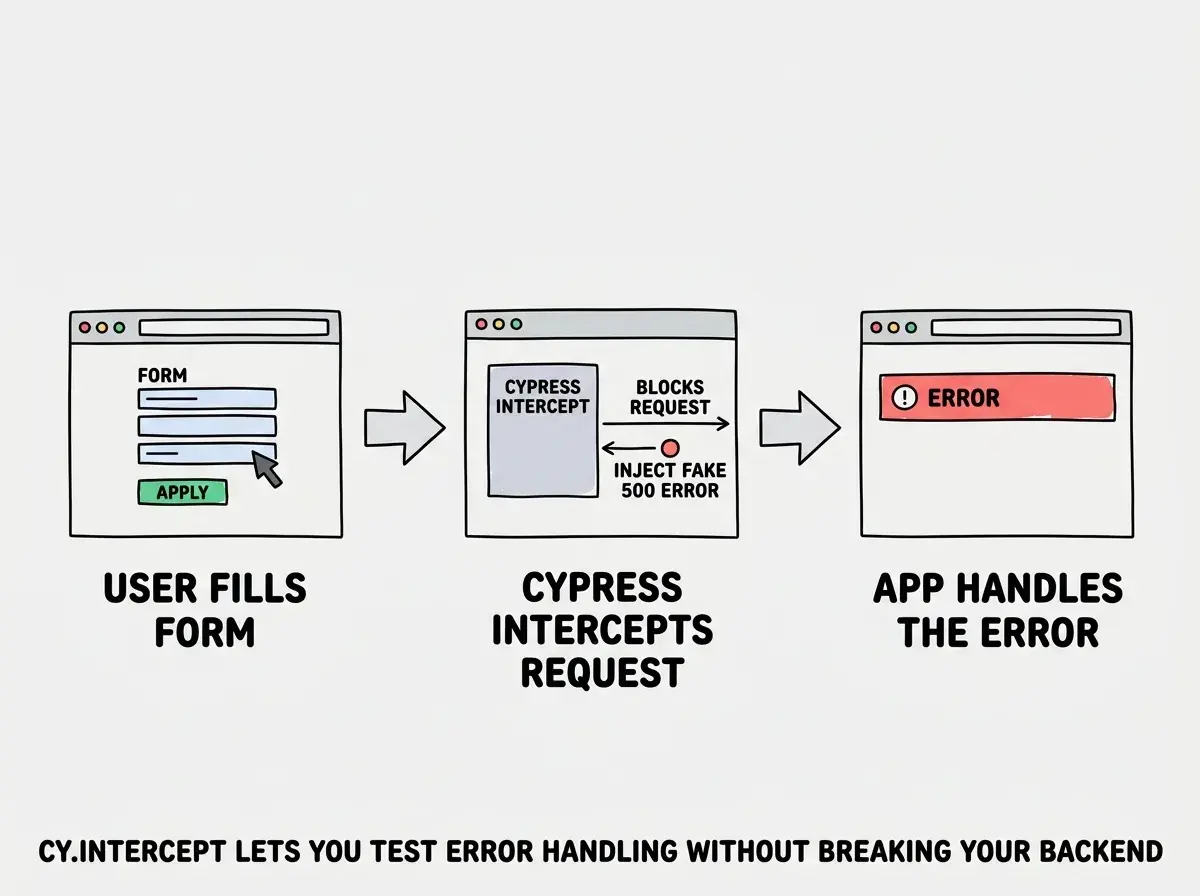
  it('intercepts the API call and handles server errors', () => {
    cy.intercept('POST', '/api/contact', {
      statusCode: 500,
      body: { error: 'Internal server error' },
    }).as('contactSubmit');

    cy.get('[data-cy="name-input"]').type('Jane Smith');
    cy.get('[data-cy="email-input"]').type('jane@example.com');
    cy.get('[data-cy="message-input"]').type('Test message');
    cy.get('[data-cy="submit-button"]').click();

    cy.wait('@contactSubmit');
    cy.contains('Something went wrong').should('be.visible');
  });
});
The cy.intercept() call in the third test is one of Cypress's most useful features. It lets you intercept any network request and return whatever response you want, including errors. This means you can test your error handling UI without actually having a broken backend. AI-generated error handling is often untested because the happy path works and the errors never happen in development. Intercept lets you force those paths.
Never use CSS class selectors like .submit-btn or IDs like #email to find elements in Cypress tests. These break the moment you refactor your styles or rename a component. Use data-cy attributes for anything your tests interact with, and use cy.contains() for assertions about visible text. Selectors tied to user-visible content stay stable across redesigns.
Add data-cy attributes to your elements as you build them, not as an afterthought. It takes 10 seconds per element and saves hours of test maintenance later. Treat them as part of the element's contract, the same way you treat aria-label attributes.
Cypress vs Playwright for Vibe Coders
Since we have a Playwright tutorial on this blog, the honest comparison: both tools are excellent and the difference matters less than just picking one and writing tests.
Cypress is the better starting point if you have never written E2E tests before. The interactive runner with time-travel debugging makes it easier to understand why a test failed, especially when you are working with code an AI wrote and you are not sure where to look. The error messages are more verbose and opinionated in a helpful way.
Playwright is better if you need real cross-browser testing (Firefox, WebKit/Safari), if your app targets iOS/Safari users specifically, or if you are comfortable in a programmatic API. Playwright's trace viewer is also excellent for debugging, though the setup curve is slightly steeper.
For most indie hackers and senior devs shipping AI-built apps: start with Cypress. If you hit a limitation, migrating to Playwright is straightforward because the core concepts are identical.
What This Means For You
If you are a founder shipping AI-built features, a Cypress suite is insurance. You write the expected behavior once and stop manually re-clicking every flow after every change. The ROI is immediate after the first time it catches a broken redirect or a form submission that silently fails.
If you are a senior developer on a team using AI-assisted development, a Cypress suite is the specification layer. Tests document what the application is supposed to do. When the AI makes a change that contradicts that specification, the test fails and you have an objective record of the regression.
If you are a career changer or student building a portfolio, a working Cypress suite signals professional competence. It is the difference between "I shipped a project" and "I shipped a project with automated quality checks." Hiring managers and technical co-founders notice.
Start with three tests: successful login, failed login with wrong credentials, and your app's most important form submission. Run them on push with GitHub Actions using the start-server-and-test package. That is a real test suite. It covers more ground than most teams ship with, and it takes under an afternoon to set up.
Testing is the first step. Learn how CI/CD ties the whole workflow together.
See the full workflowThe moment that makes testing click is when Cypress catches its first real regression, a bug you introduced while making a completely unrelated change. You will get that feeling within a week of setting this up. After that, shipping without tests feels uncomfortably risky, which is exactly the right instinct.
Get the full picture on what it takes to ship something production-ready.
Start here