Resend vs SendGrid vs Postmark is the email decision that separates "my app sends emails" from "my emails actually reach inboxes." With 92% of developers using AI daily to build and ship, the email service you plug in during that first afternoon of coding determines whether your password resets land in spam, your onboarding sequences get opened, and how many hours you spend debugging delivery failures instead of building features.
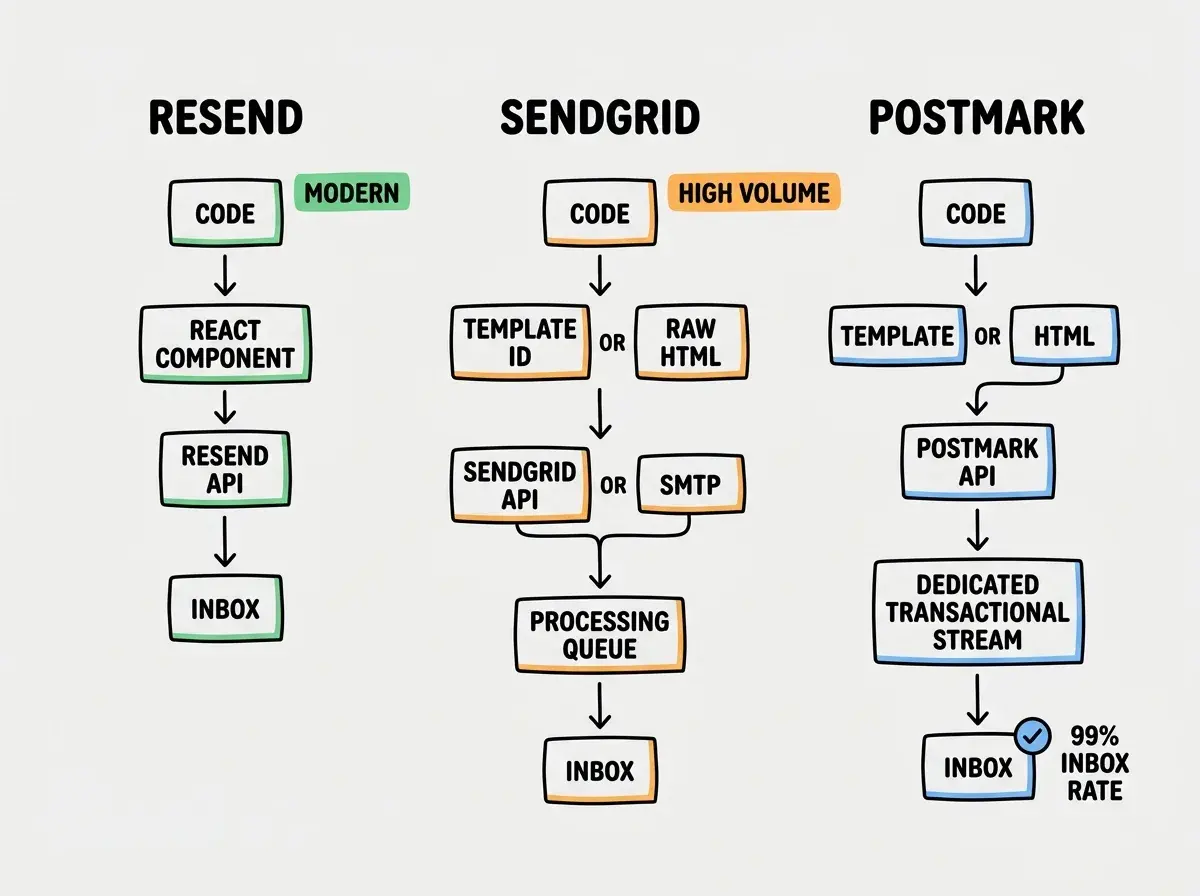
Think of it like choosing a postal service. Resend is the modern courier with a slick app and real-time tracking. SendGrid is the industrial mail center that processes millions of parcels daily. Postmark is the boutique delivery service that hand-carries your envelope to the front door and guarantees someone signs for it. All three get letters delivered, but they are built for different senders with different priorities.
Quick Verdict
| Resend | SendGrid | Postmark | |
|---|---|---|---|
| Best for | Modern dev experience, React emails | High volume, marketing + transactional | Transactional email, inbox placement |
| Free tier | 3,000 emails/mo | 100 emails/day | 100 emails/mo |
| Paid starting | $20/mo (50K emails) | $19.95/mo (50K emails) | $15/mo (10K emails) |
| API style | REST, modern SDKs | REST + SMTP, legacy SDKs | REST + SMTP, clean SDKs |
| Template system | React Email (JSX) | Handlebars + visual editor | HTML + variables |
The right choice depends on whether you prioritize developer experience, sending volume, or deliverability guarantees. Most AI-built apps need transactional email first (password resets, receipts, notifications), and the differences between these three services in that category are more meaningful than the pricing suggests.
Deliverability is not a feature you can see in a pricing table, but it is the feature that matters most. Postmark consistently achieves 99%+ inbox placement for transactional email because they refuse to let marketing senders onto their transactional infrastructure. Resend and SendGrid mix transactional and marketing traffic, which can affect your delivery rates if other senders on shared IPs behave poorly. If your app depends on emails arriving instantly (authentication codes, payment receipts, time-sensitive alerts), deliverability should outweigh API ergonomics in your decision.
What Resend Does Well
The best developer experience in email, period. Resend was built by the creator of React Email, and that heritage shows in every part of the product. Their SDK is clean, typed, and feels like calling a modern API instead of wrestling with a decade-old email abstraction. If you are building with TypeScript and React, sending an email through Resend feels like rendering a component, because that is literally what you are doing.
React Email changes how you build templates. Instead of writing HTML email markup (nested tables, inline styles, Outlook conditionals), you write JSX components. The React Email library handles the rendering into cross-client compatible HTML. For developers who already think in components, this eliminates the context switch between building your app and building your emails.
Domain verification is fast and well-documented. Setting up DKIM, SPF, and DMARC records through Resend's dashboard takes about 10 minutes. The UI walks you through each DNS record, checks propagation automatically, and tells you exactly what to paste into your DNS provider.
Webhooks and event tracking work as expected. Delivery events, opens, clicks, and bounces come through webhooks with clear payloads. No parsing legacy event formats or decoding nested JSON structures.
What SendGrid Does Well
Scale that nothing else matches. SendGrid (owned by Twilio) processes billions of emails per month. If you need to send hundreds of thousands of transactional notifications alongside marketing campaigns, SendGrid handles that volume without breaking a sweat. The industrial mail center was built for throughput.
Marketing and transactional email in one platform. SendGrid offers both a transactional API and a full marketing platform with contact management, segmentation, A/B testing, and automation workflows. You do not need a separate tool for your newsletter if you already use SendGrid for transactional email. Whether that bundling is a benefit or a liability depends on your needs.
The most mature ecosystem. SendGrid has been around since 2009. That means more Stack Overflow answers, more integration guides, more AI training data, and more third-party tools that plug into it. When you ask an AI coding assistant to "add email to my app," SendGrid code is well-represented in the suggestions.
Flexible sending options. REST API, SMTP relay, or both. Some legacy systems need SMTP. Some modern apps want REST. SendGrid supports either approach without configuration headaches. The industrial mail center accepts packages in any format.
What Postmark Does Well
Deliverability that other services envy. Postmark publishes their delivery stats publicly, consistently reporting 99%+ inbox placement rates with sub-second delivery times. They achieve this by being opinionated. Postmark separates transactional from marketing email at the infrastructure level ("streams"), and their transactional stream has strict sending policies that keep shared IP reputation pristine. The boutique delivery service guarantees your letter reaches the front door.
Transactional email is a first-class citizen. While Resend and SendGrid treat transactional and marketing email as features of one platform, Postmark built their entire reputation on transactional delivery. Password resets, order confirmations, and authentication codes are what Postmark optimizes for. If these emails are critical to your user experience, Postmark takes them more seriously than anyone else.
Speed that users notice. Postmark's average delivery time is under 1 second. That matters when a user clicks "forgot password" and expects a reset link immediately, not in 30 seconds. Delivery speed is a UX feature. The boutique service does not batch your letter with 10,000 others.
Templates without framework dependencies. Postmark's template system uses HTML with variable placeholders, managed through the API or dashboard. No build step, no JSX compilation, no React dependency. For teams that want templates without adopting a frontend framework for email, Postmark's approach is simpler.
Picking an email service based solely on the free tier and switching later when deliverability problems appear. Migrating email providers means re-verifying domains, updating DNS records, rewriting integration code, re-testing every email template, and warming up new sending IPs. The cost of switching is 10-20 hours of work minimum. Spend 30 minutes evaluating deliverability and API fit before you commit, not after your password reset emails start landing in spam at 5,000 users.
Pricing That Actually Matters
The sticker prices hide important details.
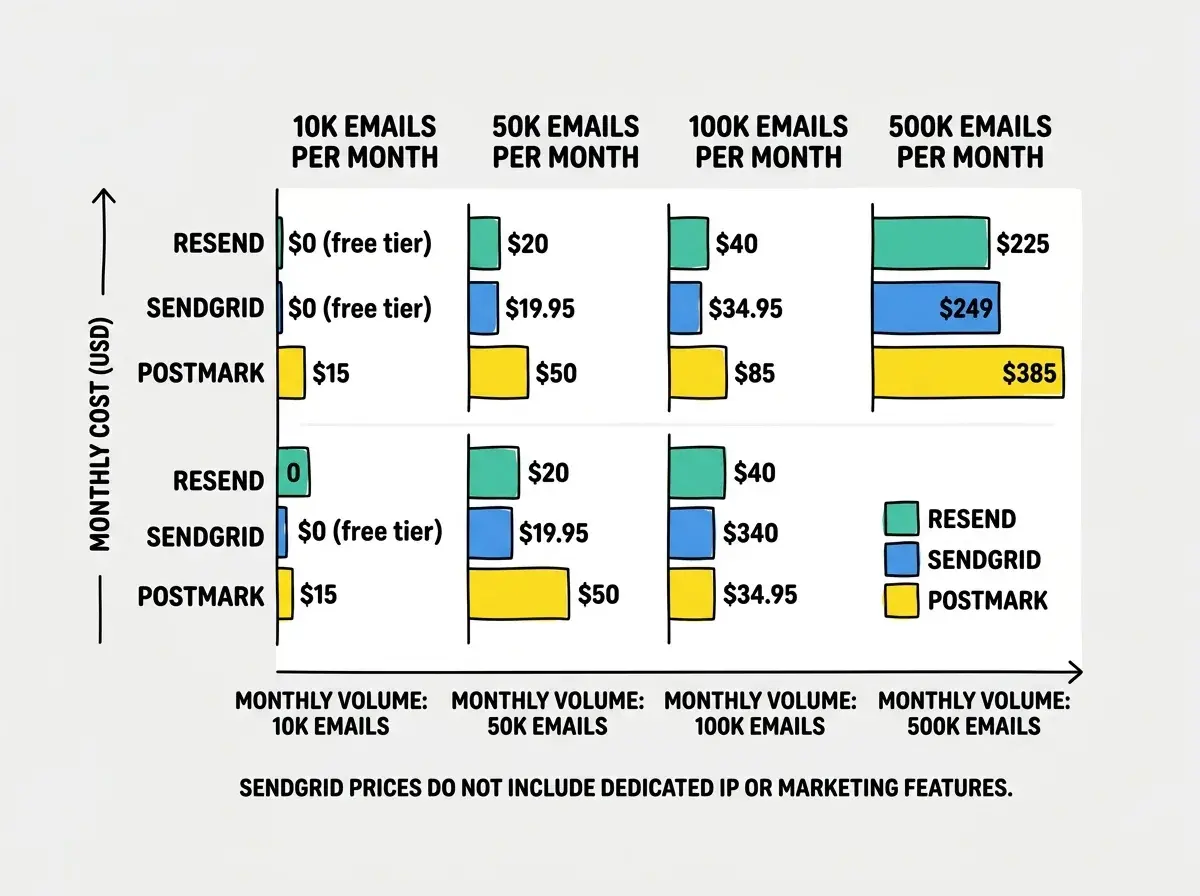
Resend charges $20/mo for 50,000 emails with a generous free tier of 3,000 emails/mo. Enough to build, test, and launch. No contacts fee, no feature gating. Clean pricing from the modern courier.
SendGrid starts at $19.95/mo for 50,000 emails, but the real costs appear when you need features. Marketing platform, dedicated IPs, and advanced analytics sit behind higher tiers. The free tier caps at 100 emails per day (not per month), which can surprise you during a launch day spike.
Postmark costs $15/mo for 10,000 emails, the most expensive per-email at low volumes. But that price includes transactional and marketing streams, all webhooks, and analytics with no feature gating. At 50,000 emails/mo, Postmark runs about $50/mo. The boutique service charges a premium, but everything is included.
For most AI-built apps under 5,000 users, the monthly email cost difference between all three services is less than $30. Developer time spent on integration and deliverability troubleshooting dwarfs the hosting cost.
What AI Coding Tools Generate
This matters for the same reason it matters with payment platforms. Your AI tool's default shapes your default choice.
When you prompt an AI assistant to "add email sending to my app," you will most likely get SendGrid code. It has the largest documentation footprint in training data. Resend is increasingly common in newer codebases, especially AI-generated Next.js projects. Postmark appears less frequently in AI suggestions but has clean SDKs that AI tools handle well when prompted explicitly.
All three services need 5-15 lines of integration code. The difference is not in complexity. It is in the template system, webhook handling, and deliverability infrastructure that runs after your code hands off the email. Explicitly naming the service you want in your prompt gives you better results than accepting the default.
Learn the full stack of decisions for building a production-ready app with AI tools.
See the build guidesWhen Each Service Wins
Resend wins for modern TypeScript/React apps. If you are building with Next.js, Remix, or any React-based framework, Resend's developer experience is unmatched. React Email templates, typed SDKs, and a modern API make email feel like a natural extension of your codebase. Best for teams that value developer ergonomics and are building greenfield projects.
SendGrid wins for high volume and marketing needs. If you need to send hundreds of thousands of emails per month, need both transactional and marketing email in one platform, or need SMTP relay for legacy systems, SendGrid's scale and feature breadth are hard to beat. Best for apps that have outgrown simple transactional email and need marketing automation.
Postmark wins for mission-critical transactional email. If your app depends on emails arriving in the inbox within seconds (authentication, payments, alerts), Postmark's deliverability focus justifies the higher per-email cost. Best for SaaS products where a missed email means a missed customer.
Start with the fundamentals of building production-ready applications with AI.
Read the guideWhat This Means For You
The email service decision is really about what you optimize for.
- If you are building a new app with a modern stack and want the best DX: Start with Resend. The free tier covers your launch, React Email templates scale with your codebase, and the API is the cleanest of the three. The modern courier matches the modern workflow.
- If you need volume, marketing email, or SMTP compatibility: SendGrid handles the widest range of requirements. The industrial mail center is not glamorous, but it processes at scale without questions.
- If email deliverability is non-negotiable for your business: Postmark's transactional stream is the gold standard. The boutique delivery service costs more per letter, but every letter arrives. For apps where a missing email means a lost customer or a security incident, that guarantee is worth the premium.
All three services work well for AI-built applications. The worst choice is not picking any of them, but instead using your hosting provider's built-in SMTP because it was the path of least resistance. Spend 20 minutes integrating a proper email service now. Your users will notice when their password reset arrives in one second instead of never.