Your code ships and your docs lie. Not because anyone intended it that way. Documentation rot is what happens when code moves faster than the words describing it. It is the most invisible form of technical debt, and AI-assisted development makes it worse by an order of magnitude.
Why Documentation Rots Faster in AI Projects
Vibe coding projects have a particular rot problem. You prompt, the AI refactors three files at once, a PR merges, and the architecture decision record from two weeks ago is already wrong. The README still describes the old folder structure. The API docs reference an endpoint that no longer exists.
This is not a discipline problem. It is a physics problem. Code is executable and gives you immediate feedback when it is wrong. Documentation is inert. Nothing breaks when your docs lie. Nobody gets paged. The test suite still passes. The lie just sits there, accumulating compound interest until a new team member spends four hours debugging something that the old docs "explained."
The root cause has two parts. First, documentation lives in a different place than code. A developer updating a function has no friction-free path to also update the corresponding docs. Second, AI tools are extremely good at regenerating docs on demand, which paradoxically reduces the motivation to keep existing docs fresh. Why maintain the README when you can regenerate it in thirty seconds?
That logic is seductive and wrong. Regenerating docs from scratch on demand means your docs are always slightly behind the current state, never ahead of it. A well-maintained living document is a decision log. A regenerated document is a snapshot. They are not the same thing.
The Three Types of Documentation That Matter
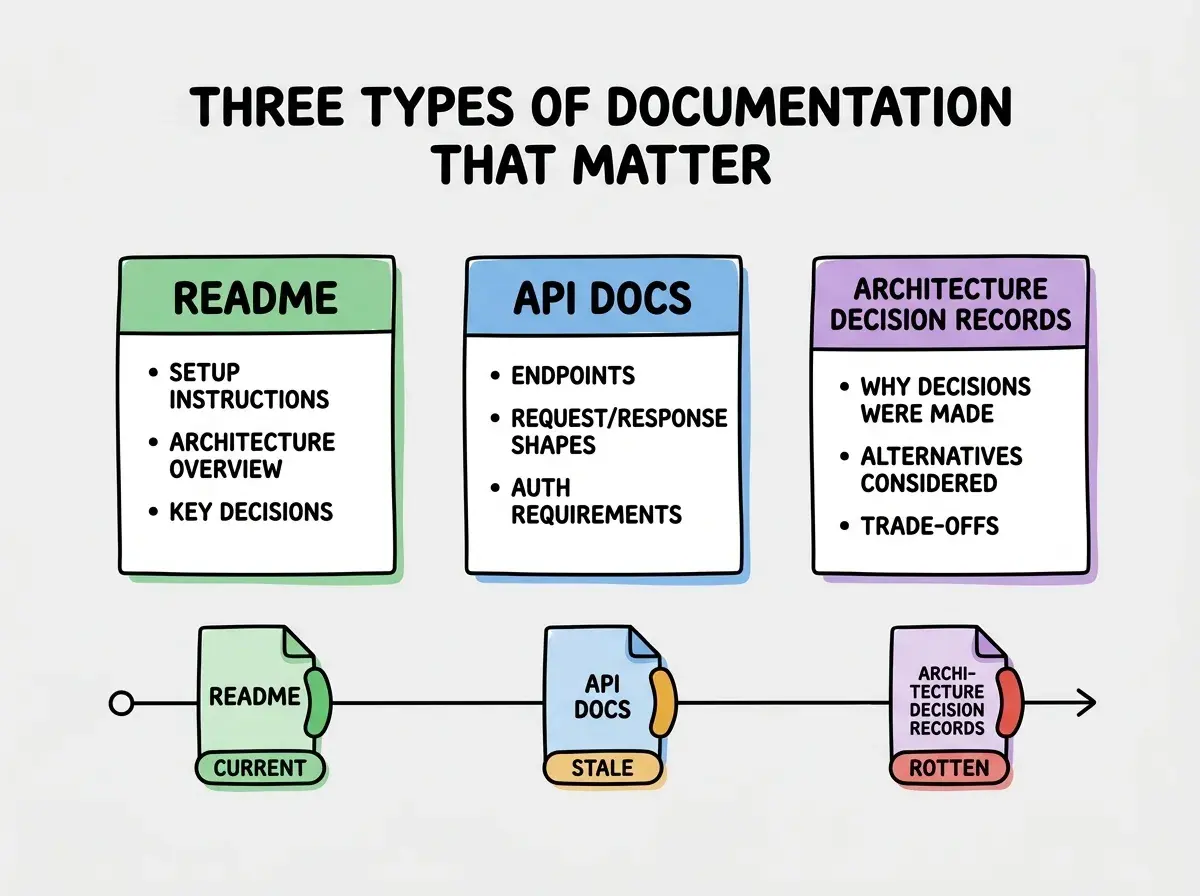
Not all documentation rots equally. Before building a freshness system, you need to know which docs are worth maintaining and which are not.
READMEs are the highest-value, fastest-rotting category. A README tells someone how to get the project running locally. It lists required environment variables, the tech stack, and the commands that matter. READMEs rot fast because setup instructions are deeply tied to tooling decisions, and tooling decisions change often. A stale README sends new contributors down a broken path before they have even started.
The rule for READMEs is simple: if it takes more than fifteen minutes to get a new person running locally following only the README, the README is wrong. Treat setup failures as documentation bugs.
API docs are the second category and the most dangerous when wrong. A team consuming your internal API trusts those docs. When an endpoint changes its response shape and the docs do not, every consumer silently inherits a bug. API docs must be treated as a contract, which means they need versioning and explicit deprecation notices rather than quiet in-place edits.
Architecture decision records (ADRs) are the third category and the most neglected. An ADR documents why a technical decision was made, not just what was decided. Why did you choose this database? Why is this service separate from that one? ADRs are almost never wrong because they describe the past. The risk is not rot, it is absence. Teams that do not write ADRs make the same decisions three times, usually incorrectly on the second and third attempt.
README, API docs, and ADRs are the only three documentation types most projects need to maintain. Everything else is either generated on demand or does not need to exist. Tighten your scope and your freshness problem becomes tractable.
Automating Documentation Freshness
Manual documentation maintenance fails because it depends on human memory and discipline under deadline pressure. Automation removes both of those failure modes.
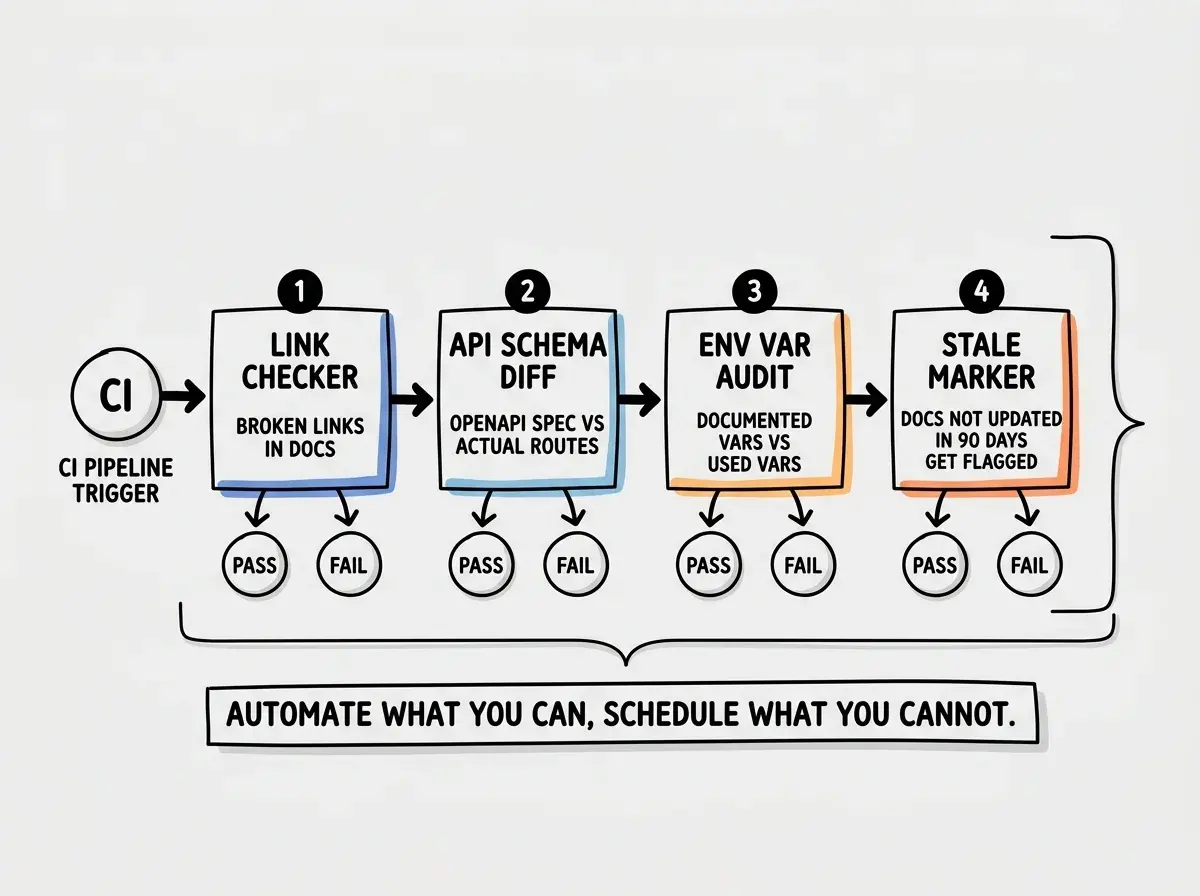
Doc-linting is the lowest-friction place to start. Tools like Vale and alex run in CI and check documentation for broken links, undefined terms, and style consistency. More importantly, you can write custom rules. A rule that flags any reference to a file path that no longer exists in the repository will catch README rot before it ships. A rule that warns when an API doc references an HTTP method that does not appear in your route definitions catches API doc drift before it misleads a consumer.
Setting up a basic Vale config takes under an hour and pays back that investment in the first sprint. The key is treating documentation linting failures the same way you treat test failures: a failing lint check blocks the PR.
CI checks for stale docs go one step further. The most useful check is a script that compares your API docs against your actual routes. If you use OpenAPI or a similar spec, tools like Spectral can validate that your spec matches your implementation. For projects without a formal spec, a simpler approach works well. Write a script that extracts all documented endpoints from your API docs markdown and compares them against the route definitions in code. Any endpoint in the docs but not in code is a documentation ghost. Any endpoint in code but not in docs is an undocumented surface.
Run this check in CI on every PR that touches either your API layer or your docs directory. The check takes seconds and eliminates an entire class of stale documentation.
Generated docs are the third tier. Some documentation should not be maintained by humans at all. Type signatures, function signatures, and database schemas are better generated directly from source. Tools like TypeDoc for TypeScript projects, or Drizzle Kit's introspection for database schemas, produce documentation that is structurally impossible to be wrong because it is derived from the code itself.
The distinction to hold onto here is between generated docs (always correct, zero maintenance, no human voice) and living docs (require maintenance, carry context and decisions, worth the effort). Know which is which before you invest time in either.
When to Write Docs vs When to Delete Them
Documentation that is wrong is worse than no documentation. A missing README forces someone to ask a question. A wrong README sends them confidently down the wrong path for hours.
Delete documentation when three conditions are met. First, when the thing it describes no longer exists. Second, when it has not been read or updated in over six months and the project is actively maintained. Third, when the information in it is already captured, more accurately, somewhere else.
The hardest delete to make is the ADR that describes a decision you have since reversed. The temptation is to update it to reflect the new decision. Do not do that. Mark it as superseded and write a new ADR explaining what changed and why. The original decision, and the reasoning behind it, is still valuable context. Deleting it removes the institutional memory of a mistake, which means you are more likely to make it again.
For READMEs, the delete question is simpler. If a section of the README has not changed in eighteen months on an active project, it is either perfectly accurate (great, leave it) or completely orphaned from the current reality (delete it and rewrite from scratch). Running a git blame on your README sections is a fast way to surface orphaned content.
For API docs, the delete trigger is deprecation. When an endpoint is removed, its documentation should be explicitly marked deprecated for one release cycle and then removed. Silent removal of API docs without a deprecation notice is a trust violation with your consumers.
Updating docs in the same PR that changes code seems like good hygiene. It often is. But it also means the review treats the doc change as secondary to the code change, and reviewers rarely push back on stale phrasing or missing context. Give documentation changes their own review eye, even if they ship in the same PR.
The write-vs-delete decision also applies to the volume of documentation you generate with AI tools. AI can produce fifty pages of docs for a weekend project. That is not a win. That is fifty pages of future maintenance burden. Before generating docs, decide what decisions they need to encode. If you cannot name a specific person who will be helped by a specific document in the next ninety days, do not write it.
What This Means For You
Documentation rot is not a motivation problem. It is a systems problem. The fix is not asking people to try harder. It is building a pipeline where stale docs surface automatically before they mislead anyone.
Start with the three categories: README, API docs, ADRs. Audit what you have right now against those three. Delete anything that does not fit and is not actively read. Then add one CI check this week. It does not have to be perfect. A broken-link check on your README, run on every PR, is better than nothing and takes thirty minutes to set up.
The goal is not perfect documentation. It is documentation that does not actively lie. That bar is lower than it sounds, and the automation to hit it is well within reach for any team using AI tools today.
Build the system once. Let CI enforce it. Stop spending energy on documentation you cannot trust, and start spending it on documentation you can.