Debugging code you wrote six months ago with AI help is a specific kind of confusion. You built it, you shipped it, and now you are staring at it like a stranger left it on your desk. That feeling is not a character flaw. It is what happens when the mental model lives in the AI session that closed six months ago.
Why AI-Written Code Ages Differently
There is a reason code you wrote entirely yourself tends to age better than code you wrote with heavy AI assistance. When you author every line, the reasoning lives in your head. When an AI writes a function and you accept it, the reasoning lived in the prompt context, and that context is gone.
AI-generated code has three specific aging problems that hand-written code usually avoids.
The first is the absence of a mental model. When you ask an AI to implement something, you understand the what but often not the how. The AI picks an approach, you verify it works, and you move on. Six months later, you have the output without the decision trail.
The second is pattern soup. AI assistants draw on a huge range of patterns and idioms. A single file might use three different approaches to the same problem depending on which part of the session generated it. Your past self did not notice because each piece worked in isolation.
The third is inconsistent conventions. AI tools will happily switch between camelCase and snake_case, between async/await and promise chains, between functional and class-based patterns, based on what the surrounding context suggested at generation time. The code works but reads like it was written by four different developers who never spoke to each other.
None of this is your fault. You were moving fast. That was the right call. Now you need to catch up to your own codebase.
AI-written code is not harder to maintain because AI writes bad code. It is harder to maintain because the context that explains the code lived in a session that expired. Your job when debugging is to reconstruct that context, and AI is actually good at helping you do that.
The Code Archaeology Approach
Before you touch anything, do a read-only investigation. Treat the codebase like an archaeological site. Dig carefully, document what you find, and do not move anything until you understand why it is where it is.
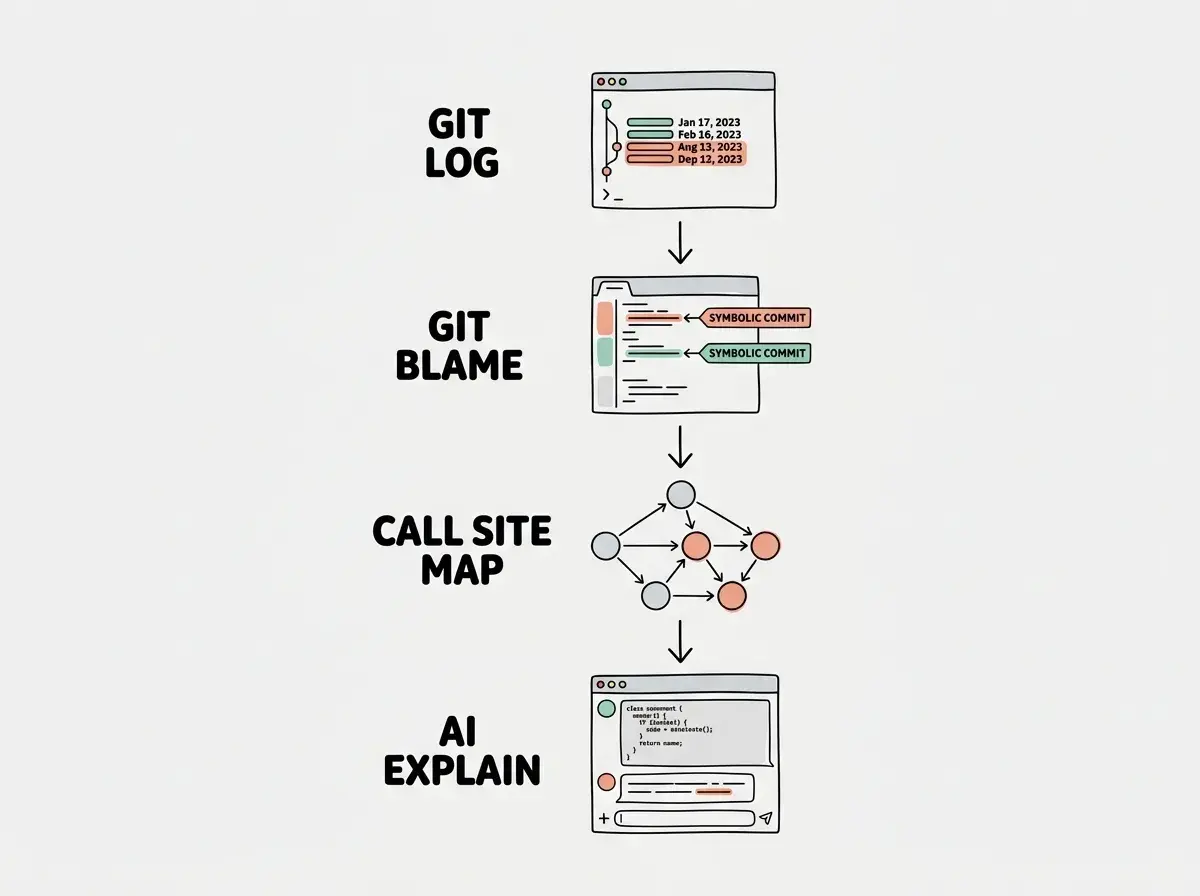
Start with git. Run git log --oneline --follow path/to/file on the file that is confusing you. If you used an AI tool that commits frequently (like Cursor's auto-commit or a CI-driven workflow), you may have a detailed commit history. Even sparse commit messages like "working payment integration" tell you something: this file was part of the payment integration, not the auth flow.
Then run git blame on the specific function that is breaking. You are not looking to assign blame. You are looking for the date cluster. If ten lines were all written in the same commit on the same day, they were probably written together as a unit and should be understood together. If one line was written three weeks after the rest, it was a patch, and there might be a bug report or PR comment that explains why.
Next, look at what touches the confusing code. Run a quick search for every import, every call site, every reference to the function or module you are investigating. Build a list on paper or in a scratch file. You are not analyzing yet, just mapping.
This mapping phase usually takes fifteen minutes and saves two hours. Most debugging sessions go wrong not because the bug is hard but because the developer is debugging the wrong layer of the system.
Getting AI to Explain Its Own Code
Here is the part that feels strange the first time you do it: paste the old code back into Claude or ChatGPT and ask it to explain what it does and why. This works remarkably well, even though a different session wrote the original code. The model was trained on enough patterns that it can reason about what an AI would have been doing and why.
The key is the prompt. A weak prompt gets you a description. A strong prompt gets you a mental model.
Weak prompt: "What does this code do?"
That gives you a summary of the obvious. You probably already know what it does at a surface level.
Strong prompt: "Here is a function I wrote about six months ago. I am not sure why it is structured this way. Please explain: (1) what problem this code is solving, (2) what approach it is using and why that approach might have been chosen over simpler alternatives, (3) what assumptions this code makes that could break, and (4) what I would need to understand to confidently modify it."
That prompt gets you a real briefing. You are asking the AI to reconstruct the reasoning, not just narrate the behavior.
For trickier situations, add context about the bug. "This function is supposed to handle X but it is currently doing Y in the situation where Z. Given how the code is structured, where would you look first?" This turns the explanation into a directed investigation rather than a general overview.
Another pattern that works well: paste the function and all its dependencies together. "Here is a module and everything it imports. Treat this as a system and explain how data flows through it from input to output." Context matters more than brevity here. Give the AI the full picture and it will give you a better explanation.
One more prompt worth keeping handy: "What would a senior developer find surprising or concerning about this code, and why?" This surfaces the assumptions and edge cases your past self did not document.
Asking the AI to fix the bug before you understand the code. This feels efficient and is actually how you end up with two bugs instead of one. The AI will make a change that addresses the surface symptom while leaving the underlying structural issue intact. Understand first, then fix. The explain-first workflow takes an extra fifteen minutes and saves an afternoon of confusion.
Building a Map of What You Have
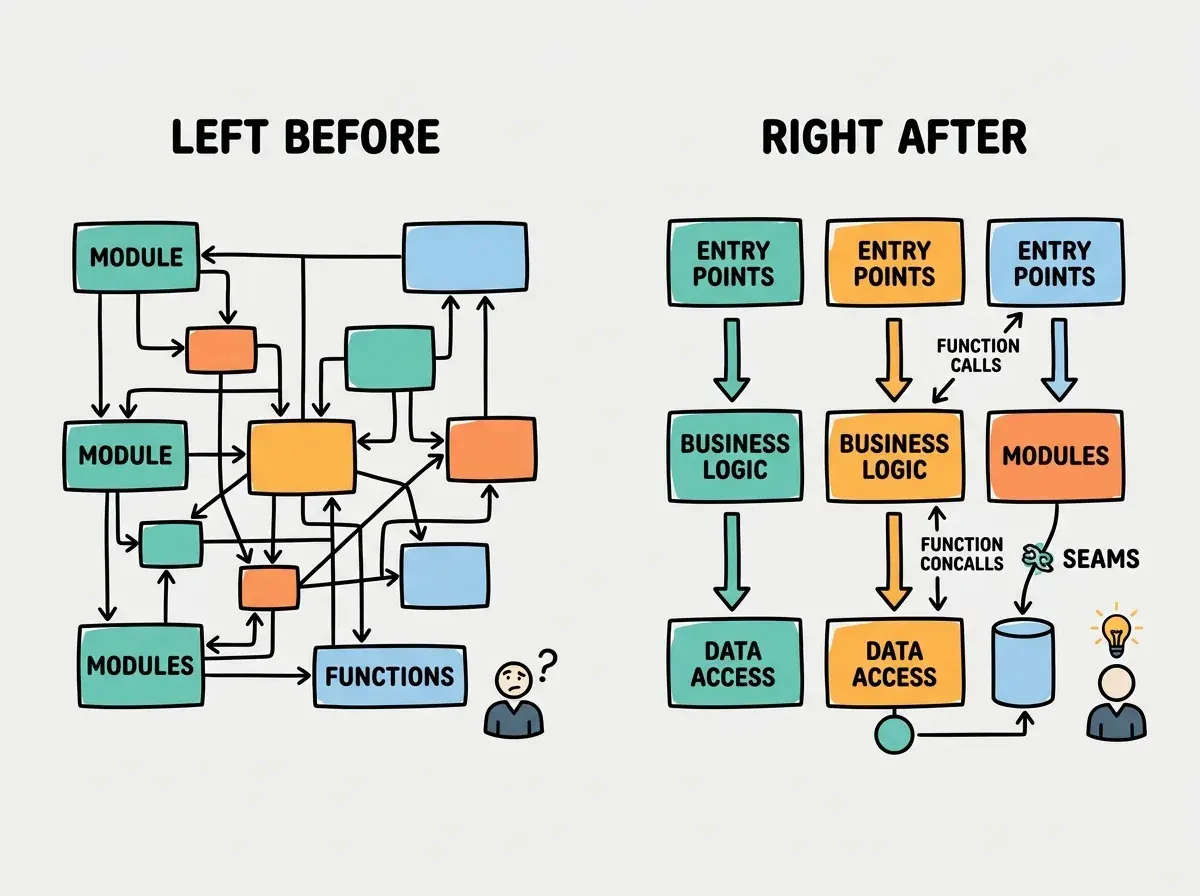
Once you understand individual pieces, you need a picture of the whole. This is especially important for AI-assisted projects where the high-level architecture may have evolved in ways you did not consciously plan.
Start with the data flow. Pick the most important piece of data in your system, probably the thing your app primarily does, and trace it from entry point to storage (or output). Where does it come in? What transforms it? What validates it? Where does it end up? Draw this on paper. It does not need to be formal.
Most AI-built codebases have cleaner architecture than their owners give them credit for. The AI was working from reasonable patterns. What is usually missing is documentation of the seams, the places where one module hands off to another and where assumptions about data shape live implicitly.
For dependency graphs, a quick automated scan is faster than reading. Run your package manager's built-in tools or a tool like madge (for JavaScript/TypeScript) to generate a visual dependency graph. This tells you which modules are load-bearing (many things depend on them) versus peripheral (few things depend on them). When you find a bug, you want to know which category the affected module falls into before you start changing things.
For databases and state, write out your schema in plain English. Just the tables and their relationships, in one sentence each. "Users have many subscriptions. Subscriptions belong to one plan. Plans have many features." This exercise usually surfaces at least one place where the model does not match how the code actually uses the data.
What This Means For You
The path through debugging old AI code is not the same for everyone. Here is what matters depending on where you are.
-
If you are an indie hacker: You almost certainly have a codebase that grew faster than your understanding of it. That is not a mistake you made; it is the deal you made to ship fast. The code archaeology workflow described here was built for you. One afternoon of mapping will tell you more about your own project than six months of feature development. Do it now, before the next bug, not during the next crisis.
-
If you are a senior dev: You may notice that the AI explanation prompts work better than asking a junior developer to explain code, because the AI will surface the structural concerns and hidden assumptions without feeling defensive about them. The pattern is worth adding to your code review toolkit, especially when reviewing AI-assisted PRs where the author may not fully understand what was generated.
-
If you are a career changer or student: The shame spiral of not understanding your own code is especially common when you are newer to development. You built something, it worked, and now it feels like someone else's problem. The truth is that even experienced developers face this. The difference is that experienced developers have a process. Now you have that process too.
The code you do not understand is not broken. It is just undocumented context. Give yourself an hour, a good prompt, and the patience to read before you fix. The understanding will come faster than you expect.
That is what this blog is about. Real workflows for developers who are figuring it out as they go.
Explore the blogOne Last Thing
The goal is not to understand every line perfectly before you touch anything. That standard would paralyze you.
The goal is to understand the shape of the system well enough to predict where a change will ripple. If you can answer "if I change this, what else might break?" you have enough understanding to move forward safely.
AI tools are genuinely excellent at helping you build that predictive model quickly. The same tool that wrote the code six months ago can help you understand it today. Use it.
The grow section covers everything from debugging workflows to career decisions for developers using AI.
Start reading