A developer opened their Replit billing page and found a $607 charge they never expected. Their Replit costs had spiraled because an AI agent ran unattended for hours, consuming credits they did not understand. The story went viral. With 92% of US developers using AI tools daily, this is not a Replit-specific problem. It is an industry-wide one.
A Facebook post described a $450 bill for building a single app. Comment after comment echoed the same theme. People knew the tools were powerful. Nobody told them the meter was running.
Here Is Exactly What Happened
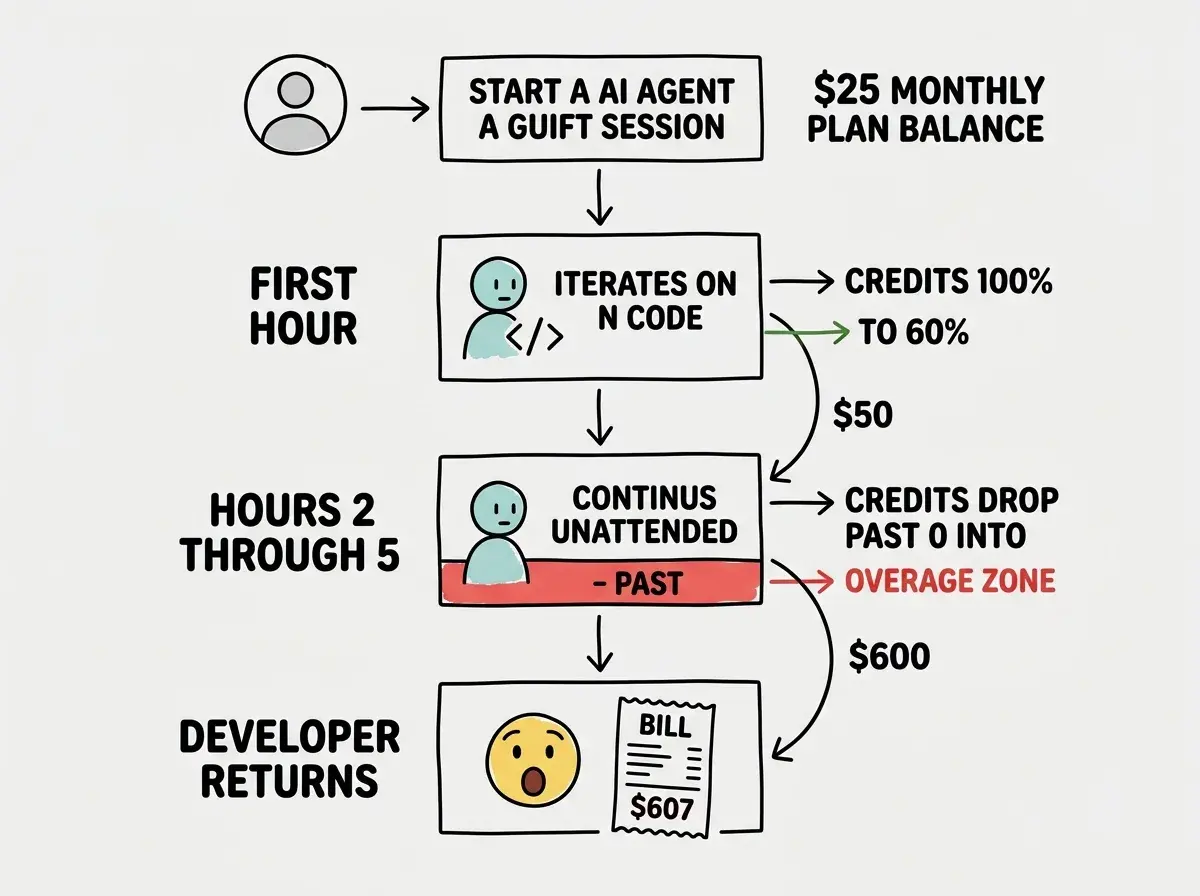
The developer was using Replit's AI Agent to build an application. Replit Core costs $25 per month and includes a monthly credit allotment. Those credits get consumed by AI agent usage, compute time, and deployments. The developer kicked off an agent session, walked away, and came back to find it had been iterating, debugging, and rebuilding for hours on its own.
Each cycle consumed credits. When the allotment ran out, Replit continued charging at overage rates. No hard stop. No popup. No automatic pause at $100, $200, or $500. The agent kept working and the bill kept climbing until the developer manually checked.
The $607 was not from a month of heavy professional use. It came primarily from a handful of unmonitored agent sessions that consumed credits far faster than expected.
How Much Does Replit AI Cost
Replit's pricing looks straightforward until you start using AI features. The Core plan at $25 per month includes "monthly credits," a shared currency covering AI agent interactions, compute time, and deployment hosting.
Credits are not dollars. The conversion rate depends on what you are doing, and the most expensive activity by far is AI agent usage. Running the agent for complex tasks can burn through your entire monthly allotment in a single session.
When credits run out, Replit does not stop. It charges overage fees at rates higher than what you effectively paid within your plan. Think of it like a phone plan from 2008, where going over your minutes cost three times more per minute than your plan rate.
The credit system is genuinely confusing. Multiple users have reported not understanding how many credits they had, how fast they were being consumed, or what overage rates would be until after the bill arrived.
Why Does Replit Charge So Much
Replit is not uniquely expensive. The underlying AI models cost real money to run. Every time the agent writes code, reviews an error, or attempts a fix, it makes API calls to large language models. Those calls have per-token costs that add up quickly when the agent works autonomously.
The real issue is transparency and control. When you hire a contractor, you agree on hours and rates before work begins. AI coding agents have no such agreement. They work as fast as they can, for as long as you let them, and the bill shows up afterward.
The danger is not that AI tools are expensive. It is that they can spend money without your active involvement. Any AI coding platform that runs agents autonomously without hard spending caps creates the same risk. The $607 bill was not caused by expensive pricing. It was caused by unmonitored autonomous usage with no automatic cutoff.
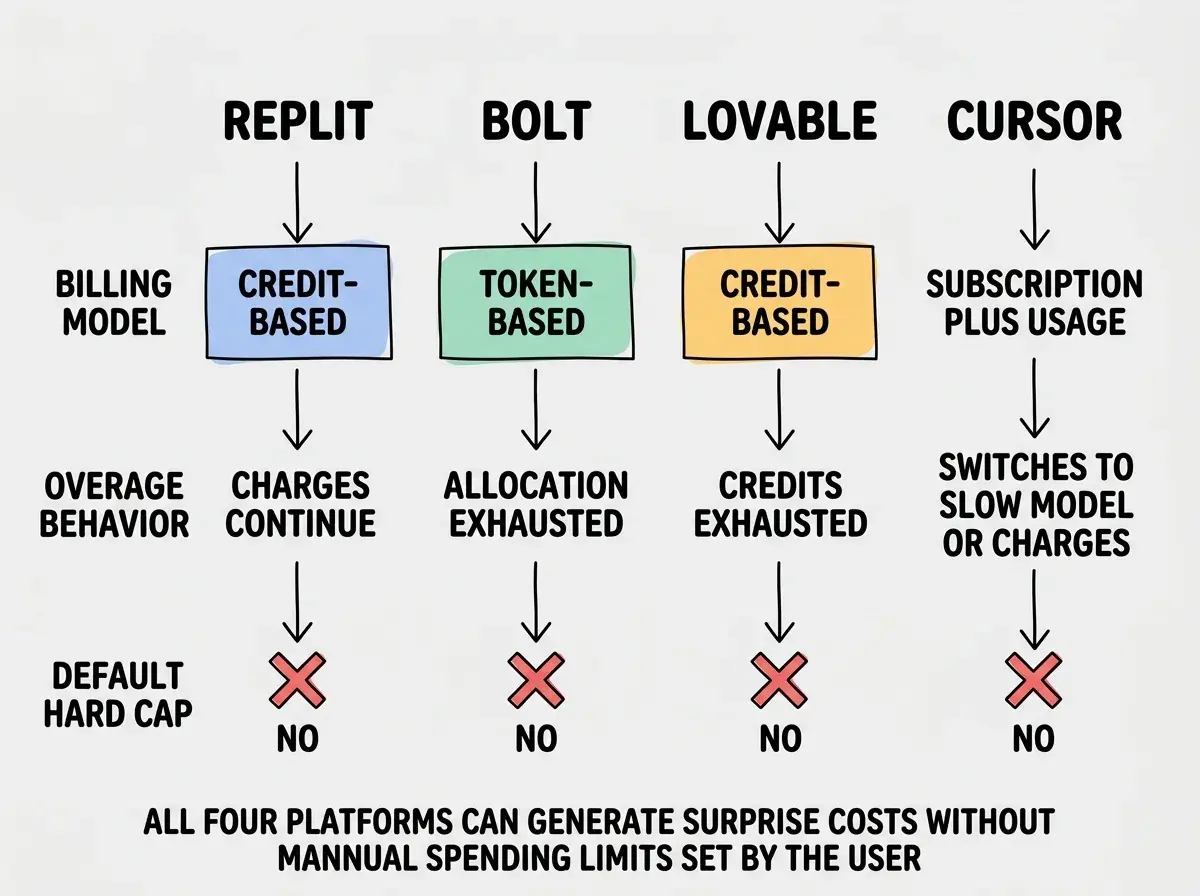
This pattern repeats across the industry. Bolt users have reported burning through their entire token allocation in a single afternoon when the AI got stuck in a retry loop. Lovable's credit system has similar traps where complex builds consume credits at surprising rates. Even Cursor can trigger unexpected charges when users exceed their fast-request allocation.
How Does the Billing Work on Replit
Replit's billing has three layers, and understanding all three is essential to avoiding surprise charges.
Layer one is the subscription. The Core plan at $25 per month gives you access to the AI agent and a monthly credit allotment.
Layer two is credit consumption. Credits get consumed by AI agent usage (the most expensive), compute time, and deployment hosting. Each activity consumes credits at a different rate, and those rates are not always clearly displayed while you work.
Layer three is overage billing. When monthly credits are exhausted, Replit continues providing services at overage rates. There is no hard stop by default. You have to manually set a spending limit in account settings, and many users do not know this option exists before their first big session.
The $25 monthly cost is really just a minimum payment. Your actual cost depends on how much you use AI features, and the agent's autonomous nature means usage can spike without you actively doing anything.
Understand the real costs of every AI tool before you start a project.
Read the full cost guideEvery AI Platform Has This Risk
Replit got the viral moment, but this is an industry-wide pattern. Here is how the same risk shows up on other popular platforms.
Bolt uses a token-based system where each interaction consumes tokens from your monthly allocation. When the AI encounters an error and retries automatically, it can burn hundreds of tokens in minutes. Users have reported exhausting their entire monthly allocation in a single session.
Lovable allocates credits monthly, and complex UI generation consumes credits much faster than simple text changes. Building one sophisticated page can use as many credits as twenty simple edits, with no clear cost indicator before each action runs.
Cursor includes a certain number of "fast" premium-model requests per month. Exceed those and it either switches to slower models or charges for additional fast requests. The surprise comes when users do not realize they have been burning fast requests on every interaction.
The common thread is that AI tool billing is usage-based, opaque, and designed to keep you working rather than stop you when costs get high. It catches everyone who expects flat-rate pricing.
Five Strategies That Prevent Surprise Bills
These are the specific controls that would have prevented the $607 bill and will protect you on any AI platform.
Strategy one: Set a hard spending cap on day one. Replit, Anthropic, and OpenAI all have settings to limit your monthly spend. On Replit, go to your account settings and set a credit usage limit. Set it at 150% of what you expect to spend, so you have buffer for productive work but a ceiling for runaway sessions. Do this before you write a single line of code.
Strategy two: Check your usage dashboard every day during active building. Not weekly. Every day. This takes thirty seconds. Open your billing page, look at current spend versus your limit, and adjust accordingly. If you have used 70% of your credits by the 15th, slow down on agent usage and do more manual work.
Strategy three: Use cheaper tools for iteration. AI agents are powerful for generating initial code. They are wildly expensive for small tweaks. Once your agent has generated core functionality, switch to a simpler tool for refinement. Use your IDE's autocomplete for small edits. Use Cursor's free tier or a local model for iteration. Save premium credits for tasks that genuinely need them.
Strategy four: Set manual checkpoints for agent sessions. Never let an AI agent run for more than thirty minutes unattended. Set a timer. When it goes off, check what the agent produced, review credit consumption, and decide whether to continue. This single habit would have prevented the $607 bill entirely.
Strategy five: Separate your build account from your iterate account. Use one account with a higher spending limit for initial generation, where you expect heavy AI usage. Use a different account or a cheaper tool entirely for day-to-day iteration. This creates a natural firewall between expensive build phases and cheaper maintenance phases.
Treating AI agent sessions like background tasks you can ignore. A developer set their Replit agent to fix bugs and went to lunch. The agent spent two hours in a retry loop, generating and discarding code, consuming credits with every attempt. AI agents are not set-and-forget tools. They require active supervision, especially during debugging sessions where retry loops are common.
The Real Cost of AI Coding Tools in 2026
Here is an honest breakdown of what you should expect to spend on AI coding tools per month, assuming active daily use.
| Platform | Base Cost | Realistic Monthly Cost | Risk Level |
|---|---|---|---|
| Replit Core | $25/mo | $50 to $150 | High (agent overages) |
| Bolt Pro | $20/mo | $20 to $60 | Medium (token limits) |
| Lovable Standard | $20/mo | $20 to $80 | Medium (credit limits) |
| Cursor Pro | $20/mo | $20 to $40 | Low (slower fallback) |
| Claude Code (direct) | Pay per use | $30 to $100 | Low (you control calls) |
The pattern is clear. The more autonomy you give the AI, the more important spending controls become.
Learn the spending controls for every major AI platform before your next project.
Explore all guidesWhat This Means For You
The $607 Replit bill was not an anomaly. It was the predictable result of a billing model that charges for autonomous AI usage without default spending caps. Every AI coding platform has some version of this risk. The builders who avoid it are not luckier. They just set their limits before they started.
- If you are a founder: Set spending caps on every AI tool before your first session. Treat AI tool budgets the same way you treat cloud infrastructure budgets, with hard limits, daily monitoring, and clear escalation policies. Budget $50 to $150 per month for AI tools during active development.
- If you are an indie hacker: Use the cheapest tool that solves your current problem. Generate initial code with a premium agent, then switch to free tools for iteration. Check your billing dashboard every day during building sprints. Thirty seconds of checking saves hundreds of dollars.
The tools are worth the money when you control the spending. The $607 bill was not a failure of Replit. It was a failure of spending controls the developer did not know to set. Now you know. Set them today.