If you have been building apps with AI tools, you have probably hit the moment where someone tells you to "just containerize it." This Docker beginner guide exists because that advice, while correct, skips about fifteen steps of context. With 92% of US developers using AI tools daily, the infrastructure underneath that code matters.
I avoided Docker for years. Deployed to Vercel and Netlify and never thought about containers. Then I needed a database alongside my app. Then I needed my app to run on Railway, which uses Docker under the hood whether you know it or not. So I learned it, and I am going to save you the confusion I went through.
The Shipping Container Analogy That Actually Works
Before standardized shipping containers existed, loading a cargo ship was chaos. Every item had a different shape, different weight, different fragility. Dock workers spent days figuring out how to fit everything together. Then someone invented a standard metal box. Everything goes inside the box. The ship does not care what is in the box. The crane does not care. The truck does not care. The box fits on any ship, any train, any truck in the world.
Docker does the same thing for software. Your app, with all its dependencies, configuration files, and runtime requirements, goes inside a container. The server running it does not care what is inside. It just knows how to run containers. Railway does not care. Fly.io does not care. AWS does not care. The container is the standard unit, and it runs the same everywhere.
This is the literal reason Docker chose the container and whale branding. When 46% of your code is AI-generated, you need a guarantee that what works on your machine works in production. Containers provide that guarantee.
Docker packages your app and everything it needs into a single standardized box. The server running it does not need to know what language you used, what dependencies you installed, or what version of Node you need. It just runs the container. This is why platforms like Railway and Fly.io use Docker under the hood for every deployment.
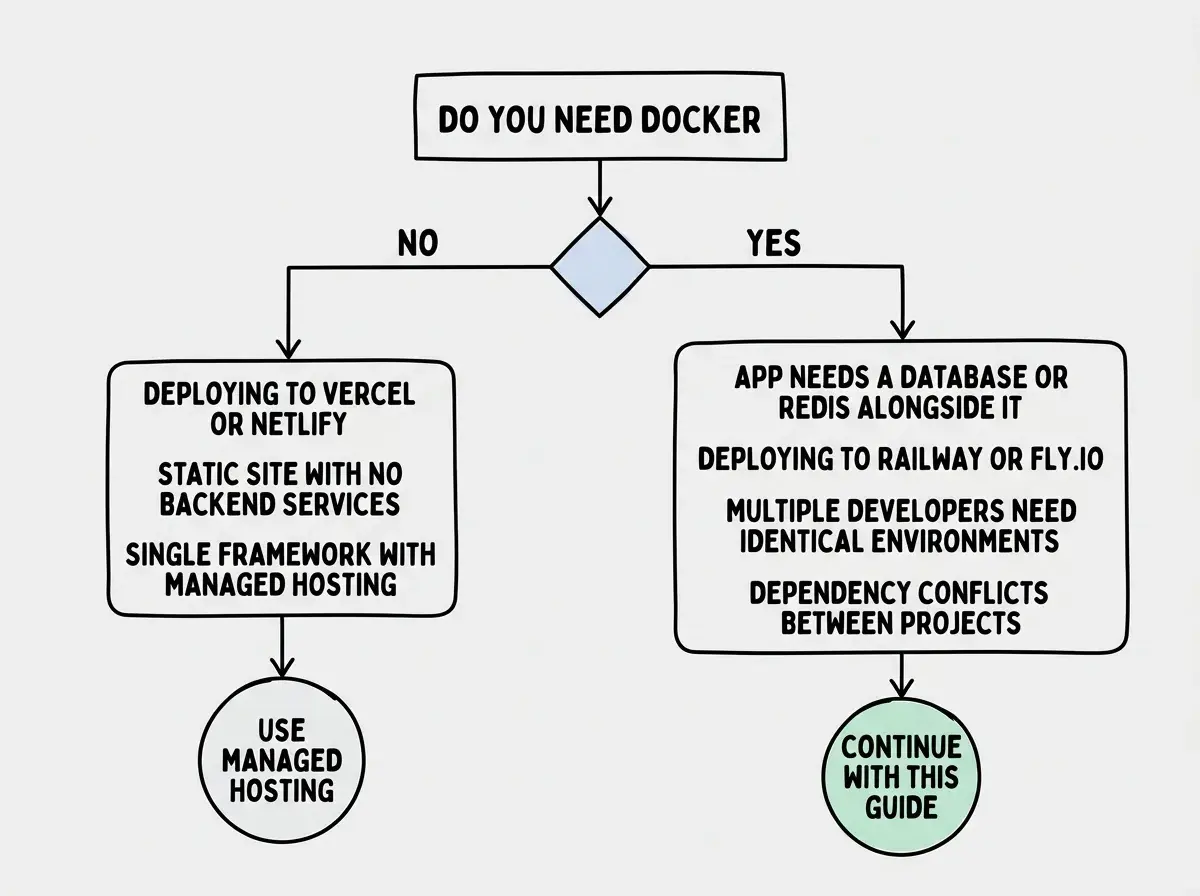
When You Actually Need Docker (and When You Do Not)
Here is the honest truth that Docker evangelists will not tell you. If you are deploying a Next.js app to Vercel, you do not need Docker. If you are shipping a static site to Netlify or Cloudflare Pages, you do not need Docker. These platforms handle everything for you, and for many vibe-coded projects, they are the right choice.
You need Docker when any of these are true.
Your app needs services running alongside it. A PostgreSQL database, a Redis cache, a background job processor. Docker Compose lets you define all of these in one file and spin them up together with a single command.
Your hosting platform requires it. Railway and Fly.io both build Docker images from your code. They can auto-detect many frameworks, but understanding what they do gives you control when auto-detection fails.
You need reproducible environments. If you have ever said "it works on my machine" and meant it as a complaint, Docker solves that permanently. Every developer, every CI pipeline, and every server runs the exact same container.
You are hitting dependency conflicts. Your app needs Node 20 but another project needs Node 18. Containers isolate everything, so conflicts become impossible.
If none of those apply to you, bookmark this guide and come back when they do. There is no prize for adding complexity before you need it.
Writing Your First Dockerfile
A Dockerfile is a recipe. It tells Docker exactly how to build your container, step by step. Think of it as packing instructions for your shipping container. Here is a Dockerfile for a typical Next.js app that your AI tool might generate.
# Start with a Node.js base image
FROM node:20-alpine AS base

# Install dependencies
FROM base AS deps
WORKDIR /app
COPY package.json package-lock.json ./
RUN npm ci

# Build the application
FROM base AS builder
WORKDIR /app
COPY --from=deps /app/node_modules ./node_modules
COPY . .
RUN npm run build

# Production image
FROM base AS runner
WORKDIR /app
ENV NODE_ENV=production

# Copy only what we need to run
COPY --from=builder /app/.next/standalone ./
COPY --from=builder /app/.next/static ./.next/static
COPY --from=builder /app/public ./public

EXPOSE 3000
CMD ["node", "server.js"]
Here is what each section does.
FROM node:20-alpine AS base picks a starting point. Alpine is a tiny Linux distribution, about 5MB instead of the usual 900MB. Smaller base means faster builds and smaller containers.
The deps stage copies only your package files and installs dependencies. Docker caches each step, so if your package.json has not changed, Docker skips this entirely on subsequent builds. This is the single biggest optimization in any Dockerfile.
The builder stage copies your source code and builds the app. Separating this from deps means dependency installation gets cached independently from code changes.
The runner stage is the final container. It only contains the built output, not your source code, not your dev dependencies. This keeps the container small and secure.
The output: "standalone" setting in your next.config.ts is critical for this to work. Add it like this:
const nextConfig = {
  output: "standalone",
};
export default nextConfig;
This tells Next.js to produce a self-contained server that does not need the full node_modules folder. Without it, your Docker image will be enormous and slow to deploy.
Forgetting to set output: "standalone" in your Next.js config before building a Docker image. Without it, your container will include the entire node_modules directory, ballooning the image size from roughly 100MB to over 1GB. This makes deployments slow and can exceed size limits on platforms like Railway's free tier. Add it before writing your Dockerfile.
Docker Compose for App Plus Database
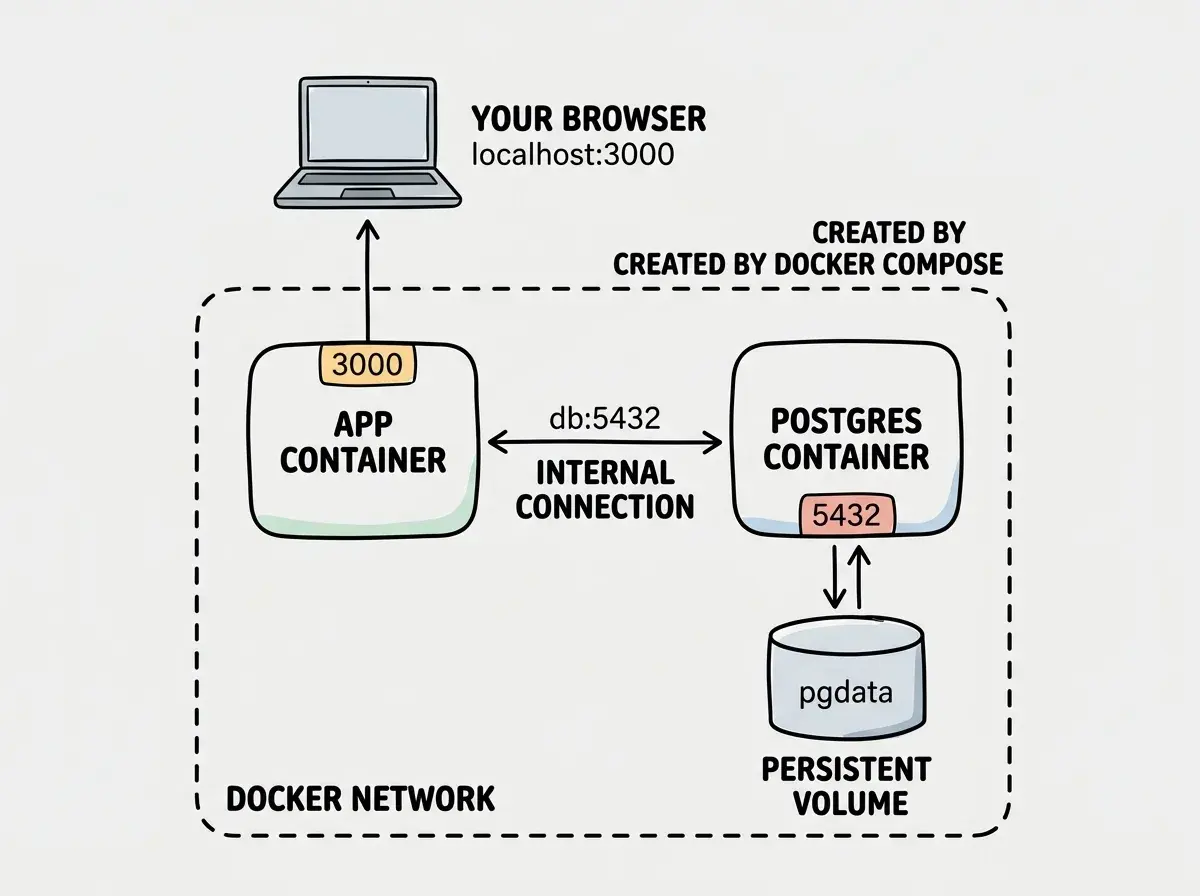
Real apps rarely run alone. You need a database, maybe a cache, maybe a background worker. Docker Compose lets you define all of these services in a single docker-compose.yml file and run them together.
version: "3.8"

services:
  app:
    build: .
    ports:
      - "3000:3000"
    environment:
      - DATABASE_URL=postgresql://postgres:password@db:5432/myapp
    depends_on:
      - db

  db:
    image: postgres:16-alpine
    environment:
      - POSTGRES_PASSWORD=password
      - POSTGRES_DB=myapp
    volumes:
      - pgdata:/var/lib/postgresql/data
    ports:
      - "5432:5432"

volumes:
  pgdata:
Three things to notice. The app service uses build: . meaning "build from the Dockerfile in this directory." The db service uses image: postgres:16-alpine meaning "pull this pre-built image from Docker Hub." You do not need to know how to build a PostgreSQL container.
The depends_on field tells Docker to start the database before the app. Without it, your app might try to connect to a database that does not exist yet.
The volumes section persists your database data. Without it, every restart wipes your database clean.
Run docker compose up and Docker builds your app, pulls PostgreSQL, starts both, and connects them. Your app reaches the database at db:5432 because Docker creates a private network between services. The name db in the connection string matches the service name in the compose file.
Deploying Docker Containers to Railway and Fly.io
Here is where Docker pays off for vibe coders. Both Railway and Fly.io detect your Dockerfile and build from it automatically.
Railway is the simpler option. Push your code to GitHub with a Dockerfile in the root, connect your repo, and Railway detects the Dockerfile, builds the image, and deploys it. Environment variables go in Railway's dashboard, just like Vercel. Railway also offers managed PostgreSQL, so use Compose for local development and Railway's managed database for production.
Fly.io gives you more control. Install the Fly CLI, run fly launch in your project directory, and it generates a fly.toml configuration file. Run fly deploy and it builds your Docker image remotely and distributes it to servers worldwide.
Both platforms handle SSL, custom domains, and scaling. The Docker container is just the packaging.
The practical workflow is Docker Compose locally (where you need your database running alongside your app) and Railway or Fly.io for production (using their managed database services).
# Local development
docker compose up

# Deploy to Railway (after connecting repo)
git push origin main

# Deploy to Fly.io
fly deploy
That is the entire deployment workflow.
Learn the fundamentals before adding Docker to your workflow.
Start with the basicsEssential Docker Commands You Will Actually Use
You do not need to memorize a hundred commands. These cover 95% of what you will do.
docker build -t myapp . builds an image from your Dockerfile and tags it "myapp."
docker run -p 3000:3000 myapp runs your container and maps port 3000 inside the container to port 3000 on your machine.
docker compose up starts all services in your docker-compose.yml. Add -d to run in the background.
docker compose down stops everything. Add -v to also delete volumes (and your database data, so be careful).
docker ps shows running containers. docker logs [container-name] shows output from a container. These are your first stop when something breaks.
docker system prune cleans up old images eating your disk space. Docker is notorious for consuming storage silently. Run this every few weeks.
What This Means For You
Docker is not something every vibe coder needs on day one. But it is something almost every vibe coder hits eventually, usually when they need a database, when they outgrow managed hosting, or when a deployment platform requires it.
- If you are a senior dev exploring AI tools: You probably already know Docker. The insight here is that AI-generated code often misses Docker best practices like multi-stage builds and standalone output. Review what your AI generates for Dockerfiles the same way you review any generated code.
- If you are an indie hacker shipping fast: Start with Vercel or Netlify. When you need a database or background jobs, Docker Compose gives you a local development environment that matches production exactly. Railway makes the production side painless. Do not add Docker until a real constraint forces you to.
The shipping container transformed global trade because standardization removed an entire category of problems. Docker does the same for your deployments. When you need it, it is worth every minute spent learning it.
Explore more tutorials on deploying AI-built apps to production.
See all tutorials