If you are a designer ready to deploy a website yourself, you are not alone. 63% of people using vibe coding tools today are non-developers. The gap between "I designed this" and "it is live on the internet" has never been smaller, and you do not need an engineer to cross it.
There is a weird social stigma in some design circles around designers who ship their own code. Peers raise eyebrows. Engineers say things like "that is cute, but..." Yet 44.2% of non-technical designers already rate AI-assisted coding favorably, and younger designers are embracing it even faster. The tools have changed. The gatekeeping has not caught up.
Here is the truth: 92% of US developers use AI tools daily. The line between "designer" and "developer" is blurring not because designers are becoming engineers, but because the tools stopped requiring you to be one. You already think in systems, components, and user flows. You are closer to shipping than you think.
Why Designers Should Own the Deploy Button
Creative control does not end at the handoff. Every designer has felt the frustration of handing a pixel-perfect Figma file to a developer and getting back something that is 80% right. The padding is off. The font rendering is different. The hover state you spent an hour refining got simplified. That gap between design and production is where craft goes to die.
When you deploy your own work, that gap disappears. You are the person who decides whether the spacing looks right on mobile. You tweak the animation timing until it feels correct. You do not file a ticket and wait three days for someone to adjust four pixels of margin.
This is not about replacing engineers. Complex backends and authentication systems still need specialized knowledge. But a marketing page, a portfolio site, a client presentation prototype? You can ship those yourself, today, with full creative control over every detail that matters.
The Figma-to-Code-to-Deploy Pipeline
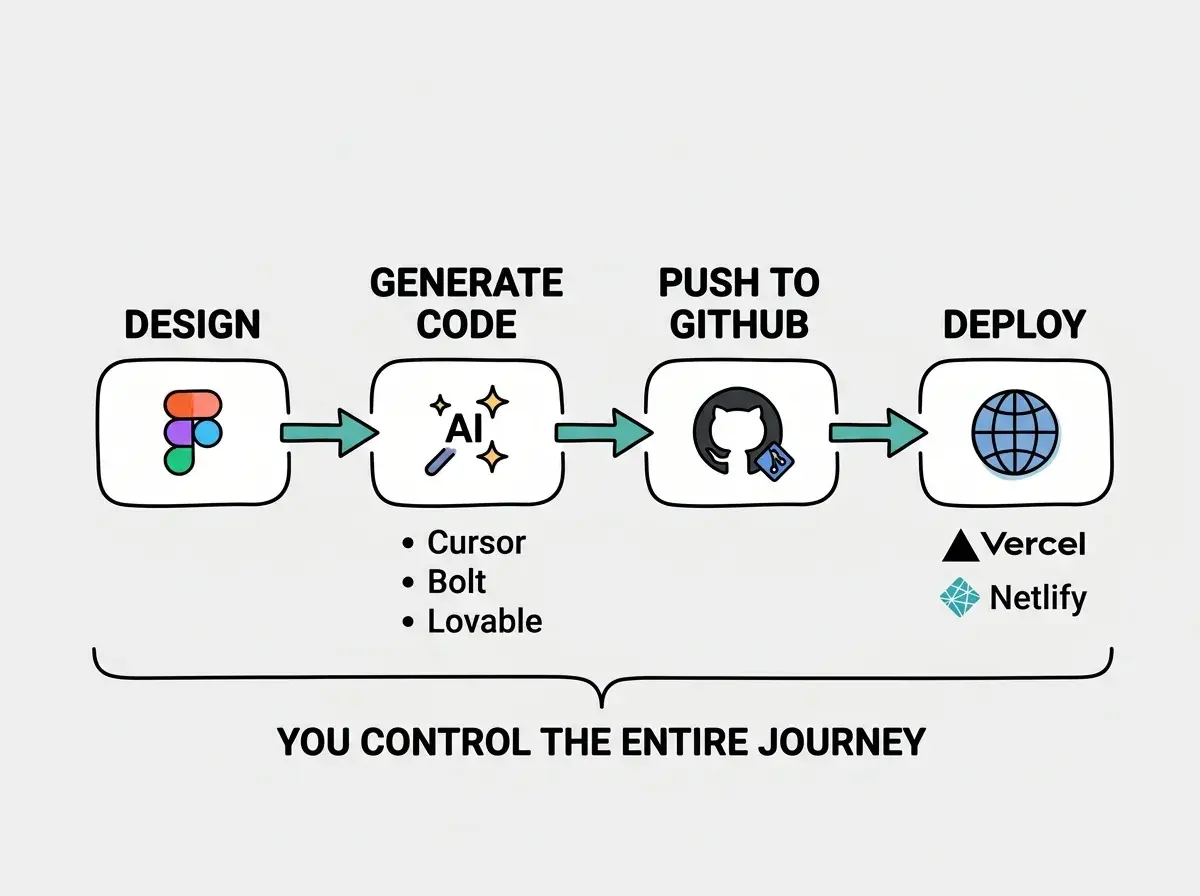
The modern workflow for designer deployment looks like this. You design in Figma. An AI tool converts your design into working code. You push that code to GitHub. A hosting platform turns that code into a live website. Four steps, no terminal required.
From Figma to code. Tools like Cursor, Bolt, and Lovable can take your designs and generate clean, component-based code. Some work directly from Figma exports. Others work best when you describe your design in a prompt while referencing your mockups. The output is usually a Next.js or React project that looks remarkably close to your original design.
From code to GitHub. Most AI coding tools have a built-in button to push your project to GitHub. Lovable does it automatically. Bolt offers a one-click export. If your tool generated files on your computer, GitHub Desktop (a visual app, no terminal) lets you drag your project folder in and publish it.
From GitHub to the world. This is the deployment step, and it is where most designers get stuck. Not because it is hard, but because nobody has explained it in language that makes sense. That changes now.
Deploying on Vercel Without the Command Line
Vercel is the fastest path for most designer projects. It was built for the frameworks that AI tools generate, and the entire process happens in your browser.
Step 1: Sign up with your GitHub account. Go to vercel.com and click "Sign Up" with GitHub. This automatically connects both services. Do not sign up with email separately; it creates unnecessary extra steps.
Step 2: Import your project. Click "Add New Project" on the Vercel dashboard. Your GitHub repositories appear in a list. Find yours and click "Import." If it does not appear, click "Adjust GitHub App Permissions" and grant Vercel access to the repository.
Step 3: Check the build settings. Vercel auto-detects your framework. For a standard Next.js or React project (which is what most AI tools generate), the defaults are correct. If "Framework Preset" shows "Other," select your framework manually from the dropdown.
Step 4: Add environment variables. If your project has a .env file, add every variable from it into Vercel's "Environment Variables" section. Copy them one by one. Missing even one can cause your site to break with confusing error messages.
Step 5: Click Deploy. Vercel pulls your code, builds your site, and gives you a live URL ending in .vercel.app. The whole process takes one to five minutes.
You do not need the command line to deploy. The entire Vercel deployment process happens in your browser through a visual dashboard. Sign up, import your GitHub repository, and click deploy. If your AI tool generated the code correctly, the default settings work without any changes. The biggest barrier for designers is not technical difficulty; it is the assumption that deployment requires engineering knowledge.
Deploying on Netlify With Drag and Drop
Netlify offers something even simpler for static sites: literal drag and drop. If your project is a static site (no server-side code, just HTML, CSS, and JavaScript), you can skip GitHub entirely.
The drag-and-drop method. Go to app.netlify.com and sign up. On your dashboard, you will see a drop zone that says "Drag and drop your site output folder here." Find your project's build output folder (usually called out, dist, or build) and drag it in. Netlify deploys it in under a minute. You get a live URL immediately.
The GitHub method. If you want automatic redeployments every time you push changes, connect Netlify to GitHub. Click "Add new site," select "Import an existing project," choose GitHub, and select your repository. Netlify handles the rest.
Netlify's drag-and-drop is particularly good for client presentations. A live, shareable URL in under sixty seconds, no GitHub required.
Setting Up Custom Domains for Client Presentations
A .vercel.app or .netlify.app URL works for testing, but it does not look professional in a client presentation. Custom domains change the perception completely.
Buy a domain. Registrars like Namecheap or Cloudflare sell domains for $10 to $15 per year. Pick something that matches your project or your client's brand.
Connect it to your hosting platform. In Vercel, go to your project settings, click "Domains," and type in your custom domain. Vercel gives you DNS records to add at your registrar. Copy those values into your registrar's DNS settings. Netlify's process is nearly identical under "Domain settings."
Wait for DNS propagation. This takes five minutes to a few hours. Once complete, your custom domain automatically gets an SSL certificate. No extra setup required.
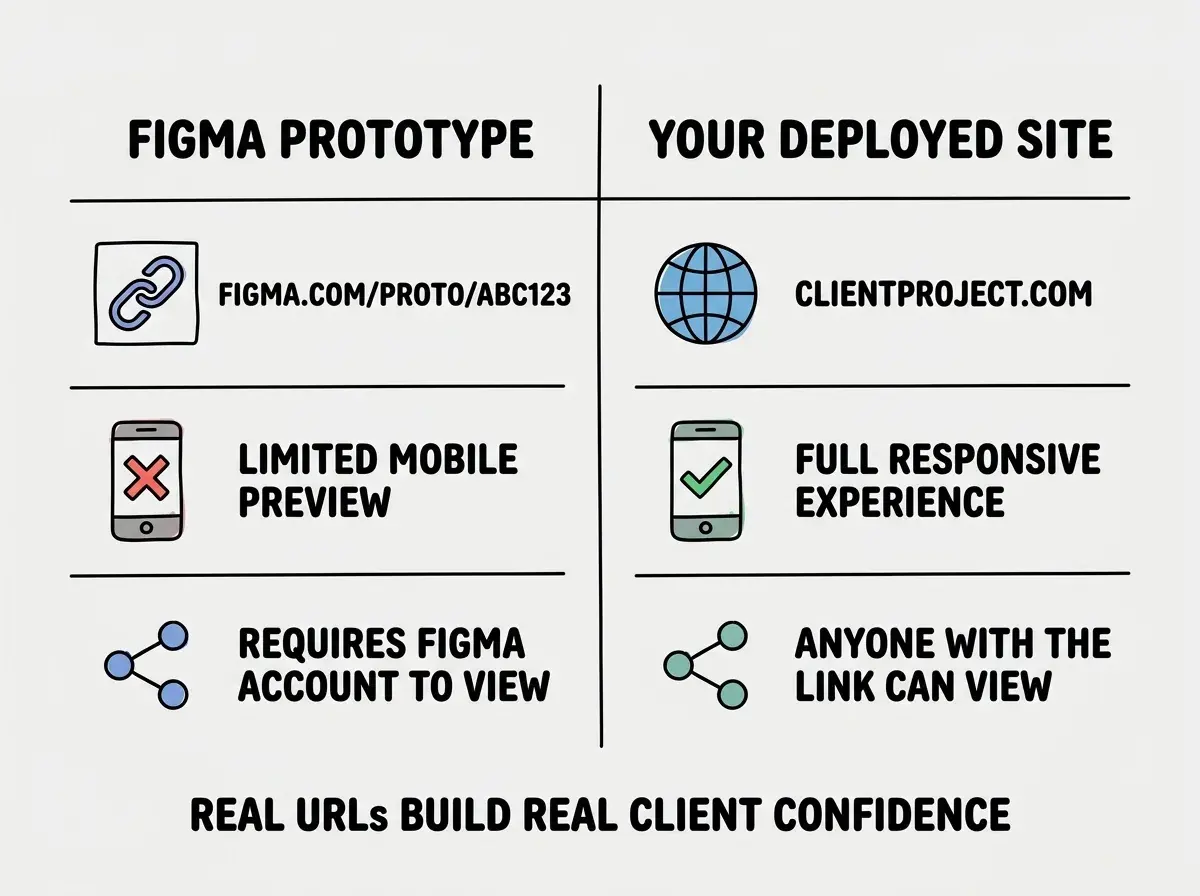
For client work, this changes everything. Instead of sharing a Figma prototype and saying "imagine this is real," you share an actual live URL on a real domain. The client opens it on their phone, shares it with stakeholders, and interacts with real transitions. That is a fundamentally different conversation than clicking through static mockups.
Maintaining Design Quality in Production
Deploying is only half the win. The other half is making sure your design looks right once it is live. Here are the checks that protect your craft.
Test on real devices. Open your live URL on your actual phone, not just the browser's device emulator. Scroll through every section. Check that fonts loaded correctly, that images are sharp, and that touch targets are large enough. Emulators lie about font rendering and scrolling behavior.
Check your responsive breakpoints. Resize your browser window slowly from desktop to mobile width. Watch for layouts that break or text that overflows. If something is off, go back to your AI tool, describe the problem, and ask for a fix. Push the updated code to GitHub and your site redeploys automatically.
Verify your images load quickly. Large, unoptimized images ruin beautiful designs. If your hero image takes five seconds to appear on a mobile connection, users leave before they see your work. Test on a throttled connection (Chrome DevTools, Network tab, set to "Slow 3G").
Check your fonts. Custom fonts that work locally sometimes fail in production because the font files are not included in the build. If your deployed site shows system fonts instead of your chosen typeface, check that the font import is in your global stylesheet.
Assuming that because it looks right on your laptop, it looks right everywhere. Production environments serve your site across different browsers, screen sizes, network speeds, and operating systems. A design that is flawless in Chrome on your MacBook might have broken fonts in Safari, misaligned layouts on Android, or painfully slow image loading on a 4G connection. Always test your deployed site on at least three real devices before sharing the URL.
Every time you push a code change to GitHub, Vercel and Netlify automatically rebuild your site. Find a problem, fix it in your AI tool, push the change, and the live site updates in minutes. Deployment is not a final destination. It is the beginning of a feedback loop where you refine your work in the environment that actually matters.
Learn how to go from idea to working app with AI-powered tools.
Start buildingDig deeper
A few hand-picked sources if you want to go further.
What This Means For You
You designed it. You generated the code. And now you can deploy it yourself, without waiting for anyone's permission. That is a fundamental shift in what it means to be a designer in 2026.
- If you are a designer building client work: Stop sending Figma prototypes and start sending live URLs. Buy a $12 domain, deploy on Vercel or Netlify, and put a real, interactive website in front of your client. You will close projects faster and eliminate the back-and-forth of translating design intent through an engineering team.
- If you are a founder with a design background: Your design skills are your unfair advantage, and deployment is no longer the bottleneck. Build your MVP in Figma, generate the code, deploy on Vercel's free tier, and start showing it to users today. You do not need a technical cofounder to validate your idea.
- If you are a design student building your portfolio: Every deployed project is proof that you can ship, not just design. A live URL on a custom domain demonstrates initiative that a PDF portfolio cannot match. Deploy your class projects now. By graduation, you will have a portfolio of live work that sets you apart.
Explore the tools and workflows that help designers ship their own projects.
Explore the guides