Deprecating features gracefully means removing functionality through a structured process of advance notice, a defined sunset period, a clear migration path, and clean removal. Done right, users adapt without friction and trust your product more. Done wrong, you break workflows silently and lose users who never saw it coming.
This is the part of product development nobody talks about. Everyone celebrates shipping new features. Nobody throws a party for the features you removed without burning your user base to the ground.
Why Deprecation Is Harder Than Building
Think of deprecating a feature like closing a road for construction. Building the road was the hard part technically, but closing it is the hard part socially. Drivers have built their entire commute around that road. Some use it every single day. The moment you close it without warning, you create chaos: missed turns, wrong routes, frustrated people who feel like the city just pulled something out from under them.
Now imagine closing that same road with six weeks of signage, a detour route mapped out in advance, and digital notifications sent to everyone in the area. The construction still happens. The road still closes. But the experience is completely different because users had time to adapt.
Most product teams treat deprecation like the first scenario. They decide internally that a feature is going away, flip it off on a Tuesday, and then wonder why the support tickets spike.
The core problem is that building features is creative and immediate. Deprecating them is slow, administrative, and feels like it produces nothing. For AI-built apps especially, this matters more than it might seem. When you can ship a new feature in an afternoon with an AI coding tool, you accumulate functionality at a pace that traditional teams never experienced. The average vibe-coded app has twice the feature surface area of a comparable hand-built product at the same age. That means the debt accumulates faster, and the moment arrives much sooner when you need to start removing things that are not working.
Keeping dead features alive has real costs: they add UI complexity that confuses new users, they create maintenance surface that slows down new development, and they make your codebase harder to hand off to an AI assistant because the context is full of things that no longer matter.
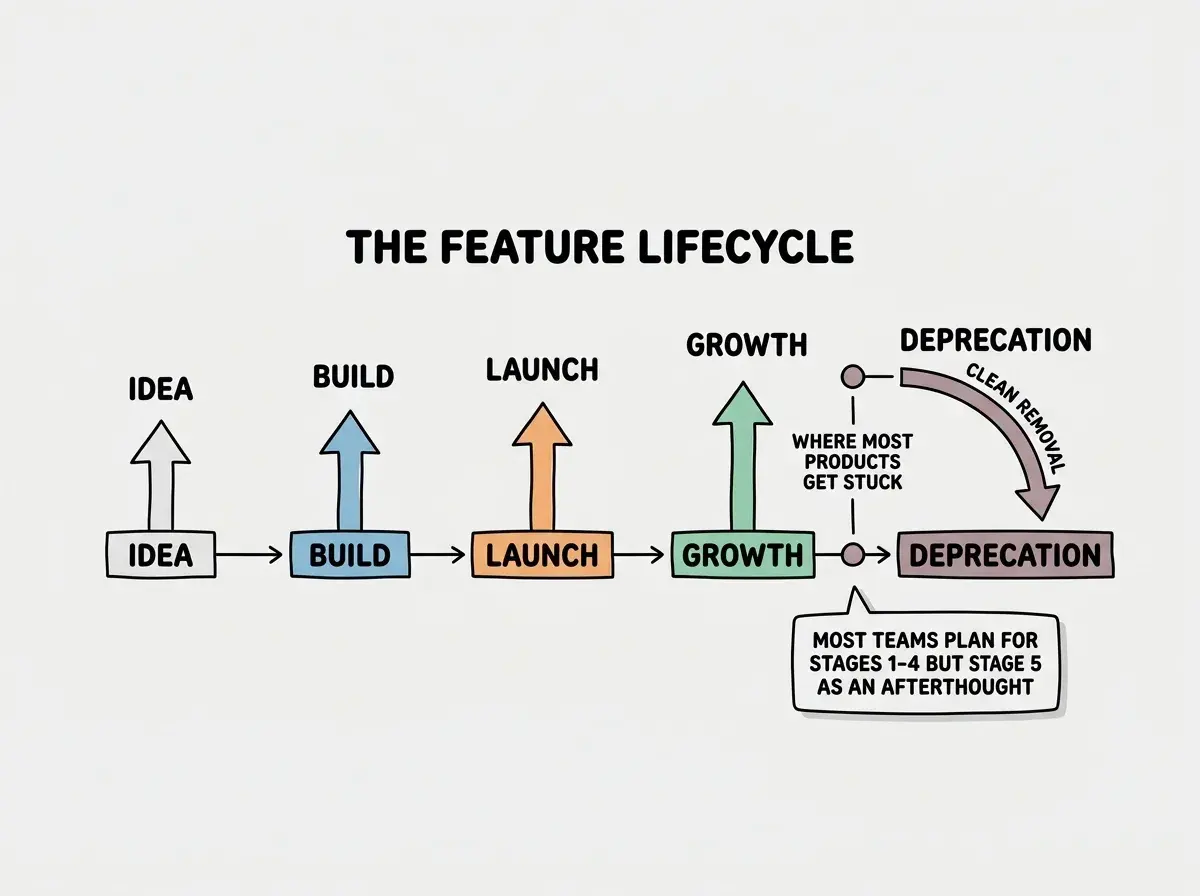
The Deprecation Timeline That Works
Every successful deprecation follows the same four-phase structure. The timing varies by feature complexity and user base size, but the phases do not change.
Phase 1: Announce (weeks 1-2). The moment you decide a feature is going away, tell your users. Not after you have built the replacement. Not once you are ready to remove it. Now. A good announcement has three parts: what is going away, when it is going away, and what they should do instead. Here is a template that works in practice:
"We are sunsetting [Feature Name] on [Date]. After that date, it will no longer be available. If you are using it for [common use case], here is what we recommend instead: [alternative]. If you need help migrating, [support link or contact]."
That is the whole message. Clean, specific, actionable.
Phase 2: The Sunset Period (weeks 3-10). This is the detour-sign phase. The feature still works, but every interaction with it carries a reminder that the road is closing. In-app banners, deprecation labels in settings, and emails to users who have touched the feature in the last 90 days all belong here. The length of this window depends on how many users depend on the feature and how disruptive the change is. Removing a rarely-used dashboard widget might warrant three weeks. Removing a core data export format might need three months.
Phase 3: Migration Path (runs parallel to Phase 2). The detour only works if the detour signs actually point somewhere. Document the migration path before you start the sunset period. If users are exporting data in format A and you are removing format A in favor of format B, they need a conversion guide. If they built automations on top of an API endpoint you are removing, they need working code examples for the replacement. Do not announce the sunset until the migration documentation exists.
Phase 4: Removal. On the announced date, remove the feature. This sounds simple but is where most teams waffle. They set a date, the date arrives, someone says "let us give it one more month," and the cycle repeats until the feature is never actually removed. Hold the date. If you need to adjust the timeline, announce the adjustment the same way you announced the original sunset: proactively, with a reason and a new hard date. Slipping the date silently is how you train users to ignore future deprecation notices.
Communicating Deprecation to Users
The structure of the announcement matters, but so does the medium. Different users need different signals.
In-app notices are the highest-value channel because they reach users in the moment they are actually using the thing you are removing. A persistent banner at the top of the deprecated feature's page, styled with a warning color (not red, which implies an error; amber works better), with a direct link to the migration guide, does more work than any email. Keep the copy short: "This feature will be removed on [Date]. [Learn more and migrate.]"
Emails reach users who rely on the feature but may not log in often. The rule for deprecation emails is the same as the rule for good product emails generally: send them to people who have actually used the feature, not your entire user list. An email about removing a feature that 98% of recipients have never touched trains them to ignore your future communications. Segment to recent users of the affected feature, send one heads-up email at announcement, and one reminder two weeks before removal.
Migration guides are the part most teams underinvest in. A migration guide is not a changelog entry. It is a step-by-step walkthrough of what a user needs to do to get the same outcome with the alternative. It anticipates the three or four most common setups and gives specific instructions for each. If you cannot write the migration guide because the alternative does not yet support the same use cases, you are not ready to deprecate. That is useful information to have before you announce.
The migration path must exist before the sunset announcement goes out. Announcing deprecation without a documented migration path is the single most damaging thing you can do to user trust during this process. It signals that you solved your problem (removing technical debt) without solving their problem (continuing to get their work done). Build the exit ramp before you close the road.
![EXPLAINER DIAGRAM: A three-column layout showing the three communication channels for deprecation. Column 1 labeled IN-APP NOTICES shows a browser UI mockup with an amber banner at the top reading This feature will be removed on May 15. A label points to the banner: Persistent, amber (not red), direct link to migration guide. Column 2 labeled EMAIL shows an email template with three highlighted sections: subject line reading Action needed: [Feature] removal on May 15, a body section pointing to segment recent users only, and a footer pointing to one email at announcement plus one reminder. Column 3 labeled MIGRATION GUIDE shows a document outline with sections labeled Step 1: Export your data, Step 2: Convert to new format, Step 3: Update your integration. A label across all three columns at the bottom reads: All three must be live before the sunset date.](/_next/image?url=https%3A%2F%2Fblog-images.vibecoder.me%2Fdeprecating-features-gracefully%2Fb68a2600-a7a6-4aa3-89c5-3d8506d70b11.webp&w=3840&q=75)
What Comes After Deprecation in Software
Removal is not the end of the story; it is the beginning of a quieter chapter. After a feature goes away, three things happen that are worth tracking.
First, the support queue. Even with excellent communication, some users will hit the removal date and file a ticket. The volume of those tickets tells you whether your communication was adequate. If you get ten tickets, you did well. If you get three hundred, something in your communication plan did not reach the people who needed it. Log the volume and the specific user segments who filed tickets. That data shapes how you handle the next deprecation.
Second, the codebase. The feature is gone from the UI, but is it gone from the code? Deprecated features leave behind database columns, API handlers, and UI components that nobody cleaned up. A cleanup pass within two weeks of removal prevents those artifacts from becoming the next generation of technical debt.
Third, and most importantly, user behavior. Did the users who relied on the deprecated feature migrate to the intended alternative, find a workaround elsewhere in your product, or leave? Looking at the usage metrics for the replacement feature in the weeks after removal tells you whether the deprecation actually solved the problem or just moved it. If the replacement is not seeing the usage you expected, the migration path had friction you did not anticipate.
Can Deprecation Be Reversed
Rarely, and usually not cleanly. The question comes up when a high-profile user or enterprise customer pushes back after removal, or when the replacement feature turns out to be less capable than the original in ways that only become apparent in production.
The honest answer is that reversing a deprecation is possible, but it carries a cost. You have already trained your team (and your AI coding tools) that this feature is dead. The code may be partially cleaned up. And if you bring it back, you signal to users that your deprecation announcements are negotiable, which makes every future announcement less credible.
A better path than full reversal is a scoped exception: keep the deprecated feature alive for a specific customer segment or integration type while still removing it from your general product. This limits the maintenance burden and keeps the signal clear for the rest of your user base.
The best way to avoid this situation is to pilot the replacement with heavy users of the deprecated feature before you announce the sunset. If those users cannot accomplish their core workflow with the alternative, the feature is not ready to deprecate yet. The road needs to be functional before you close the old one.
Announcing a sunset date and then silently slipping it. The first slip trains users to treat your announcements as rough estimates. The second slip makes the date meaningless. By the third, your users stop adapting at all because they know the feature is not actually going away. Hold the date you announced. If circumstances require a genuine extension, communicate it proactively with a reason and a new hard commitment. Slipping silently is not kindness; it is erosion of your product's credibility.
What This Means For You
- If you are a founder shipping with AI tools: You are probably accumulating features faster than any previous generation of founders. That means you will need to deprecate earlier and more often. Build the deprecation process into your product workflow now, before you have the scale that makes a botched deprecation costly. The first time you do it with five hundred users is practice for when you have fifty thousand.
- If you are a product manager: Deprecation decisions are product decisions, not just engineering decisions. You own the user communication, the migration path prioritization, and the tradeoff between timeline and user impact. Treat every deprecation with the same rigor you would give a new feature launch. It has the same potential to build or break user trust.
- If you are a student or career changer: Most junior engineers never think about deprecation because they are focused on building things. Understanding the full feature lifecycle, including removal, immediately signals maturity to any team you join or any client you work with. Knowing how to shut down gracefully is as valuable as knowing how to ship fast.
Pair your deprecation plan with a solid communication strategy for launches and updates.
See what works on this blogThe road always gets closed eventually. The only question is whether you put up the signs in time.
Get weekly deep dives on shipping products, managing complexity, and growing faster as a solo builder.
Read more on the blog