Changelog management is how you document and communicate product changes to your users. A well-maintained changelog builds trust, helps users discover new features, and cuts down on repetitive support questions. You do not need a big team or an expensive tool to do it well, just a consistent process.
This guide is for indie hackers and product managers who want to treat their changelog as a growth asset, not an afterthought.
Why Changelogs Matter More Than You Think
Most builders treat the changelog as a formality. Something you update after a big launch, if you remember. That mindset leaves a lot of value on the table.
User trust compounds. When users see regular, honest updates, they believe you are actively improving the product. That perception lowers churn. A user who sees three meaningful updates in a month is far less likely to cancel than one who has not heard from you in six weeks. The changelog is a quiet signal that the product is alive.
Feature discovery is a real problem. Research consistently shows that users only use a fraction of the features in any product. Most of the time, the feature they need already exists, they just did not know it was added. A good changelog entry with a clear description (and ideally a screenshot or short GIF) does the job a tutorial video cannot: it gets seen by existing users, not just new ones.
Support ticket reduction is measurable. When you push a change that alters user behavior, a changelog entry is the difference between a wave of confused support emails and near silence. If you change how billing works, document it. If you remove a menu item and add it somewhere else, document it. Users who read the changelog before emailing support do not become support tickets at all.
For indie hackers specifically, the changelog is one of the few marketing channels you fully control and that costs nothing. Posting updates to Twitter gets lost in the feed. Sending every change as an email trains users to ignore you. The changelog lives at your URL, indexed by search engines, and builds a living record of your seriousness as a builder.
Writing Changelog Entries That People Actually Read
Most changelogs fail at the writing level before they fail anywhere else. Here is what works.
Use plain language, not dev-speak. "Fixed a bug where the export function threw a 500 error under certain conditions" tells users nothing useful. "Fixed: CSV exports now work correctly when your account has more than 1,000 rows" tells them exactly what changed and who it affects.
Write from the user's perspective, not the implementation's perspective. You changed a database query. The user does not care. What they care about is that their dashboard now loads in under two seconds instead of eight. Lead with the user benefit.
Keep a consistent structure for each entry. A format that works well:
- Type tag: Added, Improved, Fixed, Removed, Changed
- One-sentence summary (the headline, written for a non-technical reader)
- One to three sentences of context (who benefits, what problem it solves)
- Optional visual (screenshot or GIF for UI changes)
This structure works whether your entry is two lines or two paragraphs. Users can scan the type tags to find what matters to them.
Batch small fixes, detail big ones. You do not need a separate entry for every dependency update or every CSS tweak. Group minor maintenance changes under a single "Performance and stability improvements" line. Reserve the detailed format for anything that changes user behavior or adds visible functionality.
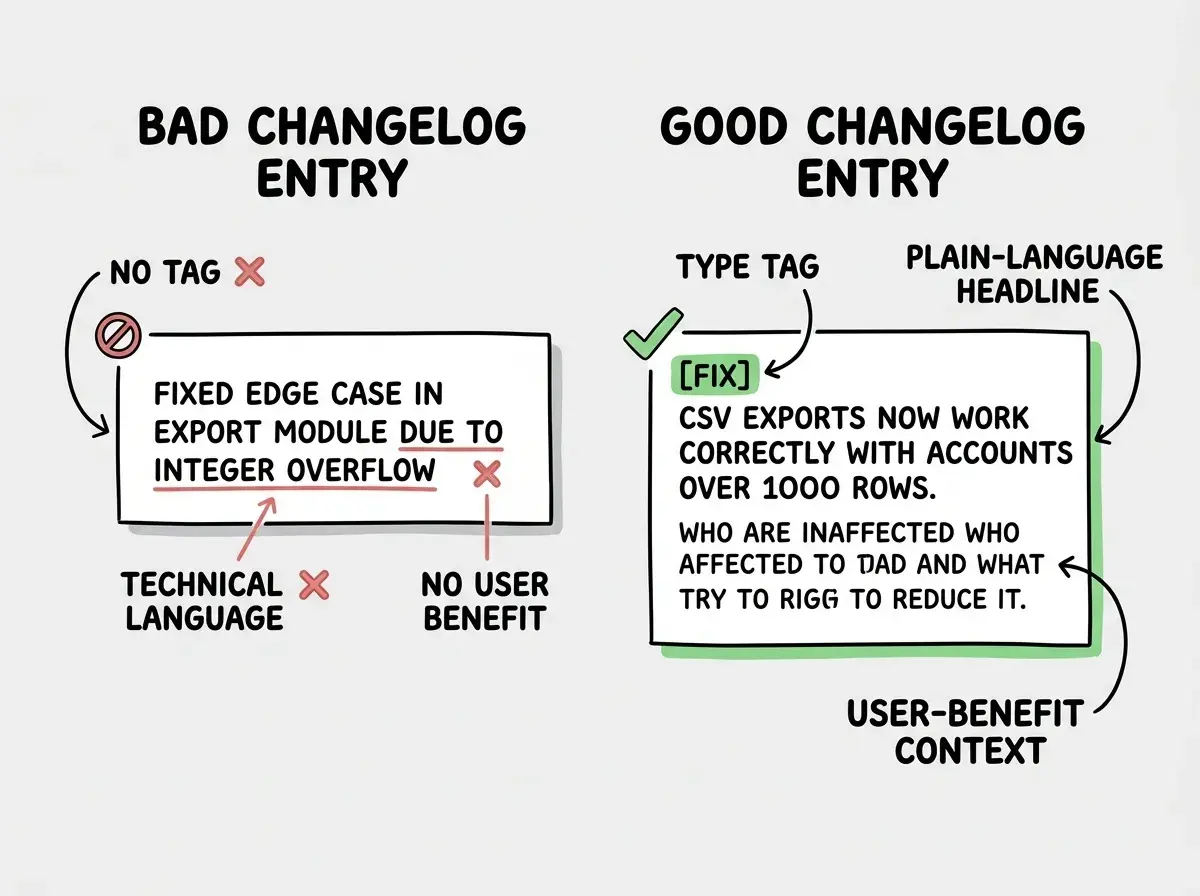
The goal of a changelog entry is not to document what you did. It is to help users understand what got better and why they should care. Rewrite every entry until you can answer both questions in the first sentence.
Changelog Tools Compared
You have real options here, from free Markdown files to dedicated platforms with segmentation and email notifications. Here is an honest comparison.
Plain Markdown (free). A CHANGELOG.md file in your repo, formatted with Keep a Changelog conventions, is a perfectly valid approach for developer tools and open-source projects. It is version-controlled, searchable, and costs nothing. The limitation is that it is not very user-friendly for non-technical users and has no notification system built in.
Changelogfy (from $9/month). Lightweight, opinionated, and fast to set up. You get a hosted changelog page, email notification opt-in for users, and a simple editor. The free tier is limited but the paid plans are reasonable for solo builders. Good choice if you want something hosted and functional in an afternoon.
Canny (from $79/month). Canny is primarily a feedback and feature request tool, with changelog functionality built on top. The changelog tab inside Canny lets you close the loop with users who requested a feature by notifying them when it ships. If you are already using Canny for feedback collection, the changelog integration is genuinely valuable. If you are not, the price is steep for just a changelog.
Beamer (from $49/month). Beamer specializes in in-app notifications. Instead of a separate changelog page, Beamer shows a notification badge inside your app and opens a panel with your updates. This is particularly effective for SaaS products where you want users to see updates while they are actively using the product, not hunting for a changelog page. The analytics (which updates get clicked, which get dismissed) are useful for understanding what your users care about.
LaunchNotes (from $49/month). Built for product teams who want a polished public roadmap alongside their changelog. You can subscribe users to specific product areas so they only get notified about changes relevant to them. More infrastructure than most indie hackers need, but the right tool for product managers at growing startups who want to build a public narrative around their roadmap.
| Tool | Free Option | Paid Starts At | In-App Widget | Email Notifs | Best For |
|---|---|---|---|---|---|
| Markdown | Yes | Free | No | No | Dev tools, open source |
| Changelogfy | Limited | $9/month | No | Yes | Solo builders |
| Canny | Trial | $79/month | No | Yes | Feedback plus changelog |
| Beamer | Trial | $49/month | Yes | Yes | In-app SaaS products |
| LaunchNotes | No | $49/month | No | Yes | Product-led growth teams |
For most indie hackers just getting started, Changelogfy at $9/month or a Markdown file is the right call. Add a more sophisticated tool when you have a user base that will actually benefit from in-app notifications or subscriber segmentation.
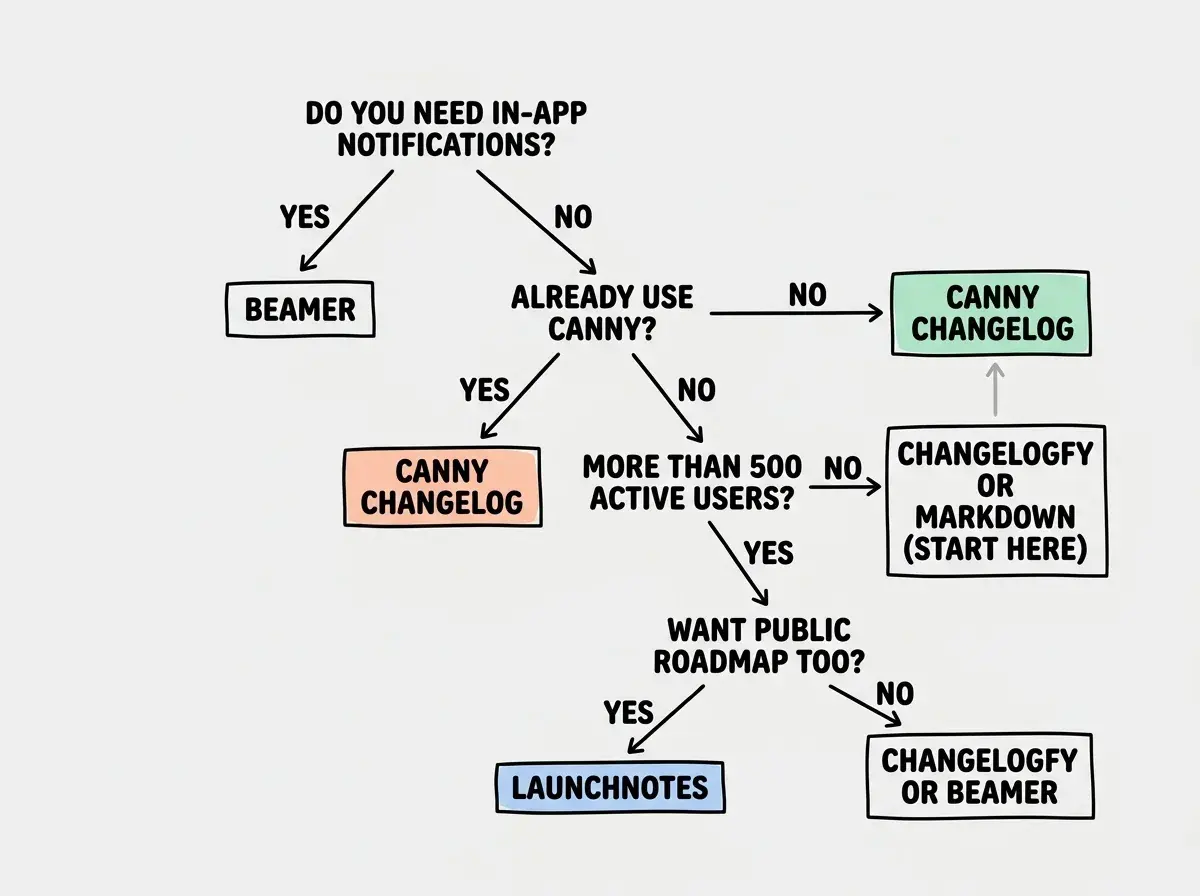
Choosing a changelog tool based on features you do not yet need. A solo builder with 200 users does not need subscriber segmentation or a public roadmap timeline. Pick the simplest tool that lets you write and publish updates consistently. Consistency beats sophistication every time at the early stage.
Automating Changelogs with AI and Git
Manual changelog writing is the main reason changelogs fall behind. Automate as much of the grunt work as possible so that writing good entries stays easy.
Start with conventional commits. Conventional commits are a commit message standard that encodes the type of change into the message itself. The format is type(scope): description. Common types are feat (new feature), fix (bug fix), perf (performance), docs (documentation), and chore (maintenance).
feat(billing): add annual subscription option with 20% discount
fix(export): handle accounts with more than 1,000 rows in CSV export
perf(dashboard): reduce initial load time by lazy-loading chart data
When your commit messages follow this format consistently, you can generate a draft changelog automatically.
Use a tool like conventional-changelog or release-please. These tools read your git history, group commits by type, and generate a formatted changelog draft. You still review and edit it before publishing, but the structure is there and the entries are mostly written.
# Install conventional-changelog CLI
npm install -g conventional-changelog-cli

# Generate CHANGELOG.md from your git history
conventional-changelog -p angular -i CHANGELOG.md -s
Use AI to rewrite technical entries in plain language. Once you have a draft from the commit history, paste it into Claude or another AI tool and ask it to rewrite each entry from the perspective of a user who does not read code. The prompt is simple: "Rewrite these changelog entries in plain language, focusing on user benefit rather than implementation details." Review the output, fix anything that sounds off, and publish.
This three-step process (conventional commits, auto-generate draft, AI polish) reduces changelog writing from two hours to about fifteen minutes per release. For a solo builder, that difference determines whether it gets done at all.
Trigger changelog updates in CI. If you use GitHub Actions, you can automate the generation step as part of your release workflow. When you push a version tag, the workflow runs conventional-changelog, commits the updated CHANGELOG.md, and opens a pull request for your review. You merge the PR when you are happy with the content.
The key principle: make the path of least resistance the path that keeps your changelog up to date. Every manual step is a reason to skip it.
What This Means For You
Changelog management is a compounding practice. The payoff is not in one great entry but in the track record you build over months.
-
If you are an indie hacker shipping solo: Start with a
CHANGELOG.mdin your repo and post updates to your changelog page after every meaningful ship. Use conventional commits from day one so you have the option to automate later. When you hit 500 active users, consider Changelogfy for the email notification feature alone. -
If you are a product manager: Own the changelog as a communication channel, not just a record. Brief your users on what changed and why, not just what was shipped. Coordinate with engineering to get conventional commits adopted so your release notes are not dependent on someone remembering to write them at midnight before a launch.
-
If you are a student or career changer building a portfolio: A public changelog on your projects signals professionalism and seriousness. Hiring managers and clients who look at your work want to see that you ship iteratively and communicate clearly. A well-maintained changelog communicates both.
A good changelog is part of a great product strategy. Explore more growth tutorials for builders.
Browse growth tutorialsThe builders who maintain great changelogs are not spending more time on it than everyone else. They have just built a system that makes consistency cheap. Pick a format, pick a tool, and ship your first entry today.
From product planning to deployment, this blog covers every stage of the vibe coding journey.
Start here