Every vibe coder hits common deployment errors eventually. The build fails, the page goes white, the API returns a cryptic 500. These are the same twenty problems that repeat across every hosting platform. With 92% of US developers now using AI tools daily, these errors are the shared experience of an entire generation of builders.
About 80% of deployment failures trace back to environment variables. If you are in a rush, check those first. Otherwise, search this page for the error message you see. Each entry gives you the message, the cause, and the fix.
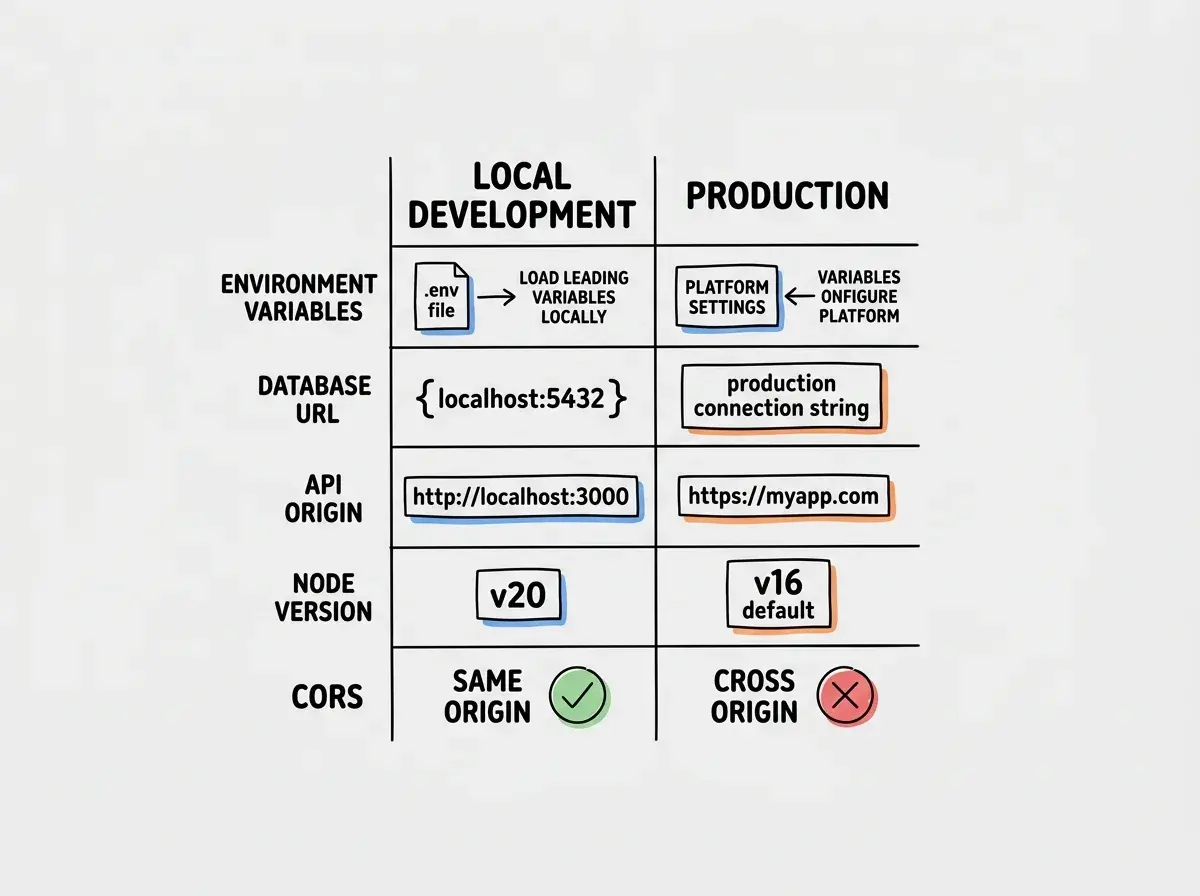
Most deployment errors are not code bugs. They are configuration mismatches between your local environment and production. The fix is almost always an environment variable, a missing dependency, or a setting your AI tool configured for localhost but not for the real world.
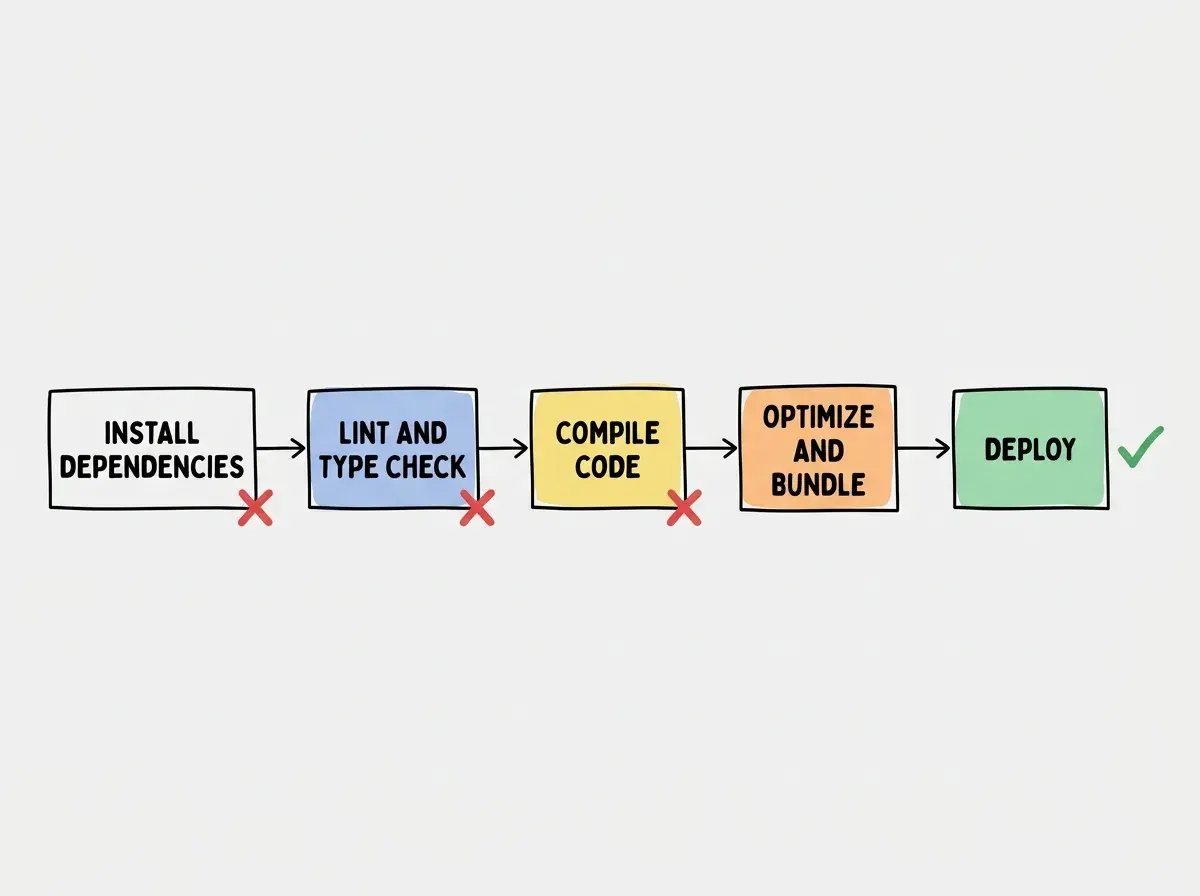
Build Errors
These stop your deployment before it starts.
1. Module not found
Error: Module not found: Can't resolve 'some-package'
Cause: Your code imports a package not listed in package.json. AI tools frequently use packages without adding them as dependencies.
Fix: Run npm install some-package locally, commit the updated package.json and package-lock.json, push and redeploy.
2. TypeScript type errors
Error: Type error: Type 'string | undefined' is not assignable to type 'string'
Cause: Local dev ignores type mismatches, but the production build enforces strict checking. AI-generated code often creates variables that could be undefined without handling it.
Fix: Add a null check or default value. Change value to value ?? '' or add an early return if the value is undefined.
3. Out of memory during build
Error: FATAL ERROR: CALL_AND_RETRY_LAST Allocation failed - JavaScript heap out of memory
Cause: The build exceeds the hosting platform's default memory allocation. Large dependency trees and unoptimized imports from AI-generated code are the usual culprits.
Fix: Add NODE_OPTIONS=--max-old-space-size=4096 as an environment variable. If that fails, audit your imports for barrel files pulling in entire packages.
4. Build command not found
Error: sh: next: command not found
Cause: The framework CLI is missing from your dependencies. It was installed globally on your machine but not in package.json.
Fix: Run npm install next (or your framework), commit the updated package.json, and push.
5. Linting failures
Error: ESLint: Failed to load config "next/core-web-vitals"
Cause: Production builds treat lint warnings as errors. AI-generated code often triggers stricter production rules.
Fix: Fix the lint errors or add NEXT_LINT_IGNORE_DURING_BUILDS=true as an environment variable.
Runtime Errors
Your app deploys successfully, then breaks when users visit it.
6. Internal Server Error
Error: 500: INTERNAL_SERVER_ERROR or a blank white page
Cause: An unhandled exception in server-side code, usually a missing environment variable, failed database connection, or incorrect API credentials.
Fix: Check your platform's function logs. The stack trace points to the exact file and line. Nine times out of ten, an environment variable is missing.
7. Hydration mismatch
Error: Hydration failed because the initial UI does not match what was rendered on the server
Cause: AI-generated code uses Date.now(), Math.random(), or localStorage during the initial render. The server cannot access browser APIs, so it renders different content.
Fix: Wrap browser-dependent code in a useEffect hook or behind a typeof window !== 'undefined' check.
8. Dynamic server usage
Error: Dynamic server usage: Route /api/something couldn't be rendered statically
Cause: Next.js tried to statically generate a route that uses cookies(), headers(), or searchParams without configuration.
Fix: Add export const dynamic = 'force-dynamic' at the top of the route file.
9. Edge function size exceeded
Error: The Edge Function "api/route" is too large
Cause: Edge functions have strict size limits (1-4 MB). AI-generated code imports heavy dependencies that balloon the bundle.
Fix: Switch from edge to Node.js runtime by removing export const runtime = 'edge'. If you need edge, replace heavy packages with lighter alternatives.
10. API route timeout
Error: Task timed out after 10 seconds
Cause: Your serverless function exceeds the platform's timeout (10s on Vercel free tier). AI-generated code often makes sequential API calls instead of parallel ones.
Fix: Use Promise.all() for parallel calls. If the operation genuinely needs more time, upgrade your plan or move work to a background queue.
Learn the fundamentals of how deployment works before diving into error fixes.
Read the deployment guideEnvironment and Config Errors
Your app builds and deploys without errors, then behaves incorrectly.
11. Missing environment variable
Error: No error message. The feature simply does not work or the page crashes on a specific action.
Cause: Your hosting platform is missing a variable your code depends on. Your .env has it locally, but nobody added it to production.
Fix: Open your .env and your platform's settings side by side. Go line by line and verify every variable exists with the correct value.
12. Wrong database connection string
Error: ECONNREFUSED 127.0.0.1:5432
Cause: Your production database URL still points to localhost. AI tools generate connection strings for local development only.
Fix: Replace DATABASE_URL in your hosting platform with your production database's connection string from Supabase, Neon, or your provider's dashboard.
13. NEXT_PUBLIC variables not loading
Error: Client-side code reads undefined for values you set in the dashboard.
Cause: NEXT_PUBLIC_ variables are embedded at build time. Changing them after deployment has no effect until you rebuild.
Fix: After updating any NEXT_PUBLIC_ variable, trigger a new deployment so the build process embeds the new values.
14. Node.js version mismatch
Error: SyntaxError: Unexpected token ??
Cause: Your hosting platform runs an older Node.js than your machine. Optional chaining and ES modules require Node.js 18+.
Fix: Set the version explicitly. On Vercel, add "engines": { "node": "20.x" } to package.json. On Netlify, set NODE_VERSION=20.
15. CORS blocking requests
Error: Access to fetch has been blocked by CORS policy
Cause: Your frontend and backend are on different domains in production (both were localhost in dev). The browser blocks cross-origin requests without CORS headers.
Fix: Add Access-Control-Allow-Origin headers to your API routes, or proxy external requests through your own API.
Network and DNS Errors
These appear after deployment when users try to reach your app or your app tries to reach external services.
16. DNS not resolving
Error: DNS_PROBE_FINISHED_NXDOMAIN
Cause: Your domain's DNS records do not point to your hosting platform. You added the domain in Vercel or Netlify but never updated records at your registrar.
Fix: Add the CNAME or A records your hosting platform specifies in your registrar's DNS settings. Check propagation at whatsmydns.net.
17. SSL certificate not provisioning
Error: ERR_SSL_PROTOCOL_ERROR or NET::ERR_CERT_COMMON_NAME_INVALID
Cause: Your platform could not issue an SSL certificate, usually because DNS is not configured correctly or a CAA record blocks the certificate authority.
Fix: Verify DNS records are propagated. Remove restrictive CAA records. If using Cloudflare proxy, pause it during provisioning or set SSL to "Full (Strict)."
18. Mixed content warnings
Error: Mixed Content: The page was loaded over HTTPS, but requested an insecure resource
Cause: Your code makes requests to http:// URLs. AI-generated code frequently hardcodes insecure URLs for API endpoints and images.
Fix: Search your codebase for http:// and replace with https://. Proxy requests to services that do not support HTTPS.
19. Serverless cold start timeout
Error: First request after inactivity takes 5-15 seconds or times out. Subsequent requests are fast.
Cause: Serverless functions spin down after inactivity. The first request must boot the runtime, import dependencies, and connect to databases.
Fix: Use dynamic imports for heavy dependencies. On Vercel, explore "Fluid" compute. On Railway or Render, use an always-on service for latency-sensitive endpoints.
20. Webhook delivery failures
Error: Your payment provider shows failed webhook deliveries with 404 or 500 codes.
Cause: The webhook URL still points to localhost, the route does not accept POST requests, or the signing secret is missing from production environment variables.
Fix: Update the webhook URL in your provider's dashboard. Add the signing secret (STRIPE_WEBHOOK_SECRET or equivalent) to production environment variables.
Copying your development webhook secret to production. Stripe and LemonSqueezy generate different secrets for test mode and live mode. If you use the test secret in production, every signature verification fails silently and your app never processes payments. Always grab the live mode secret from your provider's production dashboard.
That covers all twenty. If you hit an error not on this list, the debugging approach is the same: read the message, check environment variables, verify the difference between your local setup and production.
Get the complete deployment checklist to catch these errors before your users do.
Grab the checklistWhat This Means For You
You now have a searchable reference for the twenty errors behind the vast majority of deployment failures. The pattern is consistent: your local environment hides problems that production exposes. AI tools generate code optimized for localhost, not for the real world.
With 45% of AI-generated code containing security vulnerabilities and 80% of failures tracing to environment variables, the fix is not better AI. It is a systematic review between "works on my machine" and "works for everyone." Check your environment variables first. Read error messages carefully. They almost always tell you exactly what is wrong.