You can deploy a prototype for stakeholders yourself, without filing a ticket and without any technical background. The same AI tools you used to build the demo can get it onto a shareable URL in 15 minutes. 92% of US developers now use AI tools daily, and PMs are increasingly among them.
The ACM published "The Vibe Coding Imperative for Product Managers" because this shift is real. Jackie Bavaro, whose books defined modern product management, started an entire series on vibe coding for PMs. The message from every direction is the same: PMs who can show a live prototype get faster alignment, clearer feedback, and stronger buy-in than PMs who schedule another slide deck walkthrough.
Why a Live URL Changes Everything
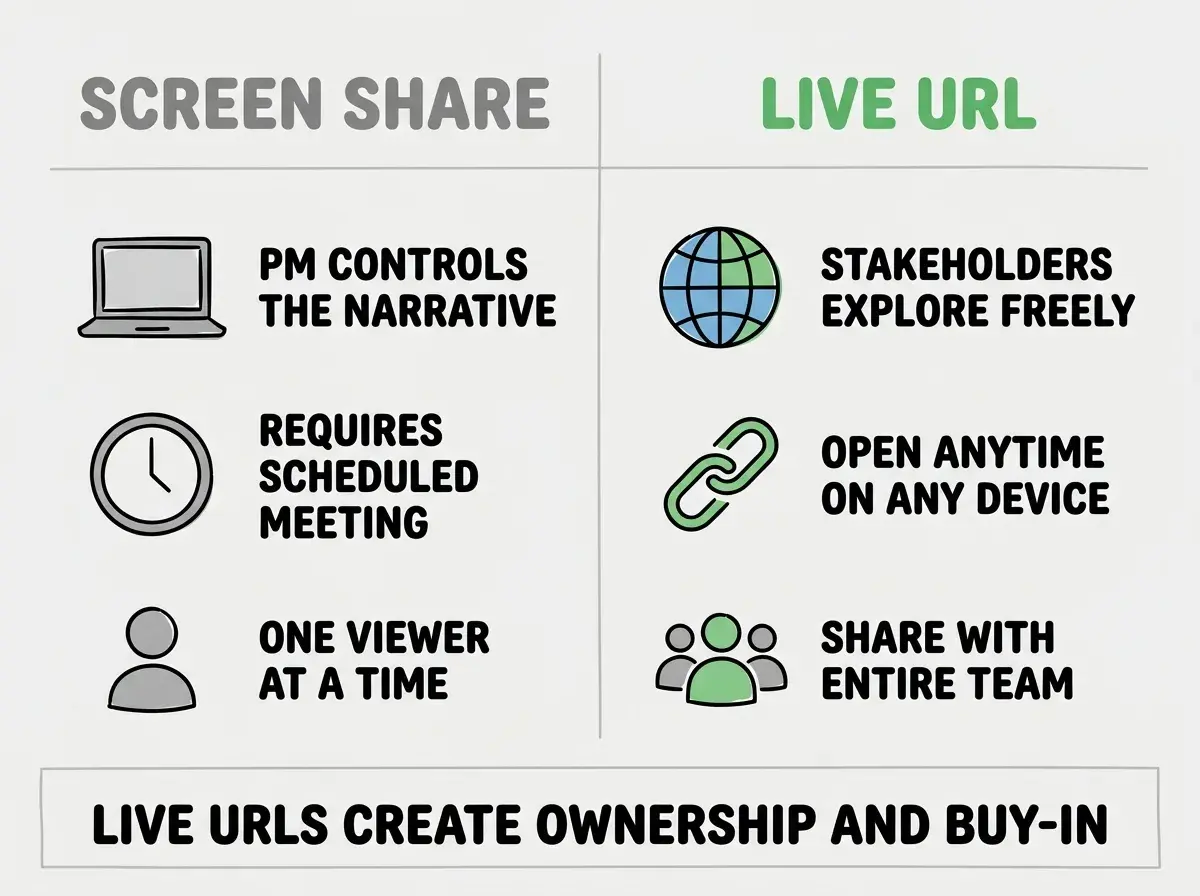
There is a meaningful difference between screen-sharing a prototype running on your laptop and sending someone a link they can open on their own time, on their own device, at their own pace. The first is a presentation. The second is an experience.
When a VP of Product receives a link to a live prototype at 7 AM with their coffee, they click around without anyone narrating. They form their own impressions. They notice the things that matter to them, not just the things you chose to highlight. By the time you sit down for the review meeting, they have already formed opinions and questions. The meeting starts at "here is what I think about this" instead of "let me explain what this is."
That is the difference deployment makes. Your prototype stops being something you present and starts being something stakeholders discover. Discovery creates ownership. Ownership creates buy-in. And buy-in is the entire goal.
Getting Your Prototype Live in 15 Minutes
This is simpler than it sounds because the tools are designed for people who have never deployed anything. Here is the exact sequence, no shortcuts, no assumptions about prior knowledge.
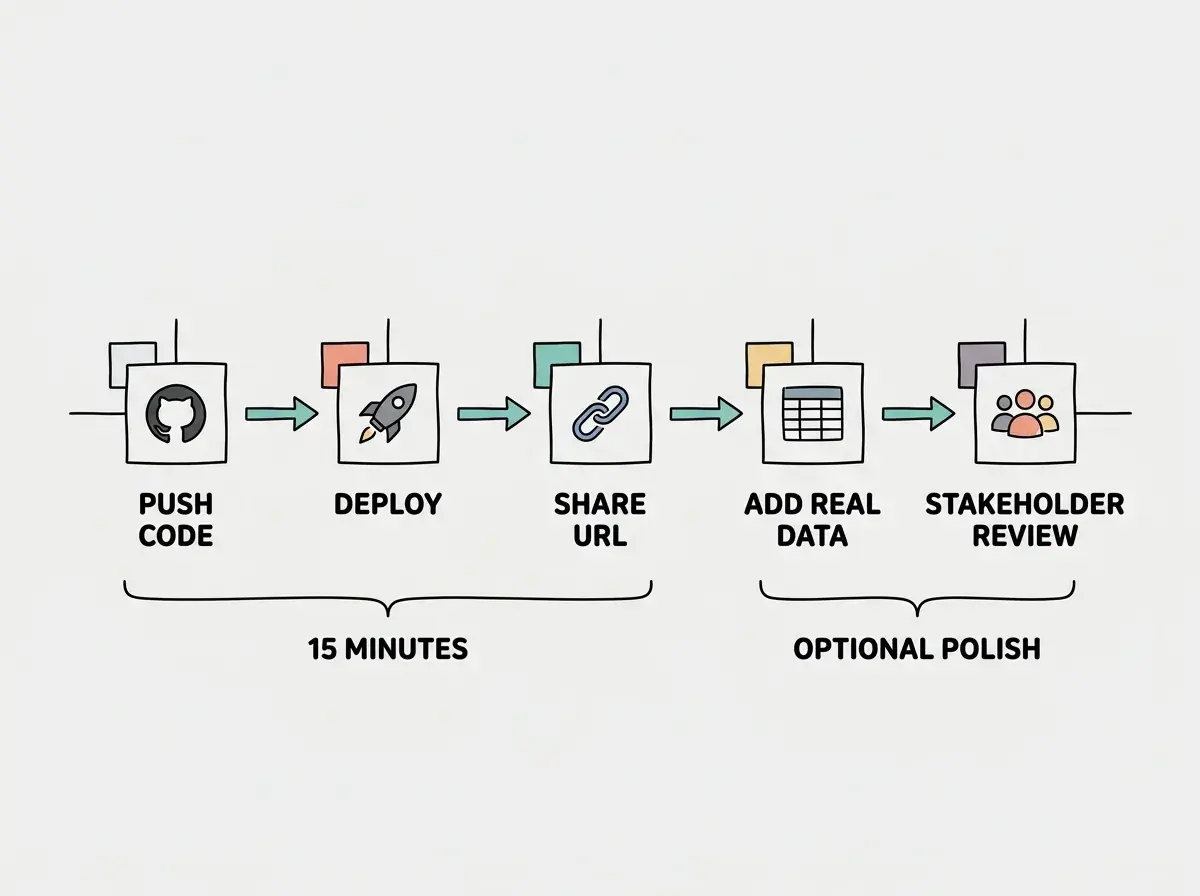
Step 1: Make sure your prototype runs locally. Before deploying, confirm that your project works when you click the preview button in your AI tool. If you are using Cursor, that means running npm run dev and seeing your app in the browser. If you are using Lovable, Replit, or Bolt, it is already running in the preview pane. If the preview works, you are ready.
Step 2: Push your code to GitHub. If your AI tool has a "push to GitHub" or "sync to GitHub" button, use it. Lovable and Replit both offer this. If you are using Cursor, open the terminal and run git add ., then git commit -m "ready to deploy", then git push. If you have never connected to GitHub, your tool will walk you through the authentication. This step takes two to three minutes.
Step 3: Connect to Vercel. Go to vercel.com and sign up using your GitHub account. This is important: use GitHub login, not email. It connects the two services automatically and saves you a configuration step later. Once signed in, click "Add New Project" and select your repository from the list.
Step 4: Check the settings and deploy. Vercel auto-detects your project type and fills in the build settings. For most AI-generated projects, the defaults are correct. If your project uses environment variables (check for a .env file in your project), add each one into Vercel's "Environment Variables" section before deploying. Then click "Deploy."
Step 5: Share your URL. Within two to five minutes, Vercel gives you a live URL ending in .vercel.app. Copy it. Paste it into Slack. Drop it in your stakeholder's DMs. Add it to your meeting invite. Your prototype is now live on the internet, accessible from any device, anywhere.
That is the entire process. Five steps, no command-line wizardry, no infrastructure decisions. The whole thing fits inside a coffee break.
The single biggest deployment blocker for PMs is environment variables. If your prototype connects to any external service (a database, an AI API, anything with a key or token), you must copy those variables from your local .env file into Vercel's dashboard before deploying. Miss one, and your prototype will either fail to build or show a blank screen. Copy all of them. It takes two minutes and prevents the most common deployment failure.
What If Something Goes Wrong
Your first deployment might not work on the first try. That is normal, not a sign that you are in over your head. Here are the three problems PMs hit most often, and exactly how to fix each one.
The build fails with an error message. Read the last few lines of the error log in Vercel's dashboard. Copy the error message and paste it into your AI tool with "this error appeared when I tried to deploy." The AI will tell you what to change. Make the fix, save, push to GitHub again. Vercel automatically redeploys.
The page loads but shows nothing. This is almost always a missing environment variable. Go back to Vercel's settings, compare every variable in your local .env file with what you entered in Vercel. Look for typos, missing values, or variables you skipped. Add anything missing, then click "Redeploy."
The prototype works but looks broken on mobile. Stakeholders will open your link on their phones. If the layout breaks on smaller screens, tell your AI tool "make this responsive for mobile devices." The AI will adjust the CSS. Push the changes, and Vercel redeploys automatically.
The pattern is always the same: see the problem, ask your AI tool for help, push the fix, Vercel redeploys. Each cycle takes five minutes. After two or three cycles, your prototype is solid.
Making Your Demo Shine for Stakeholders
A live URL is table stakes. What separates a good stakeholder demo from a great one is a few small touches that take minutes to add but signal professionalism and preparation.
Use realistic data. Replace "Lorem ipsum" and "Test User" with plausible names, numbers, and content. Ask your AI tool to "populate this dashboard with realistic sample data for a mid-size SaaS company." Stakeholders react to realistic data as if it were real, which is exactly what you want.
Add a custom domain (optional but powerful). Vercel lets you connect a custom domain for free. Instead of sending my-prototype-abc123.vercel.app, you could send prototype.yourcompany.com. This is a small touch, but it signals seriousness. A custom domain tells stakeholders this is not a toy. It is a vision.
Prepare your walkthrough. Even though stakeholders can explore independently, start your meeting with a 90-second guided tour. Click through the three most important screens. Explain the user journey. Then stop talking and let them explore. The combination of guided introduction plus independent exploration consistently produces the best feedback.
Waiting for the prototype to be "finished" before sharing it. Stakeholders do not expect a polished product. They expect to see the direction. Sharing early, even when the prototype is rough, gets you feedback when it is cheap to act on. Every week you wait to share is a week of building in the wrong direction.
Beyond the First Demo
Once your prototype is live and stakeholders have reacted, you are in a fundamentally different position than PMs who are still iterating on slide decks. You have concrete feedback on a real interface. You have a shared reference point that eliminates the "I thought you meant something different" conversation. And you have proof that you can move fast.
This momentum compounds. The next time you have an idea, you can go from concept to live demo in a single afternoon. Engineering gets clearer requirements because they can see what you intended. Design gets better briefs because they can interact with the flow you have in mind. Leadership gets more confidence in your proposals because they have seen you deliver.
The prototype is not the product. Nobody expects it to be. But the act of deploying it, of making it real enough to share, transforms it from an idea into evidence. Evidence is what moves organizations.
Learn the fundamentals of building with AI tools before your next prototype.
Start hereDig deeper
A few hand-picked sources if you want to go further.
What This Means For You
Deploying a prototype is not a technical skill. It is a communication skill with a technical delivery mechanism. The PMs, founders, and builders who learn to deploy their prototypes gain something that no slide deck or PRD can provide: a live, shareable artifact that stakeholders can experience firsthand.
- If you are a product manager, deploy your next prototype before the review meeting. Send the link 24 hours early with a one-sentence description. Watch how the meeting changes when everyone has already clicked through it. The shift from "let me explain what I built" to "what did you think" is the single biggest upgrade to your stakeholder communication.
- If you are a founder, a live prototype on a shareable URL is the most convincing pitch asset you can create. Investors, advisors, and early customers respond to something they can touch far more than slides describing what you plan to build. Deploy early, share widely, and let the product speak for itself.
- If you are a student, learning to deploy is the skill that separates portfolio pieces from proof of capability. Anyone can screenshot a project running locally. A live URL that a recruiter can click shows that you can ship, and shipping is what hiring managers look for above almost everything else.
Follow the complete deployment walkthrough and get your first app live today.
Deploy now