Monorepo deployment is the moment where your neatly organized single repository meets the messy reality of production infrastructure. 92% of developers now use AI tools daily, and those tools love generating monorepo structures with a frontend and backend side by side. The code works locally. Then you try to deploy and realize no hosting platform wants your entire repo.
You already know how to deploy a standalone Next.js app or a simple Express API. The challenge is deploying them together without the two deployments stepping on each other or breaking in ways that only show up in production.
Why AI Tools Generate Monorepos
Most AI coding tools produce monorepos by default when asked to build a full-stack application. Cursor, Claude Code, and Bolt will all put your React frontend and Node.js backend into a single repository:
my-project/
  apps/
    web/        # Next.js frontend
    api/        # Express/Fastify backend
  packages/
    shared/     # Shared types, utilities
  package.json  # Root workspace config
  turbo.json    # Turborepo config (maybe)
Or the simpler version, without a build tool:
my-project/
  frontend/     # React/Next.js
  backend/      # Node.js API
  package.json
This makes sense for development. Shared types, one command to run both services, and your AI tool can see the entire codebase. The problem appears when you need to ship.
The Core Problem With Monorepo Deployment
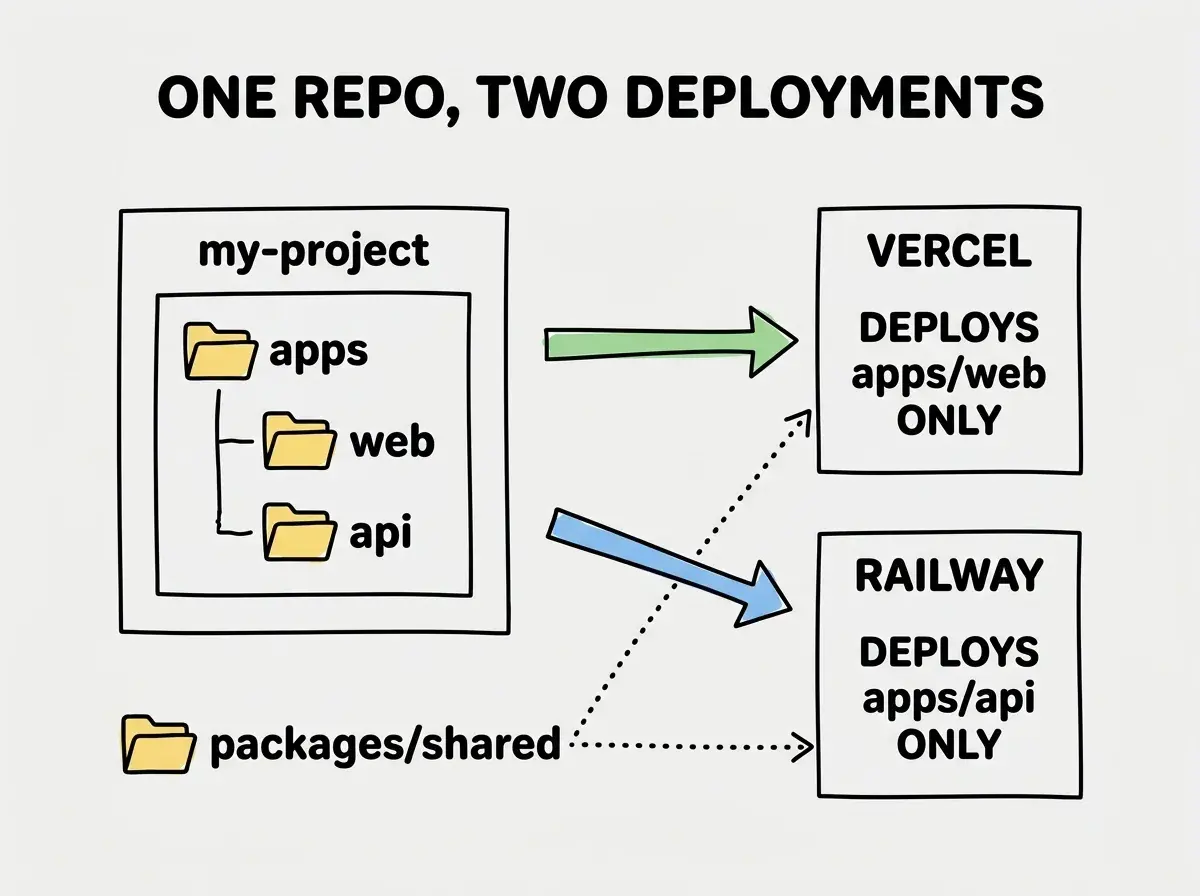
Hosting platforms deploy one thing. Vercel deploys a frontend. Railway deploys a backend. Neither looks at your repo and thinks, "I see two apps here, let me deploy both." They see one repo and try to build the whole thing, which either fails or builds the wrong part.
The fix: point each platform at the specific folder it should care about and tell it to ignore everything else. This is the "root directory" setting, and it is the single most important configuration for monorepo deployment.
Setting Up Your Workspace
Before deploying anything, your monorepo needs proper workspace configuration. If your AI tool set this up, verify it. If not, add it now.
For npm workspaces (the simplest option), your root package.json needs a workspaces field:
{
  "name": "my-project",
  "private": true,
  "workspaces": ["apps/*", "packages/*"]
}
For pnpm (which handles monorepos better at scale), you need a pnpm-workspace.yaml file:
packages:
  - "apps/*"
  - "packages/*"
Each app inside apps/ should have its own package.json with its own dependencies and scripts. The root package.json coordinates them but does not contain app-specific dependencies. This separation is what lets each hosting platform install only what it needs.
Deploying the Frontend to Vercel
Vercel handles monorepos well, but you need to configure it explicitly. When you import your repository, Vercel asks for a "Root Directory." This is where most people go wrong. They leave it blank (which means Vercel treats the entire repo as one project) or they type the wrong path.
Set the root directory to apps/web (or frontend, whatever your folder is called). Vercel will then run npm install and next build from inside that folder. It only sees the frontend code.
There is a catch with shared packages. If your frontend imports from @my-project/shared (a local workspace package), Vercel needs to install from the root of the monorepo to resolve that dependency, then build from the app directory. The setting that controls this is "Include files outside the Root Directory in the Build Step." Enable it. Without this toggle, Vercel cannot find your shared packages and the build fails with a confusing "module not found" error.
Your Vercel build settings should look like this:
- Framework Preset: Next.js
- Root Directory:
apps/web - Build Command:
cd ../.. && npx turbo run build --filter=web(if using Turborepo) or justnext build(if not) - Install Command:
npm install(runs from root automatically when "include files outside root" is enabled)
The "Root Directory" setting on your hosting platform is the single most important configuration for monorepo deployment. Every platform has some version of this setting. Get it right and everything flows. Get it wrong and you will spend hours debugging build errors that have nothing to do with your actual code.
Deploying the Backend to Railway
Your backend needs its own hosting platform. Railway is one of the best options for Node.js backends from a monorepo because it handles the root directory configuration cleanly and gives you persistent processes (not serverless functions).
Create a new project on Railway and connect the same GitHub repository. In your service settings, set the root directory to apps/api (or backend). Railway will detect your package.json in that folder and install dependencies accordingly.
You need to configure a few things:
- Start Command: Whatever your backend uses, like
node dist/index.jsornpm start - Build Command:
npm run build(from within the api folder) - Watch Paths: Set this to
apps/api/**andpackages/shared/**so Railway only redeploys when backend-relevant files change
That last point matters. Without watch paths, Railway redeploys your backend every time any file in the monorepo changes, including frontend CSS changes that have nothing to do with your API. Unnecessary redeploys waste build minutes and cause brief downtime.
For environment variables, each platform gets its own set. Your frontend on Vercel gets NEXT_PUBLIC_API_URL pointing to your Railway backend URL. Your backend on Railway gets database credentials, API keys, and other secrets. The two environments are completely separate, even though the code lives in one repo.
Using Turborepo to Coordinate Builds
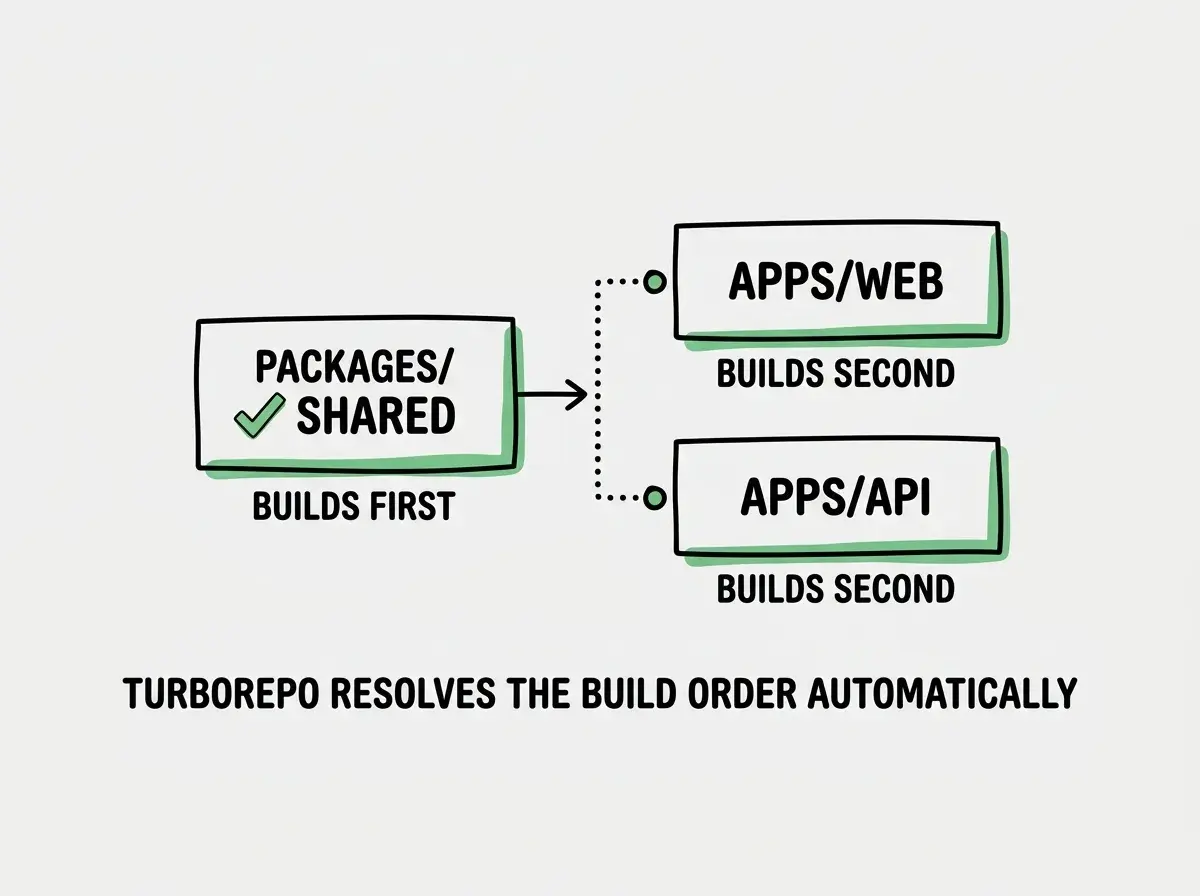
If your AI tool generated a Turborepo configuration (look for a turbo.json file), you have a powerful build coordination tool available. Turborepo understands the dependency graph between your apps and packages. When you run turbo run build, it builds things in the right order, starting with shared packages, then building the apps that depend on them.
A basic turbo.json looks like this:
{
  "$schema": "https://turbo.build/schema.json",
  "tasks": {
    "build": {
      "dependsOn": ["^build"],
      "outputs": [".next/**", "dist/**"]
    },
    "dev": {
      "cache": false,
      "persistent": true
    }
  }
}
The "dependsOn": ["^build"] line is the important part. The ^ means "build my dependencies first." So if apps/web depends on packages/shared, Turborepo builds shared before web. Without this, you get race conditions where the frontend tries to import types that have not been compiled yet.
On Vercel, you can use Turborepo directly in your build command: npx turbo run build --filter=web. The --filter=web flag tells Turborepo to build only the web app and its dependencies, skipping the backend entirely.
Connecting Frontend and Backend in Production
Locally, your frontend talks to http://localhost:3001 for API calls. In production, that URL does not exist. You need to replace it with the real backend URL, and the cleanest way to do this is through environment variables.
In your frontend code, API calls should reference something like process.env.NEXT_PUBLIC_API_URL instead of a hardcoded localhost address. Then in Vercel, set that variable to your Railway backend URL (something like https://my-api.up.railway.app).
On the backend side, configure CORS to accept requests from your frontend domain. Do not set CORS to * in production. It works, but it means any website can call your API.
app.use(cors({
  origin: process.env.ALLOWED_ORIGINS?.split(',') || [],
  credentials: true
}));
Store allowed origins as an environment variable so you can update them without changing code.
Hardcoding http://localhost:3001 as the API URL in your frontend code instead of using an environment variable. This works in development and silently breaks in production. Your app loads, looks fine, and then every API call fails. Check your frontend code for any hardcoded localhost URLs before deploying. One find-and-replace can save hours of confused debugging.
Handling Shared Packages
Shared packages are the reason many developers choose monorepos. Having a packages/shared folder with TypeScript types, validation schemas, or utility functions that both apps import is powerful. But it adds a deployment complication.
Each platform needs to be able to resolve imports from your shared packages. The standard approach is to make your shared package a proper workspace package with its own package.json:
{
  "name": "@my-project/shared",
  "main": "dist/index.js",
  "types": "dist/index.d.ts",
  "scripts": {
    "build": "tsc"
  }
}
Both apps import from @my-project/shared. The workspace configuration resolves this to the local folder. As long as the shared package is built before the apps (which Turborepo handles automatically), everything works.
If you are not using Turborepo, add a prebuild script to each app that builds the shared package first:
{
  "scripts": {
    "prebuild": "cd ../../packages/shared && npm run build",
    "build": "next build"
  }
}
The Deployment Checklist
Before pushing your monorepo to production, walk through this list:
- Each app has its own
package.jsonwith its ownbuildandstartscripts - The root
package.jsonhas theworkspacesfield configured correctly - Each hosting platform has its root directory set to the correct app folder
- Environment variables are set separately on each platform (frontend variables on Vercel, backend variables on Railway)
- No hardcoded
localhostURLs exist in frontend code - CORS on your backend allows your frontend domain
- Shared packages build before the apps that depend on them
- Watch paths are configured so each platform only redeploys when its own code changes
Miss any one of these and your deployment either fails to build, builds the wrong thing, or breaks at runtime. The checklist takes five minutes and prevents two-hour debugging sessions.
Start with the basics before tackling monorepo configurations.
Learn deployment fundamentalsWhat This Means For You
Monorepo deployment is not harder than deploying two separate repos. It is different. Instead of two independent deployments, you have two deployments that share a source of truth. The upside is real: shared types, coordinated changes, and one place to look when something breaks.
- If you are a senior dev adopting AI tools: Your AI tool probably generated a reasonable monorepo structure. The code organization is fine. What it likely did not do is configure deployment correctly. Review the root directory settings and build commands on each platform before your first push. The code is good; the infrastructure config needs a human eye.
- If you are an indie hacker shipping fast: Do not let monorepo complexity slow you down. If you have a Next.js frontend and a small API, consider whether you even need a separate backend. Next.js API routes might be enough, and they deploy to Vercel with zero extra configuration. Only split into a true monorepo when your backend needs persistent processes, WebSockets, or heavy computation that serverless functions cannot handle.
AI tools will keep generating monorepos because monorepos make sense for development. Your job is knowing how to split that clean local setup across the platforms that will serve it to the world.
See how frontend and backend fit together in the bigger picture.
Read the guide