If you need to deploy a website as a beginner, you are in the right place. You built a marketing tool with AI, it works on your computer, and now your team needs to use it. Getting it from your laptop to the internet takes about 15 minutes.
92% of US developers now use AI tools daily, and 63% of vibe coding users are non-developers. Over 1,300 marketers who could not write HTML are now building real tools. vibecodingformarketers.com calls it "the No. 1 skill for marketers in 2026." If you have already built something, deployment is the easy part.
What Vercel Actually Is
Think of Vercel as the landlord for your website. Right now, your marketing tool lives on your laptop. That is like running a pop-up shop out of your living room. It works, but only you can see it. Vercel gives your tool a permanent address on the internet so anyone with the link can visit it.
Here is what makes Vercel different from other hosting options: it was designed specifically for the type of projects that AI tools build. When Cursor, Lovable, Bolt, or Replit generates a project for you, they almost always create a Next.js app. Vercel was built by the same team that created Next.js. So your AI-generated marketing tool and Vercel already speak the same language.
You do not need a credit card to get started. Vercel's free tier includes unlimited deployments, automatic security certificates, and enough bandwidth for any marketing project that is not going viral. For a campaign landing page or an internal team dashboard, free is all you need.
Creating Your Vercel Account With GitHub
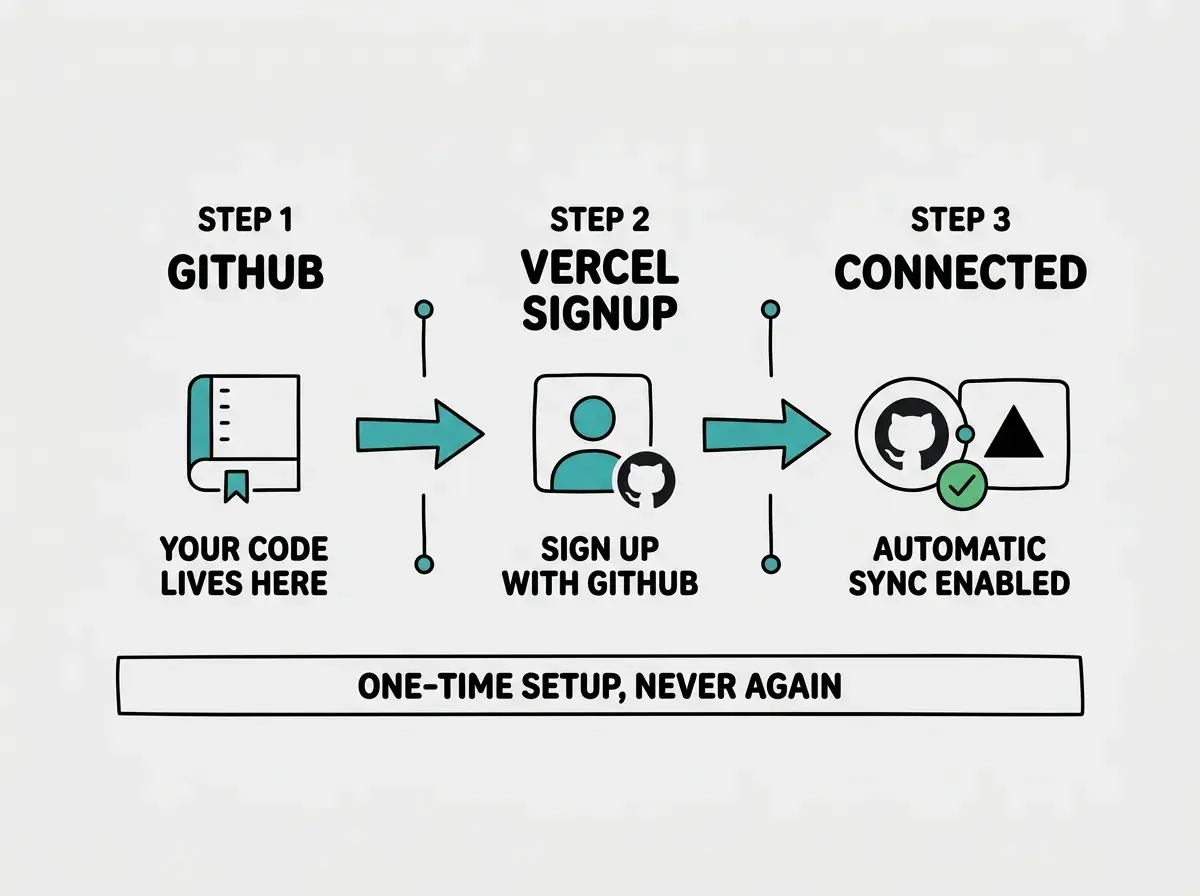
Before Vercel can host your tool, your code needs to live on GitHub. Think of GitHub as a cloud backup for your project. It is also the bridge that connects your code to Vercel, so when you make changes, your live site updates automatically.
Get your code on GitHub first. If you used Lovable or Replit, there is a "push to GitHub" button built in. Click it. If you used Cursor or another local tool, create a repository on github.com and push your code there.
Sign up for Vercel using your GitHub account. Go to vercel.com and click "Sign Up." Choose "Continue with GitHub." This connects the two services automatically. Do not sign up with email, because you would need to manually authorize GitHub later, and that is one more place where things can go sideways.
Once logged in, you will see a clean dashboard with a button that says "Add New Project." That is where you are headed next.
Importing Your Project
Click "Add New Project" in the Vercel dashboard. You will see a list of your GitHub repositories. Find the one that contains your marketing tool and click "Import."
If your repository does not appear in the list, click "Adjust GitHub App Permissions." This is the single most common hangup at this stage. Vercel needs explicit permission to access your repositories, and GitHub does not grant it automatically. Toggle on the repository you want, save, and it will appear in the list.
Once you click Import, Vercel scans your project and auto-detects the framework. For most AI-generated projects, it will show "Next.js" and pre-fill the build command. You should not need to change anything. If Vercel shows "Other," double-check that your project root has a next.config.ts or next.config.js file. If it does not, your AI tool may have put the project inside a subfolder. Set the "Root Directory" field to that subfolder's name.
Adding Environment Variables
This is where 80% of first deployments fail. Environment variables are the secret settings your app needs to run, things like API keys, database URLs, and service passwords. They live in a file called .env or .env.local on your computer. They do not get uploaded to GitHub for security reasons, which means Vercel does not have them yet.
Think of it this way. You built a content calendar that connects to Google Sheets. The connection works on your laptop because the Google API key is saved in your local .env file. When Vercel tries to build your project, it looks for that key and finds nothing. The build fails with a confusing error that says nothing about a missing variable.
The fix is simple. Open your .env file. For every line, add the variable name and value into Vercel's "Environment Variables" section (right below the framework settings during import). Copy them one by one. Every external service your tool talks to has a key, and every key needs to be copied over.
Copy every single environment variable from your .env file into Vercel before clicking deploy. Not most of them. All of them. Missing environment variables cause roughly 80% of first-deployment failures for marketers, and the errors they produce rarely mention the missing variable by name. This two-minute step saves hours of confusion.
Custom Domains for Marketing Campaigns
Once your tool is deployed, Vercel gives you a URL like your-project.vercel.app. That works perfectly for sharing with your team or testing things out. But for client-facing campaigns, you probably want a proper domain.
Buy a domain from a registrar like Namecheap or Cloudflare (typically $10 to $15 per year). In your Vercel project settings, go to "Domains," type in your custom domain, and click "Add." Vercel shows you DNS records to add at your registrar. Copy those values, wait five minutes to a couple of hours for DNS to propagate, and your site goes live on your custom domain with automatic HTTPS.
This is especially powerful for campaigns. Set up a unique subdomain for each one (spring-sale-2026.yourcompany.com), point it at a Vercel-deployed landing page, and have it live before your next standup. When the campaign ends, remove the domain. The page stays deployed in case you need it again.
One thing to watch for: if your tool has a NEXT_PUBLIC_URL or similar variable referencing the old .vercel.app URL, update it to your custom domain in Vercel's environment variables and redeploy.
Sharing With Your Team
Your marketing tool is live. Now you need your team to actually use it. Here is how to handle the most common sharing scenarios.
For internal tools like content calendars and dashboards: Send the Vercel URL directly. Bookmark it. Add it to your team's Notion workspace or Slack channel topic.
For campaign landing pages: Share the URL with stakeholders for review. Once approved, connect the custom domain. The page is ready for ad traffic, email campaigns, or social links.
For client deliverables: Use the custom domain. A .vercel.app URL looks like a work-in-progress. A proper domain looks professional.
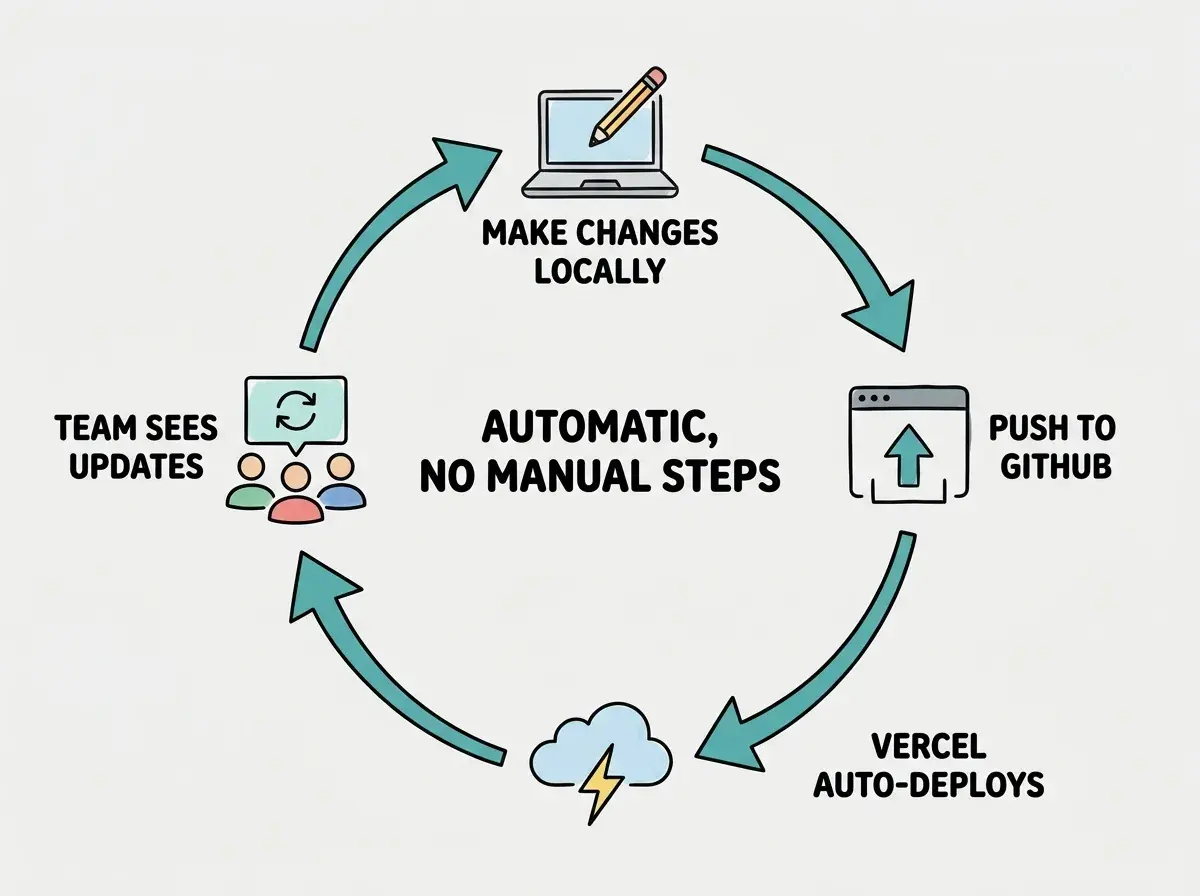
Every change you push to GitHub automatically redeploys on Vercel. Your team lead wants the headline changed? Update it locally, push to GitHub, and the live site refreshes in about a minute. No manual uploads, no "can someone update the server" Slack messages.
Waiting until your marketing tool is "perfect" before deploying it. Many marketers treat deployment as the final step, something you do when everything is polished. In reality, deployment should be one of the first things you do. Half the bugs in any project only surface on a live server, not on your laptop. Deploy early, share the link with one teammate for feedback, and iterate from there. The deploy-then-improve loop is far more productive than the perfect-then-deploy approach that kills most marketing projects.
What Happens if Something Goes Wrong
Your first deployment might fail. That is completely normal and nothing to panic about. Here are the three most common issues and their fixes.
Build fails with "Module not found." Your AI tool used a library but forgot to save it as a dependency. Run npm install [package-name] on your computer, push the updated files to GitHub, and Vercel automatically retries.
Build succeeds but the page is blank. Almost always a missing environment variable. Compare Vercel's environment variables against your .env file, add anything missing, and click "Redeploy."
The tool works but looks broken on mobile. Open the URL on your phone. If layouts overlap, go back to your AI tool and ask it to "make this responsive for mobile screens." Push the fix and Vercel updates automatically.
Every problem follows the same pattern: identify it, fix it on your computer, push to GitHub. Vercel handles the rest. And if an update breaks something, Vercel keeps every past deployment. Go to the "Deployments" tab, find the last working version, and select "Promote to Production." Your site reverts in seconds.
Learn how marketers are building real tools with AI, no coding required.
Start building todayBeyond Your First Deploy
Once you have deployed one marketing tool, the second one takes half the time. The third takes five minutes. You are not just deploying a landing page. You are building a capability your marketing team did not have before.
Think about what becomes possible. A/B test landing pages by deploying two versions to different subdomains. Build a campaign dashboard your entire team can access from anywhere. Create internal tools that automate repetitive workflows. Every one of these follows the same process: build with AI, push to GitHub, import to Vercel.
What This Means For You
You do not need to become technical to get your marketing tools live. The gap between "it works on my laptop" and "my whole team can use it" is about 15 minutes of setup.
- If you just built your first landing page with AI: Deploy it today. Do not wait for it to be perfect. Get it live, send the link to one person for feedback, and iterate from there. The deploy-then-improve approach is how every successful marketing tool gets built.
- If you need internal tools for your team: Content calendars, lead trackers, campaign dashboards. Build them with AI, deploy them to Vercel, and share the URL. Your team gets a real tool instead of another shared spreadsheet.
- If you are building for clients: Custom domains make AI-built marketing tools look completely professional. Your clients see a polished product at a branded URL. They do not need to know how it was built.
The 1,300 marketers who are already doing this started exactly where you are. They had something that worked locally and needed it to work for everyone. Now you know how to make that happen.
Explore guides on building marketing tools with AI from scratch.
Browse the guides