Your Stripe webhook is not firing. Your Twilio message never arrives. Your weather API returns data that looks right but renders blank. No error in the console, no red banner, no crash. Just silence.
Third-party API integrations are one of the most common sources of silent failures in AI-built apps. Ninety-two percent of US developers now use AI coding tools daily, and those tools generate API integration code fast. The problem is that AI models generate code that works against example responses in documentation. Real APIs return edge cases, rate limit headers, unexpected null fields, and status codes the example never showed. When real data hits AI-generated code, things quietly break.
This is the guide for that exact moment. When it worked in the docs, maybe worked in your test, but does not work now.
What Is API Debugging
API debugging is the process of tracing every step of a request-response cycle to find where the expected behavior diverges from actual behavior. For third-party integrations, that means tracking what you sent, what came back, and what your code did with the response.
The tricky part with third-party APIs is that you do not control the server. You cannot add logs there. You cannot step through their code. You are working entirely from what they document and what they return. Which means your debugging tools need to tell you exactly what crossed the wire, not just what your code assumed crossed the wire.
The gap between assumption and reality is where silent failures live.
How to Integrate a Third Party API
When AI builds your integration, it follows a pattern: read the docs, generate a function that fetches the endpoint, map the response to your data model, handle a 200 and maybe a 400. That pattern works for the happy path.
What it misses is the full surface area of a real integration. Multiple services have slightly different auth schemes. API versioning means a field that existed in v1 might be renamed or removed in v2. Cross-system state creates timing issues where your call succeeds but a dependency has not finished processing yet.
Before you start debugging, understand what your integration actually does. Open the file your AI generated and map it out:
- Which endpoint does it hit, and with which HTTP method
- What headers does it attach (especially auth headers)
- What fields does it send in the body
- What fields does it read from the response
- What happens if the response is missing a field it expects
That last question is almost always the answer to your silent failure. AI-generated integration code tends to destructure or access response properties directly without checking if they exist. When the third-party API returns a slightly different shape than the example, the code gets undefined and keeps going without warning.
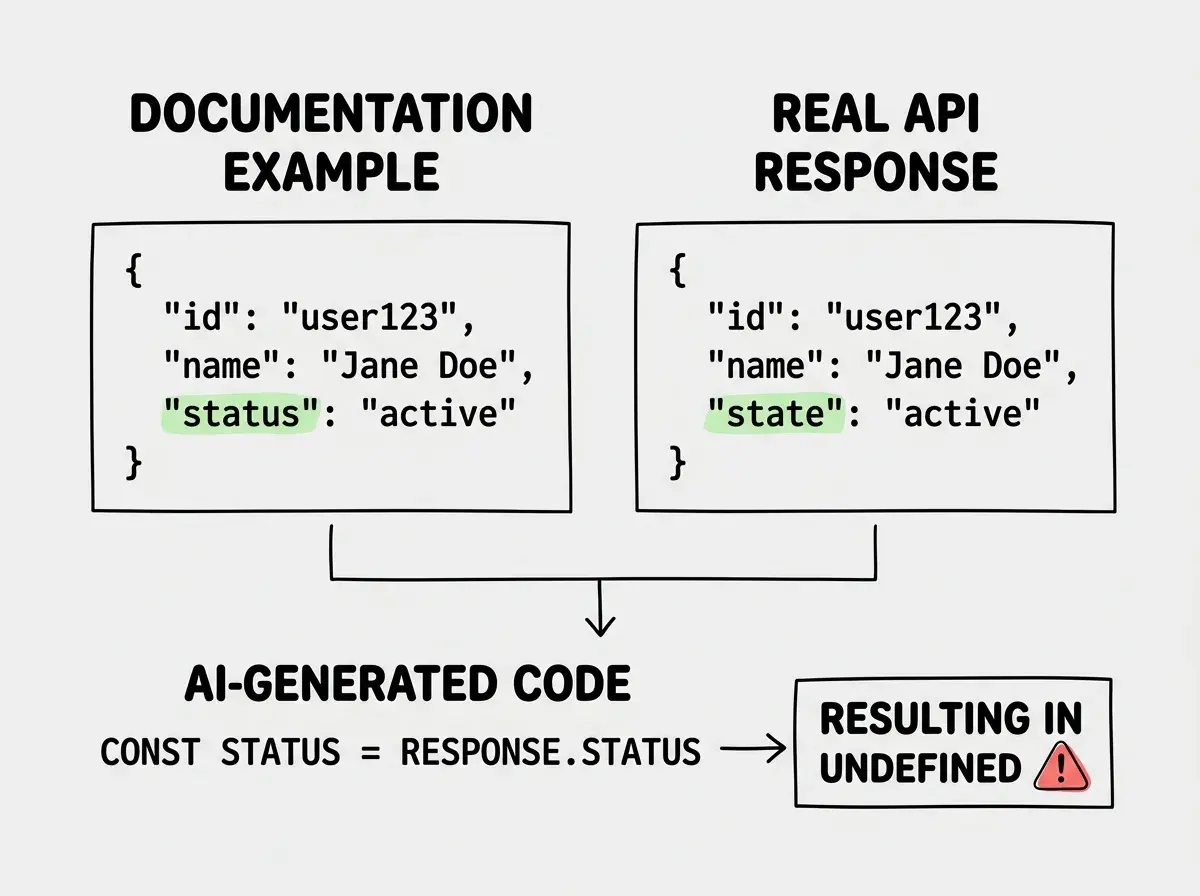
A few things to verify before anything else. Check the API version your code targets against the version currently documented. Check whether the auth method (API key in header, bearer token, query param) matches exactly. Check whether the base URL uses a staging or sandbox domain that the AI pulled from example code.
Tracing the Request in Real Time
Once you know what the code is supposed to do, confirm what it actually does. Open your browser's DevTools, go to the Network tab, and filter by Fetch/XHR. Reproduce the failure. Click the failed or suspicious request.
Look at three things in order. First, the Request URL. Confirm it matches what the third-party API expects, including the path, version prefix, and any required query parameters. A missing trailing slash or an extra /v2/ can silently route to a 404 or a deprecated version with different response shapes.
Second, the Request Headers. Find the Authorization field. If the integration uses an API key, confirm the header name is exactly what the API expects (some use X-API-Key, some use Authorization: Bearer, some use a custom header name). If the key itself looks wrong or truncated, your environment variable is not loading correctly.
Third, the Response. This is where most silent failures reveal themselves. A 200 response body that contains an error object instead of data. A response missing a field your code expects. A paginated response where your code reads page one and treats it as all the data.
Read the response body carefully. Do not skim it. Copy it, paste it into a JSON formatter, and compare it field by field against what your code expects to receive.
AI-generated integration code is written against documentation examples, not real API behavior. Before changing a single line of code, read the actual response your API is returning. Ninety percent of silent failures in third-party integrations are caused by response shapes that differ from the documented example. The fix is almost always one or two field name corrections, not a rewrite.
What Do You Test in a 3rd Party Integration API
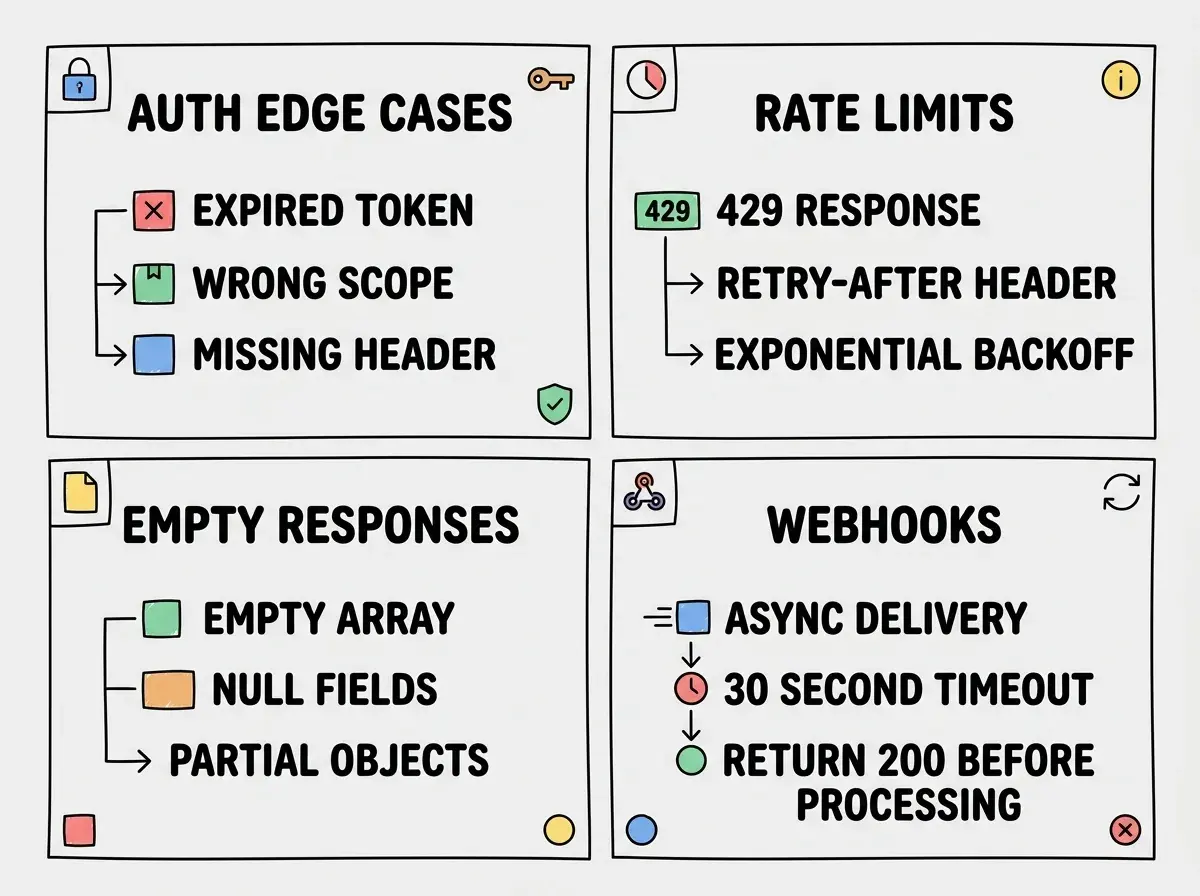
This is the question that separates integrations that hold up in production from ones that break on the second user. Testing a third-party integration means covering four categories of behavior beyond the happy path.
Authentication edge cases. What happens when the token expires mid-session? What happens when an API key has the wrong permissions scope? What happens when you send a request with no auth header at all? AI-generated code often handles the happy path auth but falls through silently when the token is stale or scoped incorrectly.
Rate limits. Third-party APIs enforce rate limits, and the limits are almost never hit in development. They get hit in production, usually at the worst time. Check whether the API returns a 429 Too Many Requests status and whether your code handles it. AI-generated code frequently ignores rate limit headers entirely. The fix is to read the Retry-After header and implement exponential backoff.
Empty and partial responses. APIs return empty arrays, null values, and partial objects more often than documentation examples show. If your code accesses response.data[0].name and response.data is an empty array, you get a silent crash or undefined. Test with responses that have zero results, one result, and the maximum result count.
Webhook delivery and retry. If your integration uses webhooks (Stripe, GitHub, Shopify, and others rely on them), the delivery is asynchronous and can fail silently if your endpoint returns a non-200 status or takes too long to respond. Test that your webhook handler returns a 200 before doing any processing, not after. Stripe marks a webhook as failed if your endpoint does not respond within 30 seconds.
Fixing the Most Common Patterns in AI-Generated Integration Code
These patterns appear constantly in AI-built integrations. Each one causes silent failures that are easy to miss and easy to fix.
Unchecked response destructuring. The AI wrote const { user, account } = await response.json(). If the API returns { error: "not found" } instead of a user object, both variables are undefined and the code continues silently. Fix it by checking for the error field first, or by validating the response shape before destructuring.
Missing Content-Type on POST requests. The AI generated a fetch() call with a JSON body but forgot to include 'Content-Type': 'application/json' in the headers. Many APIs respond with a 400 or silently ignore the body. Fix it by adding the header explicitly.
Token hardcoded in source instead of environment variable. The AI sometimes writes the API key directly into the fetch call from the documentation example. When you push to production, it either breaks because the key is wrong or creates a security exposure. Move it to an environment variable.
No error handling on non-2xx responses. The fetch API in JavaScript does not throw on 400 or 500 responses. It only throws on network errors. AI-generated code frequently uses await fetch(url) followed by await response.json() without checking response.ok. When the API returns a 401, your code parses the error body as if it were success data. Fix it by checking if (!response.ok) throw new Error(...) before parsing.
Stale API versions. The AI trained on older documentation sometimes generates calls to deprecated endpoints. If the integration was working and suddenly stopped, check whether the third-party API retired the endpoint version your code uses. Their changelog or deprecation notices are worth checking before anything else.
Wrapping the entire integration in a catch block that returns a default value. Something like catch (e) { return null } or catch (e) { return [] }. During development this hides every failure. Every unchecked response, every wrong field name, every expired token looks identical: no data. Add console.error(e) to every catch block while debugging, and only restore silent fallbacks after you have confirmed the happy path is actually working.
A Repeatable Debugging Sequence
When a third-party integration is misbehaving, use this sequence. It takes about five minutes and eliminates guessing.
First, isolate the request. Find the specific API call that is failing. Use the Network tab or add a temporary console.log before and after the fetch call to confirm which request is broken.
Second, replicate it outside your app. Copy the request URL, method, headers, and body into a tool like Postman, Insomnia, or a simple curl command. Run it directly. If it works outside your app, the issue is in how your code constructs the request. If it fails outside your app, the issue is with credentials, the endpoint, or the API itself.
Third, check the raw response. Whatever you get back, read it completely. Do not let your code transform it before you see it. Log the full response object before any processing.
Fourth, compare against current documentation. Not cached documentation, the live version. Check the field names, the response structure, and any recent changelog entries for the endpoint you are calling.
Fifth, handle the specific failure. Once you know what is actually going wrong, fix that specific thing. One small change, tested immediately. Do not refactor the whole integration based on a guess.
More practical guides for diagnosing and fixing problems in AI-built apps.
Browse debugging guidesWhat This Looks Like in Practice
Say your app integrates with an email service API to send transactional emails. It was working in development but sends nothing in production. No error surfaces to the user.
You open the Network tab and find the request. Status 200. Looks fine. You click into the response and see { "id": null, "status": "failed", "message": "domain not verified" }.
Your code checked for a 200 and treated it as success. The API returned a 200 even though the email was not sent. You were reading the id field to confirm delivery, but id is null on failure, and your check was if (response.id) which silently evaluated as false and moved on.
The fix is two lines: check response.status === "failed" and surface the message field. But you never would have found it without reading the actual response body.
That is what debugging API integrations comes down to. The API almost always tells you what went wrong. Your job is to get to the point where you can read what it said.
Practical strategies for shipping real products without getting stuck on invisible bugs.
Start here