Serverless functions are like vending machines. You put in a request, something happens inside a sealed box, and you get a response back. When it works, it feels like magic. When it does not work, you are standing in front of a machine that ate your quarter and gave you nothing. The machine jammed, or it took too long to warm up, or it dispensed the wrong item entirely, and all you have is a cryptic error on a tiny screen.
That is what debugging serverless functions feels like, and it is the daily reality for a growing number of developers. 92% of devs now use AI tools daily, which means more people than ever are shipping serverless code they did not write line by line. The AI generates an API route, you deploy it, and then it fails in production with a 500 error and no obvious trail to follow. This guide is about finding that trail.
I have spent hundreds of hours staring at serverless logs across Vercel, Cloudflare Workers, and AWS Lambda. The problems are remarkably consistent across all three platforms. Once you understand the categories of failure, you can diagnose almost any issue in minutes instead of hours.
Finding the Log Tape Inside the Machine
Every vending machine has an internal log tape that records every transaction. Serverless functions have the same thing, but each platform hides it in a different place. Knowing where to look is genuinely half the battle.
Vercel Functions. Your logs live in the Vercel dashboard under your project's "Logs" tab. Click into any deployment, then click "Functions" to see invocation logs. Every console.log, console.error, and unhandled exception shows up here. One thing that trips people up: Vercel's free tier only retains logs for one hour. If you are debugging something that happened yesterday, those logs are gone.
Cloudflare Workers. Logs appear in the Cloudflare dashboard under Workers > your worker > "Logs" tab, but the real power tool is wrangler tail. Run it in your terminal and you get a live stream of every request, response, and console output from your deployed worker. Cloudflare's local tooling is the best in the business for matching production behavior.
AWS Lambda. Logs go to CloudWatch, which is powerful but not intuitive. Navigate to CloudWatch > Log Groups > find the one matching your function name (it follows the pattern /aws/lambda/your-function-name). Each invocation creates a log stream. The critical detail: Lambda logs are not instant. There can be a 5-30 second delay before logs appear in CloudWatch.

Across all platforms, the single best debugging habit is aggressive console.log placement. I know, it feels primitive. But in a serverless function where you cannot attach a debugger or set breakpoints in production, console logging is your primary diagnostic tool. Log the input, log the output, log every branching decision. You can always remove them later.
Timeout Debugging When the Machine Takes Too Long
The vending machine has a timer. If it cannot dispense your item within the allowed window, it gives up and returns an error. Every serverless platform has a hard timeout limit, and exceeding it is one of the most common failures in AI-generated code.
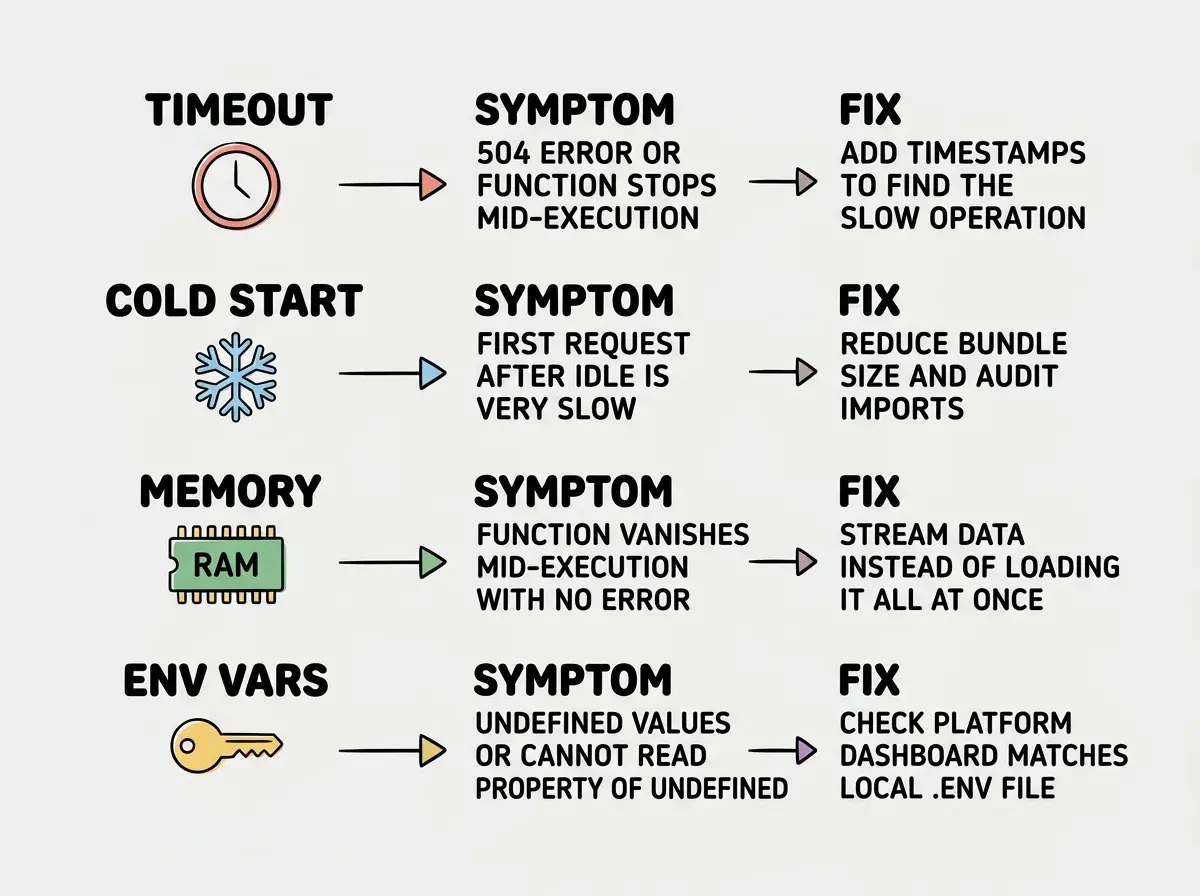
Vercel has a 10-second timeout on the free Hobby plan and 60 seconds on Pro. This is the tightest limit in the industry and catches the most people off guard. If your AI-generated API route calls an external API, processes the response, then calls another API, you can easily blow past 10 seconds. The function simply dies mid-execution with no graceful error, and the user gets a 504 Gateway Timeout.
Cloudflare Workers gives you different limits depending on your plan. The free plan allows 10ms of CPU time with a 30-second wall-clock limit. The paid plan bumps CPU time to 50ms. The important distinction: waiting for a fetch request does not count against your CPU budget on Cloudflare, only active computation does.
AWS Lambda allows up to 15 minutes, which sounds generous until you realize that most Lambda functions are invoked through API Gateway, which has its own 29-second timeout. So your function might have 15 minutes of runway but the gateway cuts it off at 29 seconds regardless.
The fix follows a consistent pattern. First, add timestamps around each operation. Something like console.log('before db query', Date.now()) and console.log('after db query', Date.now()) reveals exactly where time is being spent. Second, move slow operations out of the request-response cycle. If you are processing images or sending emails, use a background job queue instead of doing it inline.
Timeout debugging always starts with timestamps. Add console.log with Date.now() before and after every external call, database query, and processing step. The gap between timestamps tells you exactly which operation is eating your budget. This works identically across Vercel, Cloudflare, and AWS.
Cold Start Mitigation When the Machine Needs to Warm Up
Sometimes you walk up to a vending machine and it takes an oddly long time to respond. The compressor was off, the display was dark, and it needed a moment to wake up. This is the cold start problem in serverless functions.
A cold start happens when the platform needs to spin up a new instance of your function from scratch. It has to load your code, initialize your runtime, run any module-level imports, and establish database connections. On Node.js Lambda functions, cold starts range from 200ms to over 2 seconds depending on your bundle size and dependency count. Cloudflare Workers have near-zero cold starts because of their V8 isolate architecture, which is one of their biggest advantages.
The most effective mitigation strategies are reducing your bundle size (fewer dependencies means faster initialization), keeping database connections warm using connection pooling, and using the platform's keep-warm features. Vercel offers "Fluid Functions" on paid plans. AWS offers Provisioned Concurrency. Cloudflare mostly sidesteps the problem entirely.
AI-generated code is particularly prone to cold start issues because AI tools tend to import entire libraries when they only need one function. If your AI generated import _ from 'lodash' instead of import { debounce } from 'lodash/debounce', you are loading the entire Lodash library on every cold start for no reason. Audit your imports. This single change can cut cold start times in half.
Memory Issues That Kill Silently
The vending machine has a limited internal capacity. If someone loads it incorrectly, it jams. Serverless functions have memory limits, and exceeding them causes instant, silent death.
Vercel functions get 1024 MB by default (configurable up to 3008 MB on Pro). AWS Lambda allows between 128 MB and 10,240 MB, configured per function. Cloudflare Workers get 128 MB on the free plan.
The symptoms are frustrating because the function just stops. No error message, no graceful failure, just a sudden termination. The logs show the beginning of execution but nothing after a certain point, as if the function vanished.
Common memory killers in AI-generated code include loading entire files into memory instead of streaming them, creating large arrays in loops without cleanup, and importing heavy libraries that consume significant memory just by being loaded. If your function works with small inputs but dies with larger ones, memory is almost certainly the problem.
Environment Variable Problems
Back to the vending machine. Someone configured it with the wrong price list, so it charges the wrong amount or rejects valid coins. Environment variables are the configuration layer of your serverless functions, and when they are wrong, everything downstream fails.
The most common symptom is TypeError: Cannot read properties of undefined. Your function tries to use process.env.DATABASE_URL to connect to your database, but that variable does not exist in the production environment. The code hits the undefined value and crashes.
This is especially common with AI-generated code because the AI creates a .env.local file during development, everything works perfectly, and then you deploy without adding those variables to your platform's dashboard.
The fix is simple. Add a log at the top of your function that prints which environment variables exist (not their values, just their names). Something like console.log('env check:', Object.keys(process.env).filter(k => k.startsWith('MY_APP_'))). This tells you immediately whether the variable is missing or has the wrong value.
Testing serverless functions only with next dev or node locally, which reads your .env file automatically. The serverless platform does not read your .env file. Use vercel dev or wrangler dev for local testing because they simulate the real serverless environment and catch missing environment variables before deployment.
Local Testing That Actually Matches Production
The best way to debug a vending machine is to have an identical test machine in your workshop. That is exactly what platform-specific dev tools provide.
vercel dev runs your functions locally with the same timeout constraints, environment variable handling, and routing behavior as production. It catches 80% of issues before they reach production. wrangler dev for Cloudflare Workers is even more accurate, running your code in a local V8 isolate that matches the production runtime almost exactly. For AWS Lambda, sam local invoke from the AWS SAM CLI simulates the Lambda runtime locally with the most setup but also the most accurate simulation.
The pattern I follow for every serverless function is the same. Write the function. Test it with the platform's local dev tool. Deploy to a preview environment. Test the preview URL manually. Only then push to production.
Explore our collection of practical deployment and debugging guides for vibe coders shipping real products.
Read More Shipping GuidesPutting It All Together
Debugging serverless functions comes down to four questions, asked in order. Can you find the logs? Is the function timing out? Is it a cold start or memory issue? Are all environment variables present?
Every serverless debugging session fits into one of those four categories. The vending machine either could not find the item (missing env vars), took too long to dispense it (timeout), needed to warm up first (cold start), or ran out of space (memory). Once you build this mental model, the errors stop being mysterious and start being routine.
The shift from "I have no idea what is wrong" to "I know exactly which category this falls into" is the entire skill of serverless debugging. And now you have it.
Find step-by-step guides for building and shipping with AI coding tools.
Explore More Tutorials